


Dell has expanded its business accessories lineup with two new AI-powered webcams designed for modern video meetings: the Dell Pro 5 Webcam 2K and the Dell Pro 7 Webcam 4K. Both webcams are built for users who spend a lot of time in online meetings, video calls, webinars, remote work sessions, or hybrid office environments. Dell says the new models use AI to help users look clearer, sharper, and more professional on camera, even when lighting conditions or backgrounds are not ideal.
While webcams used to be simple plug-and-play accessories, they have become much more important in recent years. For many professionals, a webcam is now part of their daily work setup. Whether it is for Microsoft Teams, Zoom, client meetings, online interviews, or internal discussions, video quality can affect how polished and confident a person appears on screen.
That is the area Dell is trying to improve with its latest Pro webcam range.
AI Features Designed for Better Video Calls
According to Dell, both the Pro 5 Webcam 2K and Pro 7 Webcam 4K are able to analyse the user's face, surroundings, and movement in real time.
This allows the webcams to adjust the image more intelligently instead of simply capturing a basic video feed. The goal is to deliver a more natural-looking picture with better clarity, improved framing, and more accurate skin tones.
These features are especially useful in real-world working conditions. Not everyone has perfect lighting, a clean background, or a dedicated video call setup. Some users may be joining meetings from home, shared offices, hotel rooms, or open workspaces.
AI-powered image processing helps reduce some of these problems by keeping the person properly framed and making the video look more balanced.
Both webcams are also certified for Microsoft Teams and Zoom, making them suitable for common workplace communication platforms. They also support other major unified communications platforms, which should make them easier to deploy in business environments.
Users can further adjust settings through Dell Display and Peripheral Manager, giving them more control over how the webcam behaves.
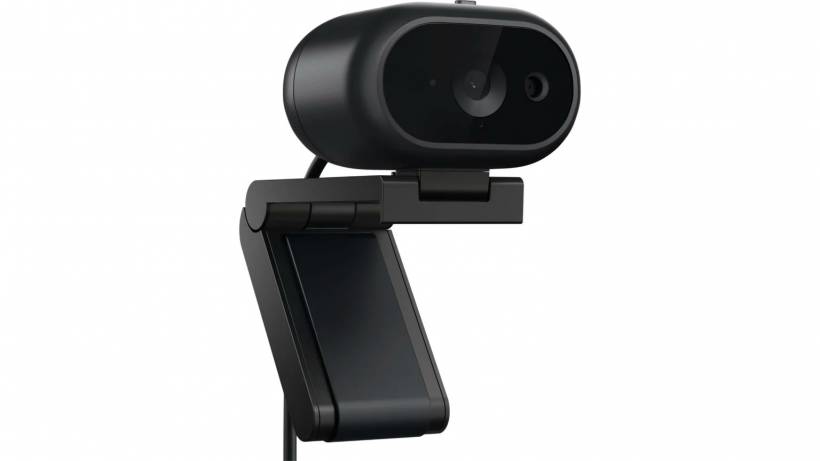
Dell Pro 7 Webcam 4K: The Higher-End Option
The Dell Pro 7 Webcam 4K, also known as the WB726, is the premium model in the new lineup.
It comes with a Sony STARVIS CMOS sensor and supports 4K UHD video recording at up to 60 frames per second. This makes it the stronger option for users who want sharper image quality, smoother motion, and better low-light performance.
The webcam also offers three field-of-view options: 65 degrees, 78 degrees, and 90 degrees. This gives users more flexibility depending on how much of the scene they want to show.
A narrower field of view can be better for individual calls because it keeps the focus on the person. A wider field of view may be useful when more people are in the frame or when the user wants to show more of the workspace.
The Pro 7 Webcam 4K also includes:
• Face tracking
• Auto-framing
• Autofocus
• Up to 4x digital zoom
• USB-C connectivity
• Detachable magnetic universal mounting clip
These features make it more suitable for users who want a more polished video call setup without needing a separate professional camera.
Smarter Audio With AI Beamforming
The Dell Pro 7 Webcam 4K also comes with dual MEMS microphones.
Dell says the microphones use AI-powered beamforming technology to help reduce background noise and focus more clearly on the user's voice. The microphone system can pick up audio from up to three metres away.
This can be helpful in office environments where background noise is common. Keyboard typing, nearby conversations, air conditioning, and general room noise can all affect call quality. Beamforming microphones are designed to focus on the speaker and reduce unwanted sound from other directions.
For business users, this matters because poor audio can be more distracting than poor video. A clear voice makes meetings easier to follow and reduces the need for people to repeat themselves.

Windows Hello and Presence Detection
One of the more convenient features of the Dell Pro 7 Webcam 4K is Windows Hello support.
This allows users to log in to their Windows PC using facial recognition. Instead of typing a password or PIN, users can simply appear in front of the camera and unlock their device.
The webcam also supports presence detection. This means it can detect when a user approaches the PC and wake the device automatically. It can also lock the PC when the user steps away.
For business and office users, this adds both convenience and security. It reduces the chance of leaving a workstation unlocked when stepping away from the desk, while also making the login process faster.
Document View and Gesture Controls
Dell has also included a Document View feature on the Pro 7 Webcam 4K.
This feature allows users to scan or show documents during video calls. Dell says the AI-powered system can apply distortion correction to make documents appear more readable and presentable.
That can be useful during meetings where users need to show printed forms, notes, sketches, or physical documents without using a dedicated scanner.
The webcam also supports gesture controls. Users can raise an open palm toward the camera to zoom in or out. This is a small but useful feature because it allows basic camera control without needing to manually adjust settings during a call.
For presenters, trainers, and frequent meeting users, gesture control can make video calls feel smoother and less interrupted.
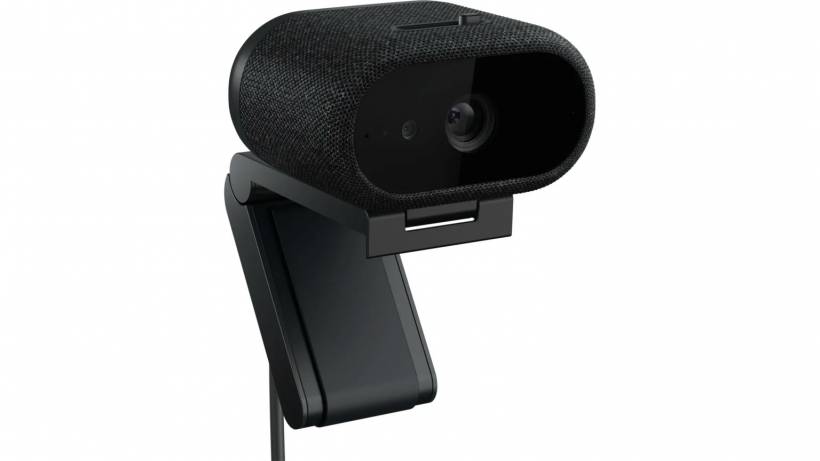
Dell Pro 5 Webcam 2K: A More Affordable Business Webcam
The Dell Pro 5 Webcam 2K, also known as the WB526, is the more affordable option.
It uses a Sony sensor and supports 2K QHD video at 30 frames per second. While it does not offer the same 4K resolution or 60fps performance as the Pro 7 model, it should still provide a noticeable upgrade over many built-in laptop webcams.
The Pro 5 Webcam 2K includes two field-of-view options: 65 degrees and 78 degrees. It also supports face tracking, auto-framing, autofocus, and up to 2x digital zoom.
These features make it suitable for users who want a better webcam for daily work calls but do not need the full premium feature set of the 4K model.
Key Differences Between the Two Models
Although both webcams share several AI-powered features, there are clear differences between the Pro 5 and Pro 7.
The Dell Pro 7 Webcam 4K is the more advanced model, offering 4K UHD at up to 60fps, a Sony STARVIS CMOS sensor, wider field-of-view options, 4x digital zoom, dual microphones, AI beamforming, presence detection, and a magnetic mounting clip.
The Dell Pro 5 Webcam 2K is simpler and more budget-friendly. It offers 2K QHD at 30fps, 2x digital zoom, a single MEMS omnidirectional microphone, and a detachable universal mounting clip.
The Pro 5 still includes useful features such as Windows Hello, Document View, gesture controls, and auto-framing. However, it does not include presence sensing, HyperSpeed autofocus, or vision-based beamforming.
Instead, Dell has added a security-focused design with a Kensington lock-compatible metal loop, which may appeal to offices, shared workspaces, or organisations that want to physically secure accessories.
Which Webcam Is Better for Business Users?
The Dell Pro 7 Webcam 4K is clearly aimed at users who want the best image quality and smarter meeting features. It may be better suited for executives, presenters, hybrid workers, content-heavy professionals, and users who frequently join important video calls.
The Dell Pro 5 Webcam 2K is likely a better fit for everyday office users who want a reliable webcam upgrade without paying for the highest-end model.
For most users, 2K video will already be a major improvement over standard built-in laptop webcams. But for those who care about sharper video, smoother motion, stronger audio pickup, and automatic presence detection, the Pro 7 will be the more complete option.
Pricing and Availability in Malaysia
The Dell Pro 5 Webcam 2K is now available in Malaysia for RM672.
Meanwhile, the Dell Pro 7 Webcam 4K is expected to arrive in Malaysia soon with a listed price of RM1,054.
Both models can be purchased through Dell's official website.
Final Thoughts
Dell's new Pro 5 Webcam 2K and Pro 7 Webcam 4K show how much webcams have evolved beyond basic video accessories.
With AI-powered framing, face tracking, autofocus, gesture controls, Windows Hello support, and document viewing features, these webcams are designed for a working world where video calls are part of everyday productivity.
The Pro 5 Webcam 2K offers a more affordable upgrade for users who want better video quality and essential smart features. The Pro 7 Webcam 4K, on the other hand, is aimed at users who want a more premium experience with sharper 4K video, stronger microphones, presence detection, and more advanced AI processing.
For professionals who spend hours in online meetings, a better webcam can make a real difference. Dell is clearly positioning these two models as practical tools for improving both appearance and communication in modern hybrid work environments.











Comments 0