

Error 503 can be one of the more frustrating website errors because it does not always mean the website files are missing or that the entire server is permanently down. In many cases, especially on shared hosting, Error 503 simply means the server is temporarily unable to handle the request. The website may still be there, the files may still exist, and the code may not be completely broken. But at that particular moment, the hosting account may have hit a resource limit and the server cannot continue serving requests normally.
That was the situation with my website recently. The issue was not caused by missing game files alone, and it was not because the whole website had disappeared. The more likely cause was that the shared hosting account was touching its resource limits, especially memory and CPU usage. Once the physical memory usage started reaching close to the 1.5GB limit, the site began behaving badly and visitors could run into Error 503.
This kind of issue is a reminder that shared hosting has limits. It can work well for blogs, small apps, and moderate traffic websites, but once a website grows and starts serving many HTML5 games, tracking scripts, public counters, and repeated background requests, the pressure can build up quietly. Eventually, the server starts saying no.
Why Error 503 Appeared
Error 503 usually means "Service Unavailable". In a shared hosting environment, that often happens when the hosting account temporarily exceeds its allocated resources. It does not always mean the web server itself is offline. It can mean the account has reached its CPU limit, memory limit, entry process limit, or input/output limit.
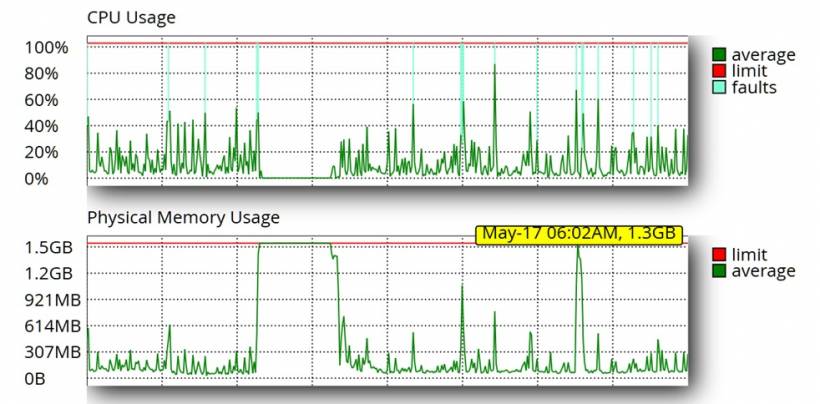
In this case, the hosting resource graph gave a clearer picture. CPU usage showed repeated spikes, with several fault indicators appearing when usage touched the upper limit. The physical memory graph was even more important. At one point, memory usage stayed close to the 1.5GB limit for a period of time, which strongly suggests that the hosting account was under heavy pressure. Another reading showed memory usage at around 1.3GB at May 17, 06:02 AM, which is already very close to the 1.5GB ceiling.
That matters because shared hosting does not give unlimited room for scripts to continue running. When memory gets too close to the limit, PHP processes can slow down, fail, or be terminated. When CPU faults appear repeatedly, the hosting platform may also throttle requests. From the visitor's side, the result is simple: the page fails to load and Error 503 appears.
The Resource Graph Tells the Real Story
The latest resource chart makes the issue easier to understand. CPU usage did not stay flat. It had repeated bursts, with several spikes touching or approaching 100%. More importantly, the chart also showed CPU faults. Those fault markers are a strong indication that the hosting account was exceeding or touching the allowed CPU threshold at certain moments.
The physical memory usage was the bigger warning sign. The memory graph showed a long period where usage climbed and stayed very close to the 1.5GB limit. This is not just a small temporary spike. When memory stays near the limit, the website has very little breathing room left. Any additional PHP request, game counter call, bot crawl, Joomla page load, or background script can push the account into failure.
The May 17 reading also showed memory at around 1.3GB at 06:02 AM. On paper, 1.3GB may still look below the 1.5GB limit, but in shared hosting terms, that is already dangerously close. It means the site was operating with only a small buffer left. A few more concurrent requests could easily push it over the edge.
I/O and Entry Processes Were Less Impacted
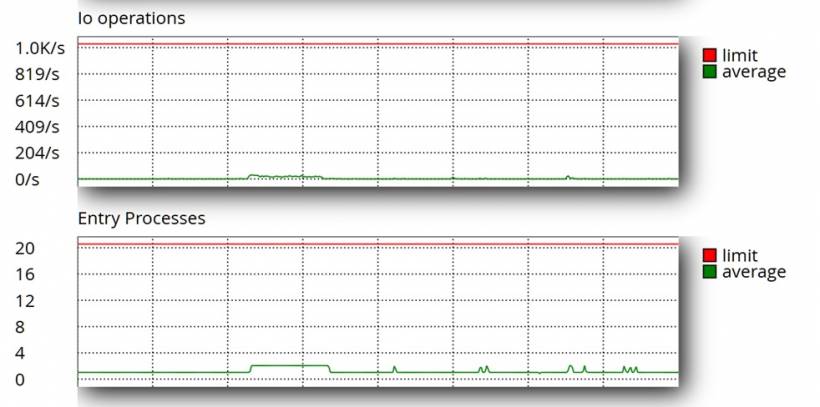
One useful observation from the resource charts is that input/output operations and entry processes did not appear to be the main source of the problem. The I/O operations graph stayed very low compared to the hosting limit, with only small movements far below the maximum threshold. This suggests that the server was not primarily struggling because of excessive disk read/write operations at that time.
The entry processes chart also looked relatively calm. The hosting limit was 20, but the actual usage remained low most of the time, with only small increases. That means the issue was probably not caused by too many simultaneous PHP entry processes hitting the maximum process limit.
This is an important distinction. If I/O or entry processes were constantly hitting the limit, the troubleshooting direction would be different. It would point more strongly toward too many concurrent requests, heavy disk activity, large file operations, or excessive PHP sessions. But based on the chart, those areas were less impacted. The bigger concern remained memory pressure and CPU spikes.
In other words, the site was not failing because every resource was maxed out at once. The more likely pattern was that CPU and physical memory were the main pressure points, while I/O operations and entry processes still had some headroom. That helps narrow down the investigation and confirms that optimizing PHP memory usage, reducing repeated script processing, and preparing for a hosting upgrade are the right priorities.
When the 503 Error Page Becomes Another Clue
One interesting clue from the server log was the repeated message showing that /public_html/503.shtml could not be found. At first glance, that may look like just another missing file. But in context, it actually tells a bigger story.
When a hosting account hits a resource limit, the server may try to display a custom 503 error page. If that file does not exist, the server then logs another "file not found" message. So instead of only seeing the real resource issue, the log becomes filled with missing 503.shtml entries. That does not mean the missing 503 page caused the problem. It means the server was probably already trying to show a service unavailable page because something else had gone wrong first.
In simple terms, the flow looks like this: the hosting account hits a resource limit, the server tries to show a 503 page, the 503 page is missing, and the log records that missing file. The visitor may still see Error 503 or a generic server error depending on how the hosting environment handles the failure.

When a Simple Game Counter Turns Into a Shared Hosting Headache
Running a web-based game section sounds simple enough at first. You upload the games, add a bit of tracking, count how many times each game is played, and display the results nicely on the website. In theory, it is a small feature. In practice, once traffic increases and the tracking file grows larger, even something as basic as a game counter can suddenly become one of those quiet problems that affects the whole server.
This is exactly the kind of issue that can happen on shared hosting. Everything appears to be working fine for months, then suddenly the website starts showing Error 503. The files are still there, the scripts are not missing, and nothing obvious seems broken. But behind the scenes, the hosting account may already be hitting its memory or resource limit. Once that happens, PHP scripts that were previously harmless can start causing trouble.
That is what makes this kind of issue frustrating. The counter system may have worked perfectly when the data file was small. The same script may still be logically correct. But once traffic increases and the data grows, the server has to do more work for every request. On shared hosting, that extra work matters.
The Original Counter Setup Was Simple
The original setup was straightforward. A JSON file stored the game counter data, including the number of plays, the number of users, and a list of hashed IP identifiers used to count unique visitors. A PHP file then read that JSON file, removed the private IP hash data from the output, and returned only the public-facing values such as plays and users.
That approach works well when the JSON file is small. It is easy to understand, easy to maintain, and does not require a database. For a lightweight game tracking system, using a JSON file can be perfectly acceptable, especially when the traffic is moderate and the number of tracked games is still manageable.
The problem begins when the JSON file grows. Once hundreds of games and thousands of unique visitor hashes are stored inside the same file, the PHP script still needs to read and decode the entire file every time the public counter endpoint is requested. Even if the script only returns plays and users, PHP has already loaded the full structure into memory first.
Why the Counter Became a Memory Concern
The important detail here is that removing data from the output does not mean the server avoided loading it. If the script reads the full JSON file and decodes it using PHP, then all nested data is processed first. That includes the large IP hash maps, even if they are stripped out later before sending the response to the browser.
On shared hosting, this matters a lot. Shared hosting environments usually have strict memory limits, CPU limits, input/output limits, and process restrictions. A single request may not seem heavy, but when many visitors open game pages at the same time, the same PHP endpoint may be called repeatedly. Each request loads the same large JSON file again, decodes it again, and uses memory again.
This is how a small script can become a bigger performance issue. The script may be technically correct, but it is not efficient enough for repeated public access under traffic. It is not necessarily a coding mistake. It is more of a scaling issue caused by the way the data is stored and read.
Optimizing the Game Counter PHP
One of the key fixes was optimizing the Game Counter PHP logic. The goal was to reduce unnecessary memory usage and avoid making the public display endpoint do more work than needed.
The original concern was that the public gamecounts.php endpoint could end up reading a larger counter file that contained more information than the website actually needed to display. For a public counter display, the site does not need to expose or repeatedly process the heavier internal tracking data. It only needs the visible count values, such as total plays and users.
By optimizing the Game Counter PHP, the counter display becomes lighter and safer for repeated public access. This matters because the counter endpoint can be called many times across many game pages. Even a small inefficiency becomes bigger when it is repeated constantly by visitors, bots, reloads, and multiple open game pages.
This optimization does not magically remove all shared hosting limits, but it reduces avoidable pressure. The less memory and CPU the counter script uses per request, the better the chance that the site remains stable during traffic spikes.
The Difference Between Tracking and Displaying
This issue also highlights an important separation: tracking and displaying are not the same thing.
Tracking is the part where the system records a game play, updates the play count, and stores the user or IP hash information. Displaying is the part where the website reads the count and shows it to visitors. In the original setup, both were closely tied together through the same counter data structure.
A better design separates these two jobs. The tracking side can maintain the full detailed counter data, while the display side should read only the lightweight public version. This keeps the public endpoint fast, reduces memory usage, and avoids exposing unnecessary internal data.
A proper optimized flow should look like this: when a game is played, the tracking script updates the full counter data, then refreshes or prepares a smaller public count output. After that, the public display script reads only what it needs. This keeps the count fresh while reducing the server load for normal visitors.
Fixing Missing HTML5 Game References
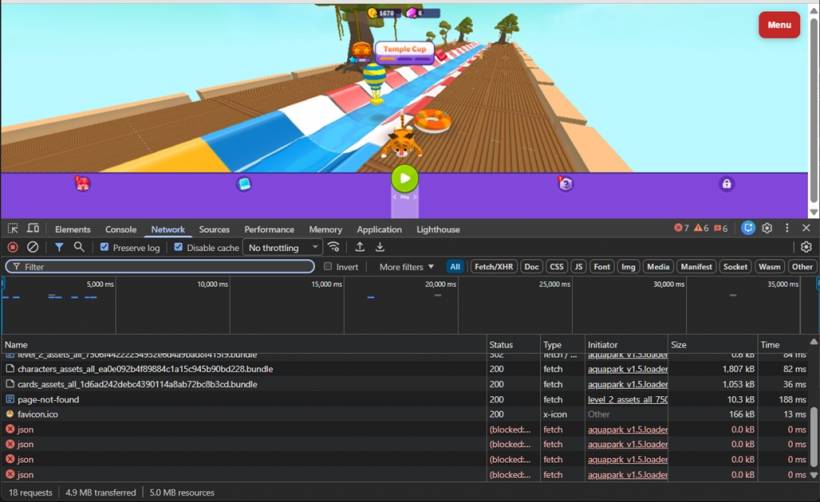
Another important cleanup step was fixing missing HTML5 game references and files. The server logs showed repeated missing file requests from different game folders. These included missing manifest files, service worker files, localization files, and other referenced assets.
On their own, missing file requests may not always be serious. A browser requesting a missing manifest.json or sw.js file will usually just receive a 404 response and continue. However, on a busy shared hosting account, repeated missing requests still create extra server work. Every failed request still needs to be processed, logged, and returned to the visitor or bot.
That is why fixing these missing references matters. It reduces unnecessary 404 noise, keeps the server logs cleaner, and prevents browsers or game scripts from repeatedly asking for files that do not exist. For a website with many HTML5 games, this kind of cleanup can make a real difference over time.
The objective is not only to fix visible errors. It is also to reduce silent background activity. A game page should load only the files it actually needs. If old scripts, broken references, missing service workers, or incorrect manifest paths are left behind, they create avoidable requests that slowly add pressure to the hosting account.
Why Reverting Temporarily Can Still Make Sense
When troubleshooting a live website, the first priority is usually to restore working behavior. Optimization is important, but not at the cost of breaking the actual feature. If a counter display stops updating after a partial optimization, it can be safer to temporarily return to the last known working behavior while the proper fix is prepared.
That does not mean the older method is the best long-term solution. It simply means live troubleshooting should be careful. First, restore the feature. Then confirm the counter is tracking correctly. After that, optimize the process properly and test it again.
This kind of step-by-step approach is important because a half-converted system can be more confusing than a broken one. The backend may still be tracking data, but the front-end display may not update. From the visitor's perspective, the counter looks broken. From the developer's perspective, the data may still be there. That is why both tracking and display need to be tested separately.
The Better Long-Term Design
The long-term solution is not to rely on heavy public scripts or manually triggered rebuilds. The better design is to keep the public counter display as lightweight as possible and let the tracking process manage the heavier work in the background.
For the game counter, the ideal setup is simple: the tracking script updates the main counter data, then produces or updates the smaller public display data. The public website should not need to repeatedly load and process the full internal tracking structure just to show a simple count.
Another possible approach is to use a scheduled cron job to rebuild the public count file every few minutes. That can reduce write activity and make the public endpoint very light. The trade-off is that the displayed count may not be real-time. For a game website, that may be acceptable, especially if stability is more important than instant count updates.
Eventually, if traffic continues to grow, moving the counter system into a database would be more reliable. A database can update individual game records without repeatedly decoding and rewriting one large JSON file. However, for a shared hosting setup, a properly optimized PHP and JSON approach can still work if the design is kept lean.

Why a Hosting Upgrade Is Planned for June 2026
The fixes are important, but they do not change one major reality: the website is growing. Lemon Web Games, the blog, web apps, tracking features, and static game assets all add load in different ways. Even after optimizing scripts and fixing missing references, shared hosting still has a ceiling.
That is why a hosting upgrade is planned for June 2026. This is not just about solving one Error 503 incident. It is about giving the website more room to grow. A better hosting environment would provide more memory, more stable CPU availability, stronger input/output performance, and better control over server-level caching and logs.
Shared hosting is useful when a project is smaller, but as the site becomes more active, it starts to show its limitations. A hosting upgrade would reduce the risk of the entire site becoming unstable whenever traffic spikes, bots crawl too aggressively, or a public endpoint becomes busy.
In short, the immediate fixes help reduce pressure now. The hosting upgrade is the longer-term plan to make the platform more stable.
What This Teaches About Shared Hosting Limits
Shared hosting is affordable and convenient, but it is not forgiving when scripts become inefficient or traffic increases. A site can run smoothly for a long time, then suddenly fail once data files grow larger or visitor activity becomes heavier. The issue is not always a missing file, a broken script, or a hosting outage. Sometimes, the problem is simply that the same scripts are doing too much work too often.
A public endpoint that is called by many game pages should be as light as possible. It should avoid loading large files unnecessarily. It should avoid decoding private or detailed data when only a small summary is needed. It should also fail safely when files are empty, locked, or temporarily unavailable.
The latest resource graph reinforces this point clearly. With CPU spikes repeatedly approaching 100%, CPU fault indicators appearing, and memory reaching around 1.3GB at May 17, 06:02 AM against a 1.5GB limit, the website was already operating close to the edge. At the same time, the I/O operations and entry processes charts show that those areas were less impacted, which helps narrow the root cause. The site was not mainly suffering from high disk operation usage or a maxed-out entry process count. The stronger concern was memory and CPU pressure.
Final Thoughts
This Error 503 issue is a good reminder that a website problem is not always caused by one broken file. Sometimes the files are there, the scripts are valid, and the feature still works in theory. The real issue is that the server no longer has enough breathing room to handle the same workload under heavier traffic.
The game counter issue also shows how a feature can be technically correct but still become a performance problem over time. Reading a JSON file for counters is not wrong. Using a public PHP endpoint to display game counts is not wrong either. The problem appears when the same public endpoint has to repeatedly process more data than it actually needs.
For now, the practical steps are clear. The missing HTML5 game references and files have been fixed to reduce unnecessary requests. The Game Counter PHP has been optimized to reduce avoidable server load. The latest hosting graph also confirms that memory and CPU usage remain areas to watch closely, especially with memory reaching around 1.3GB out of the 1.5GB allocation and earlier usage patterns showing the site getting very close to the limit. I/O performance and entry processes appear less impacted, which is good news, but it also confirms that the main bottleneck sits elsewhere.
That combination makes the next step obvious. Clean up what is broken, optimize what is heavy, monitor the resource pattern carefully, and prepare the hosting environment for the next stage of growth. Error 503 may look like a temporary service problem on the surface, but in this case, it is also a useful warning that the website has started to outgrow the comfort zone of shared hosting. That is why the planned hosting upgrade in June 2026 is not just a nice improvement, but an important move toward better long-term stability.











Comments 0