

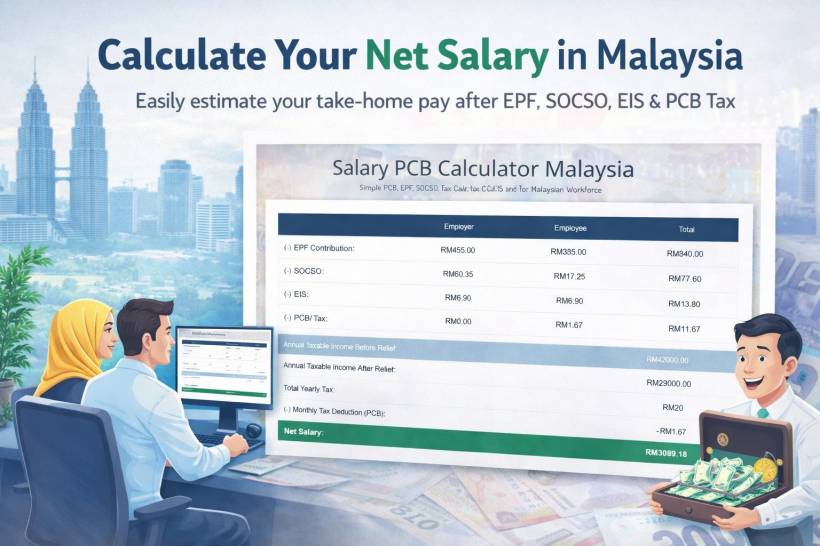
If you have ever looked at your monthly salary and thought, "Okay… so where did the rest of it go?", you are definitely not alone. In Malaysia, your payslip usually includes a few standard deductions that quietly chip away at your gross salary before it becomes your net salary (the amount you actually get to spend).
That is exactly why I built this Malaysia Salary PCB Calculator. It is designed to give you a quick, practical estimate of your net salary after common deductions like EPF, PCB tax, SOCSO, and EIS. Whether you are planning your monthly budget, comparing job offers, or just trying to understand your payslip better, this calculator helps you see the numbers clearly without needing to manually figure everything out.
Why net salary matters more than your gross salary
Gross salary is the headline number. It looks nice on an offer letter. But net salary is the number that actually affects your daily life.
Net salary is what determines things like:
• How much buffer you have after bills
• Whether you can commit to a car installment comfortably
• How realistic your savings goal is every month
• How much you can safely spend without feeling broke halfway through the month
In other words, gross salary might impress you for five seconds. Net salary is what your wallet lives with for the whole month.
The common Malaysian deductions that affect your take-home pay
A typical Malaysian payroll calculation includes several standard deductions, and the exact amounts can vary depending on salary level, tax status, and contribution rates. The calculator focuses on the deductions most employees will see every month.
EPF (Employees Provident Fund)
EPF is usually the biggest deduction on most payslips. For employees, the common employee contribution rate is 11% (although other rates may apply depending on policy changes, age, and specific conditions). Employers also contribute their portion separately, which is part of your overall compensation, but the employee portion is the one that reduces your monthly take-home pay.
The good news is EPF is not "money gone". It is your retirement savings building up over time. Still, from a monthly cashflow perspective, it is a real deduction that affects what you receive.
SOCSO (PERKESO)
SOCSO contributions support social security protection, including employment injury and invalidity schemes (depending on eligibility and scheme category). Both employer and employee contribute based on wage bands and official contribution tables.
You might not feel SOCSO day-to-day, but it matters when you need coverage. Like EPF, it is a deduction that reduces your net salary, and it is also part of the safety net structure for employees.
EIS (Employment Insurance System)
EIS is meant to provide financial assistance and re-employment support if someone loses their job. Contributions are shared between employer and employee, again based on official rates and wage ceilings.
It is usually smaller compared to EPF, but it is still part of the monthly deduction stack that affects your net pay.
PCB (Potongan Cukai Bulanan) or Monthly Tax Deduction
PCB is where many people start getting curious, confused, or both.
PCB is essentially a monthly estimate of your income tax deducted by your employer and paid to LHDN. The idea is to spread your tax payments throughout the year instead of paying a large lump sum later.
The amount can change depending on:
• Tax relief eligibility (including EPF relief)
• Your tax resident status
• Any additional adjustments your payroll team applies based on LHDN guidelines
Because tax can feel like a moving target, a calculator that estimates PCB alongside EPF, SOCSO, and EIS is incredibly useful. It helps you understand why your take-home pay looks the way it does.
What this calculator helps you do in real life
This tool is not just for "calculating tax". It is for answering everyday questions like:
• If I get a raise, how much of it turns into real net pay?
• If I switch jobs, which offer gives me better take-home pay after deductions?
• If I am planning a monthly commitment, am I basing it on the correct number?
• If I am budgeting, am I budgeting using gross salary by mistake?
Once you get into the habit of thinking in net salary, your budgeting becomes far more realistic and less stressful.
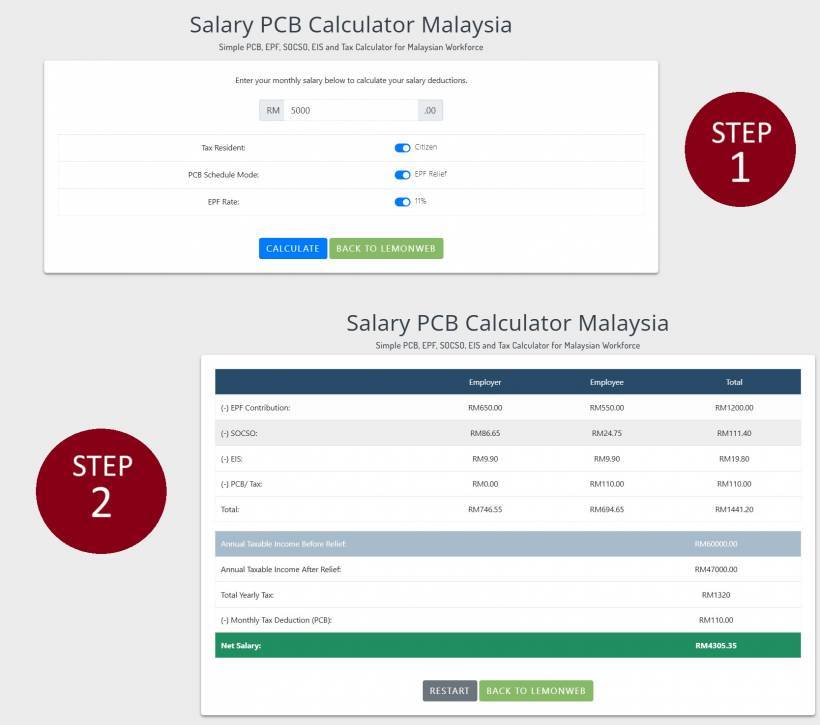
A quick walkthrough of how your PCB Calculator is structured
Your current page is built to feel simple and fast.
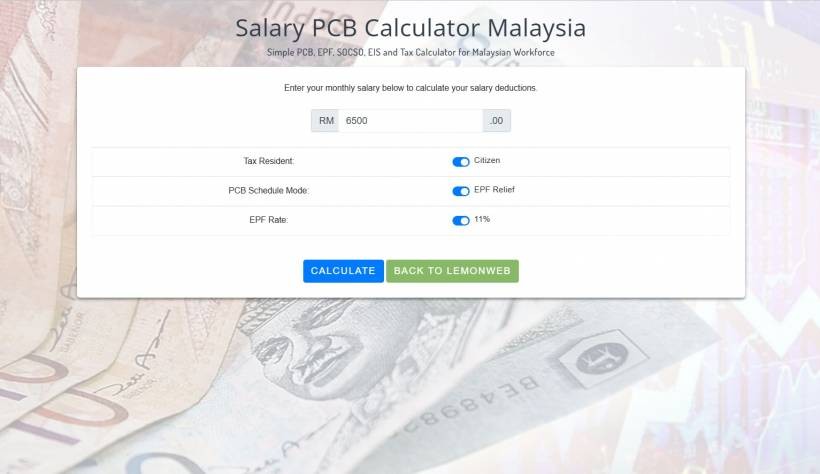
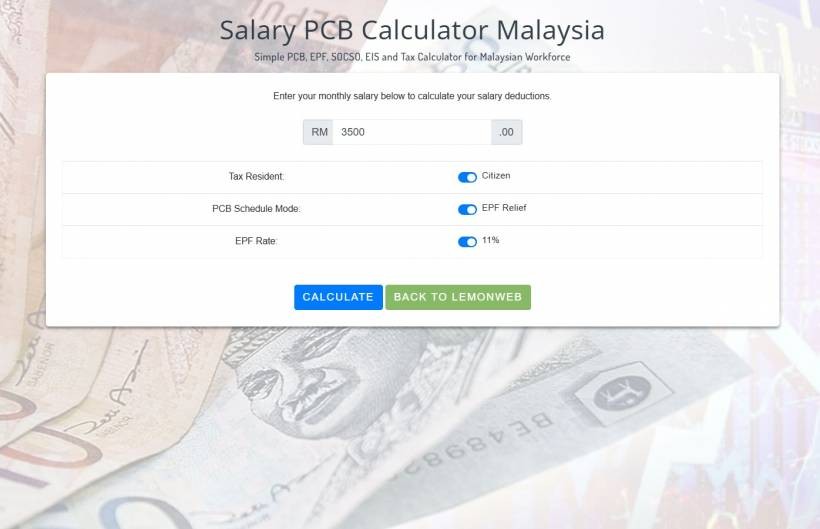
Step 1: Enter your monthly salary
The calculator starts with one main input: your monthly salary in RM. This is what most people want. No complicated forms. Just the number that matters first.
Step 2: Choose your key switches
You included a few smart toggles that reflect real payroll differences:
This is important because tax resident and non-resident tax treatments can differ significantly. The switch gives users a quick way to reflect their situation.
This is practical because many employees rely on the standard relief logic when estimating monthly tax deductions. Enabling EPF relief can change the taxable income calculation and therefore the PCB estimate.
Many employees expect the standard employee EPF contribution rate to be 11%. Having it clearly visible makes the calculator feel straightforward and familiar to Malaysian users.
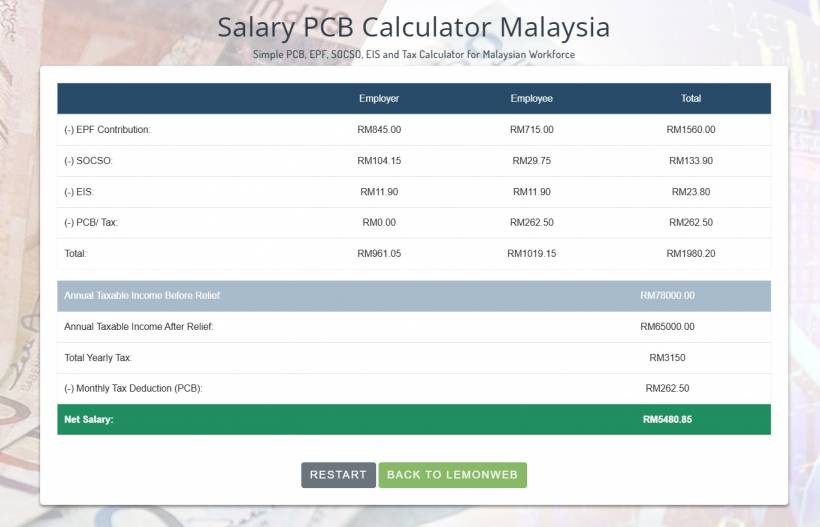
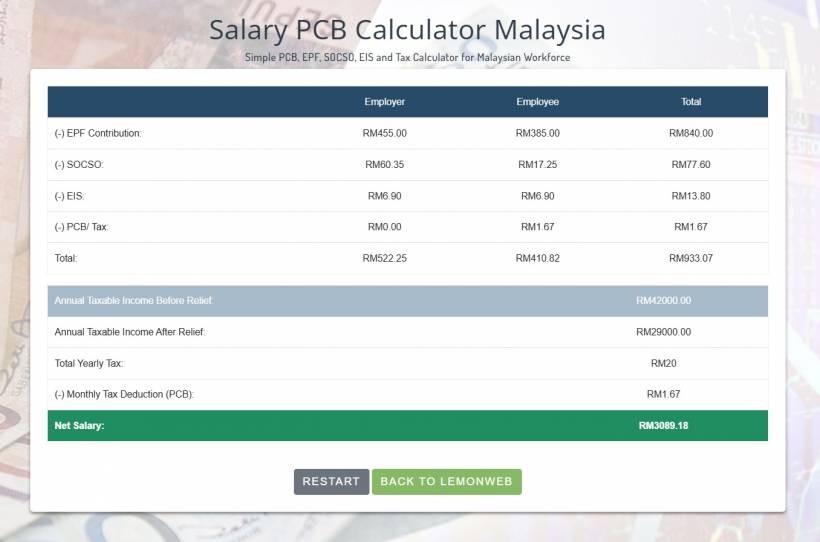
Step 3: Calculate and view the breakdown
After clicking Calculate, the page transitions to a results view that shows:
• SOCSO (Employer, Employee, Total)
• EIS (Employer, Employee, Total)
• PCB/Tax (Employer, Employee, Total)
• Totals and summary figures, including annual taxable income estimates and net salary
That layout is very helpful because it does two things at once:
• It also shows what your employer is contributing (employer side), which many people forget is part of their overall compensation value
Even if users only care about net pay, seeing the employer contribution columns gives extra context about the real cost of employing someone and the real value of the job package.
Why estimating annual taxable income is a big deal
A lot of people only think about deductions monthly. But income tax is annual in nature, and PCB is just the monthly mechanism to collect it.
By showing annual taxable income before and after relief, your calculator helps users understand that their tax is not random. It is derived from annualised numbers and then broken down into a monthly deduction.
This is useful for:
• People who got a raise and want to predict how PCB might change
• People who are trying to avoid surprises during e-Filing season
• People who are comparing a stable salary vs a salary with allowances (and want to see likely tax impact)
Who should use this calculator
This is the kind of tool that quietly helps a wide range of Malaysians, including:
• Working adults planning their monthly budget and commitments
• Job seekers comparing offers and trying to estimate realistic take-home pay
• Employees who recently got increments and want to see the net difference
• Anyone who wants a quick check before a big financial decision
Even if you are already familiar with payroll deductions, having a quick calculator available saves time and reduces guesswork.
A realistic note about accuracy and why estimate is still valuable
Because payroll deductions depend on official tables, tax rules, relief eligibility, and sometimes employer-specific payroll settings, any calculator should be treated as an estimate, not a legal guarantee of your exact payslip amount.
But an estimate is still extremely valuable because it gets you close enough for real planning.
For example, when deciding whether you can afford an extra RM300 monthly commitment, you do not need a perfect net salary down to the last sen. You need a realistic range that prevents you from overcommitting based on gross salary fantasies.
This calculator is meant to be that practical planning tool: simple, fast, and good enough to guide everyday decisions.
How to use the result to plan smarter
Once you have your estimated net salary, you can do something that most people should do but rarely actually do: build your monthly budget based on net salary, not gross salary.
A simple approach is:
• Allocate your fixed commitments first (housing, car, insurance, bills)
• Set aside savings before lifestyle spending
• Then decide what is left for food, transport, and fun
This way, your budget reflects what you truly receive each month, and you avoid the common trap of planning based on a number you never actually get in hand.
Final thoughts
Most Malaysians do not need a complicated spreadsheet to understand their salary. They just need a clear, fast way to see what comes out of their pay and what they are likely to take home after EPF, SOCSO, EIS, and PCB tax.
That is the whole purpose of this Malaysia Salary PCB Calculator. It is a practical tool for real people who want to budget smarter, plan better, and avoid surprises. If you are comparing job offers, planning commitments, or simply curious why your payslip looks the way it does, this calculator gives you a clean estimate in seconds.











Comments 0