Please wait while we're digging into our systems to find what you want....
close
What’s on your mind..?
LOADING...
listing out our multimedia graphic design services...
GRAPHIC & MEDIA
VECTOR Tracing
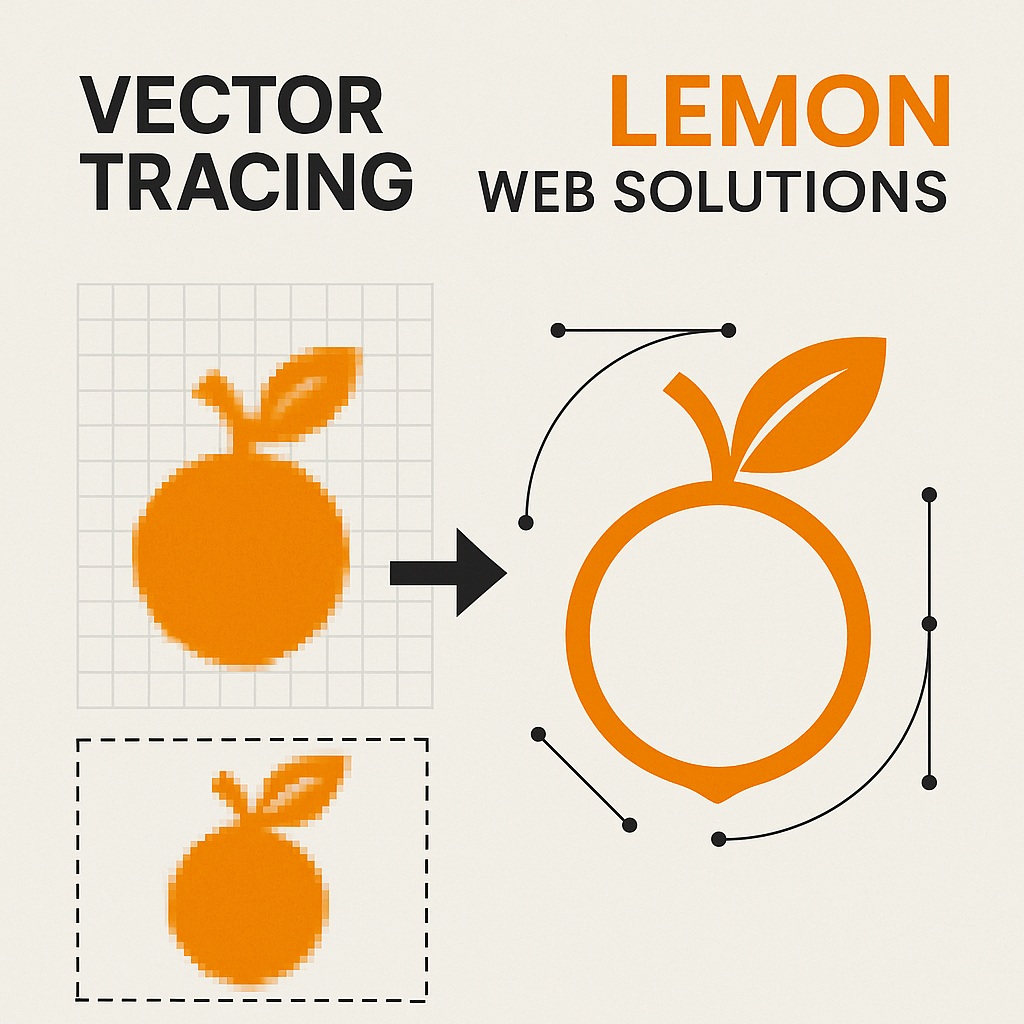
A low-resolution image may look acceptable on a phone or website, but enlarging the same file for printing, signage, merchandise, packaging, or professional branding can quickly reveal blurry edges and visible pixels. Vector tracing solves this by rebuilding the artwork as clean mathematical paths that can be resized without losing clarity.
Lemon Web Solutions provides manual vector tracing and artwork recreation for logos, symbols, illustrations, icons, emblems, line artwork, and other graphics that may only exist as JPG, PNG, scanned documents, screenshots, or older low-quality files.
Rather than relying entirely on automated conversion, each artwork can be redrawn and refined carefully so shapes, curves, outlines, colours, proportions, and spacing remain faithful to the source while producing a cleaner and more practical final file.
A proper vector file is designed to stay sharp whether it appears on a business card or a large signboard. The goal is to recreate the artwork once, then make it useful across future print and digital applications.
RM 250 - RM 500 per artwork tracing, depending on complexity, detail, source quality, and required reconstruction
CHECK Your Vector Tracing Requirement
The amount of work required depends on what the source image contains, how clear it is, the number of colours and shapes involved, and how accurately the final artwork must reproduce small details. Answer five quick questions below to create a preliminary tracing direction.
Question 1 of 5
What type of artwork needs to be traced?
Choose the option that most closely matches the source artwork.
How clear is the source image?
Better source quality usually makes fine details easier to reproduce accurately.
How detailed is the artwork?
Complexity affects the number of paths, curves, shapes, colours, and corrections required.
Where will the vector artwork be used?
The intended use helps determine what final formats and preparation are most useful.
What level of recreation do you need?
Choose whether the goal is faithful reproduction or some cleanup while preserving the original identity.
Your Tracing Direction
Professional Vector Recreation
RM 250 - RM 500 per artwork tracing
— final price depends on source quality and complexity
Your answers have been combined into a preliminary vector tracing direction.
Artwork Type
-
Source Quality
-
Detail Level
-
Intended Use
-
Recreation Level
-
Next Step
Send the clearest available source file for inspection so the final tracing scope and quotation can be confirmed.
CONVERT Pixels into Scalable Paths
Raster images such as JPG and PNG files are built from pixels. When they are enlarged beyond their original resolution, the individual pixels become visible and edges begin to look rough, blurry, or blocky.
Vector artwork is built differently. Shapes and curves are represented mathematically, allowing the artwork to be enlarged or reduced without the same loss of sharpness. This makes vector files especially useful for logos, signage, packaging, printing, merchandise, and future design work.
Vector tracing rebuilds the visual structure of the original artwork so that the final graphic is no longer dependent on the size of the source image.
Vector tracing is useful whenever an important graphic exists only in a format that is too small, unclear, or unsuitable for professional reproduction. The same reconstructed artwork can then support many different future applications.
Logos and Brand Marks
Recreate logos, symbols, emblems, badges, and brand marks that may only exist as low-resolution JPG, PNG, screenshots, or old digital files.
Old and Archived Artwork
Rebuild artwork from scanned documents, old advertisements, printed materials, photographs, or archived graphics where the original vector source is no longer available.
Printing and Signage
Prepare graphics for banners, posters, signage, packaging, large-format printing, display panels, and other situations where sharp reproduction matters.
Merchandise and Production
Create cleaner source artwork for shirts, stickers, merchandise, engraving, product labels, cutting, and other production-based applications.
Illustrations and Icons
Trace line drawings, symbols, icons, simple illustrations, mascots, decorative motifs, and other graphics that need clean editable paths.
Digital Design Assets
Prepare reusable graphics for websites, applications, presentations, social media, digital publications, UI assets, and future design work.
TRACE Carefully Instead of Relying on Automation
Automated tracing tools can be useful for very simple graphics, but they often create excessive anchor points, irregular curves, uneven shapes, inaccurate corners, and unnecessary complexity when the source image is blurry or contains many small details.
Manual tracing allows the artwork to be rebuilt more deliberately. Curves can be simplified, proportions checked, edges corrected, shapes aligned, colours matched, and paths organised so the final file is cleaner and easier to work with.
The intention is not to redesign the original artwork unless requested. The aim is to preserve its identity while producing a more usable master file.
A good vector recreation should not only look correct at normal size. It should remain clean when enlarged, preserve important proportions, avoid unnecessary distortion, and keep colours and outlines consistent enough for future design and production work.
Curves and Shapes
Smooth important curves, remove unwanted bumps, and rebuild shapes with cleaner geometry that better reflects the original artwork.
Proportion and Alignment
Review spacing, symmetry, placement, angle, centre points, and relationships between multiple artwork elements.
Colour Consistency
Recreate flat colours and obvious tonal relationships as accurately as the available source allows.
Fine Details
Preserve meaningful small details while avoiding unnecessary complexity that makes the vector difficult to edit or reuse.
SCALE the Artwork without Losing Clarity
One of the main reasons for recreating artwork as a vector is flexibility. A clean vector can be resized for a small label, presentation slide, business card, packaging panel, website graphic, banner, or large sign without the same pixelation problems associated with raster images.
This makes vector artwork especially useful when the same logo or graphic needs to support several departments, suppliers, printers, designers, websites, and future campaigns over time.
Instead of repeatedly searching for a better-quality version of the same image, a proper master vector gives future design work a cleaner starting point.
Small Format
Medium Artwork
Large Display
Print Production
Digital Use
PREPARE Useful Final File Formats
The exact delivery format depends on the artwork and how it will be used. Different printers, designers, websites, manufacturers, and software may require different file types, so the final requirement should be confirmed before delivery.
SVG
Useful for modern web, interface, digital, and scalable browser-based graphics where vector support is appropriate.
EPS / Vector Production File
Commonly useful for design and print workflows where scalable vector artwork is required by another designer or supplier.
Vector PDF
Useful for review, print workflows, sharing, and applications where vector content should remain embedded inside a PDF.
PNG / Preview Files
Raster previews may also be supplied where useful for websites, presentations, social media, or convenient everyday reference.
PROCESS from Source Image to Final Vector
Every tracing project begins with reviewing the source artwork and understanding how closely it needs to be reproduced. The clearer the original reference and required outcome, the easier it is to confirm the scope before tracing begins.
01
Send the Source
Provide the clearest JPG, PNG, scan, photograph, screenshot, printed reference, or available digital artwork.
Manually recreate important outlines, shapes, curves, details, colours, and proportions as editable vector artwork.
04
Refine and Compare
Compare the vector against the source and refine alignment, curves, spacing, proportions, details, and colour relationships.
05
Prepare Final Files
Export the approved vector and agreed supporting formats for print, digital, production, or future design use.
START Your Vector Tracing Project
The most useful starting point is the clearest version of the artwork you can find. This may be a JPG, PNG, screenshot, scan, photograph, PDF, old printed document, packaging sample, or another reference containing the graphic.
If several versions exist, send the best available copies because one file may reveal details that another does not. It also helps to explain how the final vector will be used, whether the artwork should remain exactly faithful to the source, and whether any damaged or unclear areas need reconstruction.
RM 250 - RM 500 per artwork tracing based on detail, source quality, reconstruction, and complexity
We craft visual systems that look sharp and work hard—unifying brands, interfaces, and media into clear, memorable experiences.
From identity and web UI to motion and print, our designs balance creativity with production-ready precision.
Brand Identity & Logo
UI/UX & Web Design
Print & Marketing Collateral
Motion Graphics & Video Edits
Infographics & Data Visuals
Packaging & Large Format
Color Lab
Palette Contrast
Artboard & Layers
Layers Crop
Video Timeline
MP4 1080p
ABOUT LEMON
Experienced webmaster specializing in functional, visually appealing web design since 2008, with a strong focus on programming and innovation.