

In today's digital world, email isn't just a communication tool — it's the frontline of your organization's identity. Unfortunately, it's also one of the easiest channels for attackers to exploit. From phishing campaigns to domain spoofing, cybercriminals love impersonating trusted brands to trick recipients. That's where SPF, DKIM, and DMARC come in — the trio of DNS-based security protocols that help your emails prove they're legitimate.
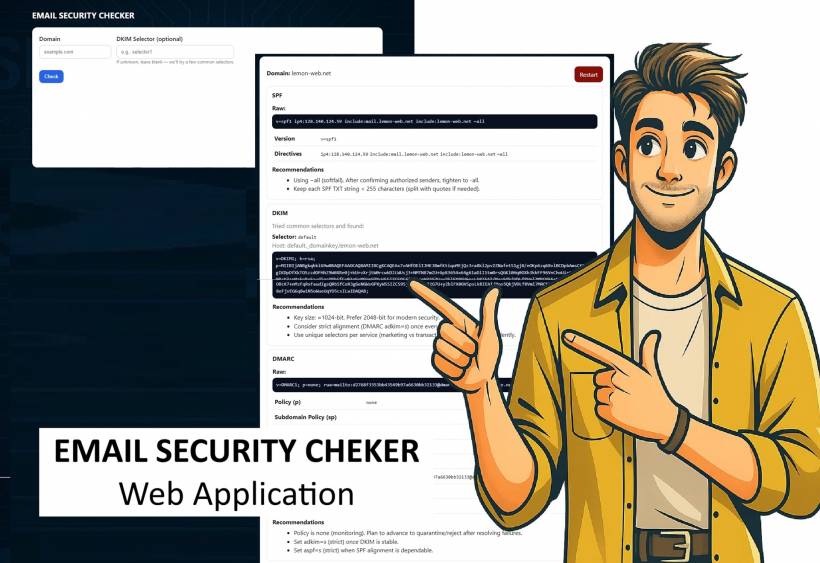
To make checking these records simpler, LEMON WEB SOLUTIONS created the Email Security Checker, a web app that instantly analyzes a domain's SPF, DKIM, and DMARC setup — giving you detailed results, clear explanations, and practical recommendations to strengthen your email protection.
What Are SPF, DKIM, and DMARC?
Before diving into the tool, let's quickly break down what these three terms mean.
1. SPF (Sender Policy Framework)
SPF is a DNS TXT record that tells the world which servers are allowed to send emails on behalf of your domain. When a recipient's mail server receives an email claiming to be from "This email address is being protected from spambots. You need JavaScript enabled to view it.," it checks your SPF record to confirm if the sending server is authorized.
If no SPF record exists — or it's misconfigured — your emails might be marked as spam, or worse, attackers could send fraudulent messages that appear to come from your address.
2. DKIM (DomainKeys Identified Mail)
DKIM adds a cryptographic signature to every email. This digital signature allows receiving mail servers to verify that your message wasn't tampered with in transit and that it genuinely originated from your domain.
It relies on a DKIM selector stored in your DNS — if it's missing or invalid, your emails lose an important layer of trust verification.
3. DMARC (Domain-based Message Authentication, Reporting & Conformance)
DMARC ties SPF and DKIM together. It tells other mail servers what to do if messages fail those authentication checks — whether to monitor, quarantine, or reject them outright.
It also provides reporting capabilities, allowing you to monitor who's sending emails on your behalf and whether those messages are passing authentication.
Why These Records Matter
Having proper SPF, DKIM, and DMARC records is crucial for several reasons:
Without these configurations, your domain remains vulnerable to misuse, and legitimate emails could get blocked or flagged as suspicious.
Introducing the Email Security Checker Web App
The Email Security Checker (SPF, DKIM & DMARC) by LEMON WEB SOLUTIONS is a free, browser-based diagnostic tool built for IT teams, web administrators, and small business owners who want quick, no-fuss visibility into their domain's email authentication setup.
The app runs on PHP 5.6, so it's lightweight and compatible with most shared hosting environments. Simply open the page, enter your domain (e.g., example.com), and optionally specify your DKIM selector if you know it. Once you hit Check, the app flips into a dynamic result card — revealing detailed SPF, DKIM, and DMARC records in expandable accordion sections.
Each result includes:
All results are visually presented in a clean, card-based layout, and the app's smart flip animation provides an intuitive, modern experience. Once you've reviewed your domain's configuration, you can hit Restart to check another — or return to the main LEMON WEB APPS directory with a single click.
How to Use the Checker
mycompany.com).default, selector1, etc.), enter it. Otherwise, the tool automatically tries common ones.It's that easy. No logins, no installations, and no need for command-line tools.
What the Recommendations Mean
The Email Security Checker doesn't just show you what exists — it helps you understand what to do next. Here are some examples:
SPF Recommendations
v=spf1 a mx ip4:<your-mail-server-ip> include:spf.yourprovider.com -allDKIM Recommendations
selector._domainkey.yourdomain.comDMARC Recommendations
v=DMARC1; p=none; rua=mailto:This email address is being protected from spambots. You need JavaScript enabled to view it.; adkim=r; aspf=rnone → quarantine → reject.rua and ruf to receive feedback from recipient servers.These actionable insights help users strengthen email security posture immediately — without decoding cryptic RFC jargon.
Behind the Scenes: Smart Logging and Analysis
Every lookup is safely logged (domain, time, and IP) to ensure traceability and for potential analytics on usage trends. This allows administrators to monitor which domains are frequently checked and track improvements over time — perfect for in-house IT departments maintaining multiple corporate domains.
Why This Tool Matters
Email authentication isn't just for big enterprises anymore. Even freelancers, small clinics, or local businesses sending invoices or newsletters need to protect their domains from impersonation.
The LEMON WEB SOLUTIONS Email Security Checker bridges the gap between complex DNS concepts and real-world usability — delivering clarity, transparency, and education through design.
You don't need a cybersecurity background to use it — the app explains everything in plain language while giving professionals enough depth to act confidently.
Final Thoughts
Email security begins with awareness. SPF, DKIM, and DMARC are your digital trust badges, silently working behind every legitimate message you send. The Email Security Checker makes understanding and managing them effortless — combining diagnostics, education, and design in one elegant web app.
If you haven't verified your domain yet, give it a try today.











Comments 0