

NVIDIA is rolling out a new Frame Generation performance option aimed at squeezing even more frame rate out of supported GeForce hardware. The new mode, known as Preset C, is designed for users who are willing to trade a little image quality for faster generated frames and higher overall performance.
The update applies to GeForce RTX 40 Series, RTX 50 Series, and supported RTX Spark laptops. Preset C works across NVIDIA's current Frame Generation technologies, including standard DLSS Frame Generation, Multi Frame Generation and Dynamic Multi Frame Generation.
Preset C Uses A Lighter, Faster AI Model
The biggest change is that NVIDIA has replaced the previous Frame Generation AI model with a lighter and faster algorithm. The objective is simple: reduce the processing overhead required to create generated frames, allowing the GPU to push out more frames in the same amount of time.
This does come with a compromise. Because Preset C prioritises speed over visual quality, image fidelity may be slightly lower compared with the older model. How noticeable that difference is will likely depend on the game, resolution and the amount of motion on screen.
For users chasing maximum smoothness, however, that trade-off could be worthwhile.
NVIDIA Claims Up To 35% Faster Frame Generation
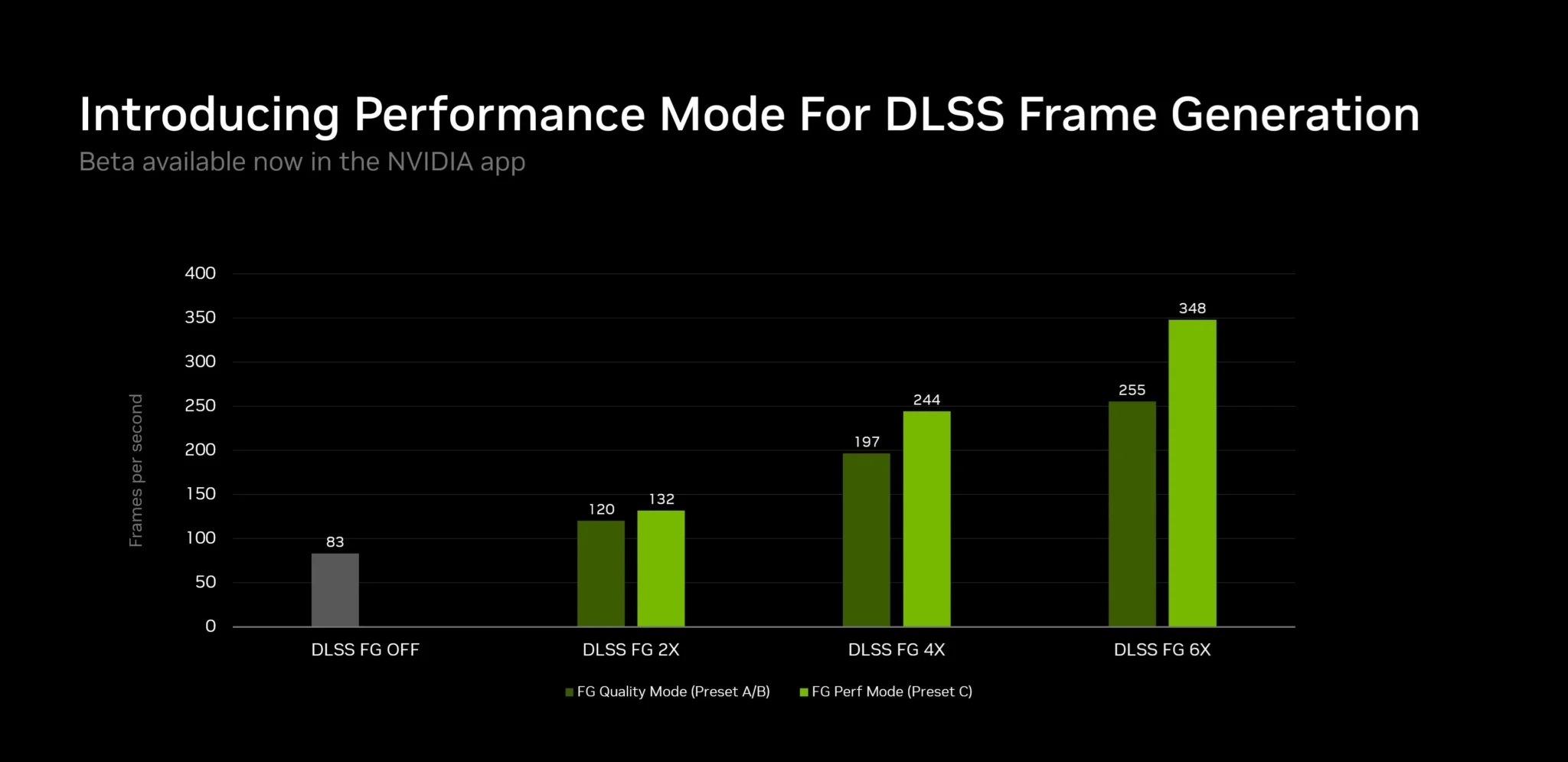
According to NVIDIA, an RTX 5060 using the new Preset C can generate frames up to 35% faster than the previous Frame Generation model.
That does not necessarily mean the entire game will run 35% faster, since overall performance still depends on the base rendering frame rate, CPU performance, GPU workload and other factors. What NVIDIA is specifically improving is the speed at which the AI-generated frames themselves are produced.
This could be especially useful in games that already support DLSS Frame Generation but where the additional processing overhead limits how much benefit users actually receive.
Works With More Than Standard Frame Generation
Preset C is not limited to the original DLSS Frame Generation implementation.
NVIDIA says it also applies to:
• DLSS Frame Generation
• Multi Frame Generation
• Dynamic Multi Frame Generation
This makes the update relevant across a broader range of RTX 40 and RTX 50 Series capabilities. RTX 50 Series users in particular may benefit from the newer Multi Frame Generation technologies, while RTX 40 Series owners can still use the faster model with supported standard Frame Generation titles.
It Is Still A Beta Feature
For now, Preset C is not enabled automatically.
The feature remains in beta and must be activated through the NVIDIA App's experimental settings. NVIDIA is effectively giving users early access so they can test the new model before it becomes part of the normal driver experience.
That also means behaviour may still change before the feature is considered final. Performance, compatibility and image quality could all be adjusted based on feedback.
How To Enable Preset C
NVIDIA has provided a fairly straightforward process for enabling the new Performance Mode.
First, update to the latest version of the NVIDIA App. This can be done through the app itself or by downloading the latest release directly.
Then:
• Open Settings
• Go to About
• Enable Opt in to access Beta or experimental features
• Wait for the beta update to download
• Install the update when prompted
• Open the Graphics section
• Select a supported Frame Generation game, or use Global Settings
• Scroll down to Driver Settings
• Select DLSS Override – Model Presets
• Choose Custom
• Open the Frame Generation drop-down menu
• Select Preset C
• Click Apply
If Preset C does not appear after updating, NVIDIA recommends rebooting the system.
Global Settings Can Apply It Across Supported Games
Users do not necessarily need to configure Preset C individually for every title.
The NVIDIA App allows the override to be applied through Global Settings, meaning supported games across the library can use the same Frame Generation preset automatically.
That makes the feature much easier to test across several games without repeatedly changing driver settings.
Users who prefer more control can still configure individual titles separately.
Why A Faster Frame Generation Model Matters
Frame Generation works by creating additional frames between traditionally rendered ones. This can dramatically increase the displayed frame rate, but the process itself still requires GPU resources.
A lighter model reduces some of that overhead.
In theory, that means the system spends less time generating artificial frames and can deliver them to the display more quickly. The improvement could be particularly valuable on mid-range GPUs such as the RTX 5060, where every bit of additional performance matters more than it would on a flagship GPU.
Image Quality Is The Main Trade-Off
The downside is predictable: Preset C sacrifices some visual quality in exchange for performance.
NVIDIA has not suggested that the mode is intended to replace higher-quality presets completely. Instead, it provides users with another option depending on their priorities.
Someone playing a fast-paced competitive game may prefer the additional frame rate even if generated frames are slightly less accurate. On the other hand, someone playing a visually demanding single-player title may prefer to keep the existing higher-quality model.
It is essentially another performance-versus-quality choice.
RTX 40 Series Owners Are Not Being Left Behind
One of the more positive aspects of the update is that it is not exclusive to the latest RTX 50 Series.
RTX 40 Series GPUs also gain access to Preset C in supported Frame Generation titles. This extends the usefulness of older Ada Lovelace cards without requiring users to upgrade hardware.
That is particularly welcome given how expensive new graphics cards have become.
Software improvements that increase performance on existing GPUs can sometimes be just as valuable as new hardware, especially when they arrive at no additional cost.
RTX 50 Series Gets The Biggest Flexibility
RTX 50 Series owners still have the broader advantage because newer Blackwell GPUs support Multi Frame Generation and other more advanced DLSS features.
Preset C gives those users another tuning option.
Instead of simply choosing whether Frame Generation is enabled or disabled, users can now influence how aggressively the system prioritises generation speed over image quality.
That makes the NVIDIA App increasingly important as a central place for configuring DLSS behaviour beyond what individual games expose internally.
Driver-Level Overrides Are Becoming More Important
NVIDIA has been gradually expanding the number of DLSS options available through its own app.
Driver-level overrides allow users to apply newer models or different presets even when a game itself has not yet been updated to expose those controls.
This gives NVIDIA more flexibility to improve older supported games through driver and software updates.
It also reduces dependence on developers releasing game-specific patches every time a new DLSS model becomes available.
Competitive Gamers Could Benefit Most
Preset C may be particularly attractive to users who prioritise frame rate and responsiveness over perfect image reconstruction.
Fast-paced shooters, racing games and other competitive titles often benefit more from smoother frame delivery than from small improvements in visual quality.
If the faster model reduces Frame Generation overhead meaningfully, users may be able to reach higher refresh rates more consistently on 144Hz, 165Hz or even faster displays.
That said, actual results will vary significantly between games.
Not Every Game Will Benefit Equally
The performance improvement depends on how heavily a game relies on GPU rendering and how Frame Generation interacts with the base frame rate.
A game already limited by the CPU may see less improvement. Similarly, if the native frame rate is extremely low, generating additional frames does not necessarily solve underlying responsiveness issues.
Frame Generation works best when the game already has a reasonably strong base frame rate.
Preset C makes the generation process faster, but it does not change that fundamental limitation.
Latency Still Matters
Higher displayed frame rates do not automatically mean lower input latency.
Frame Generation inserts synthetic frames between traditionally rendered ones, so NVIDIA continues to pair the technology with latency-reduction features such as Reflex where supported.
Users should therefore evaluate more than just the FPS counter.
A configuration that produces a higher displayed frame rate but feels less responsive may not necessarily provide a better gaming experience.
Preset C is another tool, not a universal best setting.
Beta Testing Will Determine How Useful It Really Is
Because Preset C remains experimental, real-world testing will be important.
Users will likely compare the new mode with existing presets across different games to see how much image quality is lost and whether the performance improvement is noticeable.
The 35% figure NVIDIA cites for Frame Generation speed on an RTX 5060 sounds substantial, but the impact on total game performance may be smaller.
Visual artefacts will also matter. Faster generation is useful only if the resulting frames remain good enough that users do not notice distracting errors.
Final Thoughts
NVIDIA's new Preset C gives RTX 40 and RTX 50 Series users another way to tune DLSS Frame Generation for higher performance. By using a lighter and faster AI model, NVIDIA claims Frame Generation can run up to 35% faster on an RTX 5060, with support extending across standard Frame Generation, Multi Frame Generation and Dynamic Multi Frame Generation.
The trade-off is lower image quality, making Preset C more of a performance-focused option rather than a universal replacement for existing models. For users chasing maximum frame rates, particularly on mid-range GPUs, that may be an acceptable compromise.
The feature remains in beta and must currently be enabled manually through the NVIDIA App's experimental settings. Still, it is another example of how much modern GPU performance is increasingly being improved through software and AI models rather than hardware alone.











Comments 0