

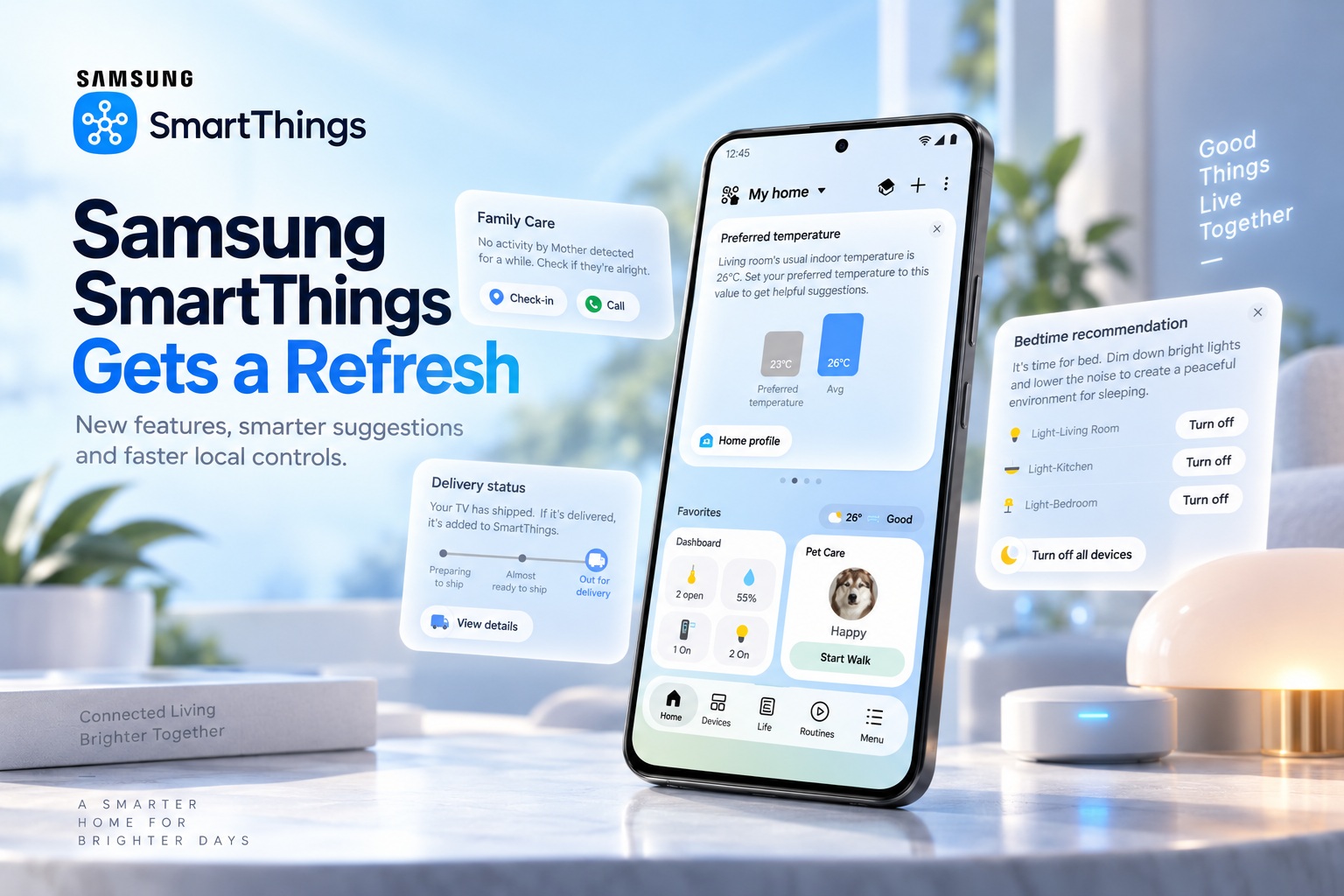
Samsung has rolled out a refreshed version of its SmartThings platform, bringing a redesigned interface, more contextual recommendations and faster local control for compatible smart home devices. SmartThings remains at the centre of Samsung's connected home ecosystem, linking appliances, televisions, sensors and other supported devices through a single application. The latest update focuses on making that experience more proactive while reducing the dependence on cloud connectivity for everyday commands.
One of the biggest changes is the introduction of SmartThings Now, which surfaces timely information and suggested actions based on factors such as location, usage history and everyday habits. Samsung is also improving one-handed usability, adding new offline troubleshooting tools and expanding support for the latest Matter 1.6 smart home standard.
SmartThings Now Brings Contextual Suggestions To The Home Screen
SmartThings Now appears as a series of cards at the top of the app's Home tab. Rather than displaying the same information continuously, these cards can change according to the user's current situation and previous behaviour. Samsung says the system can consider factors such as location, usage patterns and habits when deciding which actions or information may be most relevant.
For example, when a user is arriving home, SmartThings Now may suggest turning on connected lights or an air purifier. If the user repeatedly chooses that action, the app can then recommend creating an automated routine so the same devices activate automatically in similar situations. The idea is to help users discover SmartThings features naturally instead of requiring them to manually explore every automation option.
Recommendations Can Change With Your Habits And The Seasons
The new SmartThings experience can also adjust recommendations based on longer-term behaviour. Samsung provided an example involving seasonal changes, where an air-conditioning card might become less useful as temperatures begin to fall. In that situation, SmartThings could suggest removing the card from the Home tab to make space for controls that are more relevant.
This approach turns the Home tab into something more dynamic than a fixed device dashboard. Instead of requiring users to constantly reorganise their smart home interface manually, SmartThings can suggest changes based on how devices are actually being used. Users still remain in control of whether those recommendations are followed.
SmartThings Can Also Help Users Check On Family Members
Samsung is extending some of these contextual features beyond traditional appliance control. SmartThings can now suggest checking on family members when their registered devices have shown no activity for an extended period. This introduces a more people-focused element to the smart home platform rather than treating SmartThings purely as a collection of connected switches and appliances.
Such recommendations could be useful in households where family members rely on SmartThings-enabled devices regularly. A long period of inactivity may not necessarily indicate a problem, but prompting users to check in adds another layer of awareness. The feature sits alongside the broader redesign of the Home tab, which aims to present connected devices and services in a more streamlined way.
Home Tab Gets A Cleaner Design
The refreshed SmartThings app also redesigns its main Home interface to provide a clearer overview of connected devices and services. As smart homes grow to include more appliances, sensors, lighting and entertainment devices, managing everything through one screen can quickly become cluttered. Samsung's redesign attempts to make the most relevant controls easier to reach without overwhelming users with every connected product at once.
SmartThings Now cards play an important part in that strategy by surfacing actions that may be useful at a particular moment. Combined with personalised recommendations, the Home tab becomes less about showing everything and more about highlighting what the system believes the user is most likely to need.
Floating Bar Improves One-Handed Use
Another interface addition is the Floating Bar, which Samsung says should make SmartThings easier to use with one hand. This is particularly relevant as large-screen smartphones have become increasingly common and controls positioned near the top of the display can be difficult to reach comfortably. Bringing frequently used actions closer to the user's thumb can make everyday smart home control more convenient.
Samsung has also made changes to Live Wallpaper, allowing users to personalise the visual appearance of SmartThings further. While this is a less functional change than local device control or SmartThings Now, it reflects the company's effort to make the app feel more personal rather than simply utilitarian.
Local Device Control Works Without An Internet Connection
One of the most practical improvements is the addition of local device control. Compatible SmartThings devices connected to the same Wi-Fi network can now be controlled even when the internet connection is unavailable. Previously, many smart home commands depended heavily on cloud services, meaning an internet outage could prevent users from controlling devices that were physically inside the same home.
Local communication reduces that dependency by allowing the smartphone and compatible smart home devices to communicate directly across the home network. Samsung claims this can also improve device response times by around 30% compared with cloud-based control. Commands such as switching devices on or off should therefore feel noticeably faster in supported situations.
SmartThings Automatically Chooses Local Or Cloud Control
Users do not need to manually choose which connection method SmartThings should use. The platform can automatically switch between local and cloud-based control depending on whether the user is at home or away. When the smartphone and device are on the same network, SmartThings can use local communication, while remote control can continue through cloud services when the user is outside the home.
This hybrid approach provides the convenience of remote access while improving speed and resilience when devices are nearby. It also means a temporary internet outage does not necessarily make compatible smart home equipment inaccessible. For everyday smart home reliability, this may be one of the most valuable additions in the entire update.
Offline Device Diagnostics Makes Reconnection Easier
The refreshed app also introduces Offline Device Diagnostics to help users deal with connected products that unexpectedly lose network access. Smart home devices can occasionally become disconnected after a router replacement, Wi-Fi password change or other network configuration update. Reconnecting multiple appliances individually can quickly become frustrating.
Samsung says the new diagnostic feature makes it easier to update network information across registered devices when they go offline. This should simplify recovery when household Wi-Fi settings change and reduce the amount of manual setup required. For homes with a large number of SmartThings-connected products, that could save considerable time.
Matter 1.6 Adds More Smart Home Device Categories
Samsung is also adding support for Matter 1.6, the latest version of the cross-platform smart home connectivity standard. Matter is designed to make compatible devices work more consistently across different ecosystems, reducing the dependency on proprietary platforms and improving interoperability between brands.
Matter 1.6 adds support for four additional categories relevant to SmartThings users:
The additional categories expand SmartThings beyond conventional indoor lighting and appliances, giving the platform more potential applications for energy monitoring, property access and outdoor automation.
Available Across More Than Just Smartphones
The refreshed SmartThings experience is available on both iOS and Android devices. Samsung is also extending the updated platform across compatible Smart TVs, Family Hub refrigerators, Windows devices and Samsung appliances equipped with supported displays. This reflects the company's broader strategy of making SmartThings accessible throughout the home rather than requiring users to rely entirely on their smartphones.
Having the platform available across multiple screens can also make smart home controls easier for households with several users. A connected television or refrigerator, for example, can serve as another access point for managing devices without requiring someone to find their phone first.
Final Thoughts
Samsung's latest SmartThings refresh combines visual improvements with several genuinely useful smart home upgrades. SmartThings Now makes the platform more proactive by offering contextual recommendations, while the redesigned Home tab, Floating Bar and personalised elements improve everyday usability. The addition of local device control is particularly important because it can reduce response times while allowing compatible devices to remain controllable even when the internet connection is unavailable.
Support for Matter 1.6 and Offline Device Diagnostics also strengthens SmartThings as Samsung continues expanding its connected home ecosystem. Rather than simply adding more device categories, the latest update focuses on making existing smart homes easier to control, more responsive and less dependent on cloud connectivity.











Comments 0