

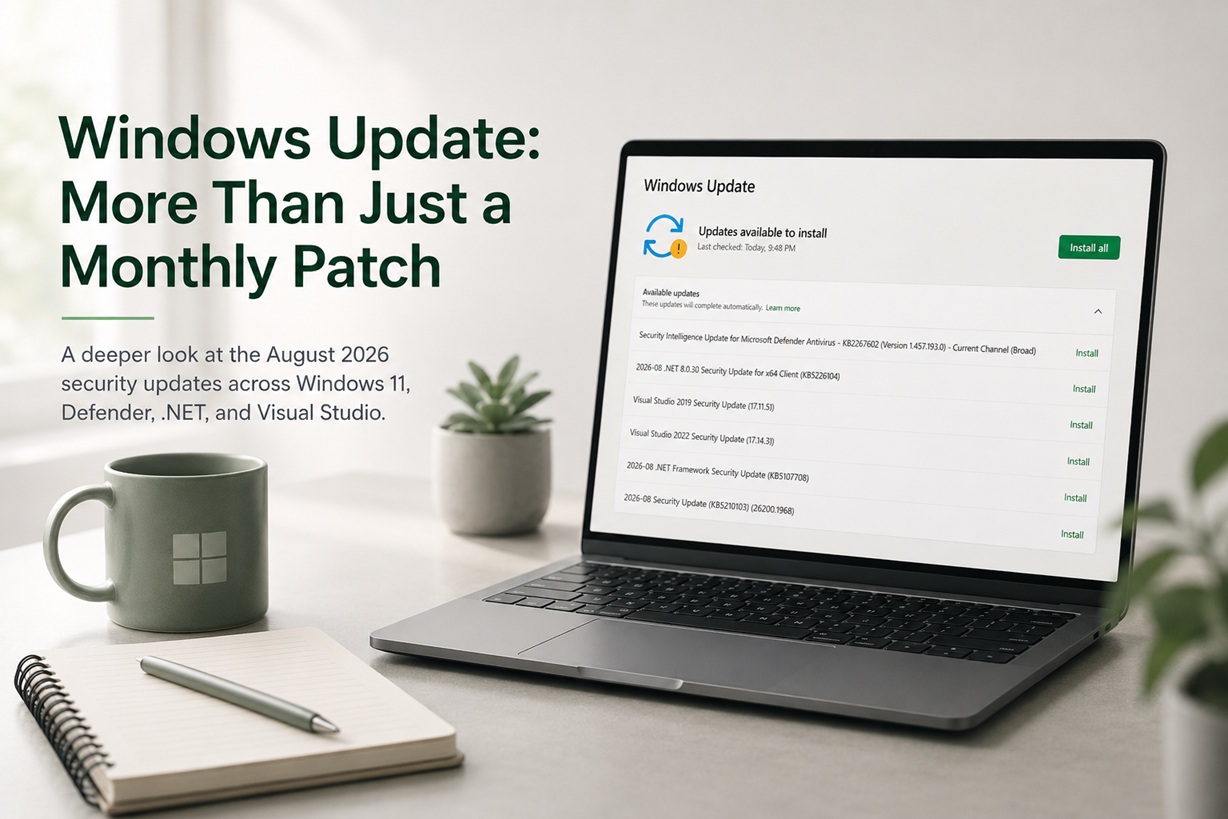
Opening Windows Update this month reveals quite a collection. Instead of a single Windows patch, Microsoft is delivering updates across Windows 11 itself, Microsoft Defender, .NET 8, .NET Framework, Visual Studio 2019 and Visual Studio 2022.
At first glance, it looks like the usual monthly maintenance. Dig a little deeper, though, and the August 2026 update cycle is considerably more security-focused than the short descriptions in Windows Update suggest.
The main Windows update shown here is KB5121003, bringing Windows 11 version 25H2 to OS Build 26200.9168. Microsoft released it on August 11, 2026 as part of its monthly security servicing cycle. The same package also services Windows 11 24H2 as build 26100.9168.
For anyone using Windows for software development, the update becomes even more interesting because both generations of Visual Studio and Microsoft's .NET platforms are being patched at the same time.
More Than Just One Windows Update
One thing that is easy to overlook about Windows Update is that the page isn't necessarily showing six different versions of the same thing.
Each update is protecting a different layer of the system.
In this case, Windows Update is offering:
Microsoft Defender Security Intelligence Update KB2267602
This refreshes the threat intelligence and malware definitions used by Microsoft Defender Antivirus. These updates occur much more frequently than normal Windows patches because Defender needs to recognise newly identified malware and other threats.
.NET 8.0.30 Security Update KB5122104
This updates Microsoft's modern .NET runtime. Microsoft classifies the August release as a security update, with the Update Catalog assigning it an Important severity classification.
Visual Studio 2019 Security Update 16.11.59
Developers still working with Visual Studio 2019 receive another servicing release rather than being abandoned simply because a newer Visual Studio exists.
Visual Studio 2022 Security Update 17.14.38
The newer IDE receives an even broader security package alongside bug fixes.
.NET Framework Security Update KB5120708
This services the older but still widely used .NET Framework 3.5 and 4.8.1 components included with Windows.
And finally:
Windows 11 Security Update KB5121003
This is the operating-system-level cumulative security update and the biggest piece of the package.
Put together, this is effectively Microsoft's security stack being refreshed from the antivirus layer all the way through the operating system and developer frameworks.
KB5121003 Is the Main Windows 11 Update
The centrepiece is KB5121003, which moves Windows 11 25H2 to build 26200.9168.
Like modern Windows cumulative updates, it doesn't simply contain fixes created during August. It incorporates improvements from Microsoft's previous July updates as well, so systems that skipped earlier updates can be brought current through the latest cumulative package.
There is also an important change happening quietly in the background involving Secure Boot certificates.
Microsoft has been replacing Secure Boot certificates used by Windows devices because older certificates began reaching their expiration period in 2026. KB5121003 expands Microsoft's device-targeting data so that more eligible computers can automatically receive the newer Secure Boot certificates through Windows Update.
That's not the sort of feature most users will ever notice, but it is an important example of why monthly Windows updates aren't merely collections of visible bug fixes.
Some of the most important work happens underneath the interface.
Even the Windows Update Mechanism Gets Updated
KB5121003 also incorporates Servicing Stack Update KB5123304, bringing the servicing stack to build 26100.9156.
The servicing stack is essentially part of the machinery Windows uses to install and maintain updates. Microsoft says this component improves the reliability of the Windows update installation process.
In other words, Windows is not only updating the operating system; it is also updating part of the mechanism responsible for updating Windows itself.
This is one reason manually skipping servicing updates for long periods isn't ideal. The servicing infrastructure evolves alongside Windows.
Microsoft Is Also Updating Windows' AI Components
Another interesting addition buried inside the release notes concerns Windows' increasingly integrated AI components.
KB5121003 updates Image Search, Content Extraction, Semantic Analysis and the Settings Model to version 1.2605.856.0.
These aren't necessarily features that will suddenly produce a new button on the desktop after restarting. They form parts of the underlying Windows intelligence and search infrastructure.
It illustrates how Windows servicing has changed. Today's monthly update can simultaneously touch traditional system components, security infrastructure, AI functionality, application frameworks and development tools.
The .NET 8.0.30 Update Deserves Attention
The 2026-08 .NET 8.0.30 Security Update KB5122104 may look relatively unimportant beside the Windows cumulative update, especially if you don't consciously use .NET.
That assumption can be misleading.
.NET is a runtime used by a huge number of applications. You don't necessarily need to be developing .NET software yourself for applications installed on the PC to rely on it.
Microsoft's Update Catalog categorises KB5122104 as a security update with an Important severity classification.
For developers, the August .NET security work is particularly relevant because Microsoft's Visual Studio security notes document vulnerabilities affecting areas such as information disclosure, security-feature bypasses, denial of service, privilege elevation and remote code execution across the .NET ecosystem.
That makes this considerably more than a routine runtime revision.
.NET Framework Isn't the Same Thing as .NET 8
Windows Update also lists KB5120708, which can be confusing because we already have a .NET update above it.
The two aren't duplicates.
Modern .NET 8 and the older .NET Framework are separate platforms, and Windows systems may have software relying on either one.
KB5120708 specifically updates .NET Framework 3.5 and 4.8.1, bringing both security fixes and cumulative reliability improvements. Microsoft recommends including it as part of normal system maintenance.
Legacy business applications are one of the reasons .NET Framework updates remain important. Plenty of software written years ago still depends on it even when the rest of the computer is running modern Windows 11.
Visual Studio 2019 Is Still Receiving Serious Security Maintenance
Seeing Visual Studio 2019 version 16.11.59 appear in Windows Update might surprise developers who have already moved on to Visual Studio 2022.
Microsoft released 16.11.59 on August 11, 2026, and this isn't merely a compatibility refresh.
The release updates the bundled Node.js components to Node.js 22.23.0 to address publicly disclosed vulnerabilities. It also addresses a Node.js denial-of-service vulnerability and a Git for Windows security vulnerability.
This matters because an IDE is much more than a text editor.
Modern development environments contain Git clients, compilers, runtime components, debuggers, package managers, language servers and various third-party libraries. A vulnerability in one of those components can matter even if Visual Studio itself appears to be operating normally.
Visual Studio 2022 Gets an Even Larger Security Refresh
The Visual Studio 2022 17.14.38 update is particularly substantial.
Microsoft released it on August 11 alongside the other patches. It fixes a reported GitHub Copilot Chat crash involving a System.ObjectDisposedException, but the security section is where things get much more significant.
Microsoft lists fixes affecting multiple areas of .NET, including vulnerabilities involving:
Remote code execution
Information disclosure
Privilege elevation
Denial of service
HTTP request smuggling and security-feature bypasses
Node.js
Git for Windows
Some of those vulnerabilities involve network-facing scenarios, while others require local or authorised access. The point isn't that every Visual Studio installation was sitting exposed to immediate compromise; rather, development environments have large attack surfaces because of the number of tools and runtimes bundled together.
For developers, that makes keeping Visual Studio patched just as important as keeping Windows itself patched.
Why Developer Updates Are Appearing Inside Windows Update
Normally, many developers associate Visual Studio updates with the Visual Studio Installer, so seeing them offered directly through Windows Update can initially seem unusual.
Microsoft's update infrastructure can service selected Visual Studio components and security releases through Microsoft Update when the appropriate update settings are enabled.
It's actually useful from a security perspective.
A developer who doesn't open Visual Studio for several weeks could otherwise miss an important IDE security patch. Integrating these releases into normal system maintenance reduces that possibility.
Microsoft Defender Gets Its Usual Intelligence Refresh
At the top of the list is Security Intelligence Update for Microsoft Defender Antivirus KB2267602, version 1.457.193.0.
This one works differently from the monthly Windows patches.
Defender intelligence updates are continuously refreshed because malware doesn't wait for Microsoft's monthly Patch Tuesday schedule. They provide updated detection information that allows Defender to identify newer threats.
So while KB5121003 might remain installed for an entire month, the Defender intelligence version will likely be replaced by newer versions very quickly.
That's completely normal.
Should You Install Everything?
For this particular collection, there is very little reason to deliberately avoid the updates on a normal system.
The list is overwhelmingly security-oriented, covering several independent parts of the Windows ecosystem.
For a development workstation, I'd simply save any open work, close Visual Studio and other important applications, select Install all, and allow Windows Update to complete the process.
For production or tightly controlled enterprise machines, the usual staged deployment and testing process still makes sense. Development runtimes and IDE updates can occasionally expose compatibility problems in older projects, plugins or build environments, so organisations may reasonably test before broad deployment.
For an ordinary workstation, however, the security benefits outweigh the inconvenience of an update and restart.
A Good Sign: No Known Issues So Far
One encouraging detail with KB5121003 is Microsoft's current status for the release.
At the time of writing, Microsoft says it is not aware of any known issues with this update.
That doesn't guarantee that nobody will encounter a problem—Windows runs across an enormous range of hardware and software combinations—but it is still reassuring compared with releases that launch with documented compatibility blocks or known bugs.
Windows 11 24H2 Users Should Also Watch the Calendar
There is another detail hidden in Microsoft's release notes that deserves attention.
Microsoft says Windows 11 24H2 Home and Pro editions reach the end of updates on October 13, 2026. Enterprise and Education editions remain supported longer.
So if you're still running 24H2 Home or Pro, the August security update is also a reminder that moving to a newer Windows release will soon become important if you want to continue receiving monthly security patches.
Systems already running 25H2, such as the build shown here, aren't affected by that October deadline.
Final Thoughts
This August Windows Update screen is a good example of why judging an update solely by the few words displayed beside the Install button can be misleading.
What looks like half a dozen routine updates actually represents a coordinated security refresh across Windows 11, Secure Boot, Microsoft Defender, the Windows servicing stack, .NET, .NET Framework, Visual Studio 2019, Visual Studio 2022 and several developer components such as Node.js and Git.
For everyday Windows users, most of that work will remain invisible. Install the updates, restart, and the computer will probably look almost exactly the same.
But that's precisely the point with a good security update.
The most valuable changes are often the ones you never notice—because the vulnerabilities they close never get the opportunity to become a problem.











Comments 0