

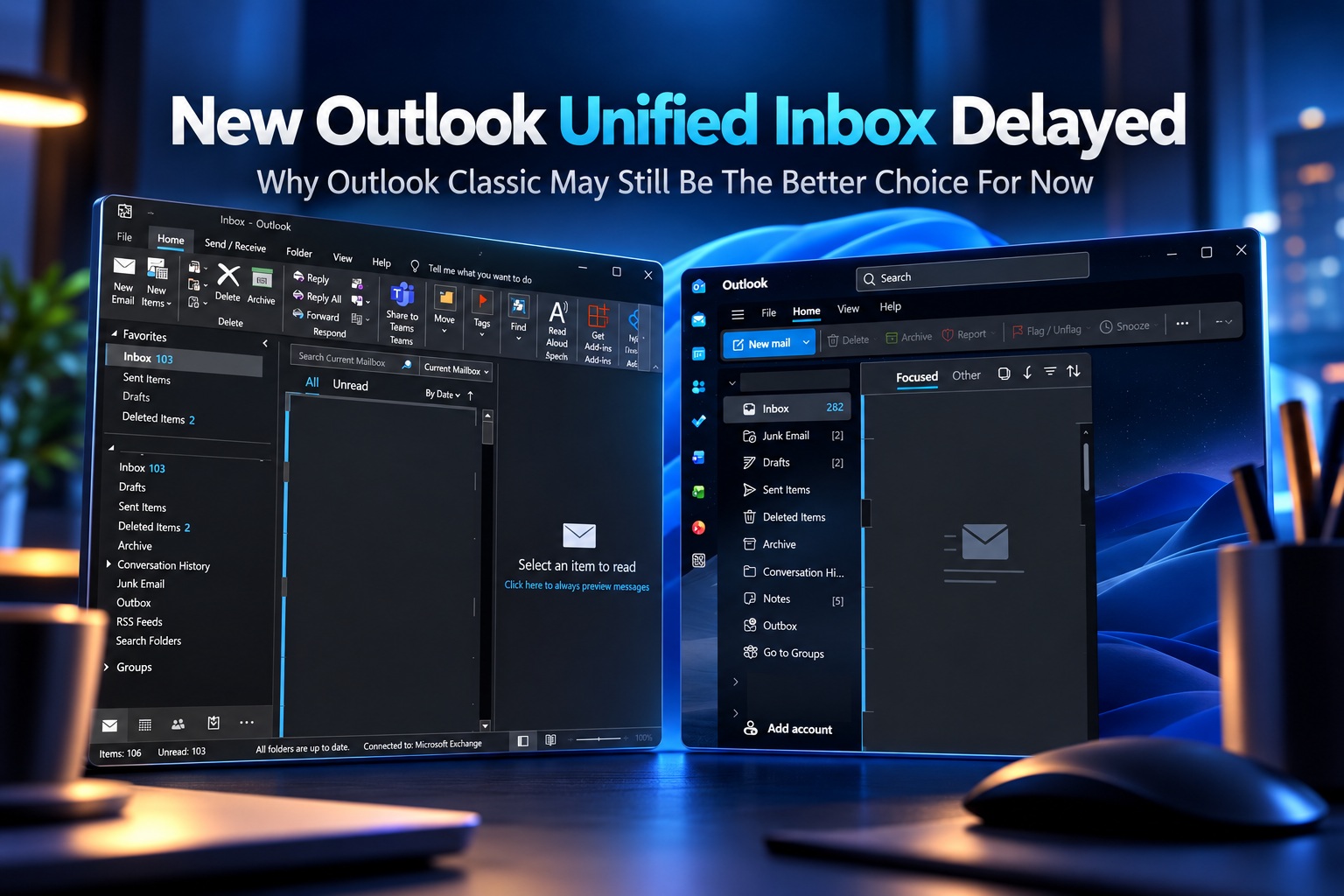
Microsoft's push to move users from Outlook Classic to the New Outlook continues, but one of the features many people have been waiting for is taking longer than expected. The long-promised Unified Inbox, also known as the All Accounts view, is now expected to complete its rollout by late November 2026 instead of late October.
For anyone managing several email accounts, the delay may be another reason to continue using Outlook Classic for a little longer. Microsoft still allows users to choose between the two clients, and although some Outlook Classic users will begin being automatically moved to New Outlook in 2027, they will initially retain the option to switch back.
Unified Inbox Is Not Exactly A Revolutionary Idea
The strange part is that combining messages from several accounts into one inbox is hardly a new concept. Microsoft itself provided something very similar years ago through the free Mail and Calendar application included with Windows 10.
That application allowed people with several connected accounts to see messages together rather than repeatedly jumping between individual inboxes. Gmail for Android and Outlook for Android also provide comparable experiences.
Yet Outlook Classic has never offered a proper unified inbox. Users can create folders, search folders or groups as workarounds, but none of those approaches provides the same straightforward experience.
New Outlook Was Supposed To Finally Fix This
Microsoft confirmed earlier in 2026 that the All Accounts view was being developed for New Outlook. The feature eventually began reaching some users, providing the first opportunity to see how Microsoft intends the unified experience to work on Windows.
The rollout started in late September, and Microsoft originally expected to complete deployment by late October. That deadline has now slipped.
Microsoft currently expects the rollout to finish by late November 2026, although gradual feature deployments can always move again if technical issues appear.
Some Users Already Have The Feature
The delay does not mean Unified Inbox has disappeared completely. Microsoft has already begun enabling it for selected New Outlook users as part of a phased rollout.
That means two people using similar versions of New Outlook may currently see different features. One account may already have All Accounts available while another does not.
Microsoft commonly uses this gradual deployment model to monitor new features across different configurations before releasing them more broadly.
Late November Is Now The Target
Microsoft says deployment began in late September and is expected to complete by late November. The previous target had been late October.
Whether that schedule holds remains to be seen. Microsoft has delayed Outlook features before, and gradual rollouts sometimes take longer than initially expected.
For users waiting specifically for Unified Inbox before abandoning Outlook Classic, there is therefore little reason to rush the transition.
You Do Not Need Microsoft 365 To Use It
One positive aspect is that Unified Inbox does not appear to require a paid Microsoft 365 subscription.
Free Outlook users can access the feature as well once it reaches their account. The trade-off is that free New Outlook accounts continue to display advertising.
Microsoft has increasingly positioned New Outlook as a service that works across both free and Microsoft 365 accounts, with certain premium capabilities reserved for subscribers.
Unified Inbox itself appears to belong to the general feature set rather than the paid tier.
The Feature May Need To Be Enabled Manually
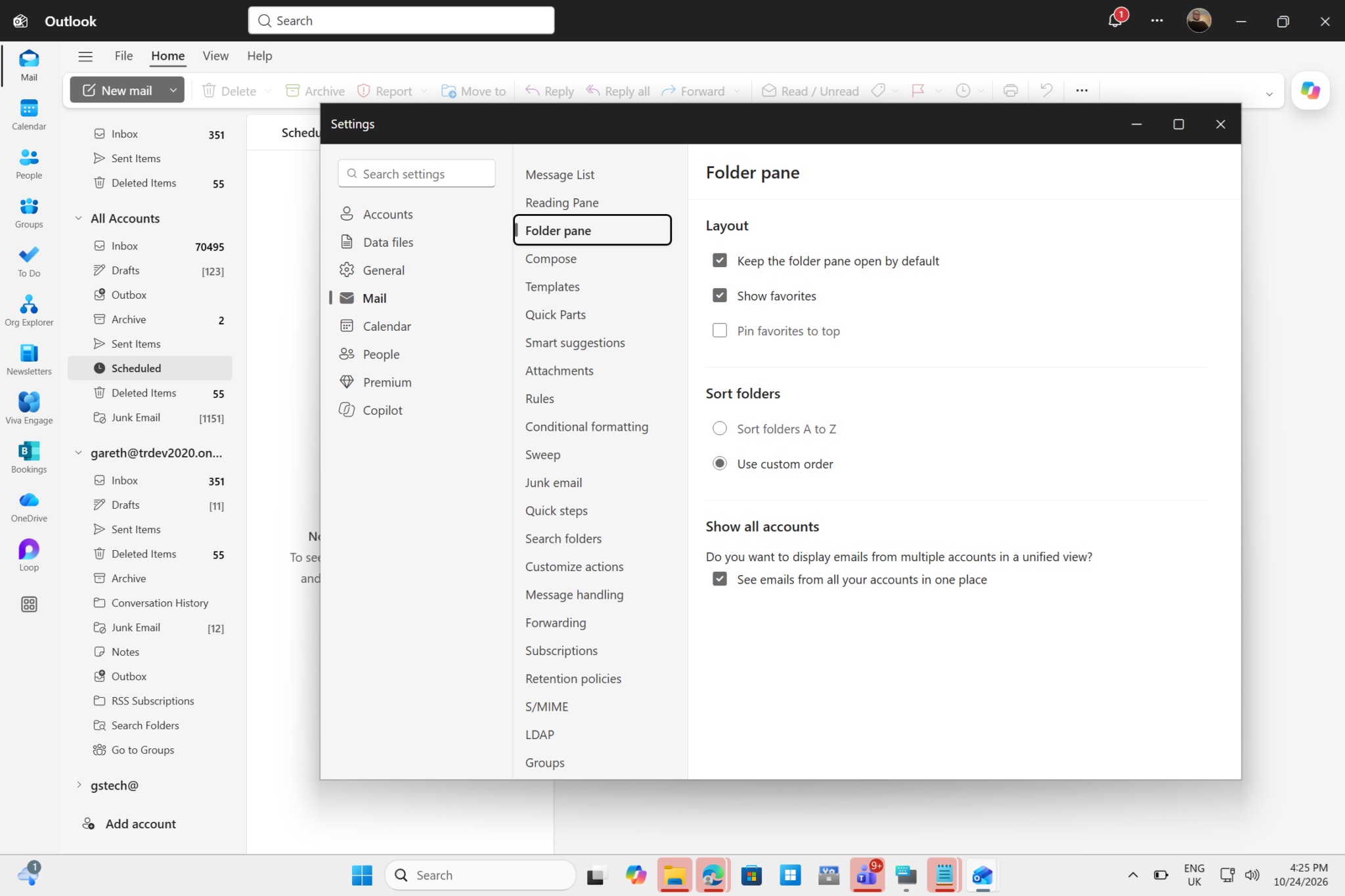
Once All Accounts reaches your account, it may not necessarily appear automatically.
Users should be able to control the feature through:
Outlook Settings > Mail > Folder pane
From there, the Unified Inbox or All Accounts view can be enabled or disabled depending on preference.
This means users who like maintaining completely separate inboxes will not be forced into the combined view.
IT Administrators Are Getting Their Own Controls
Microsoft is also preparing administrative controls for organisations running New Outlook across managed environments.
Administrators will be able to determine whether Unified Inbox should be enabled or disabled by default. They can also control whether individual users are permitted to change that setting themselves.
These controls were originally expected in October 2026 but have also been pushed back.
For enterprises managing large numbers of Outlook installations, having central control is important because email workflows can vary considerably between departments.
How Unified Inbox Actually Works
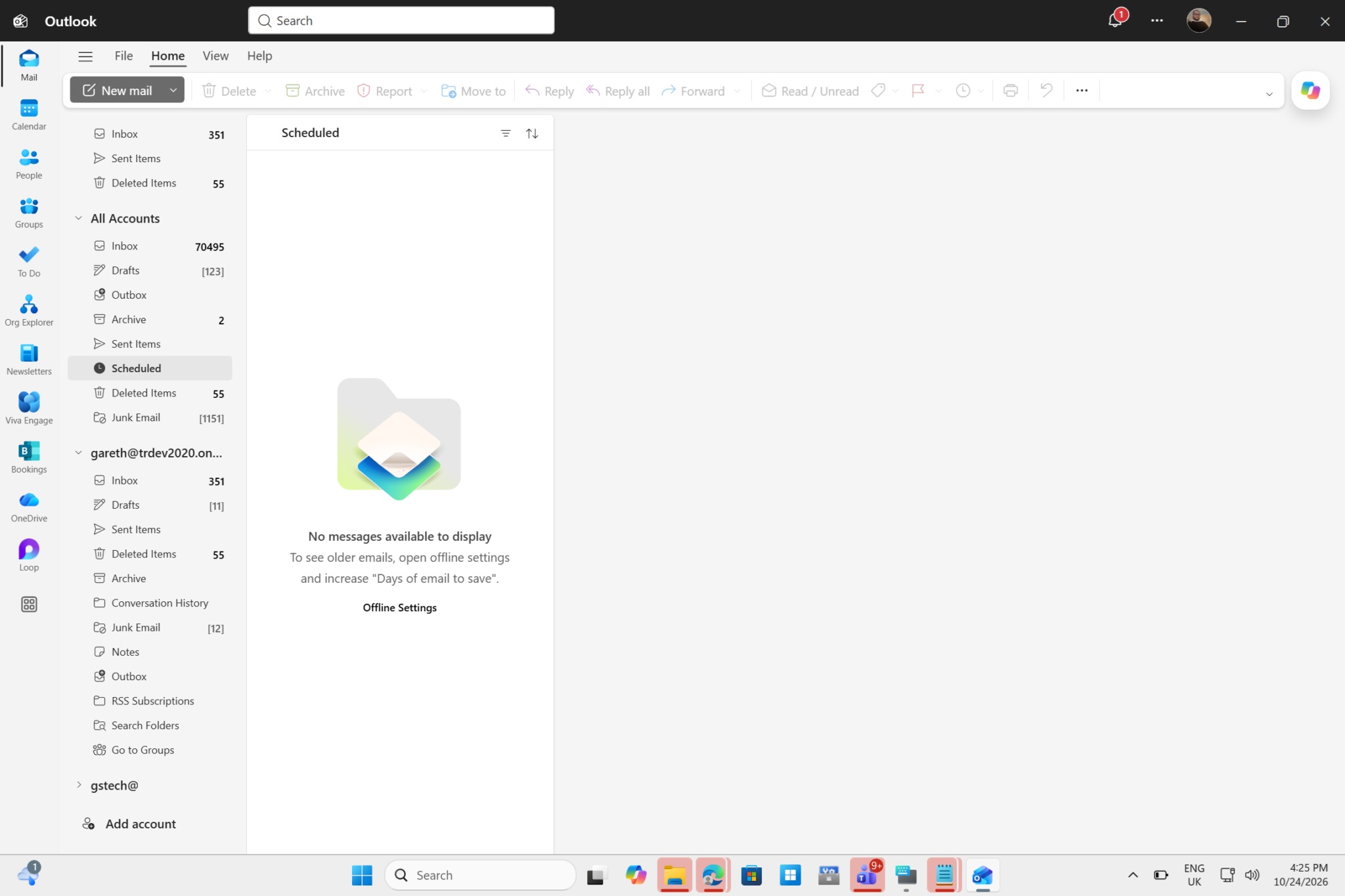
Once enabled, New Outlook displays messages from multiple connected accounts inside one combined inbox.
Instead of clicking through several mailboxes in the navigation pane, users can review incoming messages from different accounts in one location.
This becomes especially helpful for people who maintain several work, personal or project-related email addresses.
Anyone with a long list of connected accounts will immediately understand the benefit of avoiding constant navigation through the left-hand sidebar.
Your Individual Inboxes Do Not Disappear
Unified Inbox does not merge the underlying mailboxes into one account.
Each email account continues maintaining its own dedicated inbox and folder structure. The All Accounts view simply creates a combined presentation layer showing messages from those accounts together.
Users can therefore switch between the unified view and the original individual inbox whenever necessary.
This makes the feature far less disruptive than permanently combining or moving messages between accounts.
Messages Stay Inside Their Original Accounts
An email appearing in All Accounts still belongs to the mailbox where it originally arrived.
If an Outlook.com message and a Gmail message appear next to each other in Unified Inbox, nothing has actually been transferred between those accounts.
Microsoft describes the feature as a view rather than a mailbox merger.
That distinction is important because users do not need to worry about Unified Inbox rearranging their server-side email structures.
Actions Still Apply To The Original Message
The combined view remains fully interactive.
Users can delete, archive, move or mark messages directly from Unified Inbox. Those actions are then reflected inside the original account where the email resides.
For example, deleting a message belonging to Account B from the All Accounts view also removes it from Account B's normal inbox.
The combined view therefore acts as another way to manage the same underlying messages rather than creating duplicates.
This Is Particularly Useful For People With Many Accounts
Managing two email accounts manually is relatively easy. Managing ten or twenty is another matter entirely.
Some users maintain separate inboxes for personal correspondence, work, freelance projects, websites, businesses and different organisations. Navigating between all of them quickly becomes tedious.
Unified Inbox allows incoming messages to be triaged centrally.
That alone could make New Outlook substantially more practical for users who previously rejected it because of multi-account management limitations.
Windows 10 Mail Already Did Something Similar
The irony is difficult to ignore because Microsoft previously offered an All Accounts-style experience through Windows 10's Mail and Calendar app.
That application was simple, lightweight and free from the complexity associated with full desktop Outlook. Many users appreciated it precisely because switching between multiple accounts was straightforward.
Microsoft eventually discontinued Mail and Calendar and pushed users towards New Outlook.
Yet one of the replacement application's missing features was functionality that the older app had already provided.
New Outlook Has Taken Time To Catch Up
This has been one of the recurring criticisms surrounding New Outlook.
Microsoft presents the application as the future of Outlook on Windows, but several features available in older Microsoft email clients have taken time to arrive.
The company has been gradually addressing these gaps, adding offline capabilities, account improvements and other functionality over multiple updates.
Unified Inbox is another important step towards making New Outlook feel complete enough for people managing more complicated email environments.
Outlook Classic Still Has Advantages
Outlook Classic remains the more mature desktop application in several areas.
It has decades of enterprise features, extensive add-in support, advanced rules and workflows that some professional users still depend on.
New Outlook is cleaner and more modern, but users with specialised workflows may continue finding functionality missing or implemented differently.
This is why Microsoft's transition strategy remains gradual rather than immediately forcing everyone onto the replacement.
Automatic Migration Begins For Some Users In 2027
Microsoft plans to begin automatically switching some Outlook Classic users to New Outlook in 2027.
Importantly, users affected by the initial migration will still be able to return to Outlook Classic.
That gives Microsoft more time to improve New Outlook before the old client eventually becomes less central to its Windows strategy.
For users who depend on specific Outlook Classic features, there is therefore no immediate requirement to abandon the application.
Unified Inbox Could Become One Of New Outlook's Best Features
Despite the delay, All Accounts looks like one of the more genuinely useful improvements planned for New Outlook.
Email itself has not fundamentally changed, but the way people manage accounts has. It is increasingly common to have several addresses for completely different roles.
A single view that allows users to rapidly scan everything without losing the separation between accounts addresses a practical everyday problem.
It is simple functionality, but sometimes those are the improvements that matter most.
Search Across Accounts Is Potentially Even More Useful
Another major advantage should be the ability to search across several mailboxes without repeating the same query individually.
Anyone who cannot remember which account received a particular email knows how frustrating this can become. You search one inbox, find nothing, switch accounts and repeat the process several times.
A proper global search could eliminate that workflow entirely.
In theory, users could search once and have New Outlook inspect messages from all relevant connected accounts.
Search Still Appears To Need Work
Unfortunately, early testing suggests that cross-account searching may not yet work perfectly.
When older messages were searched from the Unified Inbox during testing, Outlook reportedly searched only one mailbox rather than all connected accounts.
That may simply reflect the feature's incomplete rollout or an implementation limitation that Microsoft is still addressing.
Since global search is arguably one of the biggest reasons to use a unified inbox, this behaviour will be worth watching as deployment expands.
The Inbox Is Unified, But Search Needs To Be Unified Too
A combined inbox becomes much less useful if search still requires users to know which mailbox contains the message they need.
Ideally, All Accounts should apply to both browsing and searching.
Users should be able to search for a person, subject or phrase and receive matching results regardless of which connected account contains the message.
Until that works consistently, part of the old multi-account frustration remains.
Copilot Is Coming Into The Unified Inbox
Microsoft also plans to integrate Copilot into the All Accounts experience.
The company says the feature will support AI-assisted email workflows and Copilot-based search capabilities.
That means the unified inbox could eventually become more than simply a combined list of messages. Copilot could help users locate information, summarise conversations and interact with email through natural-language requests.
However, the exact experience may vary depending on account type and Copilot availability.
Microsoft Clearly Sees Email As Another AI Opportunity
The integration is consistent with Microsoft's wider strategy of embedding Copilot throughout Windows and Microsoft 365.
Email contains enormous amounts of useful context, including conversations, schedules, documents and decisions.
An AI assistant capable of understanding that information could potentially answer questions such as what someone promised in an earlier conversation or locate an attachment buried months ago.
A unified inbox provides an obvious place to expose those capabilities.
Copilot Search Currently Has Limitations
Microsoft notes that Copilot-powered search supports finding messages across the user's primary account.
That wording is important because it does not necessarily mean Copilot searches every connected mailbox simultaneously.
This could create another odd limitation where the visual inbox is unified but some AI-powered functions remain tied to one account.
Microsoft may expand that behaviour later, but users should not assume every Copilot feature automatically covers every mailbox.
AI Should Not Be The Main Reason To Use Unified Inbox
For many users, the simple ability to see all incoming mail in one place is already enough.
Adding AI could improve the experience, but Unified Inbox does not need Copilot to justify its existence.
In fact, one reason people have been requesting the feature for so long is precisely because it solves an uncomplicated navigation problem.
Microsoft should therefore ensure the core functionality works reliably before focusing too heavily on turning it into another Copilot showcase.
Classic Outlook Users Can Afford To Wait
If your existing Outlook Classic configuration works properly, there is little reason to move immediately simply because Unified Inbox has begun rolling out.
The feature remains unavailable to some accounts and certain capabilities such as cross-mailbox search still appear unfinished.
Waiting another month or two gives Microsoft additional time to finish deployment and resolve early issues.
Users can then evaluate the feature based on the finished implementation rather than an incomplete rollout.
New Outlook Is Improving, Just Slowly
It would also be unfair to say New Outlook has made no progress.
Microsoft has steadily added functionality since introducing it, and Unified Inbox addresses one of the more obvious gaps for multi-account users.
The problem is that many features feel as though they are arriving after users already had similar capabilities elsewhere.
That creates understandable frustration among people being encouraged to switch from a mature application to something that is still catching up.
The Windows 10 Mail Comparison Remains Awkward
The fact that Windows 10's old Mail app already handled combined accounts makes the delay especially noticeable.
Microsoft discontinued that lightweight application in favour of New Outlook, but users then had to wait for functionality they had previously enjoyed for years.
From Microsoft's perspective, New Outlook provides a more unified architecture across its email products.
From the user's perspective, however, replacing software with something newer should ideally not involve temporarily losing basic features.
Free Users Still Have To Deal With Advertising
Although Unified Inbox works without Microsoft 365, free users still need to accept advertising inside New Outlook.
This remains one of the more controversial differences compared with Windows 10 Mail, which provided a simple email experience without the same advertising approach.
Microsoft increasingly uses New Outlook as both an email client and a gateway into its broader service ecosystem.
For users who want a straightforward free desktop email application, that may make the older Mail experience seem even more appealing in retrospect.
Admins May Want To Delay Deployment Too
Enterprise IT teams should also evaluate the feature carefully before enabling it broadly.
Users managing multiple corporate accounts may benefit substantially from a unified view, but organisations may have reasons to keep certain mailboxes visually separated.
Administrative controls will help organisations determine the appropriate default.
As with any major workflow change, testing with a smaller group before company-wide deployment may be preferable.
Separate Accounts Can Still Be Useful
Not everybody wants every email arriving in one enormous inbox.
Keeping work and personal accounts visually separated can reduce distraction and help users maintain clearer boundaries.
A unified inbox can also become extremely busy when several high-volume accounts are connected.
The ability to turn All Accounts off therefore matters just as much as having the feature available.
The Best Approach May Be Using Both Views
Because individual inboxes remain available, users do not need to choose permanently between unified and separated workflows.
The All Accounts view can be used for quickly triaging new mail, while individual inboxes remain useful when focusing on one project or account.
This flexibility is probably the strongest part of Microsoft's implementation.
The unified view becomes an additional tool rather than replacing the existing folder structure.
Final Thoughts
Microsoft's long-awaited Unified Inbox for New Outlook is finally rolling out, but users may need to wait longer than originally expected. Deployment began in late September 2026 and was supposed to finish by late October, but Microsoft has now moved the completion target to late November.
The feature combines messages from multiple connected accounts into one All Accounts view while leaving every underlying mailbox separate. Users can delete, move, archive and manage messages directly from the combined inbox, with those changes reflected in the original accounts.
It is exactly the kind of functionality people managing many email addresses have wanted for years, and ironically something Microsoft already offered through Windows 10's discontinued Mail and Calendar application.
Cross-mailbox search could become one of the most useful parts of the feature, although early testing suggests it does not yet behave consistently across older messages. Microsoft is also integrating Copilot into the experience, providing AI-assisted workflows and search capabilities.
The unified inbox works with free accounts as well, although New Outlook's advertisements remain part of that experience.
For existing Outlook Classic users, there is still no urgent reason to switch. New Outlook continues improving, but the Unified Inbox rollout is incomplete and some functionality still appears to need refinement.
Microsoft may want everyone eventually using New Outlook, but until All Accounts is fully deployed and reliable, Outlook Classic remains a perfectly sensible place to stay.











Comments 0