


Sometimes a small web app starts with one very specific purpose, and that is exactly how this ICO Converter began. The original idea was straightforward: upload an image, crop it into a square, and generate an ICO file for favicons, shortcuts, and desktop icons. It did the job well, especially for users who simply wanted a quick browser-based way to create an icon without installing extra software.
Now, the app has grown into something more useful.
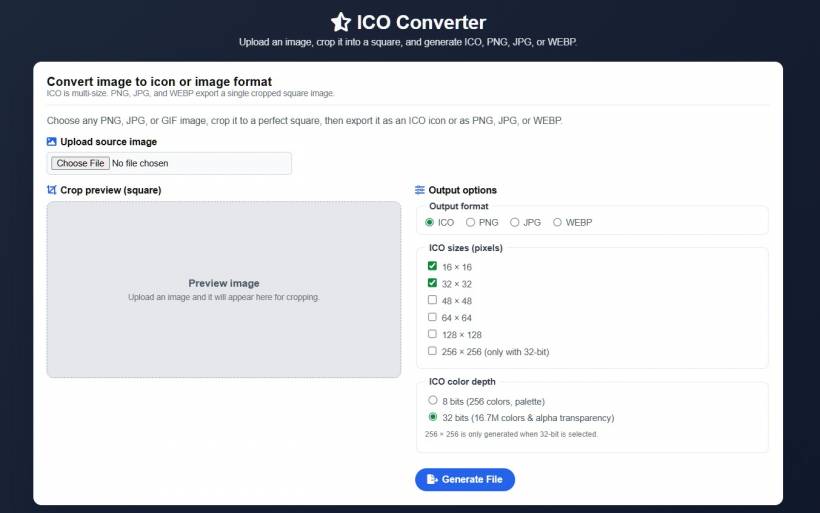
The latest update introduces support for additional output formats, allowing users to generate not only ICO files, but also PNG, JPG, and WEBP images from the same cropped source. On top of that, the interface has also been refined so the output format options now appear in a single horizontal row, helping the page maintain a cleaner layout without unnecessary vertical scrolling.
This update makes the ICO Converter more practical for a wider range of users, whether they are working on websites, mobile app assets, product thumbnails, logos, profile images, or general web graphics.
Why This Update Matters
Many people do not just need an ICO file anymore. In real-world use, a single uploaded image often needs to be saved in multiple formats for different purposes.
For example, a user might want an ICO file for a website favicon, a PNG version for transparency support, a JPG version for lightweight previews, and a WEBP version for modern web performance. Previously, that kind of workflow usually meant using several different tools or converting the same image multiple times elsewhere.
With this update, the process becomes much more convenient. Users can upload once, crop once, and then choose the format they need directly from the same interface. It is a simple improvement, but one that saves time and makes the tool much more flexible.
New Output Format Options
The biggest feature in this update is the ability to export to multiple image formats.
ICO remains the default output format, which makes sense because icon generation is still the main purpose of the app. Users can continue selecting multiple ICO sizes such as 16 × 16, 32 × 32, 48 × 48, and larger options depending on their needs. The 32-bit option also remains available for better color quality and alpha transparency.
In addition to ICO, the app now supports PNG, JPG, and WEBP.
By adding these formats, the ICO Converter is no longer just a favicon helper. It becomes a lightweight image export tool for everyday web use.
A More Efficient Crop-and-Export Workflow
The core workflow of the app remains simple, which is one of its strengths.
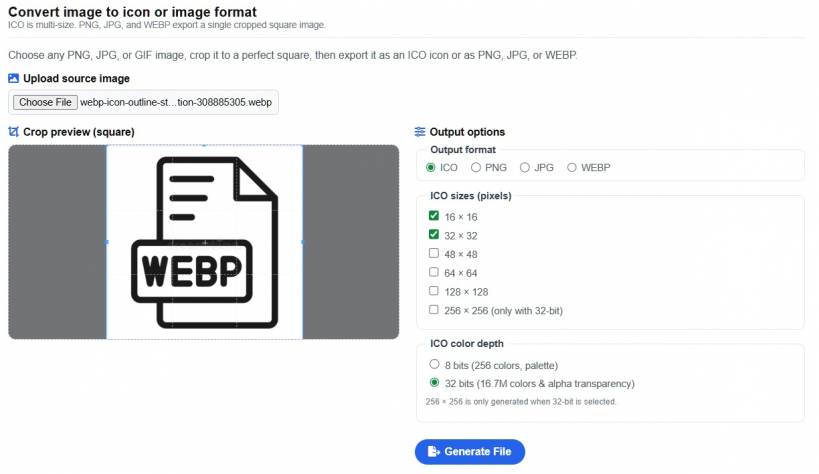
Users upload an image, crop it into a square using the built-in crop interface, then choose the desired output format and generate the file. That familiar process has not been complicated by the new features. Instead, the new options fit naturally into the same workflow.
For ICO generation, the app still behaves as expected by allowing multiple icon sizes and bit depth selection. For PNG, JPG, and WEBP, the app exports a single cropped square image based on the selected output size. This keeps the logic clean and easy to understand.
In other words, the app does not try to overwhelm users with unnecessary settings. It gives just enough flexibility to be useful, while still staying fast and approachable.
Better for Web Developers, Designers, and Everyday Users
This update also broadens the audience for the app.
Web developers can now use it not only for favicon creation, but also for generating square PNG or WEBP graphics for websites and applications. Designers and content creators can use it to quickly prepare cropped image outputs without opening heavier desktop tools. Even casual users who just want a fast online converter now get more value from a single page.
For example, someone creating a web project may start with a logo and need several outputs. The ICO version can be used as the favicon. The PNG version can be used in a transparent UI placement. The JPG version can be shared as a lightweight preview. The WEBP version can be uploaded to a modern site for better performance. That entire workflow can now start from one simple upload and crop action.
That kind of convenience is exactly what makes small web apps worth using.
Transparency and Format Behavior
Another important part of this update is how each format behaves.
ICO and PNG are both well suited for transparency, which is useful for icons and graphics that should blend nicely into different backgrounds. WEBP can also preserve transparency when supported by the server environment and browser workflow. JPG, on the other hand, does not support transparency, so transparent areas are replaced with white.
This is the kind of detail that matters because users often expect the same visual result across all formats, when in reality each format has different strengths and limitations. By supporting multiple output types in a single tool, the app gives users more choice, but it also helps them use the right format for the right purpose.
Still Focused on Simplicity
Even with the new features, the ICO Converter still keeps the same practical spirit. It does not try to become a full image editor or an overcomplicated design suite. It remains focused on one quick task: taking an uploaded image, letting the user crop it neatly, and generating a usable output file.
That focus is important. There are already many large and complex image tools out there. What makes a web app like this useful is speed, convenience, and clarity. Users do not want to spend time navigating through a hundred menus just to create one icon or export one cropped image.
This update respects that. It adds meaningful features without losing the lightweight nature of the tool.
A Small Upgrade That Adds Real Value
From the outside, adding PNG, JPG, and WEBP might look like a modest change. But in practice, it is a meaningful upgrade because it turns a single-purpose converter into a much more versatile utility.
It also shows a sensible direction for web-based tools in general. Users increasingly want fast browser-based solutions that cover the most common tasks without requiring installation, registration, or complicated workflows. When a tool can solve several related needs in one place, it becomes much easier to keep coming back to it.
That is exactly what this update does for the ICO Converter.
Final Thoughts
The new ICO Converter update makes the app more flexible, more practical, and more user-friendly. ICO remains the core default format, but users can now also generate PNG, JPG, and WEBP outputs from the same cropped image. At the same time, the cleaner single-row format selection helps the page maintain a better layout and reduces unnecessary scrolling.
It is a straightforward improvement, but one that makes a real difference. Instead of being limited to icon generation alone, the app now serves as a more complete square image export tool for web, design, and everyday use.
For existing users, this means more convenience without any added complexity. For new users, it makes the app more appealing right from the start. And for a simple web utility, that is exactly the kind of update worth having.











Comments 0