

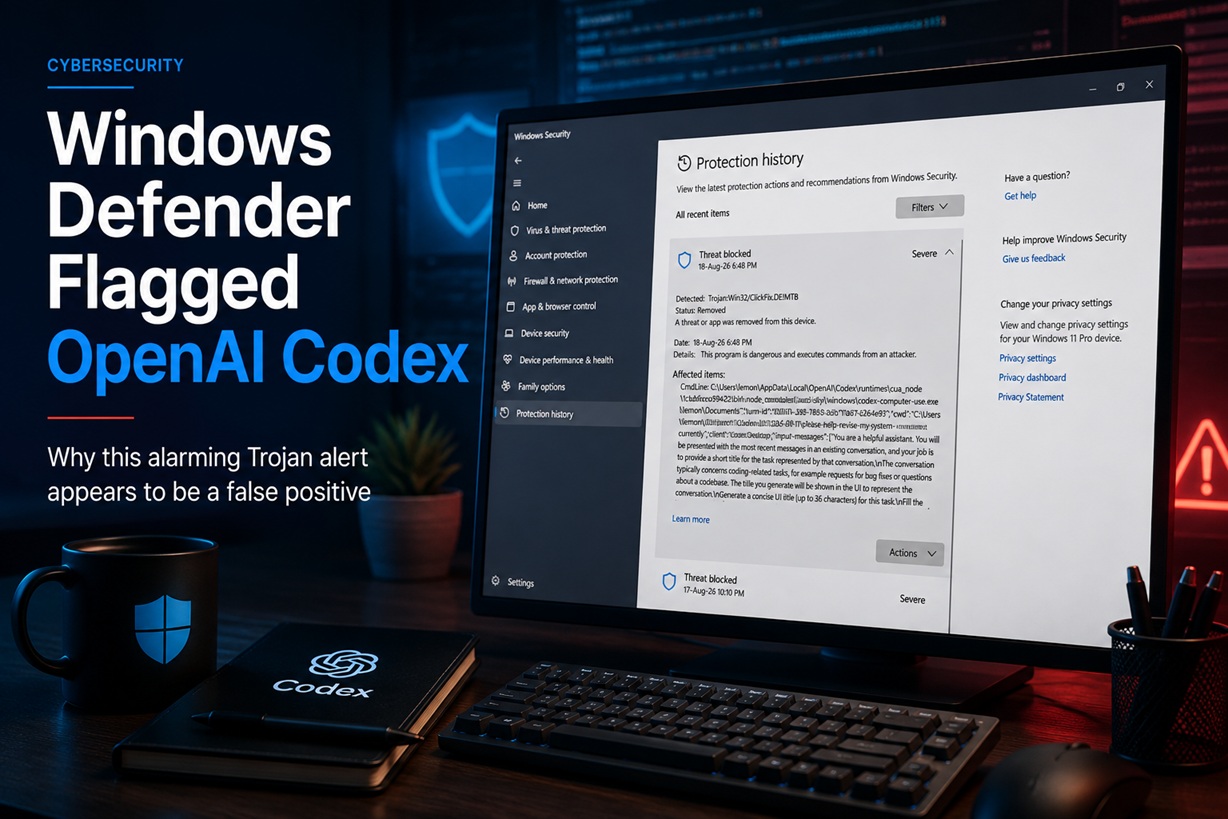
While working on one of my local development projects using OpenAI Codex Desktop, I suddenly received a rather alarming Windows Security notification.
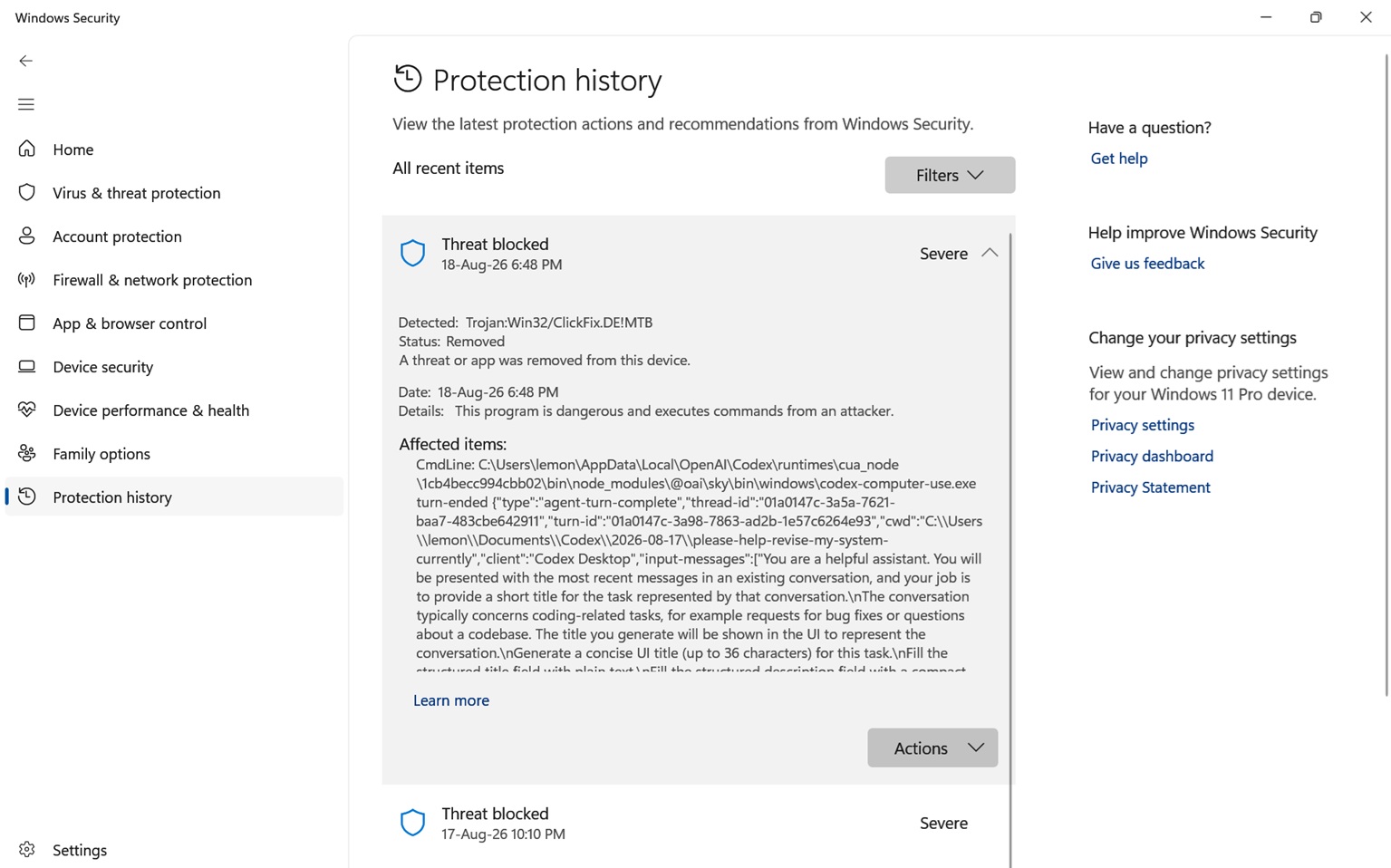
Microsoft Defender had detected what it classified as:
The alert level was marked Severe, and Windows Defender stated that the detected program was dangerous and could execute commands from an attacker.
Naturally, seeing the word Trojan associated with a development tool that is actively working with files on your computer is enough to make anyone concerned.
After taking a closer look at what Defender actually detected, however, the situation appears considerably less dramatic. Rather than an infection inside my PHP project or some unknown executable downloaded from the Internet, the detection was directly associated with a component belonging to OpenAI Codex Desktop.
The suspicious file was part of OpenAI Codex
The affected command referenced by Windows Defender pointed to a path similar to:
More specifically, the executable involved was:
That immediately provided an important clue.
At the time of the detection, I was actively using OpenAI Codex to modify and develop a local application. Codex was accessing project files, making code changes and working with my local WAMP development environment.
The Defender event also contained:
and an action called:
along with:
Even the working directory listed inside the alert matched the exact Codex project I was working on at the time.
In other words, there was a very clear connection between the Defender alert and the legitimate Codex session that was currently running.
Why would antivirus software think Codex is malware?
This is where modern AI development tools create an interesting problem for traditional antivirus software.
Codex is not simply a chatbot displaying text inside a browser. When given permission, an agentic coding environment can interact with your local development environment.
That may involve activities such as executing commands, launching programs, reading and modifying files, using PowerShell or command-line utilities, managing project directories and passing instructions between processes.
Unfortunately, those are also behaviours commonly associated with malware.
A Trojan might execute PowerShell commands and modify files.
A legitimate AI coding agent might also execute PowerShell commands and modify files.
The difference is the intent and origin of those actions, but behavioural antivirus systems do not always have enough context to distinguish between the two.
This is one reason sophisticated development tools occasionally trigger heuristic antivirus detections.
The command line appears to be the important part
Another interesting detail was how Windows Defender presented the detection.
Under Affected items, Defender identified:
followed by the Codex executable and a very long set of parameters.
The command included information about the Codex conversation itself, including the thread ID, turn ID, working directory and instructions being processed by the agent.
For example, the command contained information structured around:
followed by a JSON payload describing the completed Codex task.
That makes this particular detection especially interesting because Defender appears to have reacted to the process command line and its behaviour, rather than simply identifying one of my application files as infected.
This is very different from discovering an unknown executable hidden inside a web project or finding malicious JavaScript injected into a website.
Why the ClickFix detection makes some sense
Microsoft Defender classified the activity as:
ClickFix-style attacks commonly involve persuading or causing users to execute commands on their Windows computers. PowerShell and other command-line environments are frequently involved in these attacks.
From Defender's perspective, therefore, an application capable of receiving instructions and subsequently executing commands can resemble some of the behaviour associated with ClickFix attacks.
Codex, of course, performs command execution for a completely different reason: it is helping developers work on software.
But this overlap between legitimate automation and malicious automation can sometimes cause antivirus heuristics to become overly aggressive.
My project files were not what Defender detected
This was probably the most reassuring part of investigating the alert.
I was using Codex to work on a PHP-based system containing application code, MySQL integration and other local development files.
However, Defender did not point to one of those PHP files, SQL files or project resources.
Instead, the detection referenced the Codex runtime itself:
The command-line information even contained the genuine conversation and development instructions being handled by Codex at that moment.
That strongly suggests that this particular alert was generated by the way Codex Computer Use operates, rather than by malware being introduced into my project.
Windows Defender still did the right thing
Even though this appears to be a false positive, I wouldn't criticise Windows Defender for detecting it.
From a security perspective, being cautious about software that can autonomously execute commands is perfectly reasonable.
AI agents are increasingly capable of interacting with operating systems in ways that were previously mostly associated with administrators, automation platforms and, unfortunately, malware.
Antivirus products therefore face a new challenge.
They need to distinguish between:
and:
At a behavioural level, those two situations can occasionally look surprisingly similar.
I wouldn't immediately whitelist the entire Codex folder
Even when you're confident that a detection is a false positive, blindly excluding an entire application directory from antivirus scanning isn't necessarily a good idea.
For example, I wouldn't immediately add:
C:\Users\<username>\AppData\Local\OpenAI\Codex\
as a permanent Defender exclusion.
Doing so would mean Defender largely ignores files placed within that directory in the future.
A safer approach is to keep Codex updated, update Microsoft Defender's security intelligence and allow Microsoft and OpenAI time to resolve the compatibility issue.
In my case, Defender reported that the detected activity had already been blocked and removed, so there was no need to panic or disable antivirus protection.
AI development tools are changing endpoint security
This incident also highlights a larger issue that we're likely going to encounter more frequently.
Traditional development environments generally wait for developers to issue commands themselves.
Agentic development tools are different.
An AI agent may determine that it needs to inspect a directory, run a command, modify a configuration file, execute a script, install dependencies or test an application as part of completing a task.
From the developer's perspective, that's exactly what makes these tools useful.
From an endpoint security product's perspective, however, it can look like software receiving instructions and autonomously manipulating the computer.
As AI agents become more capable, antivirus vendors will probably need increasingly sophisticated ways of identifying trusted agent activity without weakening protection against genuinely malicious automation.
Final Thoughts
Seeing "Trojan detected – Severe" suddenly appear while an AI coding agent is working on your computer is understandably concerning.
In this particular case, though, the evidence strongly points towards a Microsoft Defender false positive involving OpenAI Codex's codex-computer-use.exe component.
The executable belonged to the Codex runtime, the working directory matched the development project being actively edited, the command identified Codex Desktop as the client, and the payload contained the genuine Codex conversation being processed at the time.
That doesn't mean antivirus warnings involving development tools should simply be ignored. Each detection should still be examined carefully.
But it does demonstrate something we're probably going to see more often as AI agents become a normal part of software development: legitimate AI automation can sometimes look remarkably similar to malicious automation when viewed purely through the eyes of endpoint security software.











Comments 0