


We've been busy improving the Lemon Web Games Emulator, and this update is one of our biggest yet. The goal was simple: make our hundreds of classic games easier to start, more comfortable to play on mobile devices, and more reliable—especially for iPhone and iPad users.
A brand-new loading experience
The first thing you'll notice is the redesigned game-loading screen.
It now features the Lemon Web Emulator logo, a refreshed background, clearer loading messages and a modern progress indicator. Instead of wondering whether a large game is still downloading, you can now follow its progress as the emulator prepares everything.
Games also start automatically once they are ready, removing the extra Start Game step from the old version.
Better reliability on iPhone and iPad
Some iPhone and iPad users previously experienced a black screen when opening certain PlayStation and Nintendo 64 games for the first time. Refreshing the page usually solved it, but that was hardly an ideal experience.
This update includes several improvements aimed specifically at making that first launch more reliable. We have adjusted how large PSX and N64 games are prepared, reduced unnecessary memory usage during startup and improved how the emulator handles Apple mobile devices.
These changes should make first-time game loading smoother without requiring a manual refresh.
Redesigned mobile touch controls
Touch controls have received a major overhaul across the different game systems available on Lemon Web.
Buttons have been resized, repositioned and adjusted for both portrait and landscape screens. Controls should now be easier to reach and less likely to overlap the game or each other.
The layouts also respond more naturally when rotating your phone or tablet.
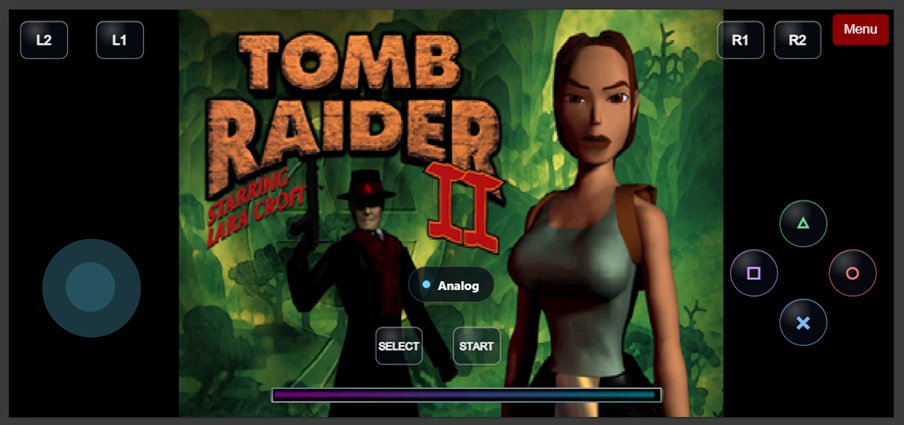
Improved PlayStation controls
PlayStation games continue to use the familiar D-pad layout by default.
For games that work better with analog movement, you can now switch between D-pad and Analog control directly from the game screen. There is no longer a need for a separate custom controller script.
A new Nintendo 64 control layout
Nintendo 64 games received the most extensive controller redesign.
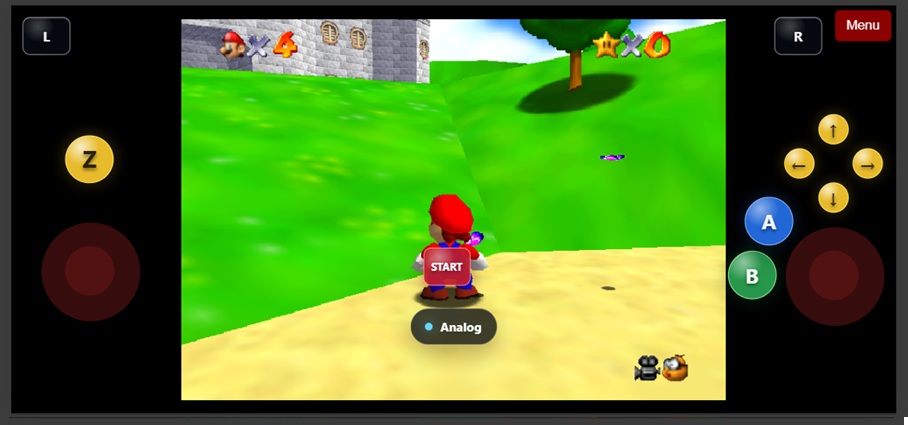
The new layout includes:
- A main joystick for movement
- A second joystick on the right for camera and C-button controls
- Small yellow directional C-buttons
- A larger blue A button
- A larger green B button
- A yellow Z-trigger button above the movement joystick
- A red Start button
- An Analog/D-pad switch below Start
This should make games such as GoldenEye 007, Super Mario 64, Super Smash Bros., Zelda and other 3D N64 titles much more comfortable to play on a touchscreen.
Updated Nintendo 64 keyboard controls
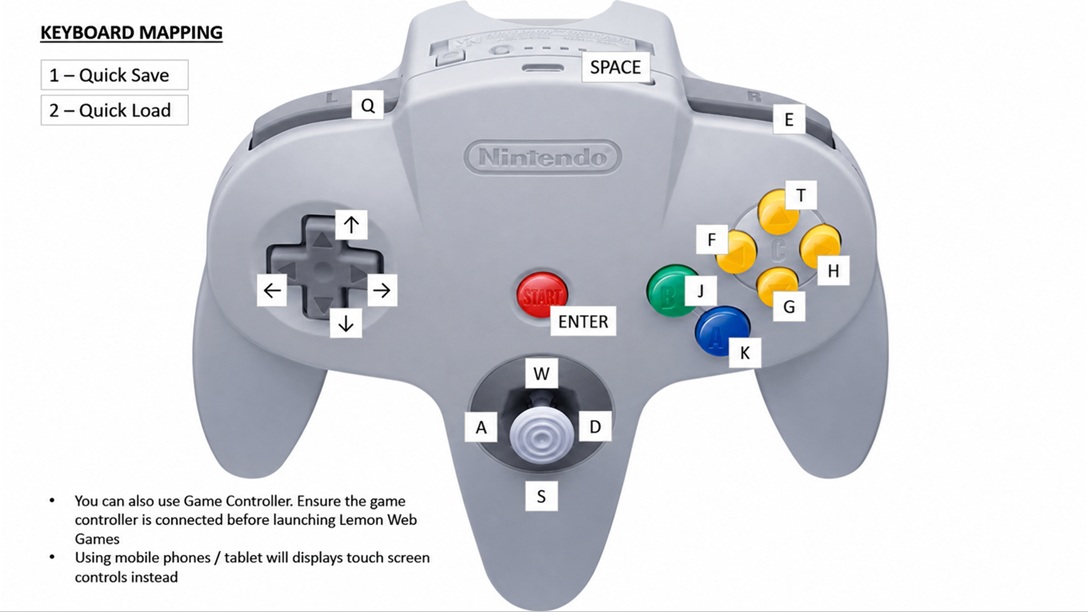
Desktop players also receive a new N64 keyboard layout:
- Analog stick: W, A, S and D
- A button: K
- B button: J
- Z-trigger: Spacebar
- L and R shoulder buttons: Q and E
- C-buttons: T, F, G and H
- D-pad: Arrow keys
- Start: Enter
- Quick Save: 1
- Quick Load: 2
You can still use a compatible game controller. For the best experience, connect your controller before launching the game.
More reliable fullscreen and screen rotation
Fullscreen behaviour has also been improved, particularly on iOS devices.
The emulator now responds more reliably when you:
- Enter or leave fullscreen
- Rotate between portrait and landscape
- Return from fullscreen to the normal browser view
- Use Safari's changing address and navigation bars
These improvements help prevent the game from becoming stretched, cropped or incorrectly positioned after changing orientation.
The familiar Lemon Web navigation remains
Although the emulator itself has received many visual and control improvements, we have kept the familiar Lemon Web navigation design.
The original top Menu button and bottom navigation bar remain available. The bottom bar now displays the consistent message "Emulating Game..." across every game.
On mobile screens, the navigation buttons have also been adjusted to remain properly aligned and accessible.
More consistency across hundreds of games
A great deal of work has also happened behind the scenes.
Shared styling and emulator settings have been standardized across all 337 game pages. This means improvements can now be applied more consistently instead of each game behaving slightly differently.
Loading screens, navigation, touch controls, viewport handling and startup behaviour should now feel like parts of one unified Lemon Web gaming experience.
Ready to play?
The updated Lemon Web Games Emulator is designed to make classic gaming more enjoyable wherever you play—on a desktop computer, Android phone, iPhone or iPad.
As always, different devices and browsers can behave differently. If you encounter a game that does not load correctly or controls that feel uncomfortable, please let us know which game and device you were using. Your feedback helps us continue improving the experience for everyone.
Enjoy the update, and happy gaming!











Comments 1