


OpenAI is rolling out a new Locked Chats feature designed to give ChatGPT users more privacy when dealing with sensitive conversations. Instead of leaving every conversation visible in the normal chat history, users can now move selected chats into a separate protected area secured behind a custom four-digit PIN. On supported smartphones and tablets, access can also be unlocked using Face ID, Touch ID or the device's existing authentication method.
The feature is useful for conversations containing personal information, confidential work discussions or anything users simply prefer to keep out of sight when someone else has access to their device. However, Locked Chats should not be confused with an encrypted vault. It primarily adds an additional access-control layer inside ChatGPT rather than changing how OpenAI stores or processes the underlying conversation.
Locked Chats Disappear From Your Normal Chat History
Normally, ChatGPT conversations appear directly inside the user's chat history where their titles can also appear in search results or the pinned chats section. Once a conversation is locked, it is removed from those normal locations and placed inside a dedicated Locked Chats section.
Its title and contents are no longer visible in the standard chat list, search results or pinned conversations. Anyone casually browsing through the user's normal ChatGPT history therefore will not immediately see that conversation or what it contains.
To access the conversation again, the user needs to enter the PIN or complete supported device authentication. This makes Locked Chats particularly useful on shared computers or devices that other family members, colleagues or friends may occasionally use.
A Separate Memory Is Used For Locked Conversations
Locked Chats also changes how ChatGPT handles memory associated with those conversations. OpenAI says conversations inside the protected area use their own isolated memory, separating information shared there from normal conversations.
For example, if a user discusses highly personal information inside a Locked Chat, that information will not subsequently be used to personalise ordinary ChatGPT conversations outside the locked section. This creates an additional boundary between sensitive discussions and everyday use.
That separation could be especially valuable for people who use ChatGPT for both personal and professional purposes. A confidential work conversation can remain isolated without influencing unrelated chats later.
Locked Chats Are Not End-To-End Encrypted
There is an important limitation to understand. Locked Chats provide privacy against someone browsing the user's ChatGPT account or device, but they do not introduce end-to-end encryption or create a separate encrypted vault.
The feature also does not override OpenAI's existing legal, security or compliance requirements. Data retention policies continue to apply in the same way they normally would.
Locking a conversation also does not change the user's Improve the model for everyone setting. Whatever preference the user has already selected for that feature continues to apply according to the account's existing configuration.
Previously Remembered Information Is Not Automatically Removed
Another important distinction involves information ChatGPT may have already remembered before the conversation was locked.
Moving an existing chat into Locked Chats does not retroactively remove information that was previously incorporated into the user's regular memory. The isolated-memory behaviour applies once the conversation is inside the protected area.
Users who want to control information already remembered outside the Locked Chat will therefore need to manage that separately.
This is another reason Locked Chats should be viewed primarily as a privacy and access-control feature rather than a complete data-isolation system.
How To Start Using Locked Chats
There are two ways to use the feature. Users can move an existing conversation into Locked Chats or start a completely new conversation directly inside the protected area.
There is one requirement for first-time users: an existing chat must be locked before the option to create new conversations inside Locked Chats becomes available.
Once that initial setup is completed, starting a protected conversation is straightforward.
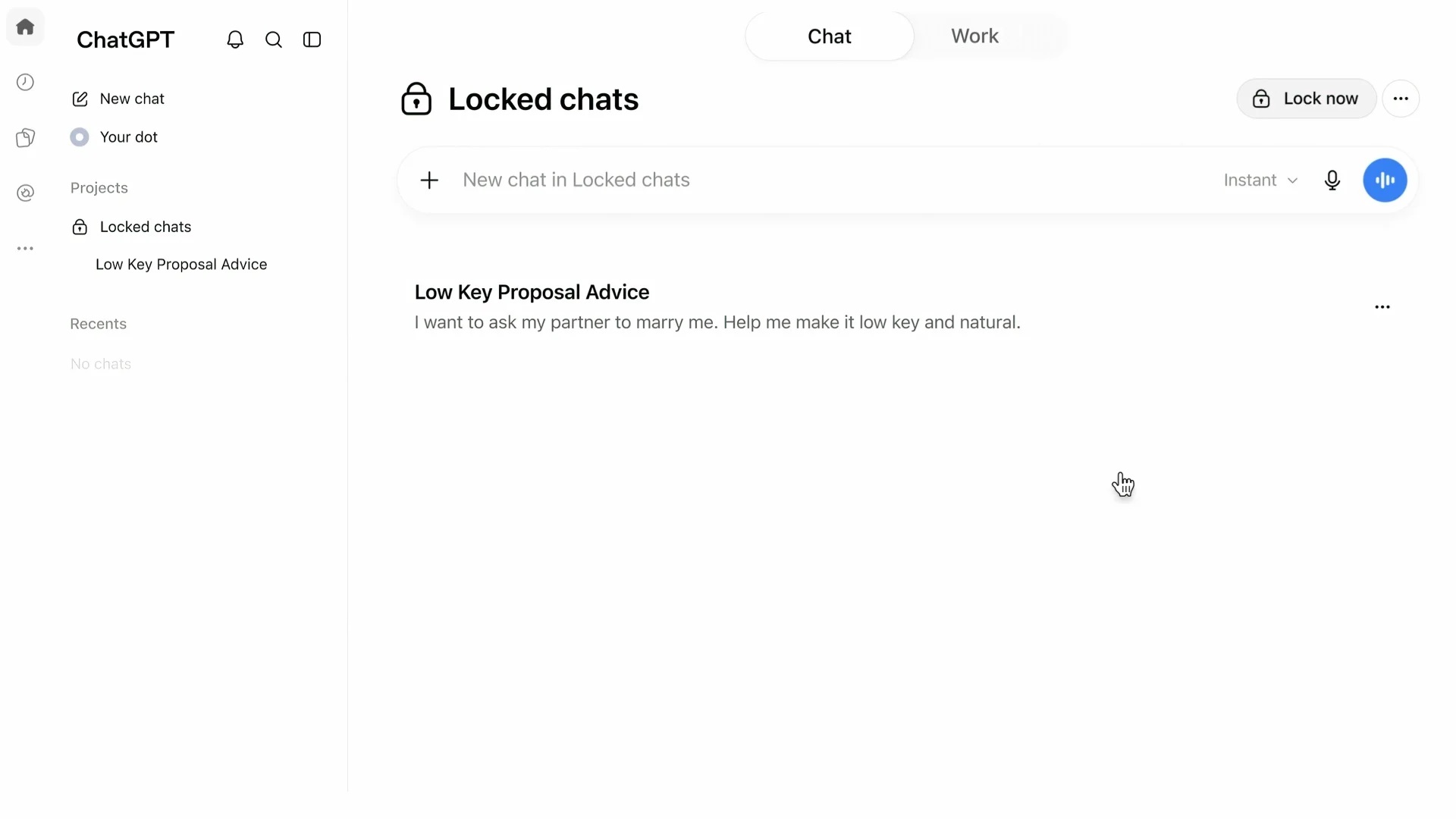
Open Projects, select Locked chats, authenticate using the four-digit PIN or supported device security, and then begin chatting normally.
How To Lock An Existing Conversation
Moving an existing chat into the protected section only takes a few steps.
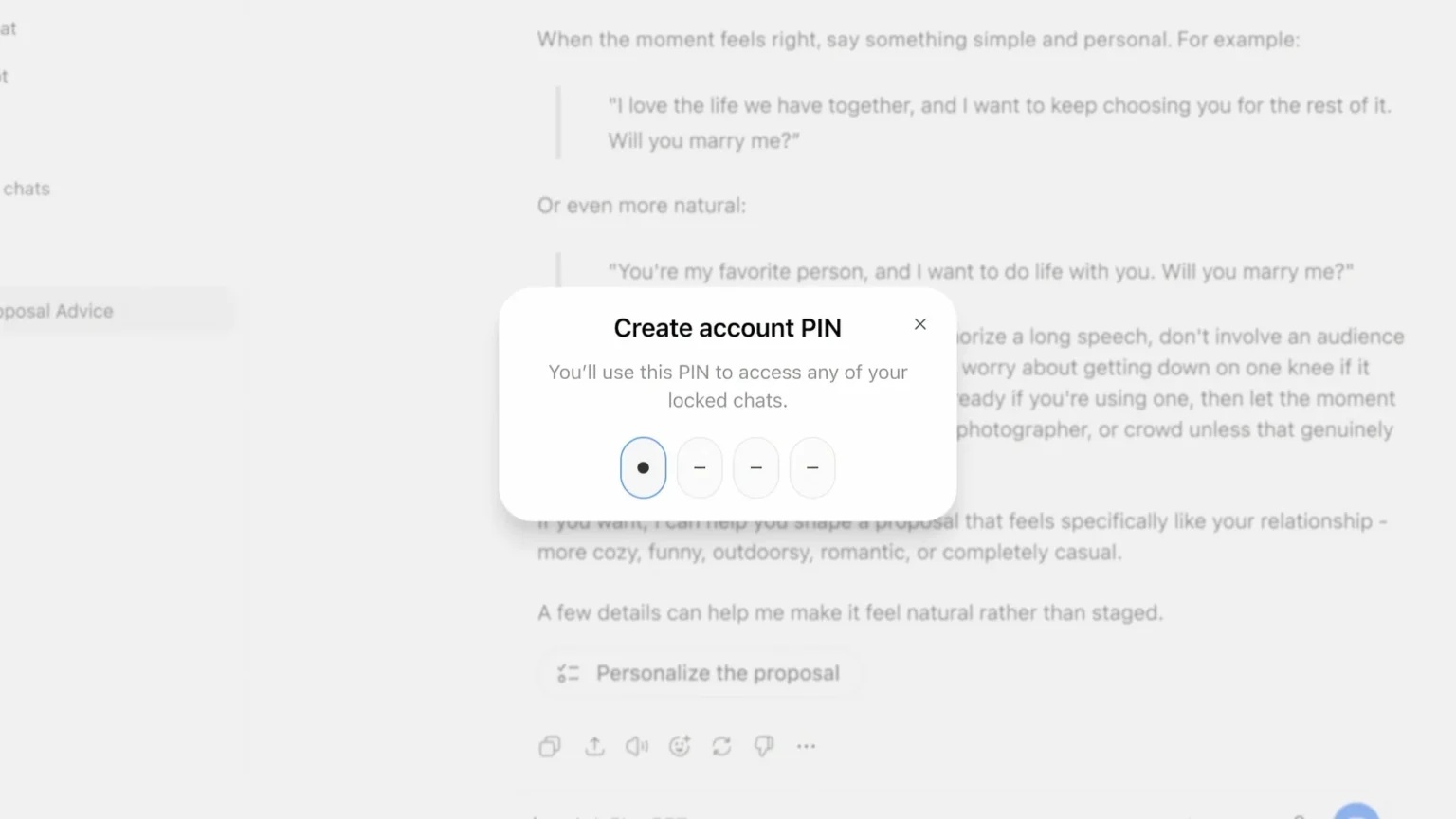
Open the three-dot menu next to the conversation and select Lock chat. ChatGPT will ask for confirmation before prompting the user to create or enter the four-digit account PIN.
After authentication, the conversation moves into the Locked Chats area and disappears from the standard history.
From that point onwards, users need to authenticate before opening it again.
How To Open A Locked Conversation
To return to protected conversations, open Projects and select Locked chats.
ChatGPT will request the PIN or, where available, device authentication such as Face ID or Touch ID. After successfully authenticating, users can select any available locked conversation and continue normally.
This makes the protected section operate somewhat like a private folder within ChatGPT.
Once unlocked, however, users should remember that access may remain active temporarily depending on which platform they are using.
Chats Can Be Returned To Normal History
Locking a conversation does not have to be permanent.
Users can open the protected conversation, select the three-dot menu and choose Unlock chat. After confirming the action, the conversation returns to the standard chat history.
Its title and contents will then once again behave like an ordinary ChatGPT conversation.
This makes the system flexible enough for conversations that only need temporary privacy.
A "Lock Now" Option Immediately Hides Everything Again
OpenAI has also included a Lock now control for users who want to immediately close access to their protected chats.
Selecting the option ends the current Locked Chats session and hides conversation titles from the sidebar again. Authentication will be required the next time someone attempts to access the protected section.
This can be particularly useful on shared computers where the user may need to step away from the screen quickly.
Instead of closing ChatGPT entirely, the protected section can be locked again immediately.
Desktop And Web Access Remain Unlocked Within The Same Window
Locked Chats behaves slightly differently depending on the platform.
On desktop applications and web browsers, authentication is tied to the browser tab or application window where the user entered the PIN. Simply moving into a regular conversation inside that same tab does not automatically close access to Locked Chats.
On the web, users can refresh the page or close the browser tab to end the authenticated session. The PIN or device authentication will then be required again before accessing Locked Chats.
Users who want immediate protection can also use Lock now instead of waiting for the session to end.
Mobile Devices Automatically Lock Again
Android and iOS behave more aggressively when it comes to automatically ending access.
If the user leaves a locked conversation or exits the Locked Chats section for around one minute, access automatically ends. The same thing happens if ChatGPT remains in the background for approximately one minute.
This reduces the chance of someone picking up an unlocked phone several minutes later and opening protected conversations without authentication.
Signing out, switching accounts or changing workspaces will also end the unlocked session.
The Four-Digit PIN Needs To Be Remembered
Users should be particularly careful when choosing and remembering their Locked Chats PIN because forgetting it carries serious consequences.
OpenAI allows users to reset a forgotten PIN, but doing so will permanently delete all conversations protected by the previous PIN.
That includes not only the chats themselves but also files, saved information and other content associated with those protected conversations.
The deletion cannot be undone.
OpenAI Support cannot restore the content after the PIN is reset.
A PIN Reset Is Effectively A Security Wipe
This behaviour may initially seem harsh, but it prevents someone from simply resetting the PIN to bypass the protection.
If a forgotten PIN could be replaced while retaining all locked conversations, anyone who gained control of the account might potentially use the reset mechanism as an alternative route into protected information.
Instead, resetting the PIN destroys everything tied only to the previous authentication.
Users should therefore treat the PIN similarly to the passcode protecting another secure application.
If the locked conversations contain important information, remember the PIN carefully.
Not Every Chat Can Be Locked
There are several categories of ChatGPT conversations that currently cannot be moved into Locked Chats.
These include:
• Temporary Chats
• Archived chats
• Group chats
• Conversations created from shared links
• Chats containing scheduled tasks
• Chats containing meeting recordings
• Conversations associated with background tasks
• Responses saved as project sources
Codex conversations and local Work conversations are also excluded at present.
These limitations mean the feature is primarily focused on conventional ChatGPT conversations rather than every type of content available across the platform.
Shared Links Need Special Attention
Shared conversations have an additional privacy consideration.
An eligible conversation that already has a shared link can still be moved into Locked Chats. However, locking the original chat does not disable the existing shared link.
Anyone who already has access to that link can continue viewing whatever content was shared.
If users want to completely revoke access, the shared link must be deleted separately.
This is an important distinction because protecting the conversation inside the user's account does not automatically retrieve copies or links that were previously made accessible elsewhere.
Voice Also Works Inside Locked Chats
Locked Chats is not limited to text conversations.
OpenAI says Voice can also be used within protected conversations on supported web, Android and iOS versions of ChatGPT where Voice is available to the user's account.
That means users can continue having spoken conversations while still keeping those chats isolated from their ordinary history.
Once the protected session ends, reopening the conversation requires authentication again just like a text-based Locked Chat.
This makes the privacy feature more consistent across different ways of interacting with ChatGPT.
The Feature Is Rolling Out Across Most ChatGPT Plans
Locked Chats is being introduced gradually rather than appearing for every user simultaneously.
OpenAI says the feature is available across:
• Free
• Go
• Plus
• Pro
• Business
• Enterprise
• Edu
Because the rollout is gradual, some users may see the option immediately while others may need to wait before it becomes available on their account.
The feature also needs to be supported by the particular ChatGPT interface being used.
Why Locked Chats Could Be Particularly Useful
ChatGPT is increasingly used for much more than casual questions.
People may discuss personal finances, relationship matters, work projects, business information, private documents or other sensitive topics inside conversations.
While device authentication already protects the overall phone or computer to some extent, there are many situations where another person may temporarily have access to an unlocked device.
Locked Chats provides another barrier specifically around selected conversations.
Users do not have to hide their entire ChatGPT account simply because a small number of chats contain particularly sensitive information.
It Could Also Help Separate Personal And Work Discussions
The isolated-memory behaviour makes the feature useful beyond simple privacy.
Someone may use ChatGPT for personal discussions while also relying on the same account for everyday productivity. Keeping particularly sensitive conversations isolated means information shared there does not influence normal personalisation elsewhere.
That creates a clearer separation between different contexts without requiring users to constantly create separate accounts.
For professionals who occasionally need to discuss confidential information, that additional separation could be useful.
Of course, organisational policies should still determine what information employees are allowed to submit to AI services in the first place.
It Is Privacy Protection, Not A Security Vault
The biggest thing users need to understand is what Locked Chats does and does not provide.
It protects conversations from casual viewing inside the ChatGPT interface and separates their memory from regular conversations.
It does not create a separate encrypted database that only the user can decrypt.
It does not override normal data retention policies.
It does not erase previously remembered information.
And it does not automatically revoke existing shared links.
Understanding those boundaries helps prevent users from assuming the feature provides stronger protection than it actually does.
Final Thoughts
OpenAI's new Locked Chats feature is a useful addition for anyone who occasionally has sensitive conversations in ChatGPT but does not want them sitting openly in the normal history. Selected chats can now be hidden behind a four-digit PIN, while supported mobile devices can use Face ID, Touch ID or other device authentication methods for easier access.
The isolated-memory approach is particularly interesting because information shared inside Locked Chats does not influence personalisation in normal conversations. Users can also immediately close access using Lock now, while mobile devices automatically end unlocked sessions after a short period away from the protected section.
There are important limitations. Locked Chats are not end-to-end encrypted, existing retention policies remain unchanged, shared links must be revoked separately and several categories of conversations cannot currently be protected. Most importantly, forgetting the PIN and resetting it permanently deletes everything protected by the previous PIN.
For users who understand those limitations, however, Locked Chats provides something ChatGPT has increasingly needed as people use it for more personal and professional conversations: a simple way to keep selected chats out of sight without hiding everything else.











Comments 0