

Windows Search has gradually become one of those features many people use only because they have to. Instead of opening to a clean list of recent files or useful local results, the panel often fills itself with recommendations, web suggestions, Microsoft Store content and promotional material before the user has typed a single word.
Microsoft now appears ready to simplify that experience. The company is testing a cleaner version of Windows Search that gives more space to recent activity, places greater emphasis on local files and reduces the visibility of product-related web results.
It is a change that sounds obvious in hindsight: when someone opens Search, Windows should help them find something—not immediately try to sell or recommend something unrelated.
Recent Searches Will Take Centre Stage
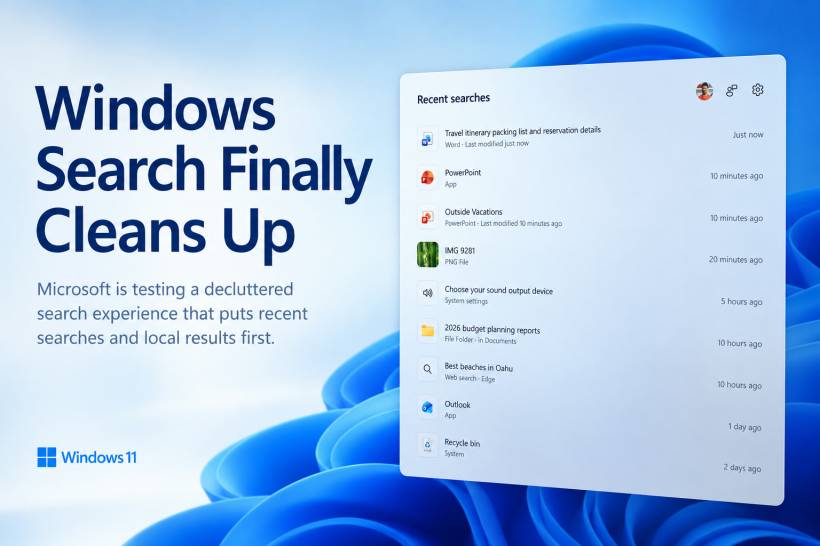
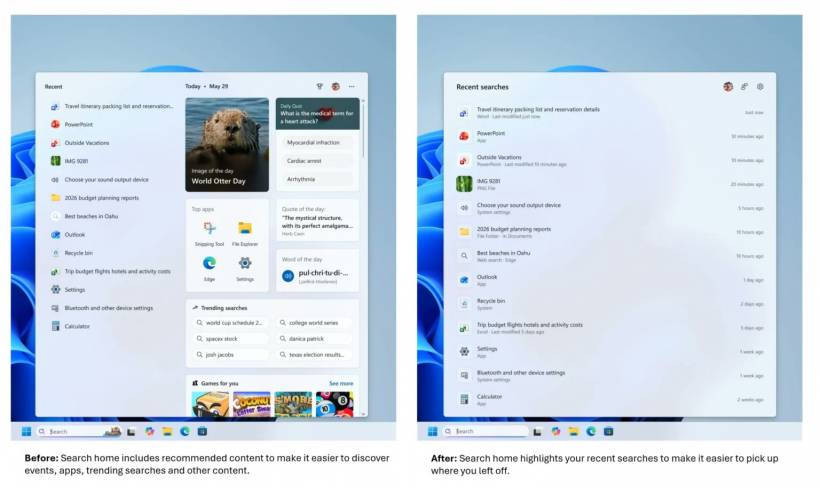
Under the revised design, the Search Home screen will focus entirely on the user's recent searches before any query is entered.
At the moment, recent activity typically occupies only part of the panel, while the remaining space is used for suggestions or promotional content. The updated layout removes that split and allows recent items to use the full available area.
This should make the panel feel more practical for people who regularly return to the same documents, folders, applications or settings.
Instead of opening Search and being distracted by unrelated recommendations, users can immediately continue from where they left off.
File Details and Previews Will Use the Extra Space
The redesigned panel also makes better use of the preview area.
When a recent item is selected, Windows will display useful metadata rather than leaving the right side mostly empty. Depending on the file type, this may include information such as its location, modification date, size or other relevant details.
A preview may also appear when Windows supports one for that particular file.
This could be especially helpful when several documents have similar names. Rather than opening each file individually, users may be able to identify the correct one directly from the Search interface.
It is a small usability improvement, but it makes Windows Search feel more like a proper file-finding tool and less like a promotional landing page.
Local Results Will Finally Receive Priority
Perhaps the most welcome change is that Windows Search will prioritise local results over content from the web or Microsoft Store.
This is how many users have always expected the feature to work.
When someone searches from the taskbar, they are often trying to open an installed application, locate a document or find a Windows setting. Web results may occasionally be useful, but they should not compete with files and applications that already exist on the computer.
By placing local content first, Microsoft can make Search faster, more predictable and less frustrating.
It may also reduce situations where users accidentally open a browser result when they were trying to launch a local tool or system setting.
Web Search Results Are Being Cleaned Up Too
Microsoft is also changing the way web results appear inside Windows Search.
The company says relevant answers will be displayed before related products, promotions or other commercially oriented suggestions.
That should reduce the feeling that Search is trying to redirect every query toward shopping or Microsoft services.
However, the cleaner design may not mean a completely traditional search experience. Microsoft's preview still appears to place an AI-generated summary above the standard web results.
Some users may appreciate receiving a quick overview without opening a browser. Others may see it as another layer standing between them and the actual results they requested.
The usefulness of that approach will depend on how accurate the AI response is and how much space it takes away from conventional links.
Less Advertising Does Not Necessarily Mean No Microsoft Content
The update is better described as a reduction in clutter rather than the complete removal of online or promotional elements.
Windows Search will still be capable of showing web results, Microsoft Store content and suggested searches. The difference is that these elements should no longer dominate the panel by default.
This is an important distinction because Microsoft continues to integrate cloud services, Bing and AI features throughout Windows.
The company appears to be adjusting the balance rather than abandoning those services entirely.
For users who mainly want a fast local search experience, the changes should still represent a meaningful improvement.
Suggestions Can Be Turned Back On
Users who prefer the current suggestion-heavy experience will still be able to restore it.
The relevant controls can be found under:
From there, users can enable suggestions from the web and Microsoft Store.
Giving people a clear choice is preferable to forcing the same search layout on everyone. Some users may genuinely find online recommendations helpful, while others want Windows Search to remain focused entirely on the device.
The ideal design is therefore one that starts clean and allows optional content to be added when requested.
Why Windows Search Became So Frustrating
The underlying problem is not that web results exist. It is that Windows often presents them at the wrong time.
Search is one of the most basic operating-system tools. People use it because they want to reach something quickly.
Every recommendation, promotion or unnecessary card introduces another visual distraction between the user and the intended result.
This becomes especially noticeable on smaller laptop screens, where promotional content can occupy a significant portion of the available space.
It also creates an inconsistent experience. A user may type the name of an installed program yet receive web links or Store suggestions before the actual application.
Over time, that unpredictability can train people to avoid Search altogether and rely on desktop shortcuts, File Explorer or third-party launchers instead.
A Simpler Search Experience Could Rebuild Trust
Search does not need to be visually impressive. It needs to be dependable.
A successful search panel should open quickly, show recent activity, understand the user's query and display the most relevant local result first.
Previews and metadata can add value without making the experience more complicated.
By clearing out unnecessary recommendations, Microsoft has an opportunity to make the taskbar search box feel useful again.
The challenge will be resisting the temptation to refill the newly available space with future promotions, news cards or AI features that users did not request.
Final Thoughts
Microsoft's planned Windows Search redesign addresses a complaint users have raised for years: the feature has become too crowded with suggestions, promotions and online content.
Giving recent searches the full panel, adding useful file previews and prioritising local results are all sensible improvements.
The cleaner web presentation should also make Search feel less like an advertising surface, although the continued use of AI summaries may still divide opinion.
Most importantly, Microsoft is allowing users to restore web and Store suggestions through Settings rather than forcing them into the default experience.
Windows Search should help people find what is already on their computer first. If Microsoft follows through without replacing the old clutter with new distractions, this could be one of those rare Windows changes that makes the operating system feel simpler rather than more complicated.











Comments