


Most people don't need "AI for the sake of AI". What they really want is simple: less repetitive work, faster turnaround, fewer manual steps, and fewer mistakes. That is exactly why I focus on practical AI developments, building real AI workflows that solve real operational problems instead of chasing hype.
What AI development means for me
When I say AI development, I'm talking about building custom applications that take your real business input (documents, tickets, forms, emails, database records), prepare the right context and rules, and then let a large language model do the heavy lifting. The output is not random text. It is shaped into something usable, like a structured response, a clean summary, a drafted email, a report section, or even a next-step action your system can trigger.
In other words, I don't treat AI like a floating chatbot widget. I build AI as a working part of real systems, like internal portals, dashboards, websites, and operational workflows.
4 core AI development solutions I build most often
Knowledge Base Chatbot (RAG)
This is for companies with SOPs, manuals, policies, PDFs, and internal pages spread everywhere. Instead of searching folders, staff can ask questions and get answers, with citations, and with permissions respected. It is one of those "why didn't we do this earlier?" improvements once teams start using it.
Customer Support and Ticket Automation
Support teams often lose time rewriting the same explanations and untangling long ticket threads. Your solution focuses on summaries, reply drafting, smart routing, and knowledge suggestions, while keeping humans in control through approvals and guardrails.
Document and Report Generation
This one is a big deal for operations-heavy teams. If your staff constantly produces reports, meeting minutes, proposals, or summaries, AI can turn raw notes or spreadsheet fields into consistent, branded documents, ready to export to PDF, Word, email, or web publishing flows.
Workflow Agents and System Integration
This is where AI becomes a real "doer", not just a "talker". Multi-step automation can collect inputs, run checks, draft outputs, request approval, then execute actions via APIs and databases, with an audit trail and production guardrails.
Working with major LLM providers
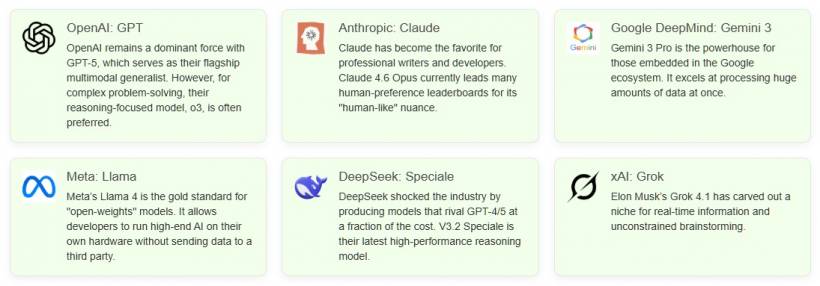
Different use cases fit different models. That is why I keep things flexible, supporting major LLM providers such as OpenAI, Anthropic Claude, Google Gemini, Meta Llama, DeepSeek, and xAI Grok, depending on what the project needs. If you prefer to host your own model internally, that can be done too, although self-hosting typically comes with higher infrastructure costs.
Where AI shines the most
If a workflow feels slow, repetitive, or full of "too many steps", that is usually where AI delivers the biggest win. My goal is not to force your business to change how it operates. The goal is to plug AI into what you already do and make it faster, cleaner, and more consistent, while keeping it secure and practical.
Privacy matters, especially for business systems
A lot of AI vendors love to name-drop clients and show screenshots. I take privacy seriously, especially when work involves sensitive business data, internal systems, or proprietary processes. That is why I avoid publicly listing client projects, and instead focus on explaining the outcomes and capabilities clearly.
Final thoughts
If you are exploring AI developments, the real question is not "Can I use AI?" It is "Where will AI save time without breaking my workflow?" That is the mindset I build around at Lemon Web Solutions: practical AI programs that integrate into real systems, support real teams, and create measurable value without turning everything into buzzwords.











Comments 0