


Microsoft has begun rolling out a new Windows 11 recovery feature called Cloud rebuild, giving users another way to restore a damaged or unbootable PC without relying on a USB installation drive. The feature was first introduced for testing in July and is now being made available more broadly through a recent Windows 11 update.
Cloud rebuild is designed for situations where Windows has become unstable or will no longer start normally. As long as the computer can still access the Windows Recovery Environment and has a working internet connection, Windows 11 can download the necessary recovery files from Microsoft's cloud infrastructure and rebuild the operating system.
Cloud Rebuild Arrives Through KB5127936
The feature is being introduced as part of the KB5127936 update, which Microsoft classifies as a non-security update. That means the update primarily focuses on features, reliability improvements and other changes rather than addressing security vulnerabilities.
However, Cloud rebuild is listed under Microsoft's Gradual Rollout category. This means installing KB5127936 does not necessarily guarantee that the option will immediately appear on every compatible PC.
Microsoft frequently introduces new Windows features this way, gradually enabling them across devices rather than activating them for everyone at once.
Not Everyone Will See The Feature Immediately
If Cloud rebuild does not appear after installing the latest Windows update, there may not necessarily be anything wrong with the PC.
Gradual rollouts allow Microsoft to monitor how a new feature behaves across different hardware and software configurations before expanding availability further. If unexpected problems appear, the company can slow or pause deployment without affecting every Windows user.
Devices that do not receive the feature initially should eventually gain access as Microsoft expands the rollout.
Cloud Rebuild Can Work Even When Windows Won't Boot
The most interesting part of Cloud rebuild is that it is designed to remain useful even when Windows itself can no longer start normally.
Traditionally, repairing a badly damaged Windows installation may require a recovery drive, installation USB or another computer capable of creating one. Cloud rebuild reduces that dependency by downloading recovery files directly from the internet.
This could make recovering from serious Windows problems considerably easier for users who do not keep installation media available.
A USB Drive Is No Longer Always Necessary
Windows already offers several recovery options, but severe operating-system corruption can sometimes leave users needing external installation media.
Cloud rebuild changes that by allowing the PC to retrieve what it needs directly from Microsoft's servers. If the recovery environment remains functional, users may be able to restore Windows without creating a bootable USB drive first.
That can be especially useful for people dealing with a failed PC when another computer is not immediately available.
Windows Recovery Environment Still Needs To Work
Cloud rebuild does not remove every recovery requirement. One of the most important prerequisites is that the Windows Recovery Environment, commonly known as WinRE or recovery mode, must still be functional.
If WinRE itself has become corrupted or inaccessible, the computer may not be able to launch Cloud rebuild at all.
This is important because Cloud rebuild is not a completely independent recovery system. It still depends on the local recovery environment to start the process and connect to Microsoft's cloud infrastructure.
WinRE Becomes The Foundation Of Cloud Recovery
Windows Recovery Environment is the troubleshooting environment that appears when Windows repeatedly fails to start or when users manually enter advanced startup options.
It provides access to tools such as Startup Repair, System Restore, command-line utilities and other recovery functions. Cloud rebuild now becomes another option available through that environment.
If WinRE remains intact, even a Windows installation that refuses to boot may still have a path towards recovery.
Network Connectivity Is Essential
Because the operating-system files are downloaded from the cloud, a working internet connection is naturally required.
That means the recovery environment must be able to communicate with the computer's network hardware. A compatible and functioning network driver is therefore another important requirement.
If WinRE cannot recognise the Ethernet or Wi-Fi adapter, Cloud rebuild may be unable to connect to Microsoft's servers and download the required files.
Network Drivers Could Become A Limitation
On common hardware, Windows Recovery Environment will usually contain suitable networking support. However, unusual or very new network adapters could potentially create problems if compatible drivers are unavailable within WinRE.
This is one reason external recovery media may still remain useful as a backup option.
Cloud rebuild makes recovery more convenient, but it does not eliminate every scenario where traditional installation media may still be necessary.
You Can Trigger Cloud Rebuild From Windows Settings
If the computer still boots normally enough to access Windows, users can manually begin the process through Settings.
Navigate to:
From there, select Rebuild PC.
The Cloud rebuild option can then be used to begin restoring the operating system using files downloaded from Microsoft's servers.
Cloud Rebuild Can Also Be Started From WinRE
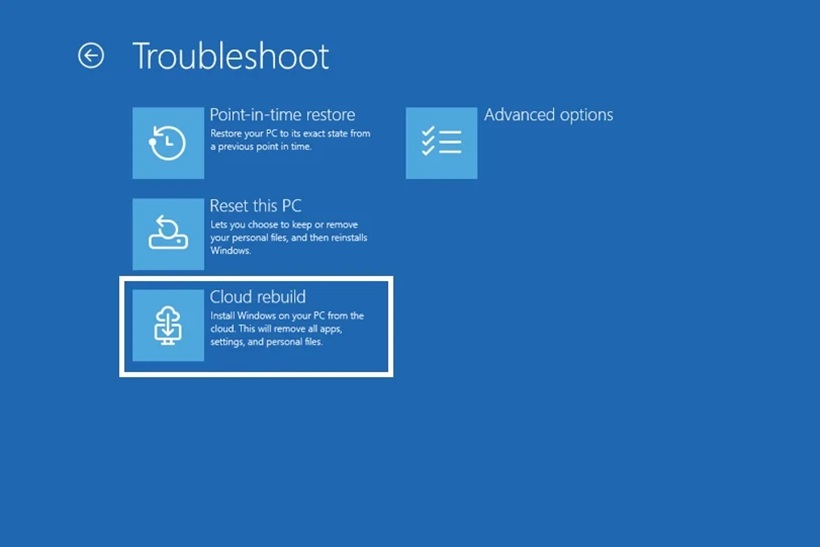
If Windows no longer starts, Cloud rebuild can be accessed directly through the Windows Recovery Environment.
The path is:
This allows the recovery process to begin even when the normal Windows desktop is completely inaccessible.
For many users, this may become the feature's most valuable use case.
The Feature Is Intended For Serious Windows Problems
Cloud rebuild could be useful when Windows becomes corrupted after a problematic update, damaged system files or another major software issue.
Instead of attempting multiple repairs manually, users can rebuild the Windows installation using fresh files retrieved from Microsoft's cloud infrastructure.
This does not necessarily mean Cloud rebuild should be the first troubleshooting step for every issue. Simpler problems may still be resolved through Startup Repair, uninstalling an update or System Restore.
However, when the operating system itself needs to be rebuilt, the cloud option provides another path forward.
Users Can Decide How Their Files Are Handled
Before Windows begins reinstalling, Cloud rebuild allows users to choose how existing data should be treated.
Microsoft provides options to remove files or to remove and sanitise files.
The sanitisation option is intended to perform a more complete and irreversible removal, making it more appropriate when the machine is being transferred to another person or when the user wants existing data thoroughly cleared.
The Sanitise Option Is More Permanent
Simply removing files and sanitising them are not necessarily the same thing.
A standard removal process may delete data as part of rebuilding Windows, while sanitisation is designed to make recovery substantially more difficult or effectively impossible.
Users should therefore choose carefully before proceeding.
Once sanitised, the files should be considered permanently removed.
Backups Remain Extremely Important
Cloud rebuild does not magically protect files that exist only on the affected Windows installation.
If users choose an option that removes local data, anything that has not already been backed up elsewhere may be lost.
This means the same basic recovery rule still applies: important information should be backed up before problems happen rather than waiting until Windows becomes unusable.
Cloud storage, external drives or another backup solution can provide protection when a system rebuild becomes necessary.
Cloud Rebuild Is Not A Backup Service
It is important to distinguish between operating-system recovery and data backup.
Cloud rebuild downloads the Windows files needed to restore the computer. It does not automatically retrieve every personal file, application or customised configuration that existed before the failure.
Applications may need to be reinstalled afterwards, while personal files need to come from whatever backup system the user previously maintained.
The feature restores Windows, not the entire history of the PC.
The Feature Could Make Recovery Much Friendlier
For less technical users, one of the biggest advantages is reducing the number of manual steps required during a serious failure.
Creating Windows installation media normally involves another functioning computer, downloading the Windows image and preparing a bootable USB drive.
Cloud rebuild can potentially remove all of those steps.
If the recovery environment works and the network connection is available, Windows can handle most of the process itself.
It Could Also Help Businesses And IT Support Teams
Although Cloud rebuild is useful for home users, it could also benefit organisations managing large numbers of Windows PCs.
IT support teams frequently deal with devices where Windows has become too damaged for normal troubleshooting. Providing users with a cloud-based recovery option could reduce the need to physically deliver recovery USB drives or bring every machine back to the IT department.
For remote employees in particular, this could simplify support considerably.
Remote Workers Could Benefit Most
A failed laptop becomes much more complicated when the employee is working from home or travelling.
If the computer requires physical installation media, the IT department may need to ship a USB drive or replacement device.
Cloud rebuild could potentially allow the user to restore Windows independently with guidance from support staff, provided the recovery environment and network connection remain functional.
That could reduce downtime significantly.
Recovery Media Still Has A Place
Despite the convenience, users should not necessarily throw away their Windows recovery drives.
Cloud rebuild depends on several local components continuing to function. A completely failed SSD, corrupted recovery partition or unsupported network adapter could still prevent the feature from working.
Traditional installation media remains useful precisely because it provides a recovery method that does not depend on the existing Windows installation or local recovery environment.
Cloud rebuild should therefore be viewed as another recovery option rather than a complete replacement for everything that came before it.
A Failed Storage Drive Still Requires Hardware Repair
Cloud rebuild cannot fix physical hardware problems.
If the computer's SSD has failed completely, downloading Windows from the internet will not help until the storage device is repaired or replaced.
The same applies to memory failures, motherboard problems or other hardware faults.
The feature is primarily intended to solve operating-system problems rather than physical device failures.
Cloud Recovery Fits Microsoft's Wider Windows Strategy
Microsoft has gradually moved more Windows functionality towards cloud-assisted services.
Windows installation files can already be downloaded directly during certain reset procedures, and account settings, OneDrive files and Microsoft Store applications can increasingly be restored through cloud-connected services.
Cloud rebuild extends this concept deeper into the recovery environment.
Instead of relying entirely on a local recovery image, the system can retrieve fresh Windows components remotely.
Fresh Cloud Files Could Avoid Corrupted Local Recovery Data
One potential advantage of cloud-based recovery is that it does not need to depend entirely on files already stored on the damaged Windows installation.
If local operating-system files have become corrupted, using those same files to rebuild Windows may not always be ideal.
Downloading fresh components from Microsoft provides another source for the installation.
The recovery environment still needs to function, but the actual operating-system payload can come from outside the affected PC.
A Reliable Internet Connection Will Make The Process Easier
Because Windows needs to download a substantial amount of data, users should ideally perform Cloud rebuild using a stable broadband connection.
A slow or unreliable connection could make the recovery take considerably longer.
For laptops, connecting the device to power during the process is also sensible so the computer does not shut down halfway through the rebuild.
Recovery operations should always be allowed to complete without unnecessary interruption.
The Download Could Be Large
Microsoft has not positioned Cloud rebuild as a lightweight repair download. Reinstalling Windows naturally requires a significant amount of operating-system data.
Users on capped or metered internet connections should therefore consider how much data may be consumed before beginning.
An Ethernet connection may also provide greater reliability than Wi-Fi when available.
The main advantage is convenience, not necessarily a small download.
The Feature Could Reduce Recovery Partition Dependence
Traditional PCs frequently include recovery partitions containing files used to restore Windows.
Those partitions consume storage space and can themselves become corrupted. Cloud-based recovery reduces some dependence on maintaining a complete local copy of the Windows installation.
However, WinRE still needs to exist locally in order to start the process.
Microsoft is therefore reducing the amount of recovery functionality that needs to remain entirely self-contained on the device without eliminating local recovery components altogether.
Gradual Rollout Gives Microsoft Time To Monitor Problems
Because Cloud rebuild interacts with networking, storage and operating-system recovery, deploying it gradually makes sense.
Microsoft can observe how it behaves across many different PC configurations before enabling it universally.
If a specific hardware combination causes problems, the rollout can potentially be adjusted while engineers investigate.
This is one of the reasons some users may need to wait even after installing KB5127936.
Do Not Assume The Option Is Missing Permanently
Users who update Windows and cannot find Cloud rebuild immediately should not conclude that their device is incompatible.
The feature may simply not have been enabled for that PC yet.
Gradual rollout features sometimes take days or weeks to reach every eligible device.
As deployment expands, the option should eventually appear without users needing to reinstall Windows or perform unusual modifications.
Cloud Rebuild Could Become A Useful Last Resort
Windows already provides several recovery tools, and users generally should try the least destructive options first.
Startup Repair can resolve boot problems, while uninstalling a problematic update may restore functionality without rebuilding the entire system.
System Restore can also revert certain configuration changes if restore points are available.
Cloud rebuild becomes particularly useful when those options are no longer sufficient and reinstalling Windows becomes the practical next step.
Users Should Understand The Consequences Before Starting
A recovery option that rebuilds Windows is inherently more disruptive than repairing one system file.
Applications may need to be reinstalled, preferences may be reset and locally stored data can be removed depending on the option selected.
Users should therefore read the confirmation screens carefully before proceeding.
The ability to start the process easily should not make the decision itself casual.
Sanitisation Is Useful Before Selling A PC
The option to remove and sanitise files can also make Cloud rebuild useful when preparing a PC for another owner.
A normal Windows reinstall may remove visible files, but users selling or disposing of a computer may want stronger assurance that their previous information cannot be recovered easily.
Choosing the sanitisation option provides a more thorough removal before Windows is reinstalled.
However, once again, users need to be certain that anything important has already been backed up elsewhere.
Final Thoughts
Microsoft's new Cloud rebuild feature could make recovering a badly damaged Windows 11 installation much simpler. The feature is arriving through the KB5127936 non-security update and allows Windows to download fresh recovery files directly from the cloud instead of requiring users to create a bootable USB drive.
Its biggest advantage appears when a PC can no longer start normally. As long as the Windows Recovery Environment remains functional and the system has working network connectivity, users can access Cloud rebuild through Troubleshoot > Recovery and uninstall > Cloud rebuild.
On a functioning Windows installation, the same process can be started through Settings > System > Recovery > Rebuild PC.
The feature still comes with important limitations. WinRE needs to remain intact, the network adapter needs a compatible driver, and users must understand that rebuilding Windows can remove applications and local files. Anything important should already exist in a separate backup before disaster strikes.
Cloud rebuild is also being deployed gradually, so some users may not see it immediately after installing the update.
It does not replace every traditional recovery method, and a USB installer remains valuable when the recovery environment itself has failed. But when WinRE is still working, Cloud rebuild removes one of the biggest frustrations associated with a broken Windows PC: needing another computer and a USB drive just to get Windows running again











Comments 0