

If you've ever tried to make a browser-based game behave nicely across desktop, Android, and iOS, you already know the truth: it's never the game that's "inconsistent"… it's the browsers. And iOS Safari is the undisputed champion of doing things its own way.
Today's work was one of those classic cases.
Everything was working perfectly in all the usual places. Desktop was smooth. Android devices (including a powerful phone like the S23 Ultra) behaved as expected. Even iPad mini was fine, and that part almost made the problem feel imaginary. But then the iPhone 12 mini showed up and decided to be the one device that refuses to cooperate.
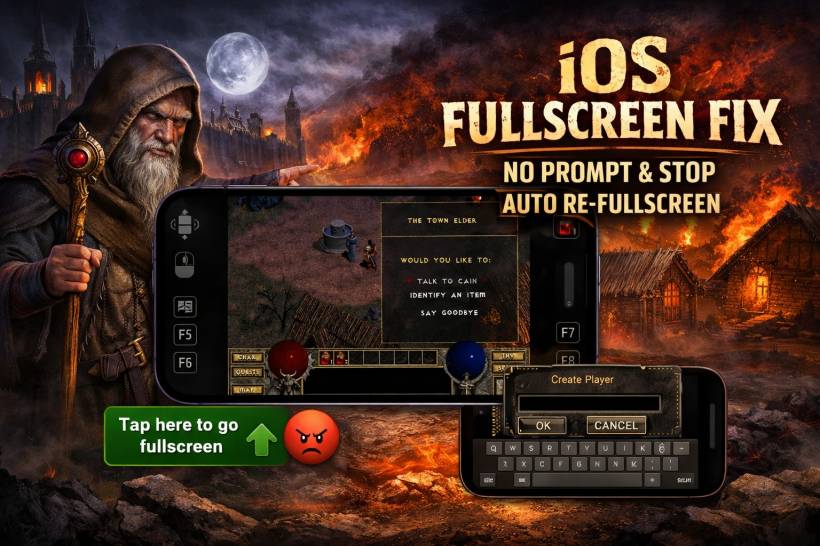
The symptom was simple but nasty: a green button at the bottom of the game that says "Tap here to go fullscreen" would appear… and never go away. Worse, it didn't even successfully bring the game into fullscreen, so it wasn't just annoying. It was a functional blocker. The game experience basically got stuck at the entrance.
And there was another issue hiding behind the curtain: whenever the game needed to bring up the touch keyboard (like when creating a new player name), it would briefly exit fullscreen and then immediately snap right back into fullscreen within less than a second. That sounds harmless until you realize it makes typing basically impossible, because the keyboard can't stay open long enough for the user to input anything.
So the goal today was clear.
We don't want iOS fullscreen behavior at all for this build. Not for iPhone. Not for iPad. Just remove it from the equation and stop iOS from forcing a bad user experience.
This article walks through what changed, why it was needed, and how the solution works, without breaking anything that already worked fine on desktop and Android.
The Starting Point: A Loader That Works Everywhere (Until iPhone 12 mini)
The Diablo web loader setup already had a strong workflow:
?autofull=1) so direct visits redirect back to the main Lemon Web Games page.DIABDAT.MPQ) from your preferred source (R2 first), with a local fallback.In short: it's the kind of polished loader that makes web-based retro gaming feel like a proper product, not a "here, click this and hope."
And that's why it was so obvious when the iPhone 12 mini broke the illusion.
The iPhone 12 mini Problem: The Fullscreen Prompt That Won't Leave
On iPhone 12 mini, the loader and game would run, but Safari presented a fullscreen overlay prompt at the bottom:
Tap here to go fullscreen
This prompt is usually triggered by some part of the app attempting to enter fullscreen mode. On Android and desktop, a fullscreen request tends to either succeed or fail cleanly. On iOS, it's a different story.
On iOS Safari, fullscreen for canvas/WebGL apps is heavily restricted and inconsistent. In many situations, Safari simply doesn't allow "true fullscreen" at all in the way games expect. So what happens is:
That's exactly what you saw on iPhone 12 mini.
And because it appears as a persistent bottom UI element, it also steals screen space in an already small display, which makes the game even less enjoyable.
The Hidden Killer: Auto Re-Fullscreen Breaks the Touch Keyboard
Even when iPad mini handled fullscreen better, another real-world usability issue showed up:
On a desktop keyboard, you might not even notice. On iOS touch devices, it destroys the flow because:
So even in cases where fullscreen "works," it isn't always desirable. If fullscreen prevents basic gameplay actions like entering a name, it's not a feature anymore. It's a bug.
The Strategy: If iOS Fullscreen Creates Problems, Remove It Completely
At this point, there were a few possible approaches:
This is a deep rabbit hole and often ends in "Safari doesn't allow it."
This adds complexity and still risks the auto re-fullscreen keyboard issue.
This keeps the game stable, prevents keyboard issues, and removes the stuck prompt.
We went with Option C, because it produces a predictable, reliable user experience.
And crucially: it does not affect desktop and Android at all.
The Solution: iOS-Only Fullscreen Override + Prompt Removal
The fix consists of two parts.
Part 1: Disable Fullscreen Requests on iOS
Instead of trying to fight fullscreen transitions after they happen, we stop fullscreen requests from ever succeeding on iOS by overriding the relevant methods.
That means:
requestFullscreen(), nothing happens.webkitRequestFullscreen(), nothing happens.This specifically solves the "auto re-fullscreen" issue that blocked typing.
Part 2: Remove the "Tap here to go fullscreen" Prompt
Even if fullscreen is disabled, the game might still inject its own fullscreen helper UI. Or Safari might display a prompt element that ends up in the DOM (depending on how the game is built).
So we remove it too.
Because we don't always know the exact class name (it can be obfuscated or changed between builds), the safest strategy is:
This ensures the prompt can't come back and trap the player.
The Actual iOS Patch Snippet
Here is the exact iOS-only patch that was added to the loader. This is the part that disables fullscreen and kills the stubborn prompt:
<style>
  .lw-kill-fullscreen-prompt{
    display:none !important;
    visibility:hidden !important;
    pointer-events:none !important;
    height:0 !important;
    width:0 !important;
    overflow:hidden !important;
    opacity:0 !important;
  }
</style>

<script>
(function () {
  function isIOS() {
    var ua = navigator.userAgent || '';
    var iOS = /iP(hone|od|ad)/.test(ua);
    var iPadOS = (navigator.platform === 'MacIntel' && navigator.maxTouchPoints > 1);
    return iOS || iPadOS;
  }
  if (!isIOS()) return;

  function noopResolved(){ return Promise.resolve(); }

  try {
    var EP = Element.prototype;
    if (EP.requestFullscreen) EP.requestFullscreen = noopResolved;
    if (EP.webkitRequestFullscreen) EP.webkitRequestFullscreen = noopResolved;
    if (EP.msRequestFullscreen) EP.msRequestFullscreen = noopResolved;
  } catch(_) {}

  try {
    if (document.exitFullscreen) document.exitFullscreen = noopResolved;
    if (document.webkitExitFullscreen) document.webkitExitFullscreen = noopResolved;
  } catch(_) {}

  function killGreenPrompt(root){
    var wanted = 'tap here to go fullscreen';
    var scope = root || document;
    var nodes = scope.querySelectorAll('button, a, div, span, p');
    for (var i=0;i<nodes.length;i++){
      var el = nodes[i];
      var t = (el.textContent || '').trim().toLowerCase();
      if (t === wanted){
        try { el.classList.add('lw-kill-fullscreen-prompt'); } catch(_) {}
        try { el.style.display = 'none'; } catch(_) {}
        try { el.remove(); } catch(_) {}
      }
    }
  }

  killGreenPrompt(document);

  var mo = new MutationObserver(function(muts){
    for (var i=0;i<muts.length;i++){
      var m = muts[i];
      if (m.addedNodes && m.addedNodes.length){
        for (var j=0;j<m.addedNodes.length;j++){
          var n = m.addedNodes[j];
          if (n && n.nodeType === 1) killGreenPrompt(n);
        }
      }
    }
  });

  try {
    mo.observe(document.documentElement, { childList:true, subtree:true });
  } catch(_) {}
})();
</script>
This is intentionally scoped to iOS only, so Android and desktop retain their fullscreen behavior exactly as before.
Why Not Cache the MPQ File?
We did explore MPQ caching as part of the day's improvements, but it was ultimately reverted.
In theory, caching DIABDAT.MPQ can reduce repeated downloads. In practice, large file caching on iOS (especially using IndexedDB) is fragile, quota-limited, and can fail silently depending on device storage, browser mode, and iOS cleanup behavior.
Worse, when we tried a more aggressive caching approach, it introduced a startup reliability problem where the game could fail to begin correctly. That's a deal-breaker, because reliability matters more than shaving a few seconds off a load.
So the final outcome was:
Compatibility Notes and Testing
Testing results were straightforward:
It's worth saying out loud: the iPhone 12 mini will never be the ideal Diablo experience. The screen is just too small for comfort, especially for a classic PC title. But the goal here wasn't perfection. It was removing a blocker and ensuring the game can still be played.
Final thoughts
This was one of those fixes that looks simple on the surface, but it's really about understanding how different browsers interpret "fullscreen" and how that impacts real usability. Desktop and Android can treat fullscreen as a feature. iOS often treats fullscreen like a suggestion it may or may not accept, and when it refuses, the leftover UI can turn into a permanent trap. Disabling fullscreen entirely on iOS might sound like removing a feature, but in this case it's the cleanest way to protect the player experience, especially when you need the touch keyboard to work properly for naming and input. The best outcome is not "fullscreen at all costs," it's a stable, playable game that doesn't fight the device.











Comments 0