

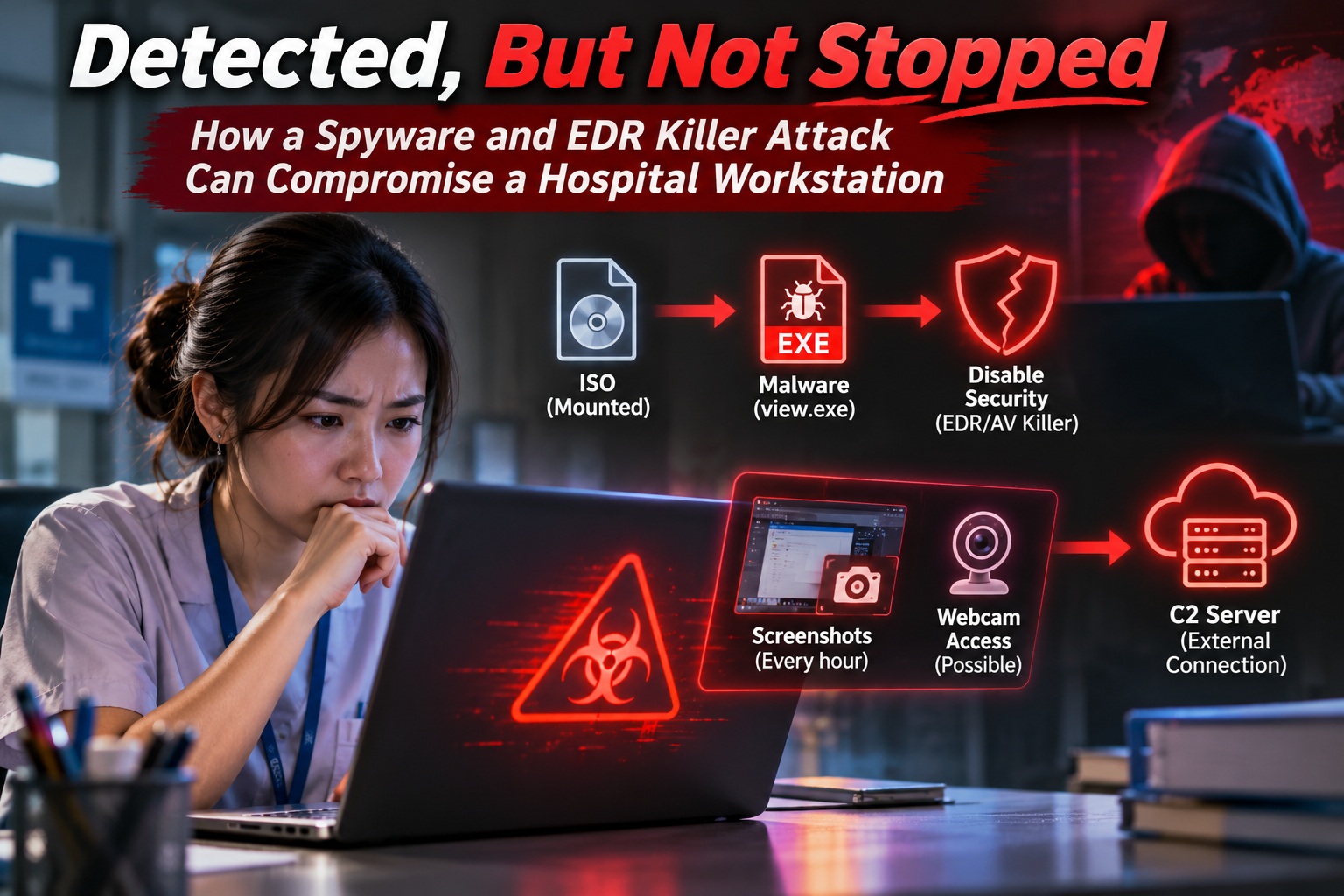
I've always believed that endpoint security is one of the most important layers of protection for any organisation. Whether we're talking about traditional antivirus software or more advanced Endpoint Detection and Response (EDR) solutions such as CrowdStrike Falcon, these tools are supposed to detect suspicious activity, prevent malicious software from executing and provide visibility into potential security incidents. However, a recent malware investigation reminded me that having an advanced security solution installed doesn't necessarily mean every attack will be stopped.
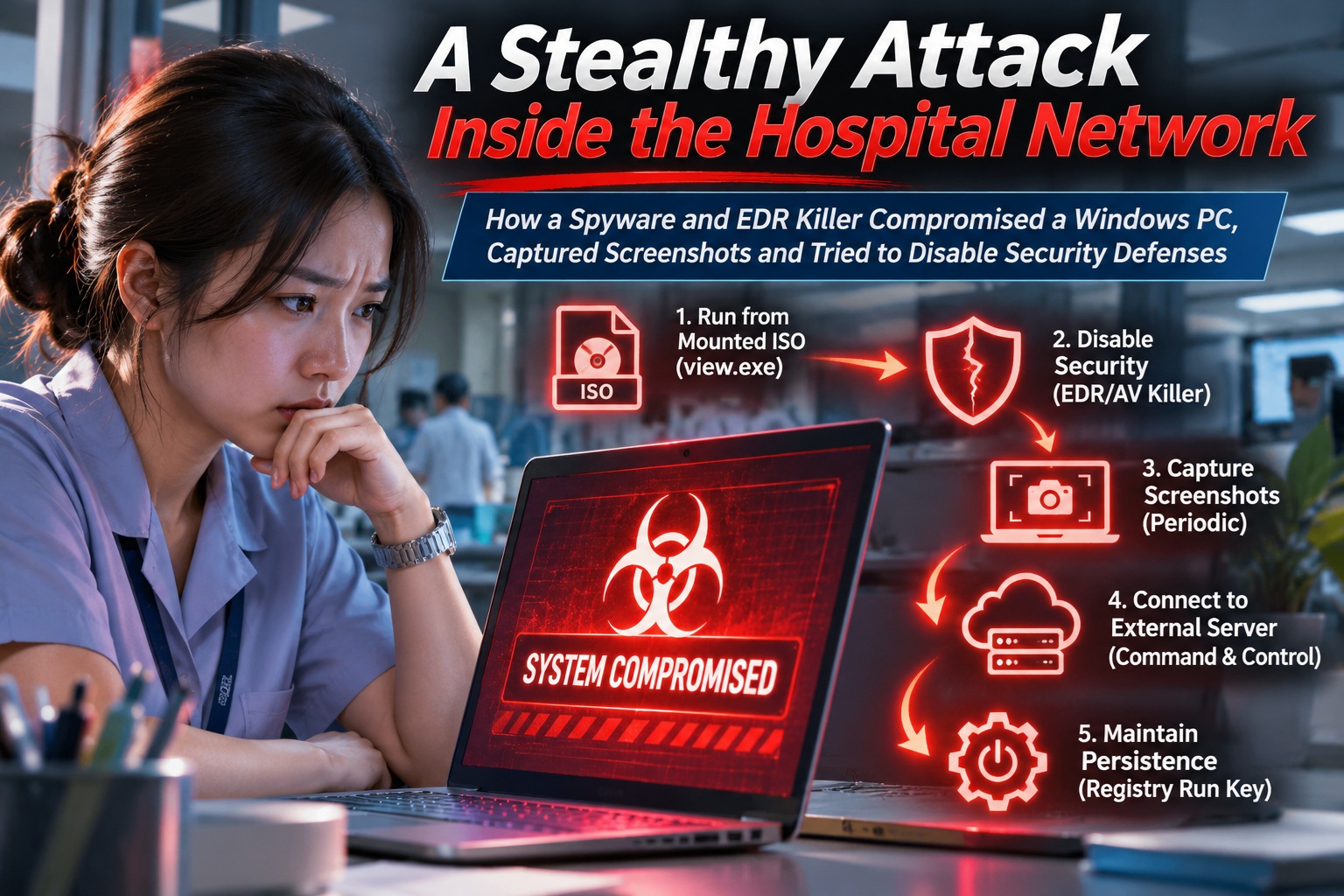
What made this particular incident interesting wasn't simply the discovery of malware on a Windows workstation. It was the fact that suspicious activity had been detected by the endpoint security platform, yet the primary executable apparently continued running for several hours. During that period, the investigation uncovered evidence of repeated screenshot capture, suspicious external network communication and attempts to establish persistence within Windows.
Another discovery made the investigation even more concerning. A related executable was identified as a security-disabling tool capable of interfering with antivirus software through a technique known as Bring Your Own Vulnerable Driver, or BYOVD. This raised an important question: how much protection can an EDR solution provide when malicious software is specifically designed to weaken or bypass endpoint security?
How the Suspicious Activity Started
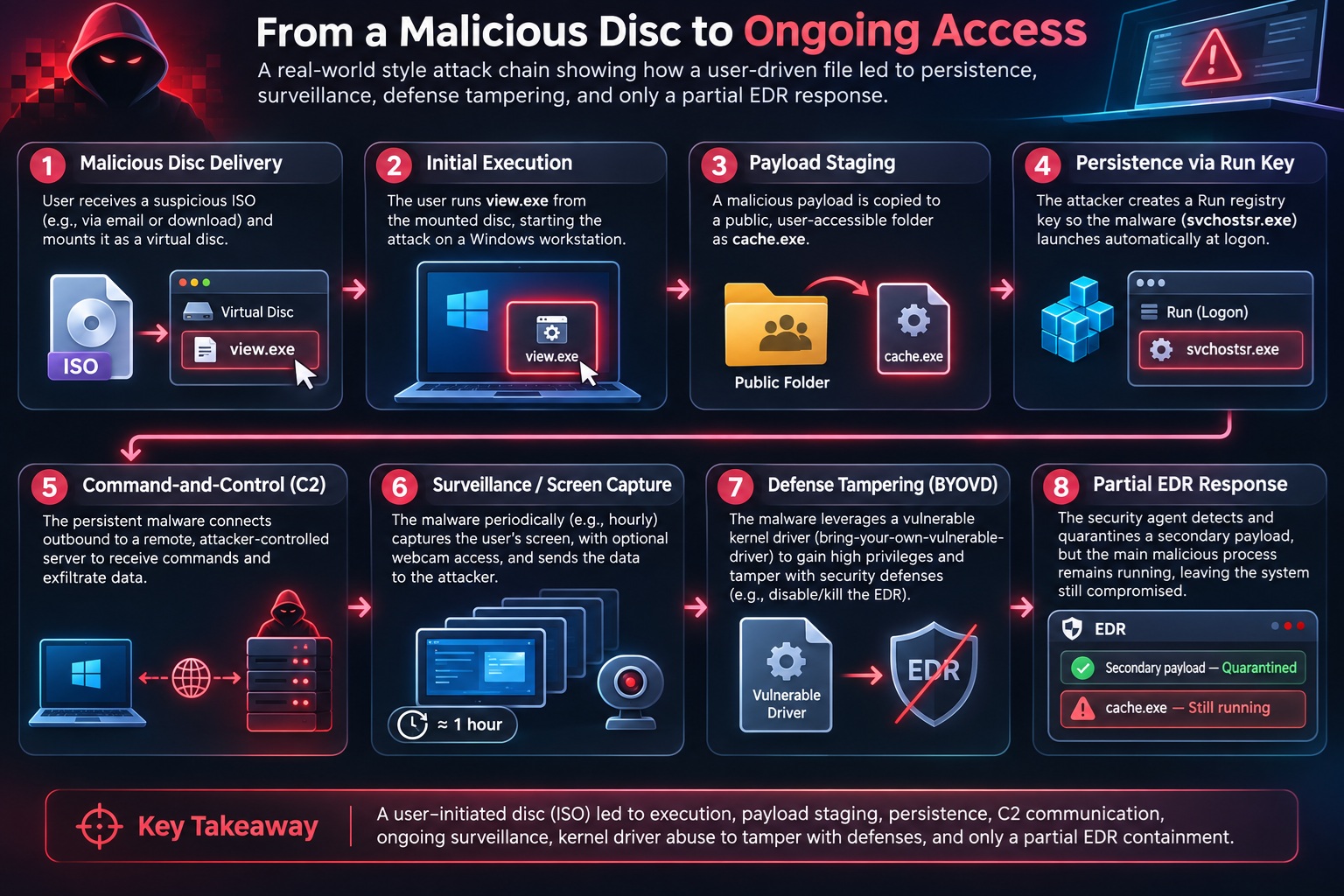
The investigation began with a suspicious Windows executable running from a drive path resembling a mounted optical disc. This immediately caught my attention because Windows typically assigns similar paths to physical optical drives or mounted ISO images. Although this suggested that the executable might have originated from a mounted ISO, the available evidence wasn't sufficient to determine exactly how the file arrived on the computer or who initiated its execution.
This is worth highlighting because ISO files are not inherently malicious. They're commonly used for installing software, distributing operating systems and packaging legitimate applications. However, they can also be misused to deliver malicious executables, especially when someone is persuaded to open an unfamiliar file and run its contents.
Once the suspicious executable started running, the endpoint security platform generated a high-severity machine-learning detection. Normally, this would be reassuring because the security solution had recognised potentially malicious behaviour. Unfortunately, detection and prevention turned out to be two very different things in this case.
CrowdStrike Detected the Threat, But the Primary Process Continued Running
One of the most interesting findings was how CrowdStrike Falcon responded to the suspicious executable. The platform successfully detected the original program as potentially malicious, but the available telemetry indicated that the program was not immediately prevented from executing. Instead, it apparently continued operating for several hours after the initial detection.
Interestingly, another executable created during the incident was successfully blocked and quarantined by CrowdStrike. This showed that the endpoint protection system was functioning and capable of preventing at least part of the malicious activity. The problem was that stopping one executable didn't necessarily stop the other components that were already running.
This distinction is particularly important when investigating malware. It's tempting to assume that once an antivirus product reports a successful quarantine, the threat has been completely eliminated. In reality, malware can involve multiple executables, processes, registry modifications and background activities that must be investigated individually.
In this case, the telemetry showed both a successful prevention action and suspicious activity that apparently continued afterward. That combination suggested that CrowdStrike had interrupted part of the attack chain without fully containing the original threat.
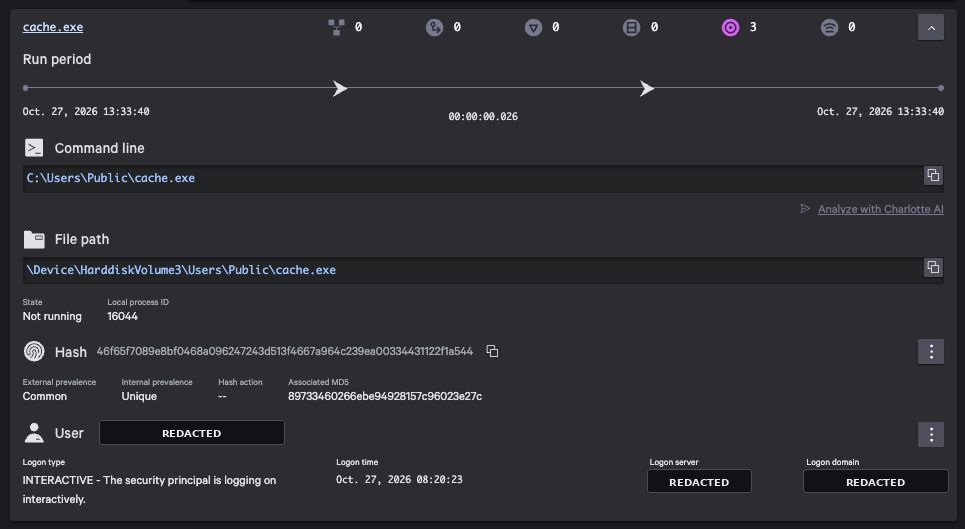
The Malware Was Taking Screenshots Repeatedly
One of the more concerning discoveries involved evidence of repeated screenshot capture. The recorded activity indicated that screenshots were being taken approximately once every hour over several hours. This immediately changed how I viewed the incident because the potential impact extended beyond ordinary malware execution.
Imagine working on your computer throughout the day without realising that malicious software may be capturing whatever appears on your screen. It could record internal applications, emails, spreadsheets, confidential documents or other sensitive information displayed during normal work. Even without direct access to the underlying files, screenshots can reveal substantial amounts of information.
The investigation also identified loaded modules associated with functionality that could support webcam capture. However, I want to be careful with that observation because the presence of webcam-related modules doesn't automatically prove that the camera was activated or that photographs or video recordings were taken. Additional evidence would be required to establish whether the malware actually accessed a camera.
There was another unanswered question concerning the screenshots themselves. Although the telemetry recorded screenshot activity, the available export didn't identify where the captured images were stored. It also didn't establish whether those images had been transmitted outside the computer, which is an important distinction when assessing the extent of possible information exposure.
Suspicious Communication With an External Server
Another finding involved an outbound connection to an unfamiliar external IP address using an unusual TCP port. Based on the surrounding activity, the connection was considered suspicious and potentially associated with command-and-control communication. This is commonly referred to as C2, where malware communicates with an external system that may provide instructions or receive information.
Command-and-control functionality is particularly concerning because it can turn a single infected computer into something that can be remotely managed by an attacker. Depending on the malware, this could allow additional commands to be executed, information to be collected or further malicious components to be downloaded. However, an outbound connection alone doesn't establish which of those capabilities were actually exercised.
In this investigation, the network activity raised concerns about possible external communication, but the available evidence didn't confirm what data, if any, was transferred. That means the connection should be investigated as a suspected C2 channel rather than treated as definitive proof of data exfiltration.
Persistence: Making Sure the Malware Comes Back After Restart
Another technique observed during the investigation involved Windows registry persistence. The malicious activity was associated with the creation of an executable in a publicly accessible Windows directory and the addition of a registry Run entry pointing to another executable with a system-like name. This type of persistence mechanism is relatively simple, but it remains effective because Windows can automatically execute programs referenced by specific Run keys when a user signs in.
What makes this technique particularly deceptive is the choice of executable names. Malware authors frequently use names that resemble legitimate Windows components, making suspicious files less obvious to someone casually browsing directories or reviewing running processes. A filename resembling a Windows service doesn't make the executable legitimate, especially when it's located somewhere an authentic system component wouldn't normally reside.
Persistence also explains why deleting a single suspicious file isn't always enough to resolve a malware infection. If additional executables, registry entries or other startup mechanisms remain, malicious activity may resume when the user signs in again. This is one reason I generally prefer rebuilding a confirmed compromised workstation instead of relying entirely on manual malware removal.
An Unexpected Discovery: A Tool Designed to Disable Security Software
The investigation became even more interesting when I examined the hash of one of the detected executables. Public malware-analysis information associated the file with WinDefCtl, a Windows security-disabling utility that can interfere with antivirus components. The binary had also been identified by numerous antivirus engines before the incident took place.
WinDefCtl is particularly relevant because its capabilities include disabling Windows Defender components and using kernel-level functionality to terminate protected security processes. It belongs to a category of tools that can be used for security research or administration but become dangerous when deployed without authorisation. In the context of a compromised workstation, finding such a utility is an important warning sign.
However, there's an important distinction here. Identifying a security-disabling binary doesn't automatically establish that it performed the observed spying activity or that every supported capability was successfully executed. The spyware-like activity and the defense-disabling capability may represent different components of the same incident, and establishing their relationship requires additional process and file analysis.
Nevertheless, the discovery demonstrates how modern attacks can involve more than a single conventional virus. A compromise may combine information collection, persistence mechanisms and tools specifically intended to weaken defensive software.
Understanding BYOVD: Bring Your Own Vulnerable Driver
One of the most interesting technical aspects of the security-disabling utility was its use of Bring Your Own Vulnerable Driver, commonly abbreviated as BYOVD. Unlike traditional malware that attempts to attack antivirus processes directly from ordinary Windows applications, BYOVD abuses vulnerabilities or dangerous capabilities in kernel drivers. Some of these drivers carry valid digital signatures, making the technique especially challenging for conventional trust-based controls.
Windows drivers operate with considerably higher privileges than normal desktop applications. When a vulnerable driver exposes unsafe functionality, malicious software may be able to use it to perform actions that would otherwise be restricted. These actions can include accessing protected processes, manipulating sensitive operating system components or interfering with endpoint security services.
The identified utility was associated with a kernel driver named kvckiller.sys, which exposes functionality capable of terminating security processes. Its design includes mechanisms for loading the driver and interacting with it to interfere with Windows Defender. The available information also describes registry modifications intended to prevent security components from starting normally.
What makes this especially concerning is that a digitally signed driver doesn't automatically mean that its functionality is safe. Digital signatures help establish the origin and integrity of software, but they don't guarantee that a driver is free from vulnerabilities or cannot be abused. This is precisely why vulnerable-driver blocklists, application control and kernel security protections are increasingly important.
Why Would Malware Attempt to Disable Antivirus Software?
The motivation is fairly straightforward. If malicious software can disable or interfere with the tools responsible for detecting it, the attacker potentially gains more freedom to operate. This can create opportunities for other malicious components to execute without encountering the same level of protection.
Security-disabling utilities are sometimes called EDR killers or AV killers because their purpose is to terminate, disrupt or otherwise undermine endpoint protection. They can be used alongside ransomware, remote-access malware, information stealers and other threats. Their presence doesn't automatically establish which additional malware family is involved, but it can reveal the attacker's intention to interfere with security monitoring.
In this investigation, the presence of a defense-disabling tool was especially concerning because the original suspicious activity had already demonstrated a prevention gap. The combination of a process that wasn't immediately blocked and a tool capable of weakening security protections represented a serious risk. However, the available evidence still needed to establish whether the driver had actually loaded and which security components, if any, were successfully disabled.
Why Didn't CrowdStrike Stop Everything?
This was probably the biggest question I had while reviewing the incident. CrowdStrike Falcon is a sophisticated endpoint security platform designed to detect and prevent malicious activity through multiple protection mechanisms. Seeing an executable detected as suspicious while apparently continuing to run naturally raises questions about how the prevention controls were configured and applied.
One possible explanation involves the difference between detection and prevention policies. EDR platforms can be configured to generate alerts for certain behaviour without automatically terminating the associated process. Machine-learning detection thresholds and prevention thresholds may also differ, meaning a suspicious executable can trigger an alert without necessarily satisfying the conditions required for an automatic block.
Other factors can include security policy exclusions, sensor health, protection settings or the timing of individual detections. More sophisticated threats may also attempt to interfere with security components, although that possibility must be verified rather than assumed. Without reviewing the complete prevention policy and detailed sensor telemetry, it wouldn't be reasonable to conclude that a specific configuration or product defect caused the behaviour.
What the available evidence does establish is that the original suspicious process was detected but apparently not stopped, while another executable was successfully quarantined. From a security operations perspective, that is a significant partial-prevention outcome. It's also a reminder that an alert is only valuable when the organisation has an effective process for investigating and containing the associated threat.
The Risk of Assuming a Detection Means the Threat Is Gone
I've noticed that one of the most common misunderstandings surrounding endpoint security is the assumption that detecting malware means the computer is already protected. In many situations, antivirus solutions do automatically stop malicious executables before they can cause harm. However, security alerts don't always correspond to successful prevention actions.
A detection may simply indicate that suspicious behaviour has been observed. Depending on the policy and type of activity, the security platform might generate telemetry, raise an alert, quarantine a file or terminate a process. Those outcomes aren't interchangeable, and understanding the difference is essential during an investigation.
For this reason, I think security teams should pay particular attention to whether an alert indicates detection only, successful prevention or attempted prevention. It's equally important to review the process tree and surrounding activity instead of focusing solely on the file that was quarantined. Otherwise, there is a risk of closing an incident while another malicious component remains active.
What Should Be Done After Discovering This Type of Compromise?
My immediate priority in a confirmed endpoint compromise would be containment. The affected computer should be isolated from the network through the endpoint security platform or another approved containment mechanism to reduce the opportunity for continued external communication or movement into other systems. At the same time, the incident-response team should preserve relevant forensic evidence before making unnecessary changes to the system.
The next step would involve investigating the full execution chain rather than concentrating on a single executable. This includes reviewing the original process, related files, registry persistence, network connections, suspected driver activity and any evidence of information collection. Particular attention should be given to the suspicious Run entry and whether security services were modified or disabled.
I would also perform a broader threat hunt across other endpoints using the confirmed file hashes, network indicators and behavioural patterns. Because the initial executable appeared to originate from an optical-drive-style path, I would include unusual ISO mounting activity in the investigation. Finding similar behaviour elsewhere could indicate that the incident is not limited to one computer.
Credential security is another important consideration. Where an account may have been exposed, appropriate password resets, session revocation and authentication reviews should be performed. If screenshots could have contained confidential information, the organisation should also evaluate potential information exposure and follow its established privacy and incident-response requirements.
Finally, once the necessary evidence has been preserved, I would favour rebuilding the compromised computer from a trusted image. Reimaging provides greater confidence that unauthorised files, persistence mechanisms and system modifications have been removed. Simply deleting the initially detected executable may leave behind other components or changes that are difficult to identify.
The Importance of Reviewing Endpoint Security Policies
An incident like this also provides a useful opportunity to review endpoint security configurations across an organisation. Having CrowdStrike Falcon or another EDR product installed is only one part of the overall security strategy. The effectiveness of the deployment also depends on prevention policies, sensor coverage, protection features and how quickly alerts are investigated.
For example, organisations should periodically review machine-learning detection and prevention settings to make sure they reflect the intended level of protection. They should also examine existing exclusions, sensor tamper protection, vulnerable-driver controls and the handling of high-severity detections. Policy changes should be carefully tested against legitimate business applications, especially in environments that depend on specialised software.
Equally important is ensuring that high-risk detections result in timely investigation rather than being treated as routine notifications. If an executable is detected as malicious but remains running, that should trigger further review even if another file has already been quarantined. Detection without appropriate response can leave an organisation exposed for longer than necessary.
What About Windows Defender and Other Antivirus Products?
Although this incident involved CrowdStrike Falcon, I don't think the lesson should be limited to one security vendor. Windows Defender and other commercial endpoint security products also face evolving attempts to bypass or disable their protection mechanisms. Attackers continually explore ways to abuse trusted operating system components, vulnerable drivers and legitimate administrative features.
BYOVD is particularly interesting because it exploits the distinction between trusting a signed driver and trusting what that driver is capable of doing. Modern Windows security features can help reduce exposure, but their effectiveness depends on system compatibility, configuration and the specific driver involved. No single setting should be considered a complete solution against every technique.
I also wouldn't recommend running multiple real-time antivirus products simply because one solution experienced a prevention gap. That can introduce compatibility problems, duplicated monitoring and unnecessary operational complexity. A better approach is to improve the existing security deployment while maintaining complementary protections such as network monitoring, application control, patch management and reliable recovery procedures.
What This Incident Taught Me About Modern Malware
For me, the biggest lesson from this investigation is that modern malware doesn't always behave like the traditional viruses we encountered years ago. Rather than simply infecting files or displaying unwanted messages, today's threats may attempt to maintain persistence, communicate externally, collect information and interfere with security controls. These activities can happen quietly while the computer continues to function normally.
The repeated screenshot activity was particularly concerning because it demonstrated how a compromised computer could potentially expose sensitive information without obvious signs of disruption. A user might continue working normally while the security team sees suspicious events that require urgent attention. This makes effective monitoring and incident-response procedures just as important as the preventive technology itself.
The security-disabling component was another reminder that attackers may deliberately target the very software organisations rely upon for protection. Finding a BYOVD-capable utility doesn't prove that all endpoint defenses were defeated, but it does show why investigating security tampering is essential. Simply knowing that an antivirus product is installed is not enough to establish that it is operating effectively.
Final Thoughts: Detection Is Important, but Prevention and Response Matter More
I still believe endpoint security solutions such as CrowdStrike Falcon play an essential role in protecting modern Windows environments. This incident doesn't change that opinion, particularly because the platform did detect suspicious activity and successfully blocked one of the executables. However, it also highlighted an uncomfortable reality: a successful quarantine doesn't necessarily mean the entire threat has been contained.
The most concerning part wasn't the malware filename, the unusual network connection or even the discovery of a BYOVD-capable security-disabling utility. It was the apparent ability of the original suspicious executable to continue operating after being detected. That gap between detection and prevention is something every IT security team should understand and regularly evaluate.
For organisations, the lesson is to avoid treating endpoint protection as a set-and-forget solution. Review prevention policies, investigate suspicious behaviour, monitor for security tampering and ensure incident-response procedures are ready when prevention doesn't work as expected. Security is never guaranteed by installing a product alone.
Sometimes the most dangerous activity is what continues happening after the first security alert appears.











Comments 0