

Every web project eventually reaches the same awkward stage. The layout is complete, the visual direction has been approved, and the final screens look polished—but someone still needs to document how everything works.
Spacing values must be recorded, colours need to be organised, typography scales have to be explained, and interaction rules must be written down clearly enough for developers to follow. It is necessary work, but it is also repetitive, time-consuming and easy to get wrong.
Without proper documentation, developers are forced to inspect individual elements, make assumptions and recreate design decisions from memory. Small inconsistencies begin to appear, and over time, the final product can drift away from the original design.
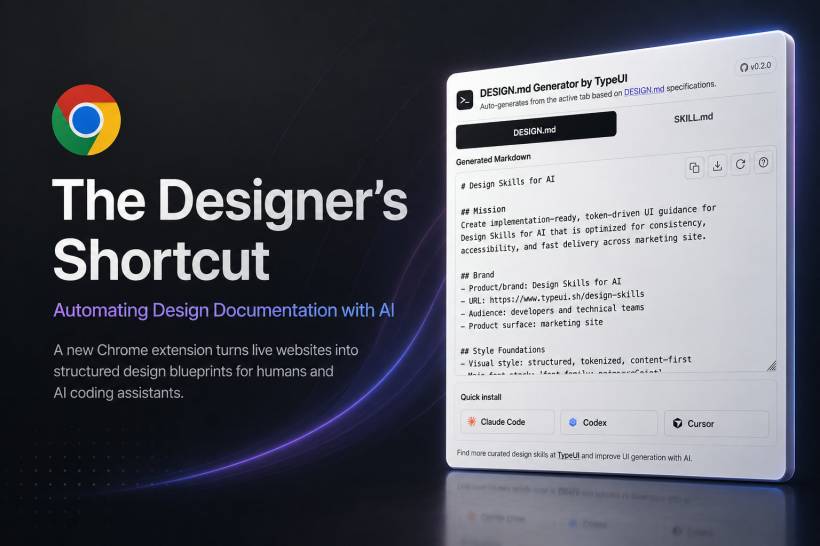
A new open-source Chrome extension called design-md-chrome aims to reduce that problem by automatically extracting design information from live websites and turning it into structured documentation.
Turning a Live Website Into a Design Blueprint
The extension analyses the active webpage and identifies the visual rules already present in the site's code.
It can capture information such as:
Once the information has been collected, the extension converts it into a structured DESIGN.md or SKILL.md file.
These files follow the TypeUI DESIGN.md format, which is designed to be readable by both people and AI coding assistants.
In practical terms, a designer or developer can visit a working website, run the extension and receive a reusable description of its design language. That documentation can then be used as a reference for future pages, redesigns or AI-assisted development.
Why Design Documentation Often Becomes a Bottleneck
Design-to-development handoff has improved considerably over the years, but it remains one of the most common sources of inconsistency in digital projects.
Designers may prepare detailed mock-ups in Figma or another design platform, yet developers still need to interpret how those designs should behave once they are translated into code.
A developer might estimate that a space is 24 pixels when it was intended to be 20. A heading may use a similar font weight but not the exact one. A hover effect might be recreated differently because the original interaction was not clearly documented.
None of these differences may seem serious on their own, but together they can change the character of the final product.
The result often looks close to the original design, but not quite the same.
Using the Working Product as the Source of Truth
The extension takes a different approach by analysing the live website rather than depending entirely on manually prepared documentation.
A working site already contains the implemented spacing, colours, typography, shadows and interaction rules. By extracting those values directly, the tool treats the existing product as the source of truth.
This can be useful when:
Instead of manually inspecting styles one element at a time, the extension provides a broader summary of the system already in use.
More Than a List of Colours and Font Sizes
A useful design system is not simply a collection of hex codes and spacing values.
The generated documentation can also include broader guidance such as the purpose of the product, its brand context, accessibility expectations, writing style and implementation rules.
A typical DESIGN.md file may contain sections covering:
The inclusion of accessibility guidance, including support for WCAG 2.2 AA expectations, makes the documentation more useful than a basic visual inventory.
It helps explain not only how the interface looks, but also how it should behave and how it should be implemented responsibly.
Built for AI-Assisted Development
One of the extension's most important features is its focus on AI coding tools.
AI assistants can generate layouts quickly, but their output is often inconsistent when they are given vague instructions such as "match the existing style" or "make this page look like the rest of the site."
Without a structured reference, the AI has to guess.
A generated DESIGN.md file gives the assistant clearer boundaries. Instead of relying on visual interpretation alone, the AI receives explicit information about spacing, colours, font sizes, component behaviour and brand tone.
The output can be used with tools such as:
A developer could provide the design file to an AI assistant and ask it to build a new page that follows the same visual language as the existing website.
That does not guarantee perfect output, but it gives the assistant a much stronger foundation than a general written prompt.
Why Structured Instructions Matter for AI
AI coding assistants perform better when expectations are specific and organised.
A prompt such as "make this look professional" leaves enormous room for interpretation. The assistant may choose different spacing, typography, colours or component styles each time.
A structured design document removes some of that uncertainty.
It can define:
This helps AI-generated pages feel like part of the same product rather than a collection of unrelated experiments.
An Open-Source Tool Gaining Attention
The design-md-chrome project has attracted more than 1,200 stars on GitHub, suggesting strong interest from designers and developers experimenting with AI-assisted workflows.
It is maintained by Zoltán Szőgyényi and released under the MIT License.
That licence allows individuals and organisations to use, modify and distribute the software with relatively few restrictions. Developers can inspect how the extension works, contribute improvements or adapt it for internal workflows.
Open-source availability is particularly valuable for a tool that analyses live websites because teams may want to review its behaviour before allowing it to inspect internal products or confidential projects.
A Growing Library of Ready-Made Design Skills
The wider TypeUI ecosystem also includes a collection of prebuilt design-skill documents available through its design-skills library.
These documents can be added directly to AI workflows without first extracting a design system from a live site.
This can be useful for teams starting a new project that do not yet have an existing interface to analyse.
Instead of writing a complete visual system from the beginning, designers and developers can begin with a prepared design skill and adjust it to match the needs of the project.
This creates two possible workflows:
Both approaches aim to give AI coding tools a more structured understanding of visual design.
How to Install the Chrome Extension
The current installation process requires loading the extension manually rather than installing it through the Chrome Web Store.
Users need to download or clone the project from GitHub and then install it through Chrome's extension-management page.
The general process involves:
chrome://extensions Once loaded, the extension icon appears in the browser toolbar.
The process is straightforward for developers, although less technical users may find it less convenient than installing a regular store-based extension.
A Simple Interface Focused on the Task
After installation, users can open a website and click the extension icon to access several actions.
The extension can automatically analyse styles from the active tab, generate a DESIGN.md file, create a SKILL.md file for agent-based workflows and download the completed document.
An explanation feature also provides information about how the output was generated and how it relates to the TypeUI specification.
The interface is intentionally minimal. Rather than presenting a large visual dashboard, it focuses on a small number of clearly labelled actions.
That approach suits the tool's purpose. It behaves more like a practical developer utility than a traditional creative application.
Reducing the Cost of Design Handoffs
Good documentation improves collaboration, but maintaining it often becomes difficult.
A designer may update a component without updating the style guide. A developer may adjust a layout directly in production. A new page may introduce slightly different spacing, and over time the documentation no longer reflects the actual product.
By extracting design information from the live site, teams can regenerate documentation whenever the implementation changes.
This does not remove the need for communication, but it gives teams a more reliable starting point.
Instead of beginning a handoff conversation with incomplete notes, the designer can provide a structured snapshot of the system currently in use.
Useful for Existing Websites and Legacy Projects
The extension could be particularly valuable when working with older websites.
Many long-running projects have no formal design system. Their visual rules exist only inside CSS files, templates and individual components.
A new team member may need weeks to understand how everything fits together.
Automated extraction can provide a quicker overview of the site's design language, helping teams identify repeated patterns and inconsistencies.
It may also support redesign projects by showing which colours, spacing values and typography styles are used most frequently across the existing product.
This can help designers decide what should be preserved, standardised or replaced.
Documentation as Part of the Build Process
The broader idea behind tools like design-md-chrome is that documentation should not be treated as a separate task completed only at the end of a project.
Instead, it can become a byproduct of the product itself.
As the website evolves, the design documentation can be regenerated from the live implementation. This makes it easier to keep the two aligned.
Over time, teams may move towards workflows where design systems, coded components and AI instructions remain connected rather than being maintained as separate documents.
That could reduce the familiar problem of style guides becoming outdated shortly after they are published.
Where Human Review Is Still Necessary
Automation can extract patterns, but it cannot fully understand the intention behind every design decision.
A website may contain inconsistencies that were introduced accidentally. If the tool documents them without review, those mistakes could become part of the generated design system.
For example, several similar shades of blue may exist because different developers added them over time, not because the brand intentionally requires all of them.
The same applies to spacing, font sizes and border styles.
Designers should therefore treat the generated file as a starting point rather than an unquestionable final document.
Human review is still needed to determine:
Automation can collect the evidence, but designers still need to interpret it.
Respecting Ownership and Design Ethics
The ability to extract a design system from any public website also raises questions about responsible use.
Analysing a site for inspiration or learning is different from copying its complete visual identity and reproducing it elsewhere.
Designers should avoid using extracted documentation to imitate another company's brand, proprietary interface or distinctive visual language without permission.
The tool is most appropriate for documenting websites that a team owns, maintains or has permission to analyse.
It can also support educational study, internal audits and migration projects where understanding the existing design system is necessary.
Like many technical tools, its value depends on how it is used.
What the Extension Cannot Replace
The extension does not replace thoughtful design work.
It cannot decide what a brand should represent, determine which emotions a product should communicate or choose the right visual direction for a particular audience.
It also cannot replace user research, accessibility testing or creative judgement.
What it can do is automate the repetitive task of documenting decisions that have already been implemented.
That distinction is important.
The tool is not designing the system. It is turning an existing system into a reusable and understandable format.
Final Thoughts
Design documentation has always been essential, but it is rarely the part of the project that designers enjoy most.
The design-md-chrome extension offers a practical way to reduce that burden by extracting visual rules directly from a working website and converting them into structured files that people and AI assistants can understand.
For developers, this can reduce guesswork during implementation. For designers, it can make handoffs clearer and leave more time for actual creative work. For AI coding tools, it provides the structured context needed to generate pages that remain closer to the original visual language.
The extension will not replace strong design thinking or careful human review. However, it can remove much of the repetitive work involved in documenting spacing, colours, typography and interaction behaviour.
For anyone who has spent hours writing design specifications by hand, turning a live website into a reusable blueprint could become a very useful shortcut.











Comments 0