

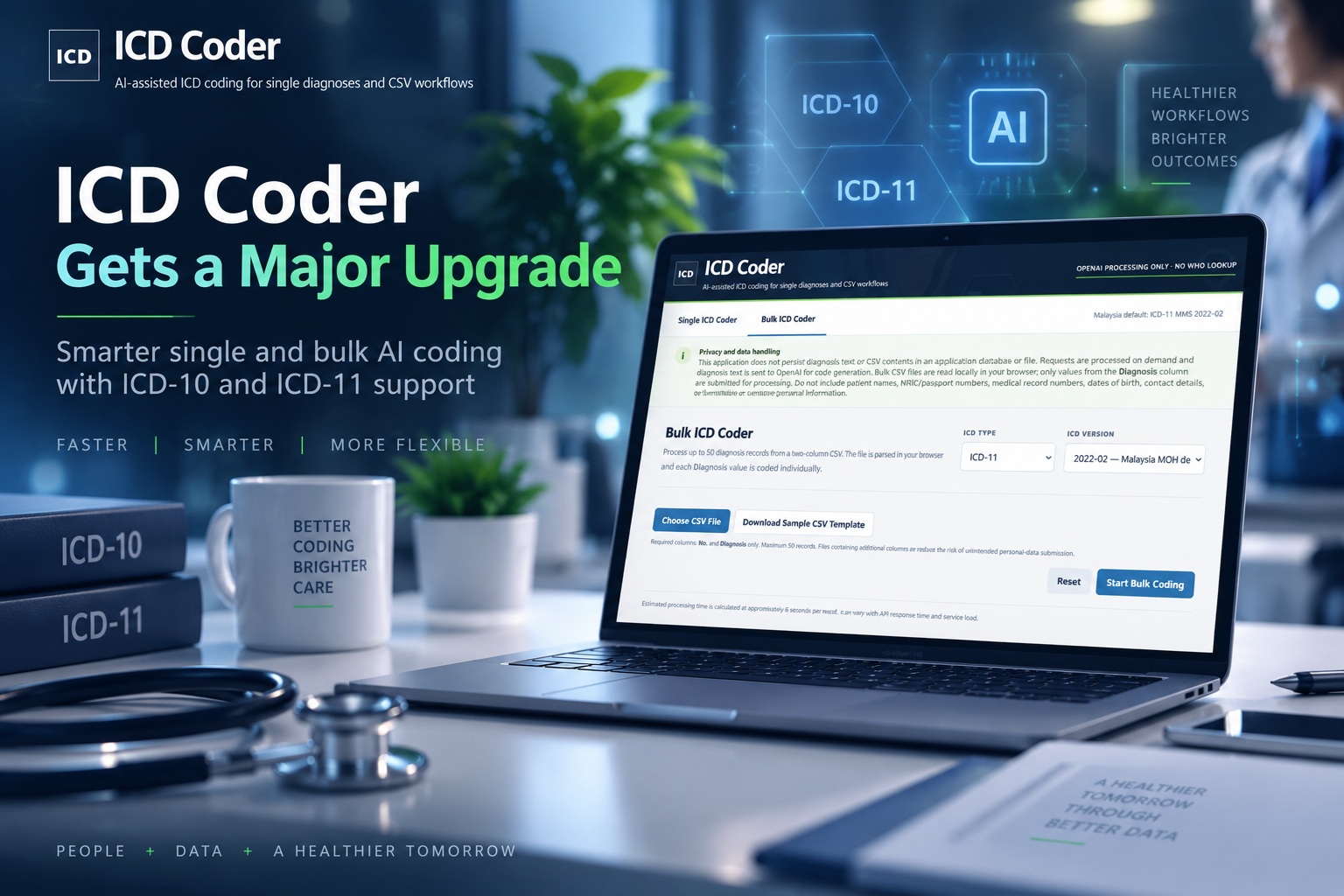
Medical coding can look simple from the outside: enter a diagnosis, find the appropriate ICD code, and move on. In reality, anyone who has worked around clinical documentation knows that things are rarely quite that straightforward. Diagnoses can be written in different ways, terminology varies between clinicians, and moving between ICD-10 and ICD-11 adds another layer of complexity.
That was the reason behind building the Lemon Web ICD Coder in the first place. The idea was never to replace professional medical coders or clinical judgment, but to provide a quick AI-assisted tool that can help turn a written diagnosis into a useful ICD coding suggestion. With the latest update, the application has been substantially redesigned and expanded, introducing both Single ICD Coder and Bulk ICD Coder workflows.
Starting with a Much Simpler Choice
Instead of dropping users immediately into a coding form, the updated ICD Coder now starts by asking what you actually want to accomplish.
You can choose Single ICD Coder when you simply have one diagnosis that you want AI to analyse, or select Bulk ICD Coder when you have a larger list that needs to be processed. It sounds like a small change, but separating these two workflows makes the application much easier to understand and keeps the interface focused on the task at hand.
The whole application has also received a cleaner and more modern redesign. Rather than filling the screen with individual card-style elements, the interface now feels more like a dedicated working tool, with clearer controls, better spacing and a workflow that guides you naturally from diagnosis entry to coding result.
Single ICD Coding with ICD-10 and ICD-11 Support
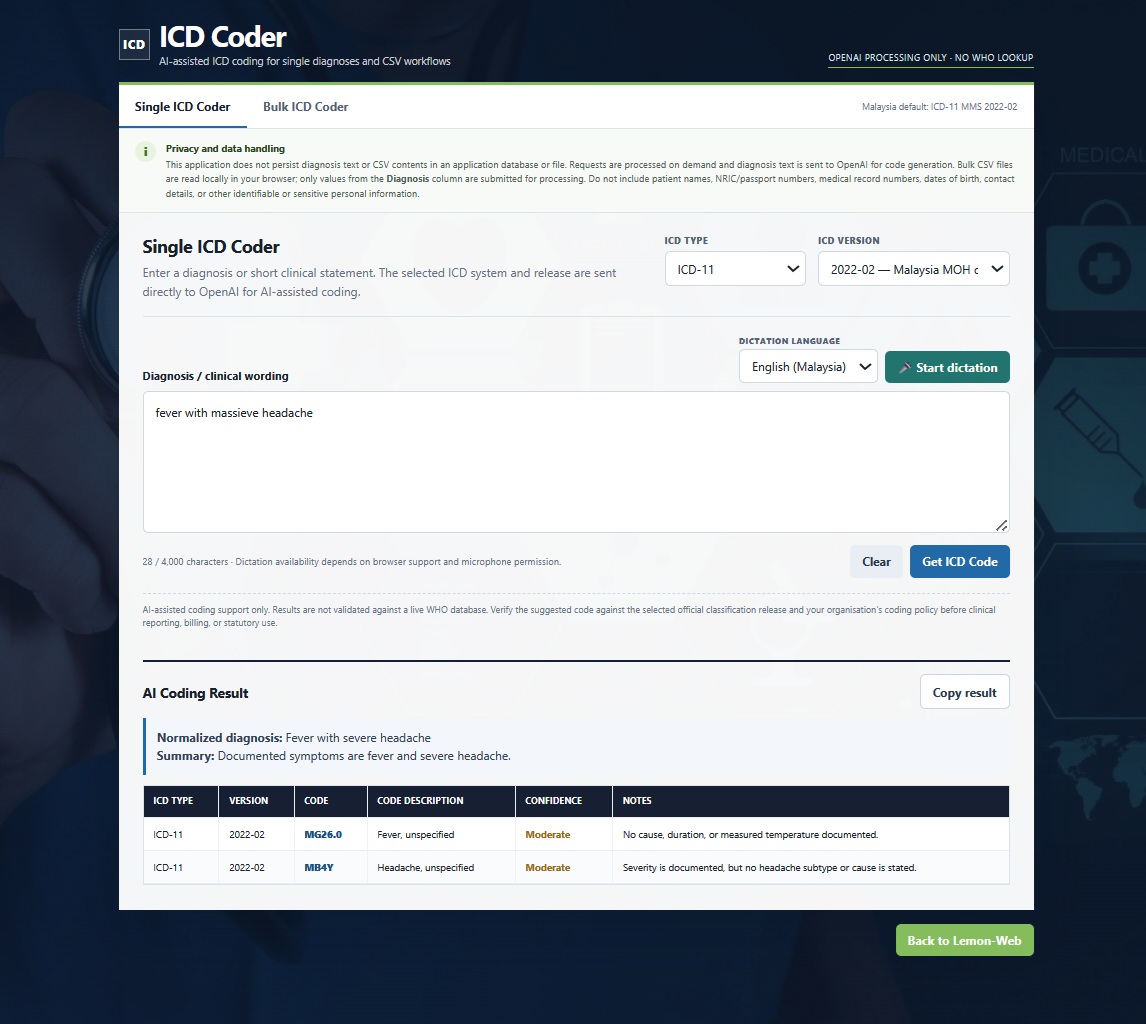
The Single ICD Coder remains the fastest way to use the application. Enter a diagnosis into the text field, select the classification system you want, and allow the AI to analyse it.
You can switch between ICD-10 and ICD-11, and selecting either classification reveals an additional version selector. This is particularly useful because ICD classifications are not simply one permanent dataset. Different releases and legacy versions continue to be used in different environments, so being able to explicitly select the required release makes the tool considerably more flexible.
For Malaysian users, the application is configured with the Malaysian-preferred ICD dataset as the default, while still allowing the selection to be changed manually whenever an older ICD-10 dataset or a different ICD-11 release is required.
The result is presented clearly with the proposed ICD code, description, selected classification and version, together with an AI confidence indication and relevant notes. There is also a convenient copy function for quickly transferring the result into another system or working document.
Dictation Has Been Improved Too
Typing diagnoses repeatedly is not always the most convenient way to work, particularly when checking several cases during a busy day. The ICD Coder therefore continues to support voice dictation, but the underlying behaviour has been improved in this release.
One of the problems with browser speech recognition is that interim transcription can sometimes be duplicated or inserted incorrectly while the user is still speaking. The updated implementation handles interim and final speech results more carefully, producing a much cleaner diagnosis entry.
Different speech-language options are also available, including Malaysian English and Bahasa Malaysia, which makes the feature considerably more practical for local use.
A New Bulk ICD Coder
The biggest addition in this update is undoubtedly Bulk ICD Coder.
There are times when looking up one diagnosis at a time simply does not make sense. You may already have a spreadsheet containing dozens of diagnoses that need preliminary coding suggestions, and manually copying each one into the application becomes unnecessarily repetitive.
Bulk ICD Coder addresses exactly that situation.
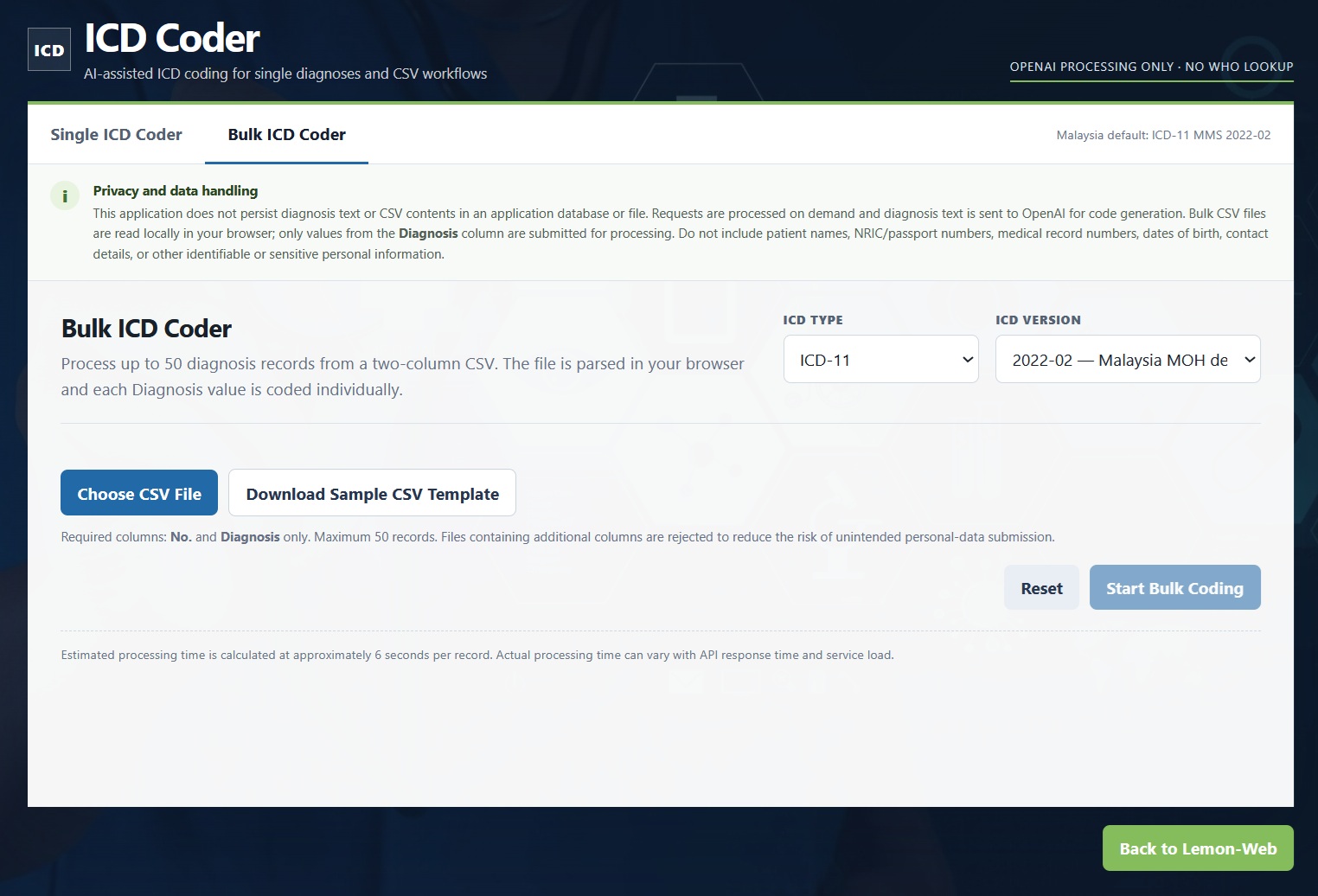
Instead of entering diagnoses individually, you can prepare a simple CSV file containing just two columns: No. and Diagnosis. A downloadable sample template is included directly within the application, along with three example records so that users can immediately see the required structure.
Once the CSV has been selected, ICD Coder checks the file before processing it. The current limit is 50 diagnosis records per CSV, which helps keep each processing session manageable and also provides an additional safeguard against excessive automated requests.
Knowing How Long the Bulk Process May Take
AI processing is not instantaneous when dozens of independent diagnoses need to be analysed, so the application now gives users a realistic indication before processing begins.
The Bulk ICD Coder calculates an estimated processing duration based on approximately six seconds per diagnosis. Before anything starts, a popup shows the expected number of minutes and seconds and asks the user to confirm the operation.
Once processing begins, a full-screen loading interface takes over. Instead of leaving users staring at an apparently frozen page, the application displays an animated progress indicator, progress bar, current record information and an estimated remaining processing time.
It is a much nicer experience, particularly when working with a CSV containing 30, 40 or 50 diagnoses.
Reviewing and Downloading the Results
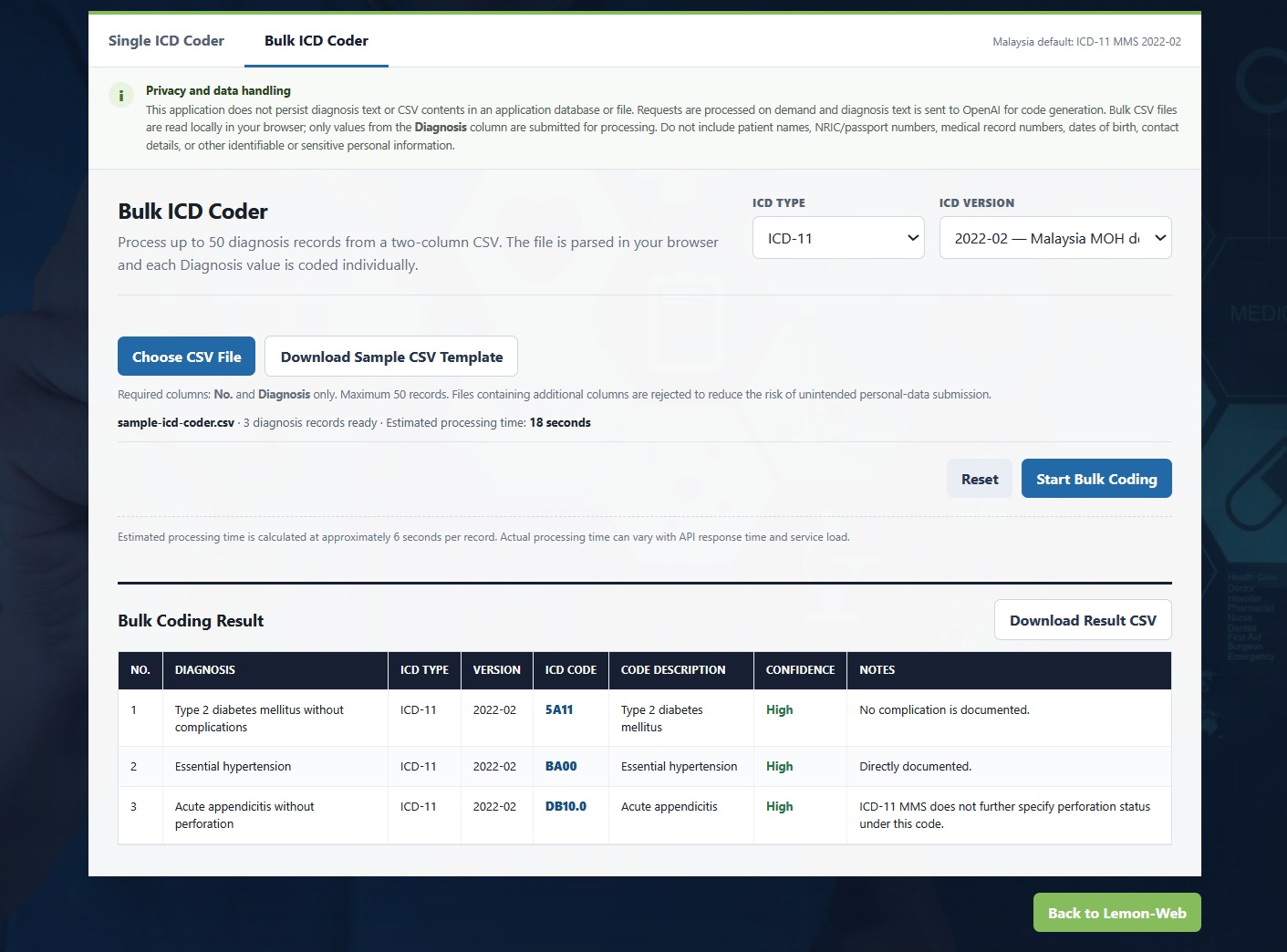
After processing is completed, the results are presented in a dedicated table showing the original diagnosis alongside its proposed ICD classification.
The table includes the record number, diagnosis, ICD type, selected version, ICD code, description, confidence and additional notes. For longer result sets, the header remains fixed while scrolling, making it much easier to understand which column you are looking at even when reaching the bottom of a 50-record list.
When everything has been reviewed, the completed results can be downloaded back into a CSV file. That means Bulk ICD Coder effectively becomes a simple workflow: prepare diagnoses, upload CSV, let AI process them, review the proposed coding and download the results.
Keeping the CSV Deliberately Simple
One important design decision was to keep the Bulk ICD Coder CSV format intentionally minimal.
You do not need to upload patient names, identification numbers, medical record numbers, dates of birth, telephone numbers or any other personally identifiable information. In fact, you should not include them at all.
Only the record number and diagnosis are necessary.
This is something worth emphasizing because the purpose of the application is ICD coding assistance, not patient record processing. Keeping identifiable information out of the source CSV significantly reduces unnecessary privacy exposure while still providing the information required for the AI to suggest an appropriate code.
Processing Data On Demand Rather Than Building Another Database
Privacy was also considered throughout the redesign.
The ICD Coder does not maintain an application database containing submitted diagnoses, and uploaded CSV files are not stored on the web server. Bulk CSV parsing takes place locally within the user's browser, after which individual diagnosis text is submitted for AI coding as required.
In other words, the application works primarily as an on-demand processing tool rather than another repository of medical information.
Users should nevertheless always remove identifiable or sensitive patient information before submitting a diagnosis. The tool only needs the clinical diagnosis itself to perform its intended function.
A Much Simpler AI Architecture
The technical architecture behind the application has also been simplified considerably.
The previous implementation used multiple stages, including AI processing followed by external ICD-related services. While that approach worked, it introduced additional dependencies and made the workflow unnecessarily complicated.
The updated ICD Coder now sends the diagnosis directly to OpenAI and requests a structured coding response based on the selected ICD classification and version. The separate WHO API integration and other external coding lookup services have been removed.
This makes the request path much cleaner: the application provides the diagnosis, ICD system and required version, and the AI returns the proposed structured result.
Reducing unnecessary service dependencies also means fewer external endpoints that can become unavailable, change their API format or introduce unexpected delays.
Removing Google reCAPTCHA Without Leaving the App Unprotected
Another noticeable change is the complete removal of Google reCAPTCHA.
CAPTCHAs can be useful, but they also create friction for genuine users and introduce another external service into an application. Rather than forcing everyone to complete a challenge, the updated ICD Coder uses less intrusive protections behind the scenes.
These include session-based request validation, same-origin checking, hidden bot-detection fields, strict server-side input validation and request rate limiting. Together, these measures help reduce automated abuse without interrupting normal users every time they want to check a diagnosis.
It is a cleaner approach and much better suited to the way the ICD Coder is intended to be used.
All Application Messages Are Now Consistent
Another smaller improvement that makes a surprisingly big difference is how prompts and errors are handled.
Browser alerts and inconsistent inline warnings have been replaced with dedicated popup modals throughout the application. Whether the system needs to report an invalid CSV, confirm bulk processing, warn about too many records or display another important message, the interaction now follows the same visual style.
It gives the application a much more polished feel and ensures important information does not get lost somewhere on the page.
Designed as an Assistant, Not a Replacement for Professional Coding
AI can be extremely useful for interpreting natural-language diagnoses and suggesting likely classification codes, but ICD coding still involves context, documentation requirements, coding standards and professional judgment.
For that reason, ICD Coder should be treated as an AI-assisted coding reference tool rather than an autonomous replacement for trained medical coders or healthcare professionals.
The real benefit is speed. Instead of manually searching through classifications every time you encounter an unfamiliar term, ICD Coder can provide a useful starting point within seconds. The final code can then be verified according to your organisation's own coding policies and clinical documentation.
Final Thoughts
This update takes ICD Coder from what was primarily a simple diagnosis lookup utility and turns it into a much more complete coding assistant.
Single ICD Coder remains perfect for those quick one-off checks, while Bulk ICD Coder opens up an entirely different workflow for processing lists of diagnoses. Add selectable ICD-10 and ICD-11 versions, Malaysian-oriented defaults, improved dictation, downloadable CSV results, better privacy controls and a streamlined OpenAI-only backend, and the application has become considerably more practical than the original release.
Most importantly, the underlying idea remains simple: give users an easier way to work with ICD coding without turning the process into another complicated piece of healthcare software.
Sometimes you just want to type a diagnosis and get some help finding the code. And when you happen to have 50 diagnoses instead of one, now ICD Coder can help with those too.











Comments 0