


CIMB is strengthening the way customers approve online banking transactions, with a new SecureTAC requirement taking effect on 19 September 2026. From that date, customers approving transactions initiated through CIMB Clicks Web or participating merchant websites will need to verify their identity using biometric authentication or their device passcode through the CIMB OCTO app.
The change effectively removes the CIMB OCTO app password as an option for SecureTAC approvals. Instead, customers will need to rely on Face ID, fingerprint authentication or the passcode used to unlock their device. For most users, the approval process itself will remain familiar, but the final authentication step will become more closely tied to the security features built into their smartphone.
How the New SecureTAC Process Will Work
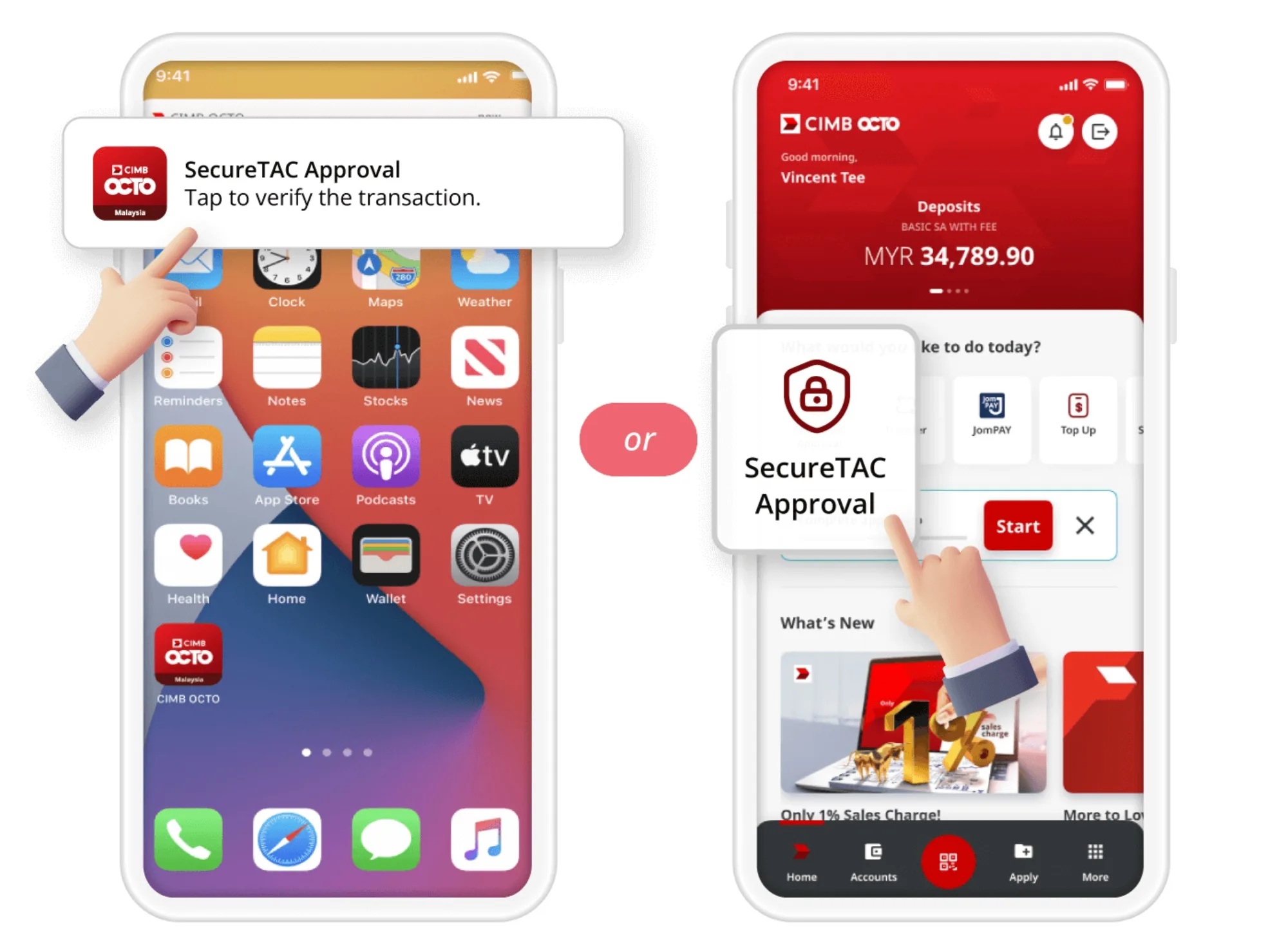
When a customer starts a transaction through CIMB Clicks Web or a merchant website, the bank will send a SecureTAC notification to the primary smartphone registered with the CIMB OCTO app. Customers will be able to open the notification, review the transaction information and decide whether they want to approve or reject the request.
If they choose to approve it, they will then be prompted to confirm their identity using one of the supported authentication methods on the device. Depending on the phone, this could mean Face ID, a fingerprint scan or entering the device passcode. This extra verification step is intended to make it more difficult for someone who gains access to the app to approve a transaction without also being able to authenticate themselves on the registered phone.
The system therefore combines two things: possession of the registered device and the ability to unlock or authenticate on that device. This brings SecureTAC approvals closer to the security model already used by many mobile banking and digital payment services.
CIMB OCTO App Passwords Will No Longer Be Accepted
One of the most important changes is the removal of password-based authentication for these approvals. Previously, customers could complete certain SecureTAC requests using their CIMB OCTO app password if biometric authentication or a device passcode was not being used.
That option will no longer be available from 19 September onwards. Customers who have not enabled Face ID, fingerprint authentication or a device passcode on their primary smartphone will need to set up at least one of those methods before they can successfully approve a SecureTAC request.
If none of the supported authentication options is available, CIMB says the customer will see an error message instead of being allowed to proceed. The user will then need to configure the appropriate security feature on the device and retry the transaction.
Why CIMB Is Moving Away From Password-Based Approval
Passwords remain one of the weakest links in many digital security systems because they can be guessed, reused, stolen through phishing or exposed through data breaches. Even strong passwords can be compromised if users enter them into fraudulent websites or accidentally share them with someone else.
Biometric authentication and device passcodes introduce an additional layer of protection because the approval is connected to the physical smartphone registered with the banking app. Someone who obtains a customer's banking credentials would still need access to the trusted device and the means to unlock it before the transaction could be approved.
This does not make fraud impossible, but it raises the difficulty for attackers. It also reduces reliance on another password that users need to remember and potentially reuse across services.
The Change Builds on SecureTAC Rules Introduced Earlier in 2026
CIMB's latest update follows an earlier tightening of SecureTAC requirements in January 2026. At that point, the bank introduced mandatory SecureTAC approval for selected transactions made through CIMB Clicks Web and merchant websites.
Under the earlier system, customers could authenticate those requests using biometrics, their device passcode or their CIMB OCTO app password. The September change removes the password option entirely, leaving device-based authentication as the only supported method.
The wording of CIMB's latest notice also suggests a wider scope. While the January announcement referred to selected transactions, the current requirement states that SecureTAC authentication will apply to all transactions made through CIMB Clicks Web and merchant websites.
That means customers who regularly conduct transactions from a desktop browser or complete purchases through merchant checkout pages should make sure their OCTO-linked smartphone is properly configured before the deadline.
Customers Should Check Their Primary Device Before 19 September
CIMB is advising customers to confirm that their primary device already has a supported authentication method enabled. For iPhone users, this may mean checking that Face ID or the device passcode is active. Android users should make sure fingerprint authentication or their device PIN, pattern or passcode is available, depending on what their phone supports.
It is also worth checking that the CIMB OCTO app is installed and working correctly on the primary registered device. Since SecureTAC notifications will be delivered there, problems such as an outdated app, disabled notifications or a changed primary device could potentially interrupt the approval process.
Customers who have recently changed phones should also ensure that the new device has been properly registered with CIMB before relying on it for online transactions.
A Failed SecureTAC Approval Will Not Suspend Your Clicks ID
CIMB has clarified that an unsuccessful SecureTAC approval will not automatically suspend a customer's Clicks ID. This is important because users may worry that failing biometric authentication several times could lock them out of their banking account entirely.
According to the bank, a failed approval simply means the transaction will not go through. No funds will be deducted if the SecureTAC request is unsuccessful. Customers can correct the authentication issue and retry the transaction when they are ready.
This separation between transaction approval and overall account access should reduce the risk of users becoming completely locked out simply because Face ID or fingerprint authentication temporarily fails.
Biometrics Are Convenient, but the Device Passcode Remains Important
Although biometric authentication will probably be the easiest option for many customers, the device passcode remains an important fallback. Face recognition may not work in certain conditions, while fingerprint sensors can occasionally fail because of moisture, damaged fingers or sensor issues.
By supporting the device passcode as well, CIMB gives customers another secure way to authenticate without returning to a separate banking password. The important distinction is that the passcode is tied to the trusted smartphone rather than being an additional password stored and managed by the banking application.
Customers should therefore make sure their device passcode is strong and not something that can be easily guessed. A secure device is increasingly becoming part of the overall security boundary for mobile banking.
Why Banks Are Making Transaction Approval More Device-Centric
The shift reflects a broader direction across the banking industry. Financial institutions are gradually moving away from SMS-based verification codes and password-only approvals toward authentication methods tied to registered mobile devices.
SMS TAC codes were once considered a major security improvement, but attackers have increasingly found ways to intercept or manipulate them through phishing, SIM-swap fraud and social engineering. App-based approvals provide banks with greater control over the authentication process and allow more information about the transaction to be shown before the customer confirms it.
Biometric verification strengthens that approach further by requiring the person holding the device to prove that they are authorised to use it. For high-risk transactions, this combination of device possession and local authentication can offer stronger protection than a password alone.
Customers Still Need to Review Every SecureTAC Request Carefully
Stronger authentication does not remove the need for customers to check what they are approving. Fraudsters increasingly use social engineering to convince victims to authorise transactions themselves, and biometric verification cannot protect someone who knowingly approves a fraudulent request.
Before accepting a SecureTAC notification, customers should still verify important details such as the transaction amount, recipient or merchant information and whether they personally initiated the request. An unexpected SecureTAC prompt should always be treated cautiously.
A useful rule is simple: if you did not initiate the transaction, do not approve the SecureTAC request, regardless of what someone on a phone call, message or website tells you.
A Small Change That Reflects a Larger Security Shift
For many CIMB customers, the September update may feel like a relatively minor adjustment because they already use Face ID or fingerprint authentication inside the OCTO app. For those users, the main difference may simply be that the password option disappears.
Behind that small interface change, however, is a broader transition in digital banking security. Banks are increasingly treating the smartphone itself as part of the authentication system, combining device registration, app-based transaction approval and local identity verification to make unauthorised payments harder to complete.
As more banking activity moves online, these layers of protection are becoming increasingly important. At the same time, customers need to understand that stronger technology works best when combined with careful behaviour.
Final Thoughts
CIMB's decision to require biometrics or a device passcode for SecureTAC approvals from 19 September 2026 marks another step in the bank's move toward stronger device-based transaction security. Customers using CIMB Clicks Web or merchant websites will no longer be able to rely on their CIMB OCTO app password to approve transactions.
For most users, preparation should be straightforward: make sure the CIMB OCTO app is active on the correct primary device and confirm that Face ID, fingerprint authentication or a secure device passcode has already been enabled. Doing this before the new requirement takes effect should help avoid unnecessary transaction failures.
The change also highlights a wider trend in online banking. Passwords are gradually becoming less central to sensitive transaction approvals, while trusted devices and biometric verification are taking on a larger role. For customers, that means the security of the smartphone in their hand is becoming just as important as the security of their banking credentials.











Comments 0