

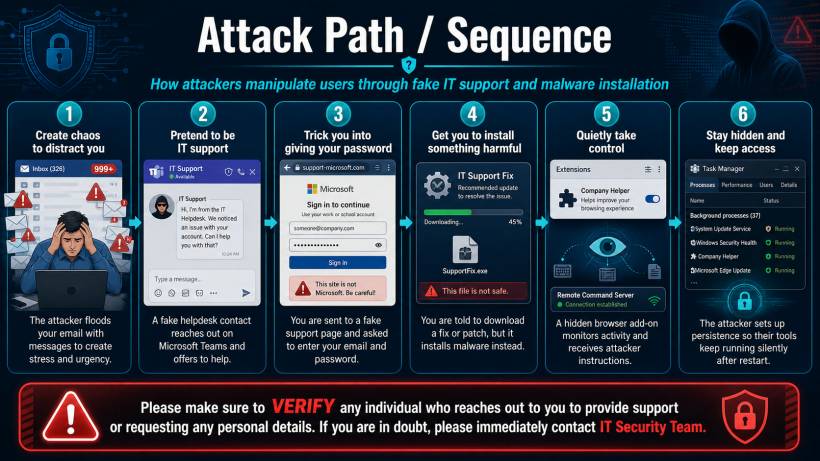
Most of us are used to receiving messages from different people during the workday. It could be from IT Support, Finance, HR, management, a vendor, a bank, a courier company, or even someone claiming to represent an external service provider. In a normal working environment, this is nothing unusual. We ask for help, we receive updates, and sometimes we are required to take action quickly.
However, this is also exactly what attackers try to take advantage of.
Cyberattacks today are no longer always about obvious suspicious emails with broken English or strange attachments. Many of them are designed to look normal, professional, and urgent. The attacker may pretend to be someone helpful. They may claim there is a problem with your account, your mailbox, your payment, your access, your delivery, or your system. The goal is simple: make you react before you think.
How the Attack Usually Starts
A common technique is to create confusion first. For example, an attacker may flood your mailbox with many emails, making it look like something is wrong. While you are distracted and trying to understand what is happening, someone may contact you through chat, email, phone call, or another platform claiming they can help resolve the issue.
This person may not always pretend to be from IT Support. They could pretend to be from Finance asking about payment verification, HR asking for employee details, a vendor asking you to download a form, or even a courier service asking you to confirm delivery information.
Once trust is created, the attacker may ask you to click a link, log in to a fake portal, provide your password, approve an MFA prompt, or install a so-called "fix", "patch", "verification tool", or "support software".
Why This Is Dangerous
The dangerous part is that these attacks are designed to feel believable. The message may look professional. The person may sound helpful. The link may look similar to a real login page. The instruction may seem urgent enough that you do not want to delay.
But once you provide your password, approve an MFA request, or install unknown software, the attacker may gain access to your account or device. In some cases, harmful software can quietly run in the background, monitor activity, install browser extensions, or maintain access even after the computer is restarted.
This is why verification is so important. It is not about being difficult or refusing to cooperate. It is about making sure the person who is asking for information or action is really who they claim to be.
Simple Guidelines Everyone Should Follow
Whenever you receive an unexpected request, especially one that feels urgent or unusual, pause first. Do not rush to respond just because the message sounds important.
Please keep these basic guidelines in mind:
• Do not click suspicious links or open unexpected attachments.
• Do not share your password, OTP, MFA approval, personal details, banking information, or confidential company information.
• Do not install any software, browser extension, remote access tool, patch, or update unless it comes from an official and verified source.
• Do not approve any MFA prompt if you did not personally initiate the login.
• Always verify unusual requests through an official communication channel.
• If you are unsure whether a message is genuine, stop and contact the IT Security Team for verification.
Verification Is Not Optional
One of the best habits we can build is to verify before acting. If someone claims to be from IT, Finance, HR, management, a vendor, a bank, courier company, or government agency, it is perfectly acceptable to confirm the request through an official channel first.
For example, instead of replying directly to a suspicious chat message, contact the department using the known official number, email address, or support channel. If the request is legitimate, the sender should have no issue with you verifying it. If the request is fake, that short pause may prevent a much bigger incident.
Attackers often rely on speed, pressure, and confusion. They want users to feel that they must act immediately. By slowing down and verifying the request, we remove one of their biggest advantages.
Final Thoughts
Cybersecurity is not only about firewalls, antivirus software, or technical controls. It also depends on everyday awareness and good judgment from every user. A single click, password entry, MFA approval, or software installation can be enough for an attacker to gain access.
So, the next time someone unexpectedly contacts you asking for support action, personal details, login information, MFA approval, or software installation, take a moment to verify first. When in doubt, do not proceed. Contact the IT Security Team and let them confirm whether the request is genuine.
A few seconds of verification can prevent hours, days, or even weeks of damage.











Comments 0