


Sending a laptop for warranty repair should normally be straightforward: hand over the machine, get the problem fixed, and receive it back in roughly the same configuration. Unfortunately, one Reddit user reportedly had a very different experience after sending a Lenovo Legion 5 gaming laptop with 64GB of DDR5 RAM for repair, only to discover that it came back with just 32GB installed.
The situation may ultimately have an innocent technical explanation, but with RAM prices under increasing pressure amid the wider global memory supply shortage, it is also a timely reminder for all of us: document your PC hardware before handing it over for repair and check everything carefully when it comes back.
The Laptop Originally Had 64GB of RAM
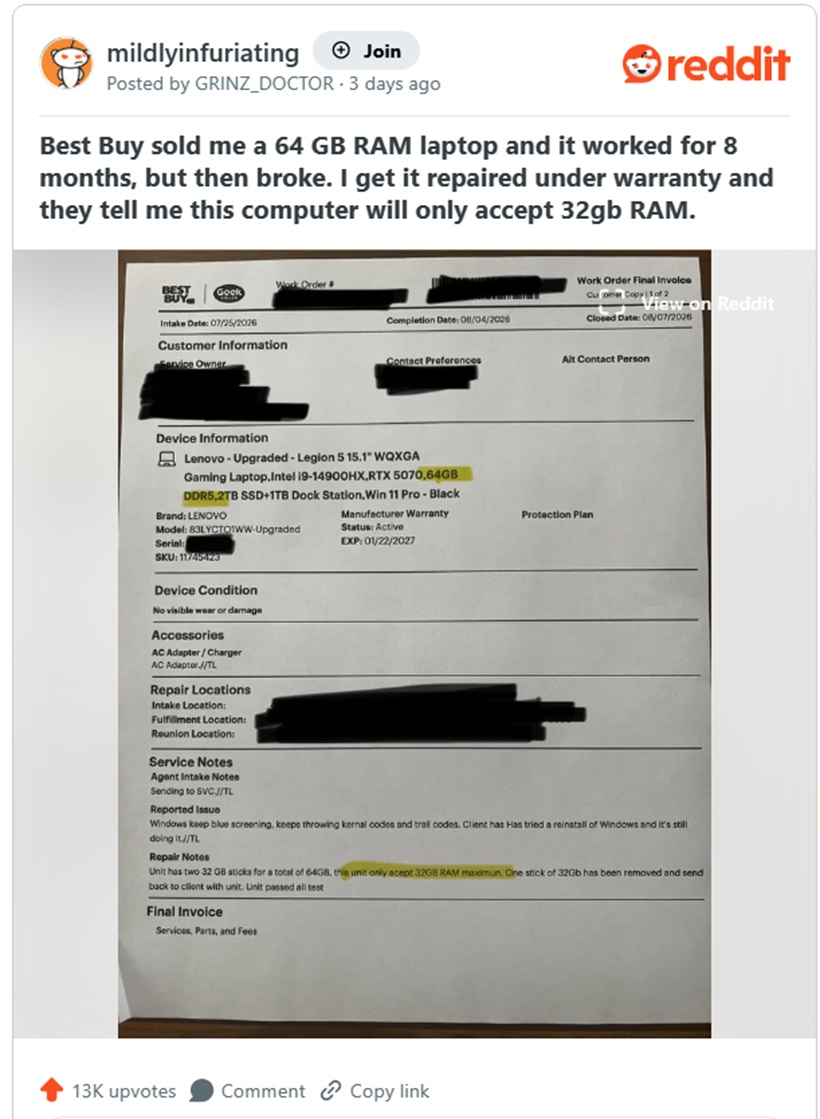
According to Reddit user GRINZ_DOCTOR, the gaming laptop was purchased through Best Buy's website last December with fairly powerful specifications:
The system reportedly worked normally for around eight months before developing repeated blue-screen crashes.
It was then sent in for warranty service.
When the laptop was returned, however, Windows showed only 32GB of RAM.
One of the two original 32GB SO-DIMM modules was no longer installed.
The Missing RAM Was Apparently Returned Separately
At first glance, this sounds like a case of someone removing an expensive memory module during servicing.
But the situation appears slightly more complicated.
Best Buy's paperwork reportedly indicates that the removed 32GB module was actually returned together with the laptop rather than being retained by the repair centre.
So this does not necessarily appear to be a straightforward case of someone stealing the RAM.
Instead, the question becomes: Why was the laptop downgraded from 64GB to 32GB in the first place?
Lenovo Officially Lists 32GB as the Maximum
One possible explanation lies in Lenovo's own specifications.
The Legion 5 15IRX10 reportedly lists 32GB DDR5 as its officially supported maximum memory capacity, despite having two SO-DIMM slots.
The laptop purchased by the Reddit user apparently did not leave Lenovo's factory with 64GB installed.
Instead, it was reportedly sold through a third-party seller called PC Heaven, which upgrades new laptops with additional components before selling them through Best Buy's marketplace.
That could explain why the laptop arrived with 64GB even though Lenovo's official specification only lists 32GB.
A technician following Lenovo's documentation may therefore have considered the second 32GB module unsupported and removed it during troubleshooting.
The Extra RAM Could Even Have Been Causing the Blue Screens
There is another possibility that should not be ignored.
The laptop was originally sent for repair because it was repeatedly crashing with blue screens.
According to the reported service notes, the system apparently passed testing after the second RAM module was removed.
If accurate, the technician may actually have discovered that the 64GB configuration was contributing to the instability.
Possible causes could include a defective memory module, an unstable dual-module configuration or an issue affecting one of the memory channels.
In that situation, removing one RAM stick may genuinely have stopped the crashes.
The problem is that the owner purchased the laptop as a 64GB machine, so returning it with only 32GB understandably feels like receiving a different product from the one originally paid for.
Third-Party Upgraded Laptops Can Create Complications
This case also highlights something buyers should watch carefully when purchasing computers online.
Not every configuration listed on a retailer's marketplace necessarily comes directly from the manufacturer.
Third-party sellers sometimes purchase standard laptops, open them and upgrade components such as:
They then resell those systems with specifications that may exceed what the manufacturer officially advertises.
That is not automatically a bad thing.
However, it can create complications when warranty repairs are required.
The manufacturer may only recognise the original factory configuration, while the retailer or third-party seller may be responsible for the upgraded components.
Consumers therefore need to understand who actually provides the warranty for those upgrades.
The Global Memory Shortage Makes This More Important
There is also a broader reason why this story deserves attention right now.
Memory prices have become increasingly volatile as the industry deals with tighter supply and strong demand across AI infrastructure, servers and consumer electronics.
DDR5 RAM that might once have been relatively inexpensive to replace can now represent a meaningful part of a computer's value.
A 32GB DDR5 module is no longer something most users would want to casually lose during a repair.
The same applies to SSDs.
As RAM and storage become more expensive, we should all become more careful about documenting exactly what hardware is inside our computers before sending them anywhere.
This kind of situation could happen to any of us.
It may be an honest servicing decision rather than theft, but without proper documentation it can become extremely difficult to prove what was originally installed.
Take Photos Before Sending Your PC for Repair
One simple precaution can prevent a lot of arguments later.
Before handing over a laptop or desktop for repair, take photographs or screenshots showing the installed hardware.
For Windows PCs, you can record information from:
You can also use tools such as CPU-Z, HWiNFO or Windows System Information to document the system configuration.
For valuable systems, consider recording:
If possible, take photographs of the actual RAM and SSD modules together with their serial numbers.
This gives you clear evidence if anything changes.
Check Everything Immediately When the Device Returns
Do not assume that receiving a repaired computer means everything is exactly as it was before.
When it comes back, check the specifications immediately.
Confirm the RAM.
Check the storage.
Make sure the GPU is correctly detected.
Inspect the physical condition.
And read the technician's service report carefully.
If something has changed, raise the issue immediately rather than discovering it several weeks later.
It is much easier to resolve a disagreement while the repair record is still recent.
Don't Automatically Assume Something Was Stolen
At the same time, it is important not to jump immediately to accusations.
Technicians sometimes remove components because they identify them as defective, incompatible or responsible for instability.
A repair centre may also restore a machine to its officially supported configuration.
That appears to be a plausible explanation in this Lenovo case.
The key issue is communication.
If hardware is removed, the customer should be clearly told what was removed, why it was removed and whether it needs to be replaced.
Returning a 64GB laptop as a 32GB machine without a clear explanation understandably creates confusion.
Final Thoughts
The Lenovo Legion case is more complicated than a simple story of missing RAM.
The removed 32GB module was reportedly returned to the owner, and there is a reasonable possibility that the extra memory was either outside Lenovo's official specification or contributing to the laptop's blue-screen crashes.
Still, the situation contains a useful lesson for everyone.
With RAM and SSD prices becoming increasingly valuable amid today's global memory supply pressures, we should treat internal PC components almost like any other valuable item sent for servicing.
Before handing over your computer, document what is inside it.
When you get it back, check the specifications immediately.
And if a component has been removed or replaced, ask for a clear explanation.
Most repairs will go perfectly normally, but when a single RAM stick can be worth hundreds of ringgit, spending five minutes documenting your hardware beforehand could save a much bigger headache later.











Comments 0