

Apple is preparing a major update for Apple Creator Studio, expanding its professional creative software with new editing tools, deeper integration between applications and a growing collection of AI-powered capabilities. The update will begin rolling out in November and covers several of Apple's major creative and productivity applications, including Final Cut Pro, Pixelmator Pro, Logic Pro, Keynote, Pages and Numbers.
While Apple's recent announcements have focused heavily on hardware such as the latest iMac and MacBook Pro, the Creator Studio update shows that the company is also investing heavily in the software used on those devices. Apple describes the upcoming release as one of the most significant updates to Creator Studio so far, with artificial intelligence becoming increasingly integrated into everyday creative workflows.
Final Cut Pro Gets Direct MotionVFX Integration
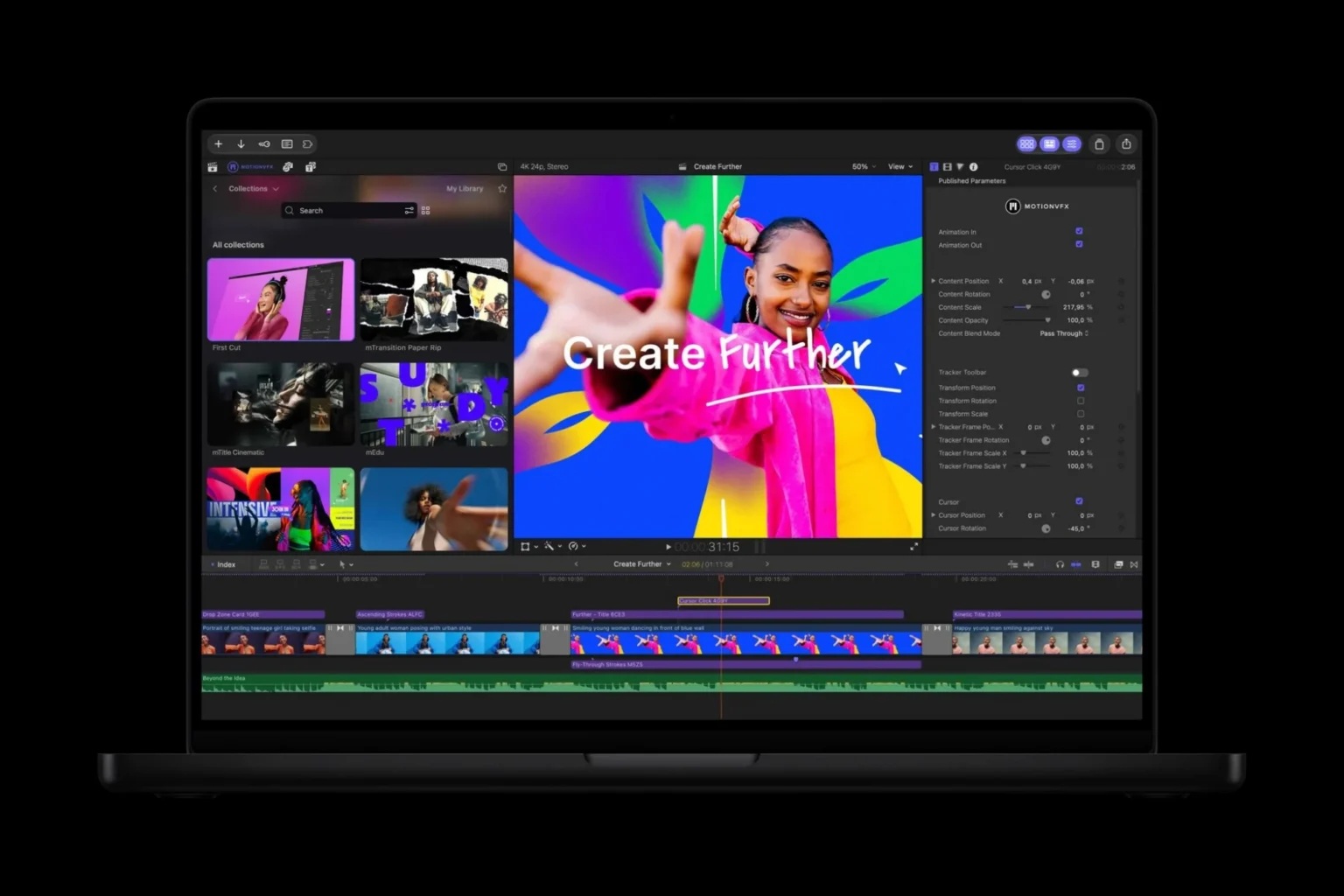
One of the biggest changes is coming to Final Cut Pro for Mac, where Apple is integrating MotionVFX directly into the application. Video editors will be able to access a collection of templates, graphics, titles and other creative elements without needing to leave Final Cut Pro.
This should make it easier to enhance projects without constantly switching between applications or manually importing third-party assets. Motion graphics and professionally designed titles can be added directly into the editing workflow, reducing some of the repetitive steps involved in building more polished productions.
For creators who already rely on MotionVFX resources, having them available natively inside Final Cut Pro could significantly simplify project management.
Rotoscoping Tools Are Being Added
Apple is also introducing new rotoscoping capabilities to Final Cut Pro. Rotoscoping allows editors to isolate people or objects from individual frames so they can be manipulated separately from the surrounding scene.
Traditionally, this can be a time-consuming process because complex subjects may need to be tracked carefully across many frames. More advanced tools can automate much of that work, making it easier to remove backgrounds, apply effects to specific subjects or combine elements from different shots.
Bringing stronger rotoscoping capabilities directly into Final Cut Pro should make sophisticated compositing workflows more accessible without requiring users to move constantly into separate applications.
Tracking And Colour Grading Are Also Improving
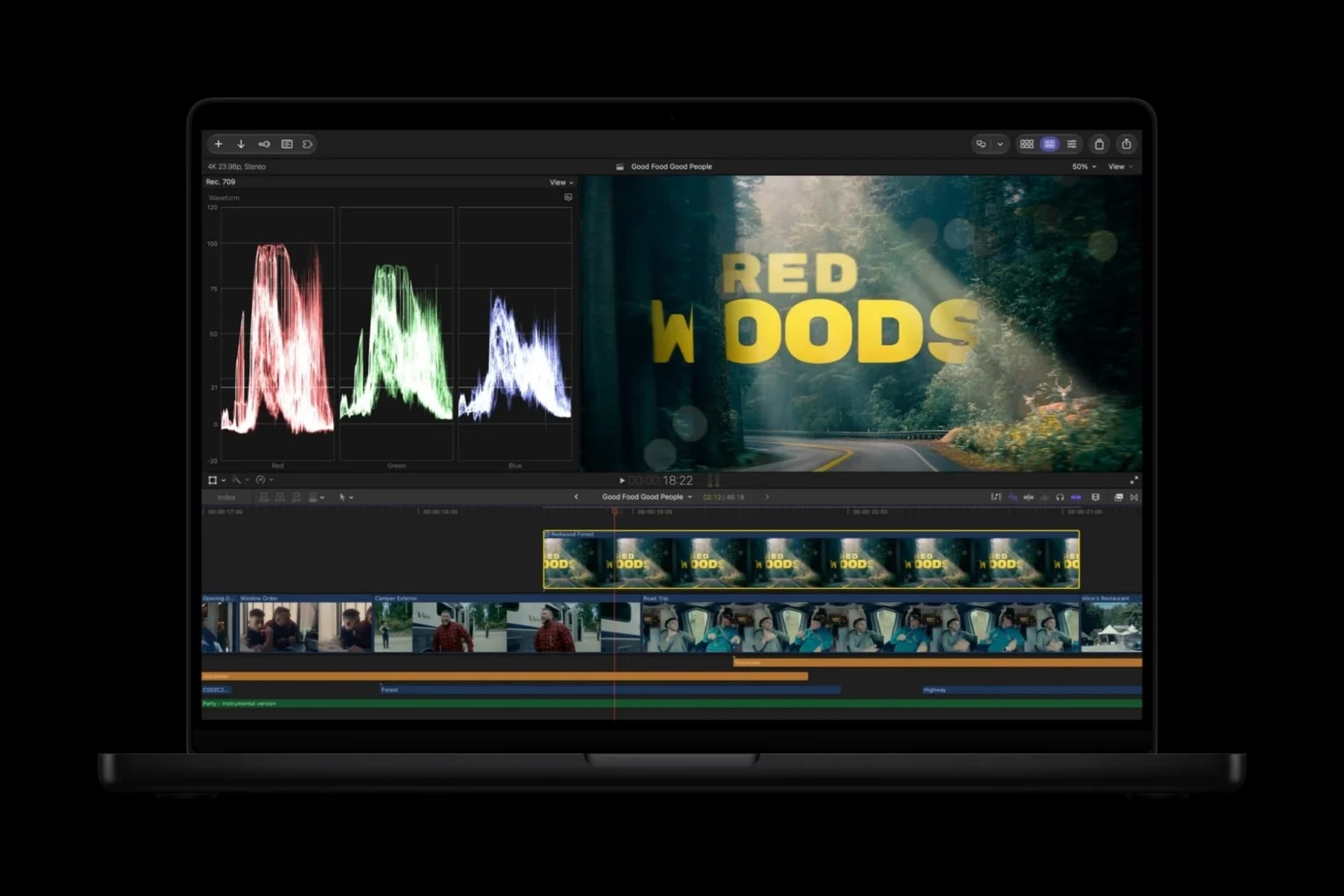
The upcoming Final Cut Pro update includes additional tools for motion tracking and colour grading. Tracking allows editors to follow objects or subjects throughout a video so that text, graphics or effects remain attached to them as they move.
Colour grading improvements should give editors more control over the final visual style of their footage. Professional colour work can dramatically change the mood of a scene, making these tools especially important for filmmaking and commercial video production.
Combining stronger tracking, rotoscoping and colour tools inside one application could reduce the need for complicated multi-app workflows.
Content Hub Brings Stock Material Directly Into Final Cut Pro
Final Cut Pro will also gain direct access to Apple's Content Hub, providing users with a curated library of stock material that can be used within projects.
Instead of leaving the application to search for additional assets, editors can browse available material from within their existing workflow. This could be useful when creators need supplementary footage, graphics or other visual elements quickly.
Integrated content libraries are becoming increasingly common across creative software because they reduce interruptions during production. Apple appears to be taking the same approach by placing more resources directly inside Final Cut Pro.
Advanced Image Generation Is Coming To Final Cut Pro
Artificial intelligence is also playing a larger role in the video editor. Apple says the update will introduce more advanced image-generation capabilities, providing creators with additional ways to produce visual assets for their projects.
Generated imagery could potentially help with concept development, backgrounds, supporting artwork or other visual material that would otherwise require separate creation tools. The key advantage is that these capabilities are being incorporated directly into the broader creative environment.
Rather than treating generative AI as a separate product, Apple appears to be embedding it into the workflows where creators are already working.
Transcription Expands To 23 Additional Languages
Final Cut Pro's transcription capabilities are also receiving a significant language expansion. The new version adds support for 23 additional transcription languages, making automated speech-to-text features useful to a much wider range of creators.
Transcription can speed up editing significantly, particularly for interviews, documentaries, podcasts and other dialogue-heavy productions. Editors can work with text representations of spoken content instead of repeatedly searching through video manually.
Broader language support should also make Final Cut Pro more practical for international productions and multilingual content creators.
Final Cut Pro And Pixelmator Pro Work More Closely Together
Apple is improving the connection between Final Cut Pro and Pixelmator Pro as part of the update. Users will be able to open an image from a Final Cut Pro timeline directly in Pixelmator Pro for editing.
Once the image has been modified, the changes are automatically saved back into the Final Cut Pro project. There is no need to export the file separately and then import the updated version again.
This seemingly small improvement could make a noticeable difference during complex projects where still images frequently need adjustment. Reducing manual file management helps keep creators focused on the work itself.
Pixelmator Pro Gains Generative Fill
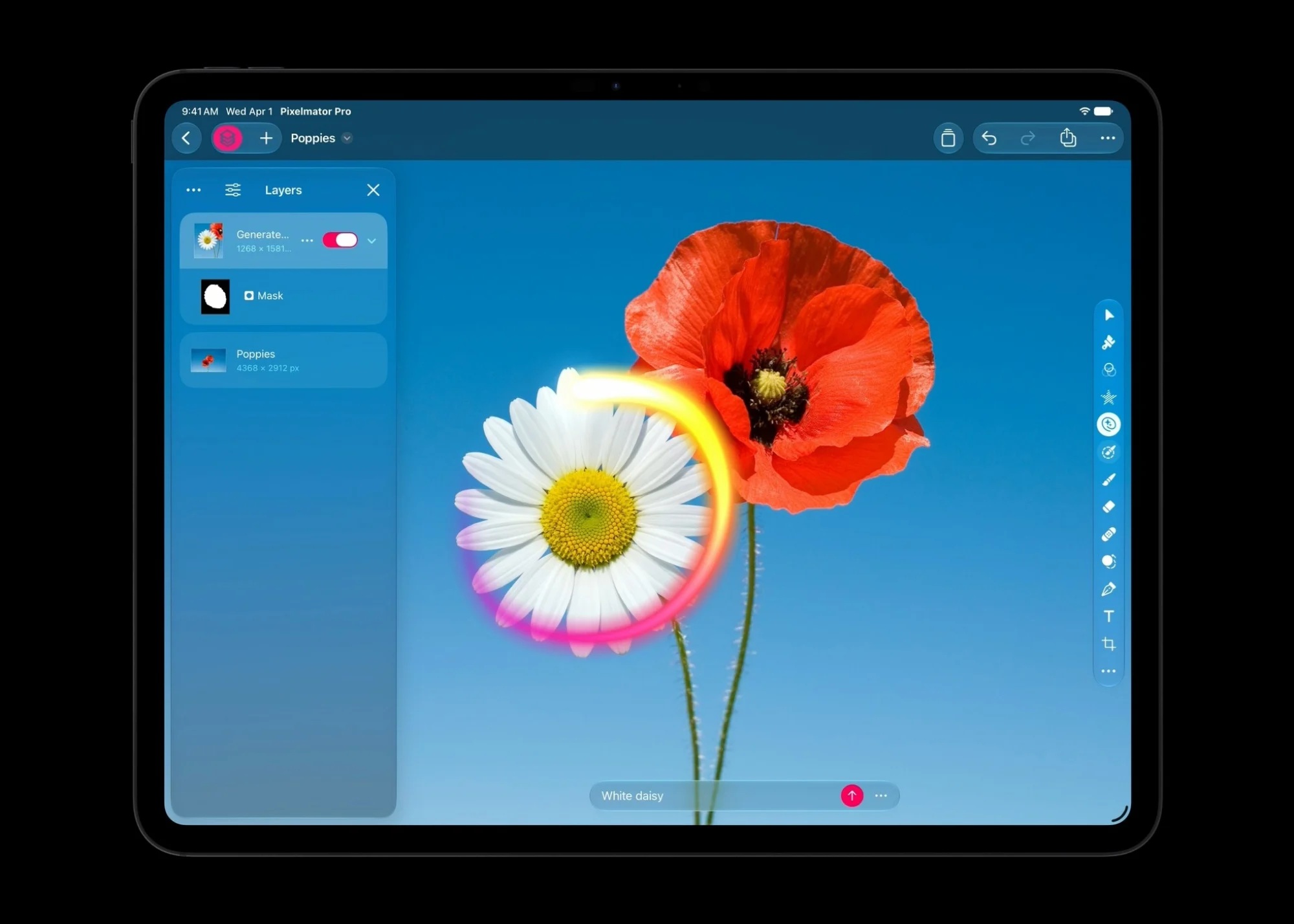
Pixelmator Pro is receiving one of the most significant AI additions through a new Generative Fill tool. Users can select part of an image and describe what they want to add, remove or change using natural language.
The application then generates the requested modification within the selected region. Existing selection tools can be used to control exactly which part of the image is affected.
This gives creators another option for making substantial image edits without manually rebuilding every element from scratch.
Generative Fill Attempts To Match The Original Image
One of the biggest challenges with generative image editing is making newly created content look like it genuinely belongs in the original photograph. Pixelmator Pro's implementation is designed to account for lighting, perspective and texture when generating additional material.
That means an inserted object should theoretically follow the direction of the existing lighting and fit naturally into the surrounding environment. Perspective also needs to match so the generated element does not appear obviously disconnected from the scene.
The more accurately these details are handled, the less manual correction designers need to perform afterwards.
Super Resolution Helps Keep Generated Details Sharp
Pixelmator Pro's existing Super Resolution technology also works alongside the new generative tools. Apple says this helps maintain sharpness and detail when new elements are created or images are modified.
Generative editing can occasionally produce softer or less detailed areas than the original material. Resolution-enhancement technology can help reduce those differences and create a more consistent final result.
The combination suggests Apple is focusing not only on generating new content but also on making that content visually convincing inside professional projects.
Logic Pro Receives A Liquid Glass Redesign
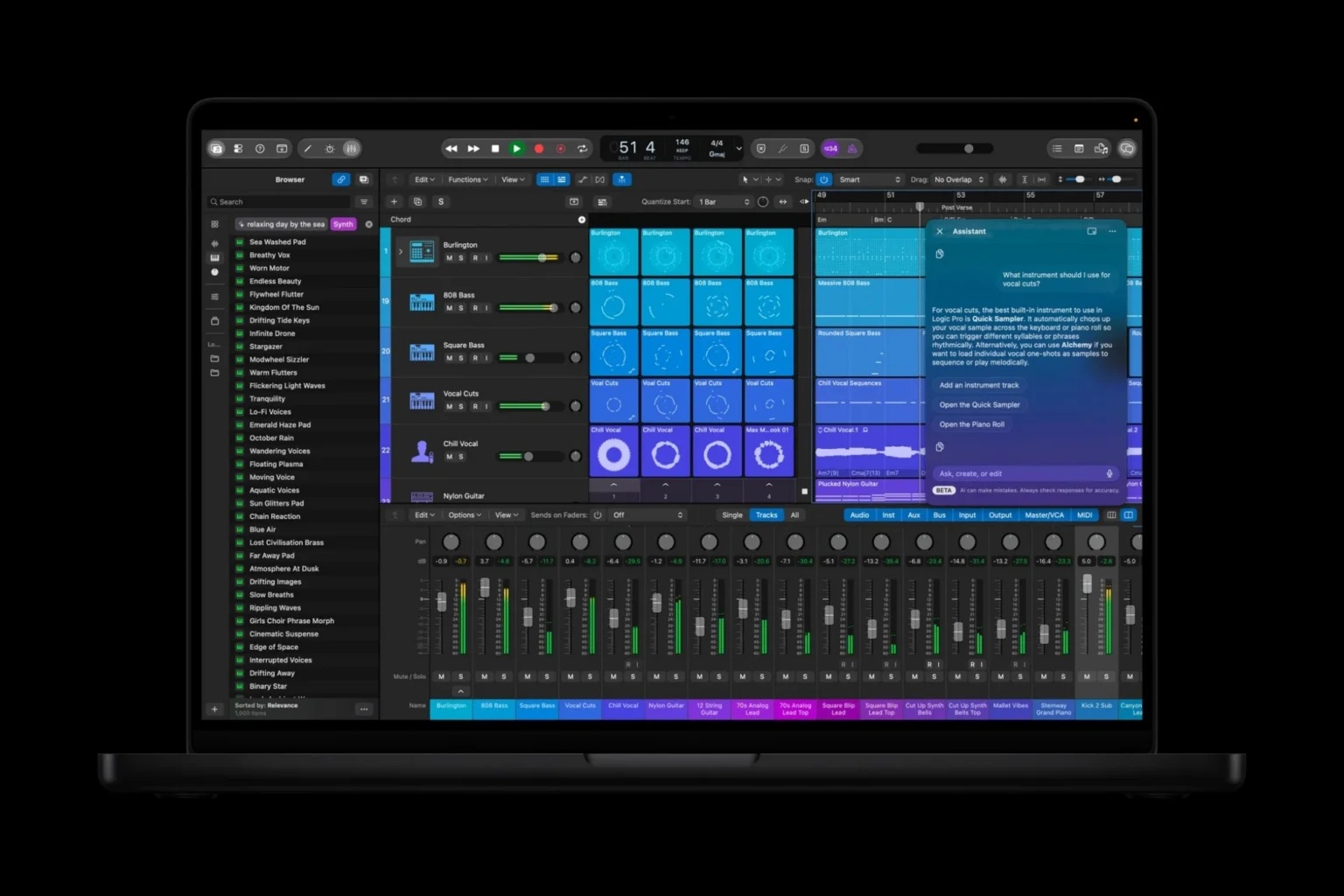
Apple is also updating Logic Pro for Mac and iPad, including a refreshed visual interface based around the company's Liquid Glass design language.
The new appearance brings Logic Pro more closely in line with Apple's wider software ecosystem while retaining the professional production tools musicians already use.
Interface changes alone are not the main focus, however. Apple is also adding several new capabilities covering beat production, songwriting, remixing and music creation.
New Tools Target Beat Makers And Songwriters
The updated Logic Pro includes additional tools designed for different stages of music production. Beat makers will gain new ways to develop rhythmic ideas, while songwriters receive tools intended to help move projects from early concepts into fuller arrangements.
Remixing and production workflows are being expanded as well. Apple appears to be trying to make Logic Pro useful throughout more of the creative process rather than focusing exclusively on traditional multitrack recording.
For musicians working entirely within Apple's ecosystem, the changes could reduce dependence on additional third-party tools for certain tasks.
Logic Pro Is Getting Its Own Intelligent Assistant
Another major addition is an intelligent assistant designed specifically around music production. The assistant can help creators navigate workflows, begin new songs and complete other production-related tasks.
Instead of searching through menus or documentation, users could potentially ask for help directly while working. The assistant can use the context of the current project to provide more relevant guidance.
For beginners, this could reduce the learning curve associated with professional music software. Experienced producers may also benefit when trying to find less frequently used tools or speed up repetitive tasks.
Mac Users Get A Reworked Logic Pro Browser
Logic Pro on Mac is receiving a redesigned Browser powered by on-device audio analysis. The system analyses audio locally so users can locate relevant material more easily.
Searching large sound libraries can consume a significant amount of production time, particularly when thousands of loops, samples and recordings are available. Better analysis and search could make it easier to find sounds based on their actual characteristics rather than relying solely on filenames or manually entered tags.
Keeping the analysis on-device may also help preserve responsiveness while avoiding unnecessary cloud processing.
Stem Splitter Is Being Improved
Apple is making additional improvements to Stem Splitter, the feature used to separate complete audio recordings into individual musical components.
Stem separation can isolate elements such as vocals, drums and instruments, giving producers more control over material that was originally mixed together. This can be particularly useful for remixes, sampling and restoring older recordings.
Improved separation quality should make the individual stems cleaner and more practical for professional production.
A New Producer Pack Is Included
Logic Pro users will also receive a new Producer Pack, expanding the collection of sounds and production resources available within the application.
Additional loops, instruments or related content can provide useful starting points for songwriting and experimentation. Apple's built-in sound libraries have long been one of Logic Pro's strengths because users receive a substantial collection of production material without needing to purchase everything separately.
The new pack expands that library alongside the broader Logic Pro update.
AI Assistance Is Also Coming To Keynote, Pages And Numbers
Apple's AI push extends beyond traditional creative applications. Keynote, Pages and Numbers will also receive an intelligent assistant designed to help users complete tasks without leaving the document they are working on.
The assistant uses contextual information from the current project to understand what the user is trying to accomplish. Someone creating a presentation, for example, could receive assistance relevant to the slides currently being edited rather than receiving generic answers disconnected from the document.
This deeper awareness could make AI significantly more useful than simply placing a chatbot beside an application.
Apple Models And OpenAI Work Together
Apple says the intelligent assistant is built using a combination of Apple's own models and OpenAI technology. The approach allows the company to use different AI systems depending on the task and context.
Apple's own models can handle many functions directly within its ecosystem, while external AI capabilities can provide additional intelligence where necessary.
The most important part from the user's perspective is that the assistance remains integrated into the application rather than requiring them to manually switch to another AI service.
Contextual Understanding Is The Key Feature
The usefulness of an assistant inside professional software depends heavily on context. An AI system that understands which document, spreadsheet or presentation the user is currently editing can provide much more practical assistance.
In Numbers, for example, an assistant could potentially help interpret information already present within a spreadsheet. In Pages, it could provide assistance related directly to the document being written.
The objective is to reduce interruptions by keeping AI assistance inside the user's active workflow.
MCP Support Opens The Door To External Agents
Another important addition is Model Context Protocol support, or MCP. This allows external AI agents to interact with application content and perform supported actions.
MCP is becoming increasingly relevant as AI moves beyond generating answers and begins working directly with software. Instead of simply suggesting what a user should do, an external agent can potentially interact with compatible applications on the user's behalf.
That could eventually create much more sophisticated automation across Creator Studio workflows.
External Agents Introduce New Possibilities
An agent connected through MCP could potentially work across several applications rather than remaining confined to one. A creative workflow might involve generating content, editing visual material and updating a presentation using several connected tools.
The potential productivity benefits are significant, particularly for repetitive tasks that currently require users to manually move information between applications.
At the same time, agent access introduces important questions around permissions and control. Applications need clear boundaries governing exactly what an external system is allowed to read or modify.
Apple Is Moving AI Into The Workflow Rather Than Creating A Separate Destination
One pattern across the Creator Studio update is that Apple is embedding AI directly into existing professional software rather than creating a completely separate AI application.
Final Cut Pro gains generative capabilities within the video-editing environment. Pixelmator Pro gets Generative Fill within its normal selection workflow, while Logic Pro receives an assistant that understands music-production tasks.
The same concept extends into Pages, Numbers and Keynote.
This approach makes AI feel more like another creative tool rather than a separate destination users need to visit.
Cross-App Integration Could Be Just As Important As AI
Although AI understandably receives much of the attention, tighter integration between applications could prove equally valuable in everyday use.
Opening a Final Cut Pro image directly in Pixelmator Pro and automatically returning the changes removes several unnecessary steps from a common workflow. Small improvements like this can save considerable time when repeated throughout large projects.
Professional users often care as much about eliminating friction as they do about receiving entirely new features.
Creator Studio Is Becoming A More Connected Ecosystem
The update suggests Apple wants Creator Studio applications to behave less like completely separate pieces of software and more like components of one creative environment.
Video editors can move more easily into image editing, AI assistants can understand content inside productivity applications and external agents can interact through MCP.
That connected approach could become increasingly valuable as creative workflows involve more applications and more types of media.
Instead of manually moving files between isolated tools, the ecosystem itself handles more of those transitions.
AI Does Not Replace The Creative Decision
Despite all the new generative capabilities, the tools remain centred around user direction. Pixelmator Pro's Generative Fill begins with a selection and description provided by the creator, while Final Cut Pro's tools assist specific editing processes.
The creative decision still originates with the person using the application. AI primarily reduces the amount of manual production work required to achieve the intended result.
This distinction is important because professional creative work depends heavily on judgement, taste and context rather than simply generating content quickly.
Existing Subscribers Receive The Update At No Additional Cost
Apple says the Creator Studio upgrades will begin rolling out in November. Existing subscribers will receive the new features as part of their current subscription without an additional charge.
This gives current users immediate access once the updated applications become available.
The rollout will cover the various applications included within Apple's Creator Studio ecosystem, although individual features may appear according to their respective application updates.
Creator Studio Costs RM29.80 Per Month
New users will need an Apple Creator Studio subscription to access the complete offering. In Malaysia, the subscription costs RM29.80 per month.
For people who use several of the included applications regularly, the bundled approach could offer better value than obtaining professional creative tools individually.
The subscription model also means Apple can continue adding features over time rather than tying major upgrades exclusively to entirely new software releases.
Annual Subscription Costs RM299
Apple also offers an annual subscription priced at RM299 per year.
For users expecting to remain subscribed throughout the year, the annual option provides a lower effective monthly cost compared with paying RM29.80 every month.
The value will ultimately depend on how many of the included applications the subscriber actually uses. A professional working across video, images, music and presentation tools may benefit significantly more than someone interested in only one application.
aApple Is Building Software To Match Its New Hardware
The timing of the Creator Studio update is particularly interesting because it arrives alongside a substantial refresh of Apple's professional hardware.
New MacBook Pro and iMac models provide more powerful processors, stronger AI capabilities and increasingly sophisticated displays. Creator Studio gives Apple software capable of taking greater advantage of that hardware.
The strategy reinforces Apple's traditional strength: controlling both the device and the software running on it.
Final Thoughts
The upcoming Apple Creator Studio update is much broader than simply adding a handful of AI features. Apple is expanding Final Cut Pro with MotionVFX integration, rotoscoping, tracking, colour grading, Content Hub access, image generation and support for 23 additional transcription languages.
Pixelmator Pro gains Generative Fill with automatic lighting, perspective and texture matching, while Logic Pro receives new music-production tools, improved Stem Splitter technology, a Producer Pack and its own intelligent assistant. Pages, Numbers and Keynote are also joining the AI push with contextual assistants powered by Apple models and OpenAI.
Perhaps just as important is the deeper integration between applications. Being able to move an image directly between Final Cut Pro and Pixelmator Pro without manually exporting and re-importing it is exactly the kind of small workflow improvement that professional users notice every day.
MCP support also points towards a future where external AI agents can participate directly in creative workflows rather than simply providing suggestions from the sidelines.
The upgrades arrive in November at no additional cost for existing subscribers, while new users can join Creator Studio for RM29.80 per month or RM299 per year.
Apple's direction is becoming increasingly clear. AI is not being treated as one standalone feature inside Creator Studio. It is gradually becoming another layer running throughout the entire creative workflow, helping users move faster while keeping the creative decisions in their own hands.











Comments 0