


Running a website on shared hosting always teaches you one important lesson: performance issues are not always caused by one obvious broken file or one badly written script. Sometimes, the real problem is a buildup of many small requests happening at the same time. That was exactly what happened again when Lemon Web Solutions hit another RAM usage spike, resulting in another round of Error 503 Service Unavailable messages.
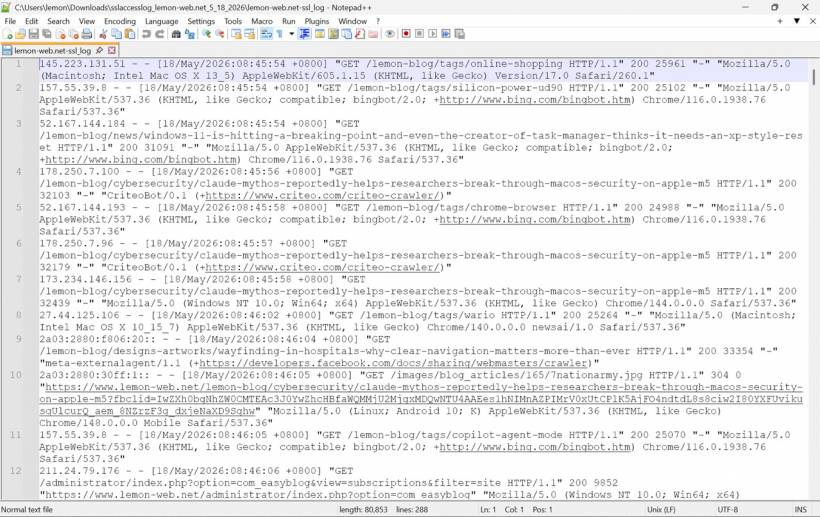
At first glance, the situation looked like the usual hosting resource limit issue. The website became unavailable, the server started rejecting requests, and the hosting environment was clearly under pressure. But after reviewing the access logs more closely, the pattern became clearer. The problem was not simply normal visitors browsing the website. A large part of the pressure came from crawler activity, repeated dynamic EasyBlog requests, captcha generation URLs, feed requests, and public blog pages being rendered by Joomla again and again instead of being served from cache.
Understanding What Triggered The 503 Issue
The 503 error itself was not the root problem. It was the final symptom. When the hosting account reached its RAM or process limit, the server simply could not continue serving new requests properly. On shared hosting, this kind of limit is very common because multiple websites share the same physical resources, and each account is restricted by its own CPU, RAM, and entry process allocation.
In this case, the logs showed that several bots and crawlers were accessing EasyBlog-related pages repeatedly. Some were hitting public blog articles, some were accessing tag and search pages, and others were triggering dynamic query URLs. These requests may look small individually, but every dynamic Joomla or EasyBlog page request can still involve PHP execution, database queries, template rendering, plugin loading, and module processing. When enough of those requests arrive close together, the load becomes noticeable.
Another issue was that some requests were touching EasyBlog captcha generation URLs. Captcha generation is useful for protecting forms and comments, but if bots are repeatedly calling the captcha endpoint, it becomes unnecessary server-side work. Even when the response size is small, the backend still needs to process the request. On a busy shared hosting account, that extra processing can contribute to a RAM spike.
Why Bot Traffic Needed To Be Controlled
Search engines and social media crawlers are part of running a public website. Some are useful because they help with indexing, previews, sharing, and visibility. However, not all crawlers provide the same value. Some third-party bots, SEO crawlers, content indexers, feed readers, social preview agents, and automated HTTP clients may repeatedly access pages without bringing meaningful human traffic.
The challenge is not to block everything blindly. Blocking major search engines without proper planning can affect SEO visibility. At the same time, allowing every crawler to freely access dynamic Joomla and EasyBlog URLs can create unnecessary load. The better approach is to identify the expensive paths and control how bots interact with them.
For this round of fixes, the focus was on reducing unnecessary dynamic requests before they reach Joomla. Cloudflare was used as the first layer of protection because it can challenge or block requests at the edge, before the hosting server needs to process them. That is much better than letting every bot request reach PHP and only dealing with the problem after the hosting account is already under pressure.
Fixing EasyBlog Captcha Bot Access
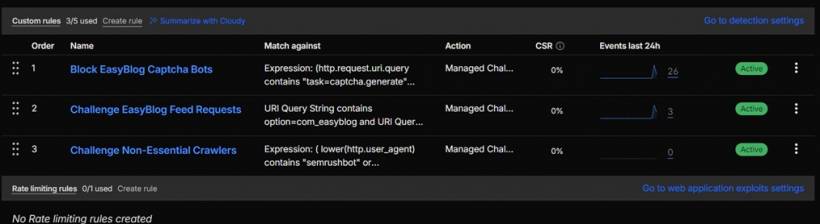
The first fix was to create a Cloudflare Custom Rule to challenge bot access to EasyBlog captcha generation URLs. These requests commonly include the task=captcha.generate query pattern. Since the logs showed repeated captcha generation activity, this became one of the first items to address.
Instead of using a direct block immediately, the action was set to Managed Challenge. This is a safer first step because Cloudflare can evaluate the request and apply a challenge where appropriate. It reduces the chance of accidentally affecting a legitimate visitor while still preventing automated crawlers from freely triggering captcha generation over and over again.
This fix is especially useful because captcha generation should not become a background workload for bots. Captcha should protect user interaction, not become another endpoint that crawlers can repeatedly request and add load to the server.
Controlling EasyBlog Feed Requests
The next fix was to create another Cloudflare Custom Rule for EasyBlog RSS and feed query URLs. Some feed-style requests use query patterns such as option=com_easyblog and format=feed. Feed generation can be more expensive than it looks because it may require Joomla and EasyBlog to query recent articles, prepare metadata, format the output, and return it dynamically.
RSS feeds are useful in some cases, but they should not become an uncontrolled load source. In this setup, feed-related requests were also placed behind a Managed Challenge. This allows useful or legitimate access to be reviewed while reducing repeated automated feed hits from generic clients and crawlers.
This is a good middle ground. It does not remove the feed system completely, but it prevents feed URLs from being treated like an unlimited free endpoint for automated traffic.
Updating Robots.txt For Cleaner Crawler Guidance
The next step was to update robots.txt. This does not replace Cloudflare rules because robots.txt is not a security control. Bad bots can ignore it completely. However, it is still useful for guiding polite crawlers away from unnecessary areas.
The revised robots.txt was updated to discourage crawler access to Joomla and EasyBlog dynamic URLs, search pages, paginated URLs, feed URLs, RSS URLs, captcha generation URLs, and EasyBlog feed query patterns. These are exactly the kind of URLs that usually provide low SEO value but can create high backend load.
The cleanup also removed a duplicate /dosgames/ entry. That was not a major performance issue, but it helped keep the file cleaner and easier to maintain.
This kind of robots.txt cleanup is important for long-term crawler hygiene. Public article pages should be discoverable, but internal search pages, repeated pagination, feed query URLs, and captcha endpoints do not need to be crawled aggressively.
Adding A Cloudflare Cache Rule For Public Blog HTML
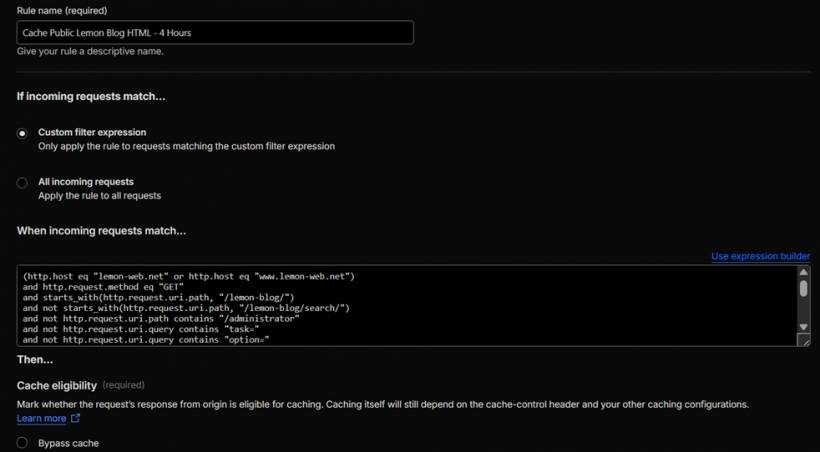
One of the bigger changes was creating a new Cloudflare Cache Rule specifically for public Lemon Blog HTML pages under /lemon-blog/. This was separate from the existing static asset cache rule.
The existing cache rule was already useful for static files such as CSS, JavaScript, images, fonts, videos, ZIP files, and other downloadable assets. However, it did not fully solve the issue of public blog article pages being rendered dynamically by Joomla and EasyBlog. Every time a bot or visitor requested an uncached article page, Joomla still had to process the page.
To reduce this, a new cache rule was created for public blog HTML pages. The Edge TTL was set to four hours. This means Cloudflare can serve cached public blog pages from the edge for a reasonable amount of time instead of repeatedly asking the origin server to regenerate the same page.
Four hours is a practical balance. It is long enough to reduce repeated PHP hits from bots and visitors, but not so long that updated blog content remains stale for too long. If an urgent correction is made to an article, the Cloudflare cache can still be purged manually.
Making The Cache Rule Safer
Caching HTML pages on a Joomla website needs extra care. Static files are easy to cache aggressively, but HTML can contain dynamic output, session-related content, reaction modules, comment areas, or logged-in user variations. Because of that, the cache rule had to be strict.
The rule was configured to only cache safe public GET requests. It excluded query patterns such as task=, option=, format=, type=rss, and start=. These exclusions help prevent Cloudflare from caching dynamic actions, feed pages, paginated query pages, and other non-standard outputs.
A cookie exclusion was also added using not http.cookie contains "joomla". This reduces the risk of caching a logged-in Joomla view. Since the website is actively managed and the administrator may browse the front end while logged in, this protection is important. Public cache should be for anonymous public visitors, not for session-based views.
The rule also needed a syntax correction. Cloudflare did not accept the initial path matching format, so the expression was corrected to use the proper starts_with(http.request.uri.path, "/lemon-blog/") syntax. This is one of those small configuration details that can stop a rule from deploying, even when the logic behind it is correct.
Preventing Error Pages From Being Cached
Another important part of the cache rule was the Status Code TTL configuration. Only successful 200–299 responses were configured to be cached for four hours. Redirects and client error responses were set to No store, and server error responses from 500 and above were also set to No store.
This is very important because caching an error page can create a confusing situation. If the origin server temporarily returns a 503 and Cloudflare caches that response, visitors may continue seeing the error even after the origin has recovered. The goal is to cache healthy public article pages, not temporary server failures.
Cloudflare's interface did not allow a simple 500–599 range in the expected way, so the workaround was to use a "greater than or equal to 500" status code rule with No store. That properly covers 500, 502, 503, 504, and other server-side error responses.
Fixing The Blog Reaction Module Issue
After deploying the HTML cache rule, one side effect appeared quickly. The blog reaction module stopped updating properly when clicked. That made sense because the cache rule was now affecting some public blog behavior, and the reaction module likely depended on AJAX or dynamic query responses.
This is a good reminder that performance tuning is not just about turning on caching. It is about caching the right things while excluding anything that needs to remain dynamic.
To fix this, the blog HTML cache rule was adjusted to exclude reaction and AJAX-style query patterns. Exclusions were added for terms such as ajax, reaction, ratings, vote, likes, and comment. After that, the cache was cleared so the updated behavior could take effect.
This adjustment kept the main benefit of caching public article HTML while preventing interactive blog features from being trapped behind stale cached responses.
Challenging Non-Essential Crawlers
Another fix was to create a Cloudflare Custom Rule to challenge non-essential crawlers. The rule included user agents such as SemrushBot, AhrefsBot, CriteoBot, YandexBot, TikTokSpider, Embedly, MuckRack, IAS Crawler, Proximic, GuzzleHttp, and newsai.
The purpose was not to block useful search traffic such as Googlebot or Bingbot. Instead, the focus was on reducing unnecessary crawler load from services that are less important to the website's regular visibility and audience.
Again, Managed Challenge was used instead of direct Block. This allows Cloudflare to slow down or challenge suspicious crawler activity without taking the most aggressive action immediately. It is a safer approach while monitoring the results.
For a small or medium website on shared hosting, this can make a meaningful difference. Reducing low-value automated traffic means more resources remain available for real visitors and important search engine crawlers.
Why Rate Limiting Was Skipped For Now
A rate limiting rule was reviewed but not implemented immediately. Since the higher-priority protections had already been added, it made sense to avoid using the limited Cloudflare Free plan rate limiting slot too quickly.
Rate limiting can still be useful later, especially if a single IP or crawler repeatedly hits EasyBlog search pages, tag pages, captcha URLs, or feed URLs within a very short time. However, it is better to monitor the effect of the current rules first before adding another control.
This avoids overcomplicating the setup. Too many rules added too quickly can make troubleshooting harder, especially if a legitimate feature suddenly stops working.
Why EasyBlog Comment And Captcha Settings Were Left Unchanged
EasyBlog comment and captcha settings were also reviewed as a possible optimization area, but no changes were made because the current captcha and comment behavior is still intentionally allowed.
This is a reasonable decision. Not every optimization needs to remove a feature. The better approach is to keep the feature available while making sure bots do not abuse the related endpoints unnecessarily. Since Cloudflare rules now challenge bot access to captcha generation, the site can keep the existing EasyBlog behavior while reducing unwanted automated load.
The Fixes Carried Out
The work completed during this tuning session included several practical fixes across Cloudflare, caching, and crawler control:
• Created a Cloudflare Custom Rule to challenge bot access to EasyBlog captcha generation URLs, especially requests using task=captcha.generate.
• Set the EasyBlog captcha bot rule action to Managed Challenge instead of direct Block, reducing the risk of affecting legitimate users.
• Created a Cloudflare Custom Rule to challenge EasyBlog RSS and feed query URLs using option=com_easyblog and format=feed.
• Updated robots.txt to discourage crawlers from accessing unnecessary Joomla and EasyBlog dynamic URLs.
• Added crawler restrictions in robots.txt for EasyBlog search pages, paginated URLs, feed URLs, RSS URLs, captcha generation URLs, and EasyBlog feed query patterns.
• Created a new Cloudflare Cache Rule for public Lemon Blog HTML pages under /lemon-blog/.
• Set the public blog HTML cache Edge TTL to four hours.
• Configured the blog HTML cache rule to only cache safe public GET requests.
• Excluded risky and dynamic query patterns from the blog HTML cache rule, including task=, option=, format=, type=rss, and start=.
• Added a Joomla cookie exclusion to reduce the risk of caching logged-in Joomla views.
• Configured Status Code TTL so only successful 200–299 responses are cached for four hours.
• Configured 300–499 responses as No store.
• Configured 500 and above responses as No store, helping prevent 503 and other error pages from being cached.
• Fixed the Cloudflare expression syntax by replacing the incorrect path matching format with the proper starts_with(http.request.uri.path, "/lemon-blog/") format.
• Adjusted the blog HTML cache rule after discovering the blog reaction module was not updating.
• Purged and cleared cache after rule adjustments so the updated behavior could take effect.
• Created a Cloudflare Custom Rule to challenge non-essential crawlers.
• Included non-essential crawler user agents such as SemrushBot, AhrefsBot, CriteoBot, YandexBot, TikTokSpider, Embedly, MuckRack, IAS Crawler, Proximic, GuzzleHttp, and newsai.
• Chose to skip the Rate Limiting rule for now because the higher-priority protections were already implemented.
• Chose to skip EasyBlog captcha and comment setting changes because the current captcha and comment behavior should remain allowed.
What This Means Going Forward
These changes should reduce unnecessary backend processing, especially from crawler traffic. Public blog pages can now be served more efficiently from Cloudflare cache, while sensitive or dynamic URLs are excluded from caching. Bots that repeatedly hit captcha, feed, or non-essential crawler patterns are now more likely to be challenged before they reach Joomla.
That does not mean the website is permanently immune from future 503 issues. Shared hosting still has limits, and a sudden traffic burst can still create pressure. However, the site is now in a better position because more traffic is being filtered or cached before it reaches the origin server.
The next step is monitoring. Cloudflare Security Events, Cache Analytics, hosting RAM usage, entry processes, CPU usage, and access logs should be watched closely over the next 24 to 48 hours. If the same kind of spike happens again, the next decision would be whether to tighten crawler rules, introduce rate limiting, or move forward with a hosting upgrade.
Final Thoughts
This round of troubleshooting shows how a website performance issue is not always solved by one single fix. The RAM spike was the result of several small pressures stacking together: crawler traffic, EasyBlog dynamic pages, captcha generation, feed requests, and uncached public article pages. By controlling bot access, improving caching, excluding dynamic behavior properly, and avoiding the caching of error responses, Lemon Web Solutions now has a stronger setup against repeated 503 incidents.
The most important lesson is that caching must be handled carefully. It is not enough to cache everything blindly. Public content should be cached, dynamic actions should be excluded, logged-in sessions must be protected, and error pages must never be stored as if they are normal content. With these fixes in place, the site should be lighter on the server, more resilient during crawler activity, and better prepared while the longer-term hosting upgrade plan remains on the table.











Comments 0