

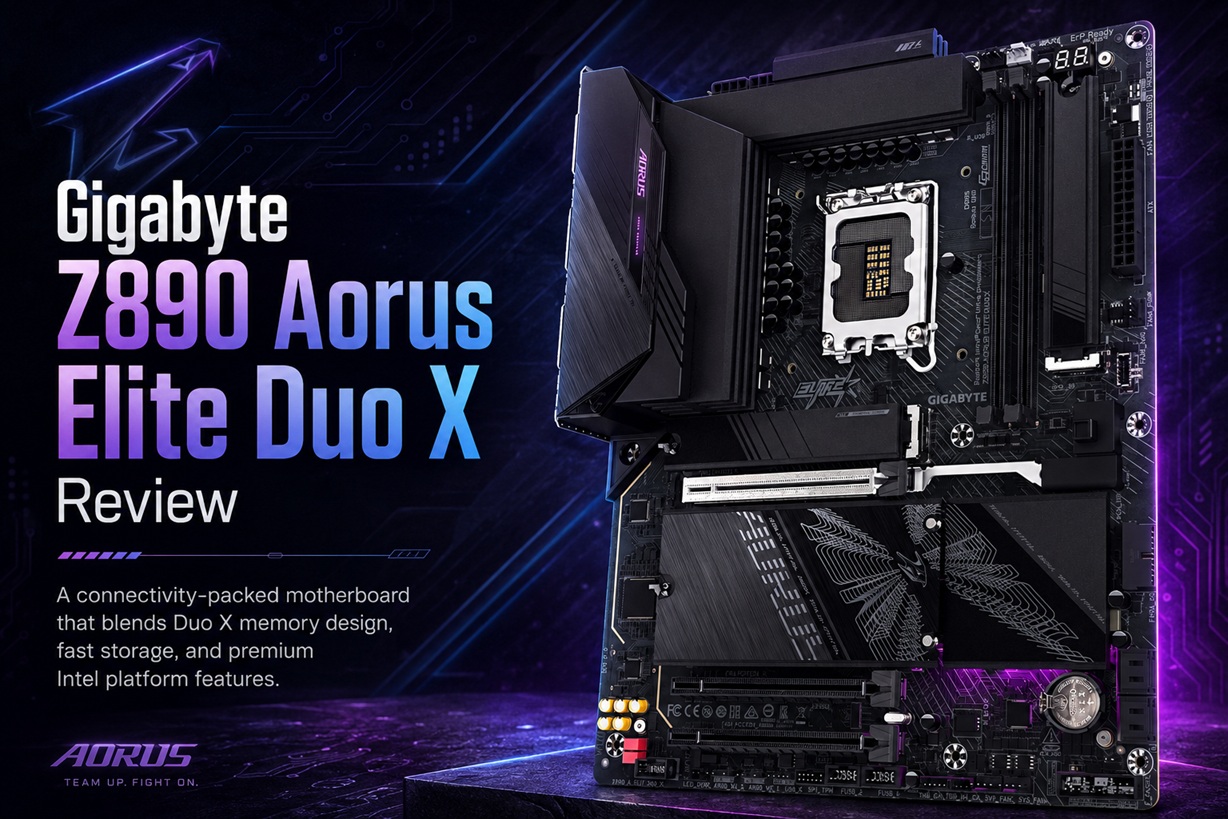
The Gigabyte Z890 Aorus Elite Duo X is not simply another colour variation or minor revision of an existing Z890 motherboard. It arrives alongside Intel's Core Ultra 200S Plus desktop processors with a noticeably different approach to memory, storage and internal layout.
Instead of providing the four DDR5 slots normally expected on a full-sized ATX motherboard, Gigabyte has reduced the design to two. That decision may initially look like a downgrade, but it forms the foundation of the board's D5 Duo X architecture, which prioritises cleaner memory signalling, higher speeds and support for emerging high-capacity CQDIMM modules.
At the RM1,499 asking price quoted for the Malaysian review unit, the Z890 Aorus Elite Duo X sits somewhere between an upper-mid-range gaming board and an entry-level enthusiast model. It is not inexpensive, but Gigabyte has filled it with five M.2 slots, PCIe 5.0 graphics support, USB4, 5GbE networking, Wi-Fi 7 and several genuinely useful tool-free installation features.
The result is a motherboard with plenty of connectivity and upgrade potential—provided its unusual two-slot memory design fits the kind of system being built.
Designed for Intel's Core Ultra 200S Plus Generation
The Z890 Aorus Elite Duo X uses Intel's LGA1851 socket and Z890 chipset, supporting Core Ultra desktop processors from Series 2. Gigabyte introduced the board as part of its refreshed Z890 Plus lineup for Intel's Core Ultra 200S Plus processors, including the unlocked Core Ultra 7 270K Plus and Core Ultra 5 250K Plus.
Intel launched the Core Ultra 7 270K Plus with 24 cores and the Core Ultra 5 250K Plus with 18 cores. Both are unlocked K-series chips intended for performance-focused desktop systems, making a well-equipped Z890 board the natural platform for users interested in tuning, higher-speed memory and broader connectivity.
Existing Core Ultra 200S processors remain supported, so buyers are not restricted to the newer Plus-branded models. Nevertheless, the board's memory architecture and updated performance features clearly target users assembling a fresh Intel system rather than those making a minor upgrade to an older platform.
The Two Memory Slots Are the Main Attraction
The most obvious feature is the pair of DDR5 memory slots positioned beside the processor socket.
Four slots remain standard on most ATX boards, so seeing only two can initially make the Z890 Aorus Elite Duo X appear closer to a Mini-ITX design. However, the reduced slot count is intentional.
Every additional memory slot adds electrical loading and makes clean signal transmission more difficult, particularly at very high DDR5 speeds. By providing a more direct path between the processor's memory controller and the two installed modules, Gigabyte can reduce signal interference and improve the board's chances of maintaining high-frequency memory configurations.
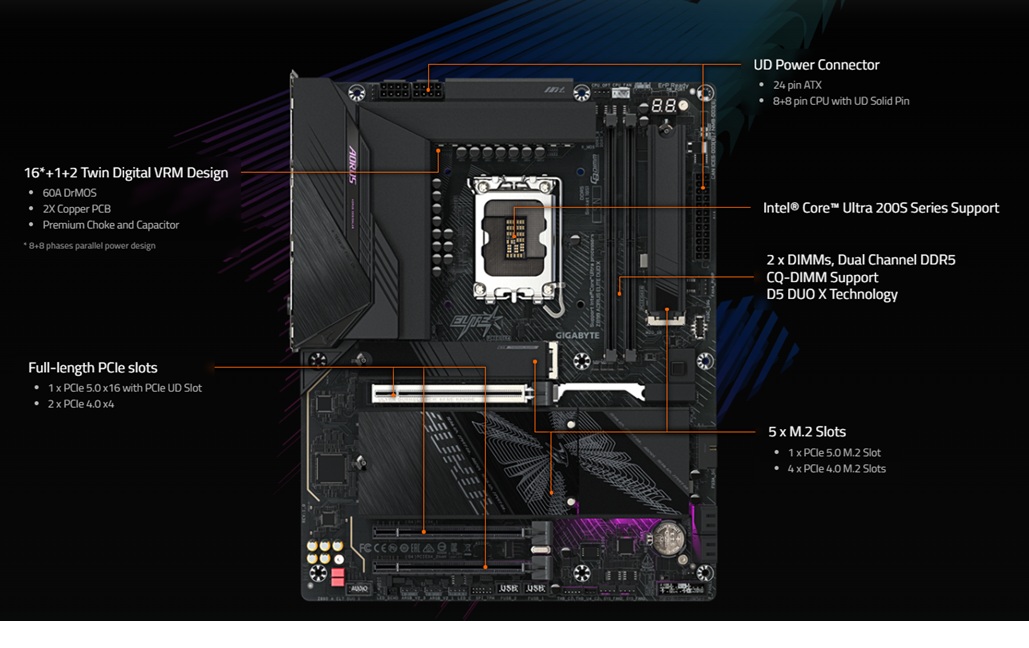
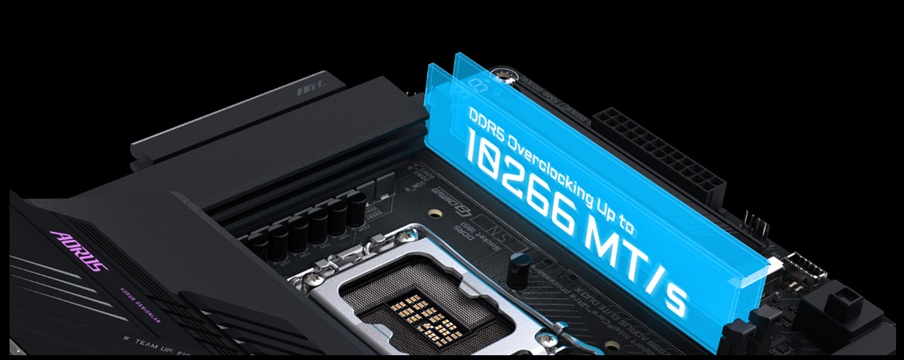
Gigabyte markets this arrangement as D5 Duo X Technology, combining a two-DIMM topology with circuit optimisation, BIOS tuning and support for both conventional DDR5 modules and newer CQDIMMs. The company advertises overclocked memory speeds reaching as high as 10,266MT/s under suitable configurations, although actual results depend heavily on the processor, module capacity, memory kit and qualified vendor list.
This is not a guarantee that every DDR5 kit will reach five-digit speeds. Extreme memory figures normally require carefully selected modules, lower capacities and substantial tuning. For an ordinary gaming or productivity build, stable operation at a sensible XMP speed remains more valuable than chasing a record frequency.
For gaming, however, 256GB is difficult to justify. Most gaming systems remain comfortable with far less memory, and early high-density CQDIMMs are unlikely to be cheap.
The support is therefore more valuable as evidence of the board's long-term flexibility than as something the typical buyer will immediately use. Someone purchasing the board today can install an ordinary two-module DDR5 kit and consider higher-capacity CQDIMMs later if prices and availability improve.
Two Slots Also Create a Different Upgrade Path
A conventional four-slot motherboard allows a user to begin with two modules and add another pair later.
The Duo X does not offer that option. Once both slots are occupied, increasing capacity means replacing the existing modules rather than adding to them.
That is not necessarily a problem, but it makes the initial memory decision more important. A buyer considering 64GB in the future may be better served by installing a 2x32GB kit immediately instead of beginning with 2x16GB and replacing it later.
The benefit is that two matched modules are generally easier for the memory controller to handle than four independently populated DIMMs. The drawback is less flexibility for inexpensive incremental upgrades.
Whether the arrangement is an advantage therefore depends on the user. Enthusiasts chasing memory speed may appreciate it, while budget-conscious builders who prefer gradual expansion may find it limiting.
Five M.2 Slots Provide Serious Storage Capacity
Removing two memory slots also gave Gigabyte more room to rearrange the upper-right area of the board.
The Z890 Aorus Elite Duo X carries five M.2 storage slots:
That is an excellent amount of storage expansion for a motherboard in this price range. A user could install a fast PCIe 5.0 drive for the operating system and applications, then populate the remaining slots with more affordable PCIe 4.0 SSDs for games, recordings, project files and backups.
Gigabyte also provides heatsink coverage and tool-free installation mechanisms across the M.2 area. The company's EZ-Latch Click, EZ-Latch Plus and M.2 EZ-Flex designs reduce the need to handle tiny screws when installing drives or removing their heatsinks.
These features may sound minor compared with processor support or memory speed, but they make a noticeable difference during an actual PC build. M.2 screws are easy to lose, particularly once a graphics card and cooling system have already been installed.
The board also includes four SATA 6Gbps ports for conventional hard drives and 2.5-inch SSDs.
Only One M.2 Slot Uses PCIe 5.0
Having five M.2 positions is impressive, although only the primary slot supports PCIe 5.0.
An additional Gen5 slot would have strengthened the board's long-term storage credentials, especially at a price approaching enthusiast territory. Some builders may reasonably expect more than one next-generation SSD connection.
In practice, this limitation is unlikely to affect most users today.
PCIe 4.0 SSDs remain extremely fast for gaming, Windows, content creation and general productivity. Even many demanding users will notice little difference between a high-quality Gen4 drive and a Gen5 model outside sustained transfers or specialised workloads.
There are also thermal and cost considerations. Gen5 SSDs tend to run hotter and remain more expensive, so populating several Gen5 slots is unlikely to be a priority for the average system.
The board would have been more future-proof with two, but one Gen5 M.2 slot and four Gen4 slots still form a practical storage arrangement.
The Expansion Slots Need Closer Reading
The board has three full-length physical PCIe slots, but they do not all operate with the same bandwidth.
The reinforced primary slot supports PCIe 5.0 x16, making it suitable for a modern graphics card. The other two full-length slots use PCIe 4.0 connections running electrically at x4 rather than x16.
That distinction matters because their physical appearance may suggest more bandwidth than they actually provide.
The secondary slots remain useful for:
They are not ideal for a second high-performance graphics card requiring a full x16 connection. Multi-GPU gaming is largely irrelevant today, but workstation users should still understand the available lane configuration before purchasing.
The primary slot includes Gigabyte's reinforced PCIe UD Slot and an EZ-Latch release mechanism, which should make removing a large graphics card easier when access around the socket is restricted.
Power Delivery Is Substantial Without Being Excessive
Gigabyte describes the board as having a 16+1+2 digital power design.
The 16 Vcore phases use 60A DrMOS components in an 8+8 parallel configuration. A separate phase serves the integrated graphics-related rail, while two additional phases support the system agent and processor-connected functions.
Calling it a 19-phase design is technically understandable, but not all 19 phases perform the same role. The more useful interpretation is that the board offers a strong 16-phase CPU power section supported by additional rails.
On paper, this is enough for the unlocked Core Ultra processors the board is designed to support, assuming appropriate cooling and a properly configured power supply.
The board uses dual eight-pin CPU power connectors at the top. Their placement appears relatively accessible, although builders should still connect them before installing a large top-mounted radiator because the available working space can quickly disappear.
Large VRM heatsinks, a 2-ounce copper PCB and 5W/mK thermal pads support the power system. Gigabyte also includes its reduced-load socket mechanism, which is intended to improve processor contact and reduce pressure-related bending around the heat spreader.
Overclocking Is Available, but It Is Not the Only Reason to Buy
The Z890 chipset and unlocked Intel K-series processors allow CPU and memory tuning.
Gigabyte includes its Ultra Turbo Mode presets, DDR5 XMP controls and BIOS-based performance options. Its more aggressive automatic modes adjust processor and memory behaviour with minimal manual input, although the company warns that changing frequencies and voltages can affect stability, component lifespan and warranty conditions.
For many users, the sensible approach will be to enable the appropriate XMP profile, confirm stability and leave the more aggressive CPU settings alone.
A board can have excellent overclocking options without every buyer needing to use them. Strong power delivery can also improve stability under sustained workloads at standard settings, particularly when paired with a higher-end processor.
Rear Connectivity Is Mostly Excellent
The rear input and output panel is one of the board's strongest areas.
It includes:
The USB4 Type-C connection also supports DisplayPort Alternate Mode, allowing compatible displays or docks to carry video through the same port. A separate front-panel header supports another USB-C connection at up to 10Gbps when used with a compatible case.
The rear DisplayPort connection replaces the HDMI output found on many mainstream motherboards. This should not matter to anyone installing a dedicated graphics card, but users relying on integrated graphics should confirm that their monitor supports DisplayPort or use the USB4 video output with suitable equipment.
Networking is particularly strong. The board combines a Realtek 5GbE controller with an Intel Wi-Fi 7 BE200 module and Bluetooth 5.4. The wireless antenna uses Gigabyte's combined EZ-Plug connector, making it easier to attach than two small threaded cables.
One Rear USB-C Port Feels Restrictive
The biggest weakness in the rear panel is that there is only one USB-C connector.
It is an excellent connector—USB4 with up to 40Gbps and DisplayPort support—but users increasingly own multiple Type-C devices. External SSDs, phone cables, audio interfaces, docks and capture equipment may all compete for the same port.
A second rear Type-C connection, even at 10Gbps or 20Gbps rather than USB4 speed, would have made the board considerably more flexible.
Gigabyte has provided a front-panel USB-C header, but that only helps when the case includes the necessary port. It does not fully replace another connection at the back, especially for permanent devices.
The board compensates with nine rear USB-A ports, but the Type-A-to-Type-C balance feels dated for a newly introduced premium-leaning platform.
Audio Is Better Than the Basic Motherboard Standard
Gigabyte uses a Realtek ALC1220 codec accompanied by WIMA audio-grade capacitors.
This is a stronger integrated audio implementation than the basic codecs commonly found on lower-cost motherboards. It should be sufficient for ordinary headphones, powered speakers, gaming headsets and general media use. The rear output also supports DSD playback through the appropriate connection and software configuration.
Dedicated audio professionals may still use an external interface or DAC, but most users should not need to purchase a separate sound card.
The Layout Is Friendly to PC Builders
Gigabyte has placed considerable emphasis on installation convenience.
M.2 heatsinks and drives can be handled without tiny screws, the main graphics slot has a quick-release mechanism, and the Wi-Fi antenna uses a simplified connector. Rear buttons provide functions such as Q-Flash Plus, Clear CMOS, power and a configurable multi-key control.
The board also includes an integrated rear I/O shield, removing another small component that can be forgotten during assembly.
Fan and pump headers are distributed around the PCB, while the memory area has additional room because only two DIMM slots are present. The extra space makes the board feel less crowded despite carrying five M.2 positions and three full-length PCIe slots.
These improvements do not increase frame rates, but they can make initial assembly, maintenance and future upgrades far less frustrating.
The RM1,499 Positioning Is Slightly Complicated
At RM1,499, the Z890 Aorus Elite Duo X is difficult to describe as a conventional mid-range motherboard.
It offers several premium features:
At the same time, it makes some visible compromises. Only one M.2 slot supports PCIe 5.0, the rear panel has a single USB-C port and the secondary full-length PCIe slots operate at x4.
This places the board in an unusual middle position. It is more advanced than a typical gaming motherboard, but it does not provide every luxury expected from a flagship model.
Its value therefore depends heavily on which features matter to the buyer. Someone who needs five SSD positions, 5GbE and high-speed memory support may find the price reasonable. Someone building a straightforward gaming PC with one SSD and ordinary DDR5 may be paying for capabilities that remain unused.
Who Is This Motherboard Really For?
The Z890 Aorus Elite Duo X makes the most sense for a user building around an Intel Core Ultra 200S or 200S Plus processor who wants strong networking, plenty of storage and a relatively advanced memory platform.
It is particularly suitable for:
It is less compelling for budget systems or buyers who want to reuse four existing DDR5 modules. The two-slot design should be treated as a deliberate platform decision rather than something that can be worked around later.
Final Thoughts
The Gigabyte Z890 Aorus Elite Duo X is a well-rounded motherboard with one defining idea: use two memory slots more effectively instead of simply providing four.
Its D5 Duo X layout supports extremely fast memory configurations and emerging 128GB CQDIMMs, allowing the board to reach 256GB without abandoning its two-DIMM signal advantages. Five M.2 slots, PCIe 5.0 graphics support, USB4, 5GbE and Wi-Fi 7 give it an impressive connectivity package.
There are still compromises. A second PCIe 5.0 M.2 connection would have been welcome, and the single rear USB-C port feels unnecessarily restrictive. The two-slot memory layout also requires buyers to plan capacity upgrades more carefully.
Even with those limitations, the board delivers a thoughtful combination of performance, expansion and installation convenience. It is not the obvious choice for every Core Ultra system, but for someone who understands the two-DIMM approach and expects to use its broad storage and networking capabilities, the Z890 Aorus Elite Duo X is easy to recommend.











Comments 1