


Many e-commerce websites do not lose revenue because of one major design failure. More often, they lose it quietly through small points of friction. A hidden search bar here. A confusing checkout field there. A cart summary that disappears on mobile. A trust message shown too early, or not shown at all.
Each issue may only cost a small number of customers. But when these problems happen across the entire shopping journey, the effect can be significant. A customer may want to buy, but the experience keeps giving them small reasons to hesitate, abandon the cart, or leave the site completely.
The good news is that many of these problems do not require a complete redesign. In fact, some of the highest-impact improvements in e-commerce UX are small, focused changes. They are the kind of changes that make the buying process feel easier, clearer, and safer.
For clients, this is where UX becomes very practical. Better design is not just about nicer visuals. It is about removing the tiny obstacles that stand between interest and purchase.
Why Small UX Problems Become Big Revenue Problems
A typical e-commerce journey has many steps. Users browse products, search for specific items, compare options, check prices, review shipping information, add items to cart, enter personal details, choose payment methods, and finally place the order.
At every step, there is a chance for doubt to enter.
Sometimes the user is unsure whether they found the right product. Sometimes they cannot see the total cost clearly. Sometimes the checkout form feels too long. Sometimes they are asked to create an account before they are ready. Sometimes the site simply feels less trustworthy at the exact moment money is involved.
These may look like minor issues from the business owner's side, but from the customer's side, they create friction. And friction kills conversion.
The goal of e-commerce UX is not to pressure users into buying. It is to make the buying decision feel natural, clear, and low-risk.
Make the Search Bar Easy to Find
One of the simplest but most important fixes is to make the search bar visible. Many e-commerce websites hide search behind a small magnifying glass icon, especially on mobile or minimalist layouts. While that may look clean, it often creates unnecessary friction.
Customers who use search usually have stronger buying intent. They are not just browsing casually. They may already know the product, brand, model, or category they want. Hiding the search box makes these users work harder than necessary.
A visible search field helps users move faster. It tells them immediately, "You can find what you need here."
A better approach is to use a clear search bar with helpful placeholder text such as "Search for products or brands." This is more useful than an icon alone because it invites action and makes the purpose obvious.
This small change can be especially valuable for stores with a large catalogue. The more products a site has, the more important search becomes.
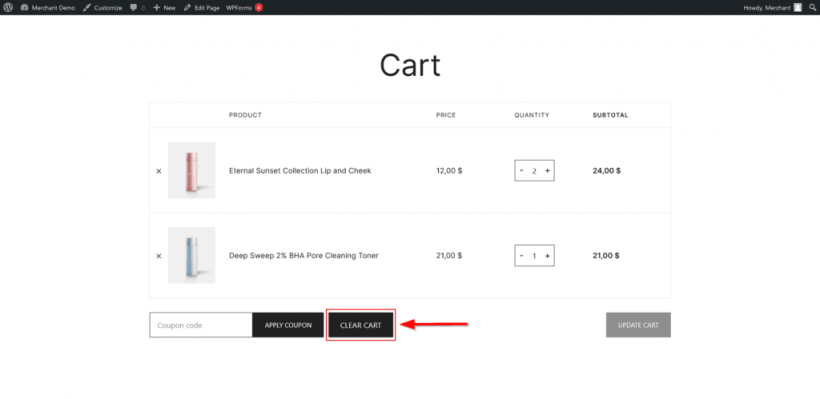
Remove the Clear Cart Button
Some e-commerce platforms include a "Clear Cart" or "Remove All" button by default. On paper, this may seem like a useful convenience. In reality, it rarely helps the business or the customer.
A customer who has added several items to cart has already shown purchase intent. Giving them a single button to remove everything creates unnecessary risk. It can lead to accidental clicks, frustration, and abandoned purchases.
Most users do not need a "clear everything" button. If they want to remove an item, they can remove it individually. That gives them more control and reduces the chance of wiping out their cart by mistake.
This is one of those UX decisions where removing a feature can actually improve the experience. Not every button deserves to exist, especially when it works against the business goal.
Keep the Subtotal Visible
Price clarity is one of the most important parts of e-commerce UX. When users cannot quickly see how much they are spending, they may feel uncertain or anxious. That uncertainty can lead them to pause, leave the cart, or abandon checkout altogether.
The cart subtotal should be easy to find and visible at the right moment. Users should not need to scroll, click another page, or enter shipping details just to understand the base cost of their order.
A strong cart design should show the subtotal clearly and update it in real time when users change quantities or remove items. Shipping and tax calculations can be shown separately, but the user should always understand the current product total.
This reduces what I would call "checkout anxiety." When users feel financially uncertain, they hesitate. When the cost is clear, they are more likely to continue.
Do Not Force Account Creation Before Checkout
Mandatory account creation is one of the most common conversion killers in e-commerce. Many customers simply want to buy something and leave. They do not want to create another password, confirm another account, or join another system just to complete a purchase.
The worst time to add extra work is right before payment. At that stage, the user has already decided to buy. The site should reduce friction, not introduce new conditions.
Guest checkout should be clear, visible, and treated as a proper option. It should not be hidden in small grey text below the login box. It should not feel like the "less preferred" path. A returning customer can sign in, but a new or one-time customer should be able to purchase without unnecessary registration.
After the order is completed, the site can offer account creation as an optional convenience. At that point, the customer already has a reason to save their details, track the order, or return later.
The key is timing. Ask too early, and it becomes friction. Ask after purchase, and it becomes useful.
Place Trust Signals Where They Actually Matter
Trust badges, guarantees, and security messages are often placed on homepages, but that is not always where users need reassurance. Most customers are not worried about payment security while casually browsing products. They become more cautious when they are about to enter personal information or payment details.
That is where trust signals should appear.
A money-back guarantee near the product price can reduce hesitation. A secure payment message near the card field can reassure users during checkout. Customer support information near the "Place Order" button can help users feel that help is available if something goes wrong.
Trust signals should be shown at the moment of concern, not randomly across the site.
Useful trust elements may include:
• Secure payment messaging
• Money-back or return policy reminders
• Customer support contact details
• Delivery and refund reassurance
• Recognisable payment method icons
• Short privacy notes near sensitive fields
The point is not to overload the page with badges. The point is to place reassurance exactly where doubt is most likely to appear.
Reduce Checkout Forms to the Essentials
Every extra form field creates effort. Some users will complete it anyway, but some will not. The longer the form, the more chances there are for hesitation, mistakes, and abandonment.
Many checkout forms ask for too much. They include fields that are useful to the business but not necessary for completing the purchase. The customer does not care about filling in marketing data during checkout. They just want to pay and receive the product.
A better checkout form should only ask for what is needed to process the order.
For example, first name and last name can often be combined into a single "Full Name" field. City and state can sometimes be filled automatically using postcode lookup. A "Confirm Email" field may reduce typos, but it also adds friction. A "How did you hear about us?" dropdown may be useful for marketing, but checkout is not the right place for it.
The checkout page should be treated like a fast lane. Anything that does not directly help the customer complete the order should be questioned.
Improve the Mobile Cart Summary
Mobile shopping is now normal, but many mobile checkout experiences still feel uncomfortable. One common issue is that the cart summary disappears as the user scrolls through shipping and payment forms.
This creates uncertainty. Users are entering personal and payment details, but they cannot easily see what they are buying, how many items are in the order, or how much it costs. That lack of visibility can make the checkout feel risky.
A persistent or collapsible cart summary can solve this. It does not need to take up too much space. It simply needs to give users access to the key details:
• Product name
• Quantity
• Price
• Subtotal
• Delivery or tax information, if available
On mobile, clarity is even more important because screen space is limited. Users should not have to move backward and forward just to confirm their order details.
A good mobile checkout keeps the user informed without overwhelming the screen.
Use Progress Indicators That Are Actually Helpful
Multi-step checkout flows can work well, but users need to know where they are in the process. A vague progress bar does not help much if it does not clearly explain what is happening.
A good progress indicator should show the steps in simple language, such as "Shipping," "Payment," and "Review." The current step should be clearly highlighted, and completed steps should be marked visually.
The purpose is to reduce uncertainty. Users are more likely to continue when they understand how much is left. If the checkout feels endless, they may abandon it.
Progress indicators are especially useful when the process requires multiple pages or sections. They give the user confidence that there is a clear endpoint.
The labels matter too. Generic terms like "Information" or "Details" are less useful because they do not tell the user what kind of information is needed. Clear labels create confidence.
The Power of Cumulative UX Improvements
Each of these changes may seem small on its own. A better search bar. A shorter form. A visible subtotal. A clearer guest checkout option. But in e-commerce, small improvements can stack.
A single change might improve conversion slightly. Several well-targeted changes can produce a much larger result because they improve the entire buying journey. Users find products faster, understand pricing sooner, trust the checkout more, and complete the order with less friction.
That is why UX refinement can be so valuable for e-commerce clients. It does not always require a full rebuild. Sometimes, the biggest improvements come from carefully fixing the areas where users are already struggling.
For a client, the revenue impact can be much greater than the design effort involved. If a store improves its conversion rate from 2% to 4%, it effectively doubles sales from the same amount of traffic. No extra advertising spend is needed. The website simply does a better job of converting the visitors it already has.
Test, Measure, and Improve One Step at a Time
Even when a UX improvement seems obvious, it is still worth testing. Different audiences behave differently, and every e-commerce store has its own context.
The safest approach is to implement changes one at a time where possible, monitor the results, and compare performance. Look at conversion rate, checkout completion, cart abandonment, search usage, and mobile drop-off. These numbers will show whether the change is working.
A/B testing is useful when the site has enough traffic. For smaller stores, before-and-after comparisons can still provide direction, even if they are not perfect.
The important thing is to treat UX as an ongoing improvement process. E-commerce websites should not be redesigned once and then ignored. They should be refined continuously based on user behaviour and business results.
Final Thoughts
E-commerce revenue is often hidden inside the details. The store may already have good products, decent traffic, and interested customers, but small UX problems can quietly block people from completing their purchases.
That is why small design improvements matter. A visible search bar respects user intent. Guest checkout removes unnecessary friction. Clear pricing reduces anxiety. Shorter forms make payment easier. Proper trust signals reassure users at the right moment. Better mobile summaries help customers stay confident.
None of these fixes are dramatic on their own. But together, they can change how the entire store performs.
For designers, developers, and business owners, the lesson is simple: do not only chase bigger traffic numbers. First, make sure the website is not wasting the traffic it already has. A smoother buying experience can often do more for revenue than another marketing campaign.











Comments 0