

Sometimes the most effective online threats are not the ones that rely on complex hacking techniques, but the ones that simply trick people into trusting the wrong thing. That was exactly the feeling I got after visiting a website that, at first glance, looked completely ordinary. The site was https://cabletechtalk.com/, and nothing about the initial page load immediately screamed danger. It looked like a normal website, the kind of page many people would open without a second thought.
A Familiar CAPTCHA That Didn't Behave Normally
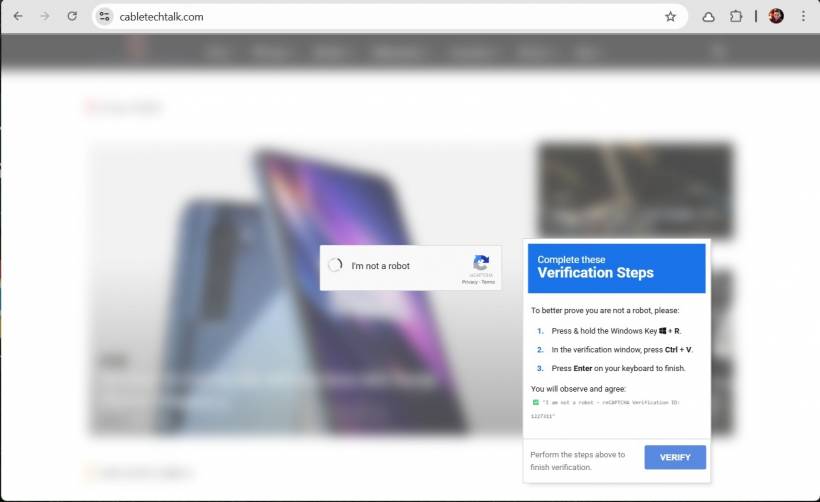
At first glance, it looked like a standard "I'm not a robot" verification. Clean layout, familiar design, and something most of us would instinctively trust.
But instead of completing the usual verification inside the browser, a second prompt appeared. This one didn't ask me to click images or select traffic lights. Instead, it gave instructions that immediately raised concern.
The "Verification" That Should Never Exist
The prompt asked me to:
And the command was:
This is the turning point.
No legitimate CAPTCHA — from Google, Cloudflare, or any trusted provider — will ever ask you to open the Windows Run dialog and execute a command. The moment you see instructions like this, it's no longer verification. It's an attempt to get you to run something on your own system.
What This Attack Is Really About
This isn't a technical exploit in the traditional sense. It's a social engineering attack.
Instead of breaking into your system, the attacker tries to convince you to open the door yourself. The method is simple but effective:
If the user follows through, they unknowingly execute the attacker's payload.
What That Command Actually Does
At a glance, the command may not look obviously dangerous, especially to non-technical users. But behind the scenes, it performs several important actions.
It Uses a Trusted Windows Component
The command starts with rundll32.exe, a legitimate Windows tool designed to run functions inside DLL files. Because it's part of the operating system, it doesn't immediately trigger suspicion. That is exactly why attackers prefer using it — it blends in with normal system activity.
It Connects to a Remote Server Disguised as a File Share
The path:
looks like a typical network share, but it is actually backed by a WebDAV server. This allows a remote website to behave like a file server.
When executed, Windows will attempt to connect to that server, treat it like a shared folder, and retrieve the file directly. All of this happens without the usual browser download prompts.
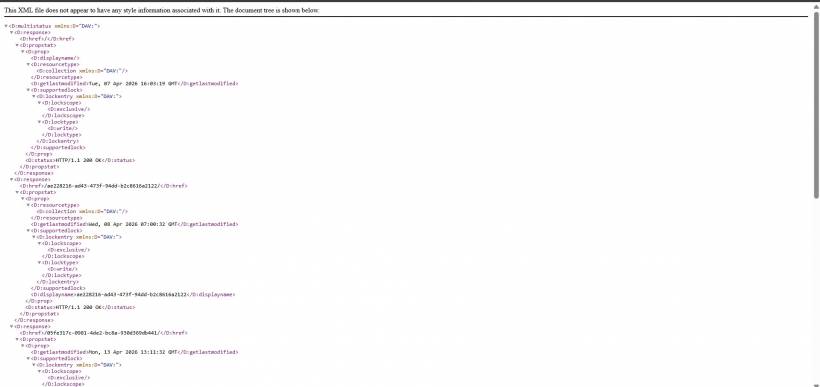
At this point, something interesting can be observed if you access the server manually. Instead of a normal webpage, it returns an XML response containing a structured list of folders. This XML is part of the WebDAV protocol and acts as a directory listing, showing available paths on the server. In simple terms, it is the server telling the client, "Here are the folders and resources you can access."
This XML itself is not malicious. It does not execute code or perform any action on its own. However, it reveals how the attacker has organized their infrastructure. The presence of multiple randomly generated folder names, often resembling long IDs or GUIDs, suggests that the server is being used to host payloads in a structured and possibly rotating manner. Each folder can contain different files, making it easier for attackers to manage campaigns or avoid detection.
Why This Technique Works So Well
What makes this approach dangerous is how normal everything appears on the surface. There are no obvious warning signs like suspicious downloads or executable files. Instead, it relies on trusted system components and familiar user interactions, which makes it far easier to slip past initial suspicion.
What the Attacker Can Gain
If the command is executed, the impact can go far beyond a single action. In many cases, this kind of payload is just the starting point. From there, an attacker may execute additional code, retrieve more advanced malware, access sensitive data, or establish persistence on the system. In a corporate environment, this can escalate into something much larger, including network-wide compromise.
The Subtle Danger: It Feels Routine
What makes this attack particularly interesting is that it doesn't feel like an attack at all. It mimics something users are already comfortable with — a CAPTCHA prompt followed by simple instructions. That familiarity lowers suspicion, and that is exactly what the attacker is relying on.
A Simple Rule That Can Save You
There's one rule that immediately exposes this kind of trick. If a website asks you to leave the browser and run a system command, it is malicious. There are no exceptions to this.
Final thoughts
This incident is a good reminder that modern threats are no longer just about technical vulnerabilities. They are about trust, habits, and how easily something familiar can be repurposed into something harmful. The fake CAPTCHA wasn't trying to prove anything about whether I was a robot. It was trying to convince me to act without thinking. And in today's threat landscape, that's often all it takes.











Comments 0