

There are some projects that sound simple at first, but quickly remind you that browser-based gaming is not always as straightforward as loading a file and pressing play. Recently, I tested Final Fantasy X using the Play! PS2 emulator inside a web browser, with the intention of making the game accessible through a web-based setup. On paper, the idea was exciting. Load the emulator, fetch the ISO automatically, show a proper loading screen, and let the game run without requiring users to manually upload the game file.
The setup itself was already quite an interesting technical journey. SharedArrayBuffer had to be enabled through the correct cross-origin isolation headers, Cloudflare cache had to be cleared before the new headers started working properly, and the game page needed several custom adjustments such as a full-height canvas, automatic ISO loading, a black background, and a proper loading overlay. After those parts were solved, the game finally launched. But launching the game and having it run smoothly are two very different things.
Getting The Emulator To Launch Was Only The First Challenge
The first major hurdle was getting the Play! emulator to work properly in the browser. The error related to SharedArrayBuffer made it clear that the browser required a cross-origin isolated environment. This meant adding the correct COOP and COEP headers through .htaccess, then making sure Cloudflare was not serving old cached files without those headers.
Once that was fixed, the emulator was able to move past the earlier technical block. The browser console confirmed that window.crossOriginIsolated was returning true, which meant the required environment was finally ready. That part felt like a proper win, because without it, the emulator could not even use the browser features it needed for threading and performance.
After that, the page was improved further. Instead of asking the user to manually choose the game file, the HTML was adjusted to automatically fetch the ISO from a remote URL. A custom loading overlay was added, complete with progress indication and a nicer presentation. The game canvas was also adjusted to fill the full browser height, while the page background was changed to black to better match the experience of a fullscreen game.

The Problem Started When The Game Actually Ran
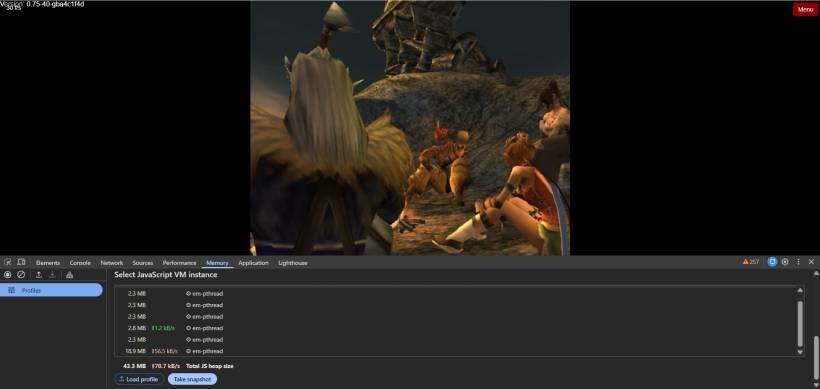
Once Final Fantasy X started running, the real limitation became obvious. The game did load, but the performance was far from smooth. The FMV scenes were especially rough. Instead of playing continuously, the video would run for a few seconds, pause or stutter for a moment, then continue again. The pattern felt like three seconds of playback followed by about one second of loading or freezing, repeated over and over.
Gameplay itself was not much better. Even outside FMV scenes, the game stuttered noticeably. It was playable in the sense that the emulator launched and responded, but it did not feel like a stable or comfortable way to experience the game. After around 15 minutes, the browser session eventually crashed, which confirmed that this was not just a small performance hiccup.
This is where the reality of browser-based PS2 emulation becomes clear. Final Fantasy X is not a small or simple game. It is a large, cinematic PS2 title with heavy use of FMV, audio, complex rendering, and constant disc access. Running all of that inside a browser adds another layer of complexity, especially when the emulator itself is running through WebAssembly.
Why The ISO Loading Method May Be Part Of The Problem
One of the things I tested was automatic ISO loading from a remote source. This made the user experience cleaner because the visitor did not need to manually upload a file. However, this method may also introduce extra memory pressure.
When the browser fetches a large ISO file, it may go through several stages before the emulator can use it. The data is downloaded, stored in memory chunks, converted into a Blob, then wrapped as a File object before being passed into the emulator. If browser caching is also enabled, the same ISO may also be stored through the Cache API for faster future loading.
That sounds useful, but for a large PS2 ISO, it can become expensive. The browser may end up holding multiple copies or references to the same huge file while the emulator is also running. On top of that, the Play! emulator itself needs memory for the virtual machine, rendering, audio processing, disc reading, and WebAssembly runtime. The result is a browser tab that can quickly become very heavy.
This is probably why the game crashed after some time. The issue may not be caused by one single bug. It is more likely a combination of browser memory usage, emulator overhead, ISO handling, and the demanding nature of Final Fantasy X itself.
Client-Side ISO Caching Sounds Helpful, But It May Not Be Ideal
At first, caching the ISO on the client side seemed like a good idea. Since the game file is large, downloading it every time is slow and inconvenient. If the browser can cache the ISO, future visits should be faster. In theory, that makes sense.
In practice, the benefit is not so clear for a PS2 game of this size. Loading the cached ISO still requires the browser to read the file back into memory and prepare it for the emulator. It may reduce network download time, but it does not necessarily reduce runtime memory usage. In some cases, it may even make the page feel heavier because the browser has to manage storage, cached response data, Blob conversion, and emulator loading all at once.
For smaller games, client-side caching may be excellent. For a large PS2 title like Final Fantasy X, it may be better to keep the setup simpler and avoid adding another memory-heavy process. Stability is more important than saving a few minutes of download time if the end result is a crash after 15 minutes.
FMV Scenes Are A Real Stress Test For Browser Emulation
Final Fantasy X is known for its cinematic presentation, and that is exactly what makes it challenging in this kind of setup. FMV playback is not just a simple video playing in the browser. The emulator has to reproduce the behavior of the PS2 hardware, process data from the game disc, handle audio and video timing, and render everything through the browser environment.
When FMV scenes start stuttering, it usually means the emulator is struggling to keep up with timing, disc reads, video processing, or all of them at the same time. The browser is also not the same as a native emulator running directly on the operating system. Even with modern WebAssembly support, there is still overhead.
This does not mean browser-based PS2 emulation is useless. It simply means some games will expose the limits much faster than others. Lighter PS2 games may run acceptably, while a large and cinematic title like Final Fantasy X becomes a much tougher benchmark.
The Difference Between Running And Running Well
This test also reminded me that there is a big difference between making something run and making it enjoyable. Technically, the page worked. The emulator loaded, the ISO was passed in, the game launched, and the custom page design behaved as expected. From a web development point of view, that is already a successful proof of concept.
But from a user experience point of view, it is not enough. If FMV scenes keep pausing, gameplay stutters, and the browser crashes after a short session, then the page cannot be presented as a polished way to play the game. It is better described as an experimental PS2 browser emulation test.
That distinction matters. Visitors should not expect a perfect console-like experience from a browser-based setup, especially for a demanding game like this. It is still impressive that the game can launch at all, but expectations need to be realistic.
What I Would Change After This Test
After testing the current setup, I would make a few practical changes before treating this as a public-facing page. First, I would disable client-side ISO caching for this specific game. The idea is good, but the memory cost may not be worth it for a large PS2 ISO. A fresh download may be slower, but it avoids some of the extra storage and memory handling.
Second, I would hide or remove the save and load state buttons for now. Although Play! documentation mentions save/load state support, the current web build does not appear to expose simple JavaScript functions for it. Without a reliable callable function, keeping those buttons visible may confuse users.
Third, I would add a clear note in the game information area explaining that this is an experimental browser-based PS2 emulation test. Performance will depend heavily on the user's browser, device memory, graphics support, and the emulator's compatibility with the game.
Finally, I would use lighter PS2 games first when building out the PS2 section. Final Fantasy X is a major title, but it is also a very demanding one. It may not be the best starting point for proving browser-based PS2 gaming stability.
Why This Test Was Still Useful
Even though the performance was not ideal, this test was still useful. It helped confirm that the web server configuration can support SharedArrayBuffer and cross-origin isolation. It also proved that Play! can be embedded into a custom Lemon Web Games style page with a loading overlay, fullscreen layout, and bottom navigation controls.
More importantly, it helped reveal where the real bottleneck is. The issue is not just the HTML, the loading screen, or the bottom navigation bar. The bigger challenge is the combination of a heavy PS2 game, a large ISO file, browser memory handling, and the current limitations of the emulator build.
That kind of test is valuable because it prevents over-promising. It is better to discover these issues early than to publish the game as if it will run smoothly for everyone. Browser-based emulation is exciting, but it still needs careful testing game by game.
Final Thoughts
Final Fantasy X running in a browser is an exciting idea, but this test shows that some games are simply too demanding to treat casually. Getting the emulator to launch was already a technical achievement, especially with the required SharedArrayBuffer headers, automatic ISO loading, and custom interface work. However, the actual gameplay experience revealed the heavier reality: FMV stutter, gameplay slowdown, memory pressure, and eventual crashing.
For now, I would treat Final Fantasy X as an experimental browser-based PS2 emulation project rather than a finished online game page. The foundation works, but the performance is not yet stable enough to offer as a smooth experience. Still, this experiment is a useful step forward. It shows what is possible, what needs improvement, and why browser-based PS2 emulation should be tested carefully before being added as a public feature.











Comments 0