

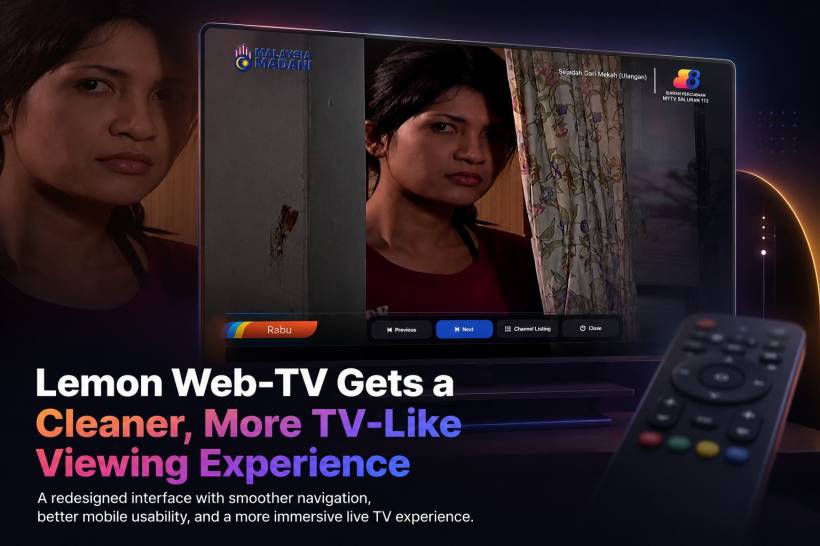
Lemon Web-TV has been updated with a much cleaner and more practical interface, focusing on making the experience feel less like a normal webpage and more like an actual TV viewing environment. The goal of this update was not just to redesign the page visually, but also to make the whole flow easier to understand, especially for users who simply want to open the page, choose a channel, and start watching without unnecessary distractions.
This update also gave us a good opportunity to refine the overall behaviour of the player interface. Since the live TV streams are loaded through embedded player frames, certain playback controls are handled directly by the external player itself. Because of that, the new design focuses on the controls that can be managed reliably from the Lemon Web-TV interface, such as channel switching, returning to the channel list, closing the player, and improving the mobile viewing experience.
A Complete Visual Redesign
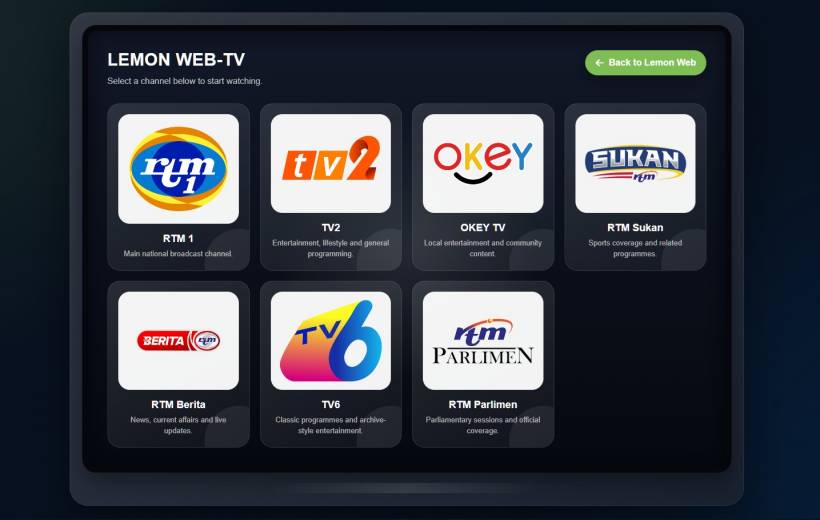
The most obvious change is the new TV-inspired layout. Instead of a plain channel listing, Lemon Web-TV now opens with a cleaner "TV screen" style design, complete with a dark modern background, rounded screen edges, and a more polished card-based channel selection area. This gives the page a more focused identity and makes the experience feel more like launching a dedicated web TV app rather than browsing a basic list of links.
Each channel is now presented using a cleaner visual card layout with the channel logo, channel name, and a short description. The logos are displayed inside consistent square containers, helping the channel list look more balanced even when the original logo images have different shapes or proportions. This makes the page feel more organised and professional, especially on desktop screens where multiple channels are shown in a structured grid.
A Cleaner Channel Listing Experience
The previous wording and layout have also been refined. The page now uses "LEMON WEB-TV" as the main heading, with a simpler instruction telling users to select a channel below to start watching. This keeps the interface direct and avoids unnecessary explanation on the main screen.
The channel listing is also scrollable when needed, while the rest of the browser page remains locked in place. This is important because it prevents unwanted page scrolling, horizontal scrollbars, and layout shifting. The channel guide scrollbar itself has also been styled to match the page design, using colours that blend with the Lemon Web look instead of relying on the default browser scrollbar appearance.
Improved Live Viewing Mode
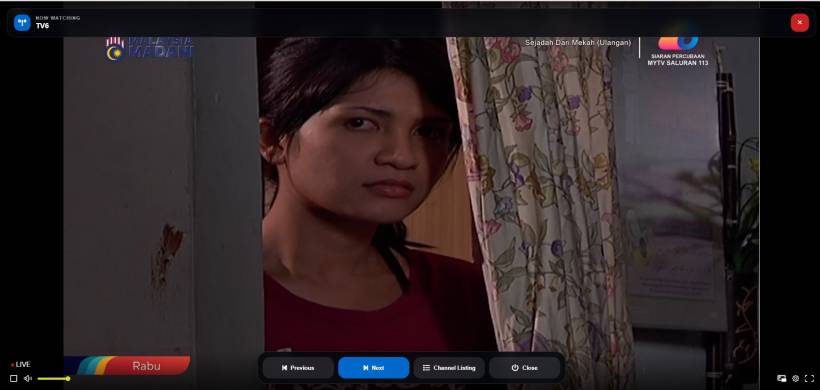
Once a user selects a channel, Lemon Web-TV now opens the stream in a fullscreen-style overlay. This makes the viewing experience feel much closer to a TV mode, where the video becomes the main focus instead of being surrounded by the rest of the webpage.
At the top of the player, a "Now Watching" bar displays the current channel name. This helps users quickly identify which channel they are currently viewing, especially when switching between multiple channels. A close button is also available at the top-right, making it easy to exit the player and return to the channel listing.
Simplified Bottom Navigation Controls
The bottom navigation bar has been redesigned to focus only on useful and reliable controls. The updated bar now includes Previous, Next, Channel Listing, and Close. The previous Start/Pause button was removed because the embedded player handles playback internally, and external control from the parent page may be blocked by the player.
This is a practical design decision. Instead of keeping a button that may not work consistently, the interface now avoids giving users a broken or confusing option. Playback can still be started directly by clicking or tapping on the video itself, while Lemon Web-TV manages channel navigation and layout controls around it.
Channel Listing Replaces the Guide Button
The "Guide" button has been renamed to "Channel Listing" to make its purpose clearer. While "Guide" is a common TV-style term, "Channel Listing" is more direct for web users and immediately explains what the button does.
When selected, the Channel Listing panel opens as a floating drawer. From there, users can quickly jump to another channel without having to fully exit the viewing mode. The current channel is also highlighted in the listing, making it easier to understand where they are in the channel lineup.
Better Handling of Hidden Controls
A major improvement in this update involved cleaning up the player controls. Earlier versions attempted to hide the embedded player's internal controls using overlays, but that caused an ugly black box to appear on the left side of the video. This was not ideal because it made the video look broken and distracted from the viewing experience.
The updated version removes that black box completely. Instead of covering the player visually, the page attempts to hide supported Bitmovin controls through CSS when the iframe allows access. If the embedded player blocks external styling, Lemon Web-TV avoids using ugly fallback covers and keeps the video area clean. This is a much better compromise because it preserves the viewing experience without adding awkward visual patches.
Mobile Usability Improvements
Mobile usability was another important part of this update. Since mobile users do not have a normal mouse hover experience, the interface had to be adjusted so users could still access controls easily. The latest version restores direct tapping on the video, which is important because users need to be able to tap the embedded player to start playback.
The bottom controls still auto-hide after a few seconds, helping keep the video clean while watching. To avoid trapping mobile users without access to controls, a floating Controls button appears when the main navigation bar is hidden. This gives users a simple way to bring the controls back without blocking the video player itself.
Mobile Portrait and Landscape Layout Refinements
The channel listing layout has also been improved for different screen orientations. On mobile portrait view, the Back to Lemon Web button is moved to the bottom of the channel list. This keeps the top section cleaner and gives more space to the heading and channel cards.
For mobile landscape view, the design has been reduced and tightened so the heading does not take up too much vertical space. The text is smaller, spacing is reduced, and the channel cards are more compact. This makes it easier to see the available channels without the top section dominating the screen, which was an issue on smaller landscape displays.
Cleaner Page Behaviour with No Browser Scrollbars
Another important refinement is the removal of unwanted browser scrollbars. The main page is now locked to the viewport, preventing both vertical and horizontal browser scrolling. Only the intended channel listing area can scroll when needed.
This creates a cleaner app-like feel. Instead of behaving like a normal webpage that scrolls unpredictably, Lemon Web-TV now behaves more like a contained web application. This is especially useful for a TV-style interface, where the viewer expects the screen to stay stable while interacting with menus and controls.
Why This Update Matters
This update matters because Lemon Web-TV is no longer just a simple embedded channel page. It now feels more like a dedicated viewing interface. The design is more intentional, the controls are more focused, and the overall layout is easier to use across desktop and mobile devices.
It also shows the importance of practical design decisions. Not every external player control can be controlled perfectly from a parent webpage, especially when the stream is loaded through an embedded iframe. Rather than forcing unreliable features, this update focuses on what can be done properly: presenting channels beautifully, switching channels smoothly, keeping the video clean, and making the interface usable on different screen sizes.
Final Thoughts
The latest Lemon Web-TV update is a big step forward in both design and usability. The new interface looks cleaner, feels more like a real TV experience, and removes several distractions that made earlier versions feel less polished. With the redesigned channel listing, improved viewing mode, simplified controls, better mobile handling, and cleaner screen behaviour, Lemon Web-TV is now much easier and more enjoyable to use.
There may still be limitations caused by the embedded player itself, especially when it comes to hiding or controlling internal playback elements. However, the overall experience is now more stable, more refined, and more aligned with the idea of a browser-based TV viewing platform. This update makes Lemon Web-TV feel less like a technical experiment and more like a proper web app built for everyday viewing.











Comments 0