

For many years, Windows users have seen more and more desktop apps arrive as web wrappers. Some of them work fine, but let's be honest, they do not always feel like proper Windows applications. They can be heavier, slower, less consistent, and sometimes disconnected from the rest of the operating system.
At Build 2026, Microsoft made its direction much clearer. The company wants developers to move toward fully native Windows apps, especially modern Windows apps built with frameworks such as WinUI 3. The message is simple: if Windows 11 is going to feel faster, smoother, and more polished, the apps running on it need to feel native too.
This is not only about Microsoft improving its own apps. It is also about convincing third-party developers to stop treating Windows as just another shell for web content.
Why Native Windows Apps Still Matter
Native apps matter because they are built to work closely with the operating system. They can use Windows design patterns properly, perform better, respond more smoothly, integrate with system features, and feel more consistent across the desktop experience.
A web wrapper may be easier to ship across platforms, but it often comes with compromises. It may use more memory, feel less responsive, or behave differently from the rest of the system. For simple tools, that may be acceptable. But for apps that people use every day, those small differences can become annoying.
Microsoft's renewed focus on native Windows development suggests the company understands that Windows 11 cannot feel truly modern if the app ecosystem feels fragmented. The operating system itself can be polished, but if users spend most of their time inside sluggish or inconsistent apps, the overall experience still suffers.
That is why Build 2026 matters. Microsoft is not only talking about native apps in theory. It is showing developers the tools, frameworks, agents, and hardware direction that can help them build those apps properly.
WinUI 3 Is at the Center of the Push
When Microsoft talks about modern native Windows apps, WinUI 3 is one of the key frameworks in the conversation. It gives developers a way to build Windows applications using the newer Windows UI stack, with a design language that fits better with Windows 11.
For this article, "native" mainly means Windows-native apps built using modern Windows frameworks such as WinUI 3. This is different from architecture-native builds, such as compiling specifically for ARM64. That is also important, but it is a separate topic.
The focus here is about apps that actually feel like Windows apps.
Microsoft has been rebuilding parts of Windows 11 through its Windows K2 initiative, including native components such as the Start menu. But Microsoft fixing its own in-box experiences is only one side of the story. To improve the full Windows experience, third-party apps also need to move in the same direction.
If only Microsoft's own apps feel native while popular third-party tools continue to behave like browser containers, the Windows desktop will still feel inconsistent.
AI Agents Are Now Part of the Native App Story
One of the interesting angles at Build 2026 was Microsoft's focus on using AI agents to help developers build WinUI 3 apps.
In a session titled "Use agents to build WinUI 3 apps," Microsoft's Beth Pan and Nikola Metulev explained how agents can assist with creating new native apps, improving existing applications, and migrating apps to the Windows UI stack.
This is important because moving to WinUI 3 is not always simple. Existing applications may have old dependencies, legacy code paths, outdated UI patterns, or architecture decisions that make migration difficult. Developers cannot always just ask a generic AI assistant to "convert this app to WinUI 3" and expect a clean result.
General-purpose AI models may produce code that technically works but is not optimized for the Windows UI stack. They may use outdated patterns, miss important framework details, or create code that does not match Microsoft's latest guidance.
That is where specialized tools come in.
The WinUI Agent Plugin for GitHub Copilot and Claude Code
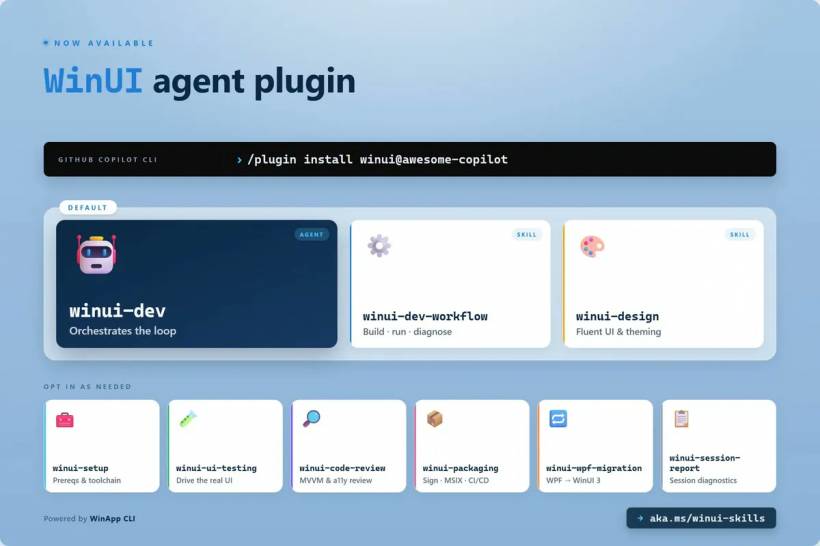
To make AI assistance more useful for Windows developers, Microsoft is introducing a WinUI agent plugin for GitHub Copilot and Claude Code. The idea is to give AI agents more specific WinUI knowledge by default, rather than relying only on generic training.
This makes sense. If developers are going to use AI to help modernize Windows apps, the AI needs to understand the right framework, patterns, and platform-specific details.
A specialized WinUI agent could help with tasks such as:
• Creating new WinUI 3 app structures
• Migrating older UI code to modern Windows patterns
• Suggesting better use of Windows controls
• Helping developers avoid outdated approaches
• Improving consistency with the Windows 11 design language
• Reducing the friction of moving away from legacy frameworks or web wrappers
This is a smart move by Microsoft because many developers are already using AI tools. Instead of telling them not to rely on AI, Microsoft is trying to make those tools more useful for proper Windows development.
Templates Can Help Lower the Starting Barrier
Microsoft is also working on WinUI 3 templates, currently in preview, to make native app creation easier. This may sound like a small thing, but templates matter.
One of the reasons developers choose web-based approaches is speed. If starting a native app feels more complicated than spinning up a web app, many teams will take the easier route. Templates help reduce that initial friction by giving developers a cleaner starting point.
Good templates can guide developers toward better structure, better UI patterns, and better use of the framework from day one. They are especially useful for smaller teams or developers who are interested in native Windows apps but do not want to start from a blank project.
For Microsoft's native app push to work, the path needs to feel practical. Developers need tools that reduce complexity, not just marketing slides telling them that native is better.
Modernizing Apps Is More Than Rewriting Code
Another Build 2026 session focused on modernizing apps with AI. The session description made an important point: modernizing an app is not just about rewriting code.
That is very true.
A real app migration often involves untangling dependencies, understanding data flows, mapping old UI behavior to new patterns, and making changes without breaking production. This is where modernization becomes challenging. It is not only a technical conversion. It is also a careful process of understanding how the existing app works.
For many businesses, older Windows applications still carry important workflows. Rebuilding them too quickly can create problems. But leaving them untouched forever can also hold the organization back.
AI-assisted modernization could help developers inspect older codebases, identify risky dependencies, suggest migration paths, and speed up repetitive work. But it still needs human oversight. Production apps are not toys, and a broken migration can cause real operational issues.
Microsoft seems to understand this, which is why it is positioning agents as assistants, not replacements for developers.
Hardware Is Becoming Part of the Developer Strategy
There is another important part of this story: hardware.
If developers are going to use AI agents heavily during coding, debugging, and modernization work, they need machines that can handle those workloads. This is where Microsoft's new hardware direction becomes relevant.
The Surface Laptop Ultra, announced at Computex and naturally connected to the Build 2026 conversation, is designed with AI-heavy development in mind. It can be configured with up to 128GB of RAM and is the first Surface built on the NVIDIA RTX Spark platform.
That platform combines an N1x CPU, an RTX GPU, and unified memory to deliver serious local AI compute performance. The headline figure is up to 1 petaflop of AI compute, which clearly positions this machine as more than just a regular productivity laptop.
This is not only for creative professionals or gamers. It is also aimed at developers who need local power for AI agents, code analysis, testing, model-assisted workflows, and modern application development.
Microsoft Is Trying to Win Developers Back to Windows
The broader message is clear: Microsoft wants Windows to be a serious development platform again, not just a place where cross-platform web apps happen to run.
That is why the native app push, AI development tools, WinUI 3 templates, and high-performance AI hardware all connect. Microsoft is trying to build an ecosystem where developers can create better Windows apps with less friction.
This matters because developers follow incentives. If native Windows development feels slow, confusing, or poorly supported, many will default to web technologies. But if Microsoft can make native app development faster, AI-assisted, better documented, and supported by powerful hardware, the argument becomes stronger.
For users, this could mean more apps that feel at home on Windows 11. For developers, it could mean a clearer path to building polished Windows applications without fighting the platform as much.
Why Web Wrappers Are Not Always the Best Answer
Web wrappers became popular because they solve a real problem. They let companies ship one codebase across multiple platforms. That can reduce development time and cost. For many businesses, that convenience is hard to ignore.
But the cost often shows up in user experience.
A web wrapper may not feel as smooth as a native app. It may not integrate as deeply with Windows features. It may consume more resources. It may look like a website inside a window rather than a proper desktop application.
That does not mean every web-based app is bad. Some are well built and perfectly acceptable. But Microsoft's argument is that Windows deserves more than "good enough" wrappers, especially for apps that are heavily used on the desktop.
Native apps can provide a better sense of performance, polish, and platform identity. That is something Windows has sometimes lacked in recent years.
The Challenge Ahead
Microsoft's plan makes sense, but the challenge is execution. Developers will not migrate to WinUI 3 just because Microsoft wants them to. They need clear benefits, stable tooling, strong documentation, good examples, and confidence that the framework has a long future.
Microsoft also needs to avoid confusing developers with too many overlapping app models. Windows development has had many frameworks over the years, and that history has made some developers cautious. A clearer roadmap is helpful, but Microsoft needs to keep that roadmap consistent.
If Microsoft can provide strong tools and avoid another round of platform uncertainty, the native app ecosystem could improve.
The potential benefits are clear:
• Better-performing Windows applications
• More consistent Windows 11 design experiences
• Smoother interaction with system features
• Less dependence on heavy web wrappers
• Better AI-assisted modernization workflows
• More capable developer hardware for local AI workloads
But it will take more than one Build conference to change developer habits.
Final Thoughts
Build 2026 shows that Microsoft is serious about pushing developers toward proper native Windows apps again. The company is not only saying that native is better. It is giving developers WinUI 3 guidance, AI agent support, app templates, modernization tools, and powerful hardware designed for AI-heavy development workflows.
That is a much stronger message than simply asking developers to care about Windows.
For users, this could eventually mean faster, smoother, and more polished apps on Windows 11. For developers, it could mean a more practical path to building native apps without starting from scratch or manually untangling every migration problem.
The big question is whether developers will follow. Web wrappers are convenient, and convenience is hard to beat. But if Microsoft can make native Windows development feel modern, productive, and AI-assisted, then WinUI 3 may finally get the push it needs.
Windows 11 will only feel truly modern when both the operating system and the apps running on it feel like they belong together. Build 2026 suggests Microsoft knows that, and now it is trying to get developers on board.











Comments 0