


Microsoft has quietly unlocked one of the biggest performance upgrades Windows Server has seen in years — and it is not just a small tweak. We're talking about massive gains in storage speed, smarter CPU efficiency, and a future-ready storage stack built around modern NVMe technology.
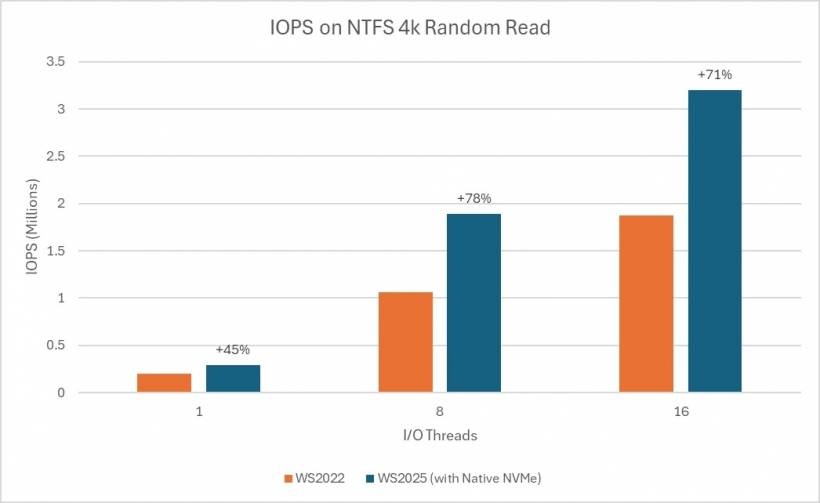
If you've been following Microsoft's Windows Server 2025 roadmap since it was teased back in April 2024, you may remember the promise of significantly faster IOPS performance compared to Windows Server 2022. Back then, Microsoft estimated around a 70% improvement. Fast forward to now, and the company has officially rolled out the feature — and the results are even better than expected.
So, What Exactly Has Changed? Native NVMe Support Now Built In
With the October 2025 Patch Tuesday update (KB5066835), Windows Server 2025 now supports native NVMe storage, but with a small caveat: it's currently an opt-in feature. Admins will need to manually enable it, meaning it won't turn on automatically after updating.
Performance Gains That Actually Matter
When Microsoft revisited its testing after final optimizations, the numbers improved even further:
In practical terms, this means servers can push storage performance much closer to the actual limits of the hardware while freeing up CPU resources for real workloads instead of storage overhead.

Why NVMe Support Is Such a Big Deal
Traditionally, Windows treated most storage devices like SCSI devices — a model originally designed decades ago for spinning hard disks. While it worked, it also meant unnecessary overhead for lightning-fast SSDs.
Native NVMe changes that.
Key Improvements Include:
Interestingly, even though NVMe was designed for SSDs, newer NVMe 2.0 standards now even support HDDs — showing just how far the tech has evolved.
How to Enable the New NVMe Feature
Since it's opt-in for now, administrators will need to manually switch it on.
Microsoft provides two main options:
Option 1: Registry Command (PowerShell)
Option 2: Group Policy Method
Install Microsoft's provided MSI, then enable it via:
Local Computer Policy
→ Administrative Templates
→ KB5066835 251014_21251 Feature Preview
→ Windows 11, version 24H2, 25H2
Beyond Servers: What Does This Mean for Windows 11?
Windows Server 2025 shares its core platform with Windows 11 24H2 and 25H2, which raises an interesting question: could consumer systems benefit too?
If Microsoft decides to extend similar NVMe optimizations to Windows 11, gamers, high-performance workstation users, and power users could see meaningful performance improvements — especially in workloads that rely heavily on fast storage.
A Quiet Update With Huge Real-World Impact
While this rollout didn't arrive with fireworks, the implications are massive. Organizations running Windows Server 2025 can now tap into modern NVMe performance capabilities that align with today's storage standards, rather than being tied to legacy SCSI behavior.
It's faster, smarter, and built for what's coming next in storage technology — and that's a big win for enterprises, data centers, and anyone serious about squeezing every bit of performance from their hardware.











Comments