


If you've ever stared at your website and wondered, "Is this actually good enough for Google?", you're not alone. Between titles, meta tags, headings, mobile responsiveness, HTTPS, structured data and a dozen other acronyms, SEO can feel like a messy checklist that never ends.
That's exactly the kind of problem the SEO Analyzer web app is designed to solve.
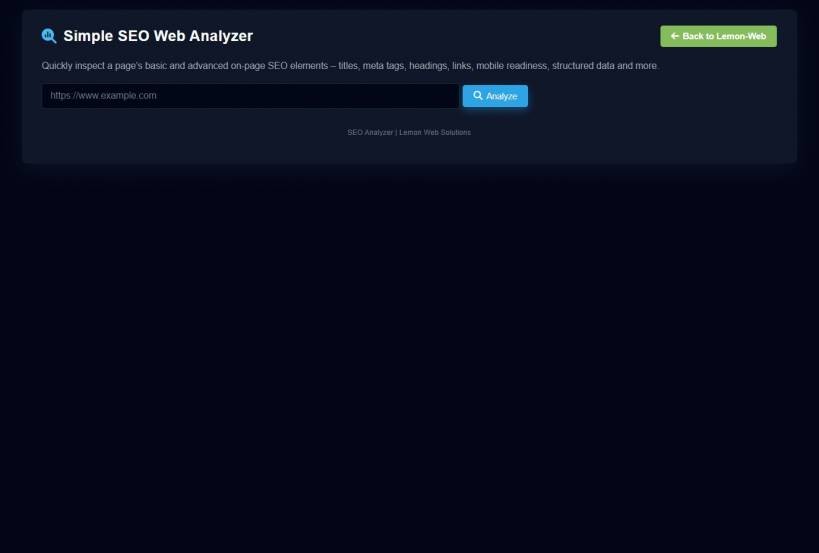
Instead of forcing you to dig through browser dev tools or pay for a heavyweight SEO platform, SEO Analyzer gives you a quick, honest health check of any page – wrapped in a clean dark interface, with an easy-to-read score and practical recommendations you can actually implement.
In this article, let's walk through what the app does, how it works, and how you can use it as part of your regular website maintenance routine.
Why Another SEO Tool?
Most people fall into one of two extremes:
SEO Analyzer aims for the middle ground.
It's not trying to replace enterprise-level suites or promise magical rankings. Instead, it focuses on the fundamentals that almost every page should get right:
In other words, it looks at the on-page signals that search engines actually see when they crawl your URL – and gives you a structured report you can act on immediately.
How SEO Analyzer Works (In Simple Terms)
Using the app is intentionally straightforward:
- A score badge and overall quality band
- Basic SEO information
- Advanced SEO information
- Page Rank Information (an estimated on-page score, not Google's PageRank)
- A Recommendations section tailored to that specific URL
All of this is done without you having to install plugins, modify your code, or sign up for anything. It's a simple, browser-based health check.
The Score Panel: Your At-a-Glance SEO Health
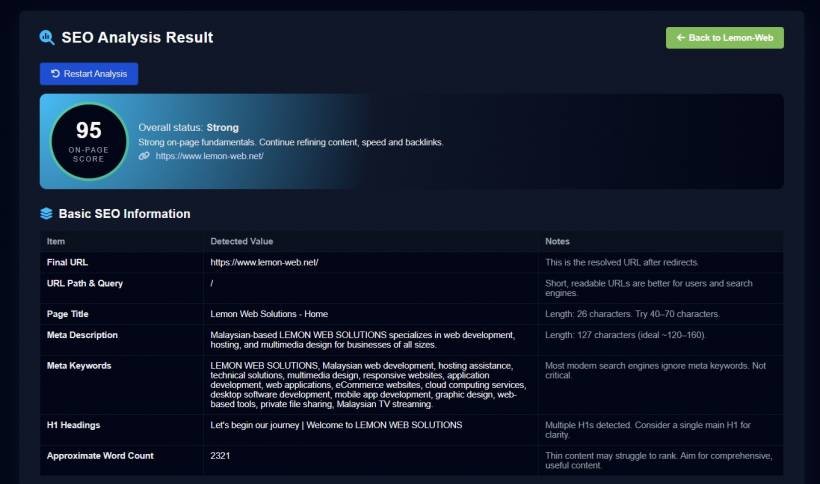
The first thing you see after running a scan is the score panel. This is where SEO Analyzer gives you an instant "gut feeling" of how your page is doing:
The idea is simple: if you send this screenshot to a colleague or client, they can immediately understand where the page stands, even if they don't read the rest of the report.
Basic SEO Information: Getting the Foundation Right
Below the score, the Basic SEO Information section covers the essentials every page should have in place. This includes:
The resolved URL after redirects, useful for checking canonical domain usage (with or without
www, http vs https, etc.).Lets you see if you're dealing with a clean, readable URL or something overloaded with parameters.
The actual
<title> tag, along with its character length and a gentle hint about the ideal range (typically 40–70 characters).Whether a description exists, its length, and whether it sits within the commonly recommended 120–160 character range.
Detected if present, but clearly explained as non-critical since modern search engines largely ignore this field.
Shows how many H1 tags are present and lists them out. If there are multiple H1s or none at all, the report highlights that so you can fix it.
A rough word count of the page content, useful for spotting "thin" pages that may need more substance.
This table alone can expose a lot of easy wins. Missing title? Weak description? No H1? Thin content? All of that becomes obvious in seconds.
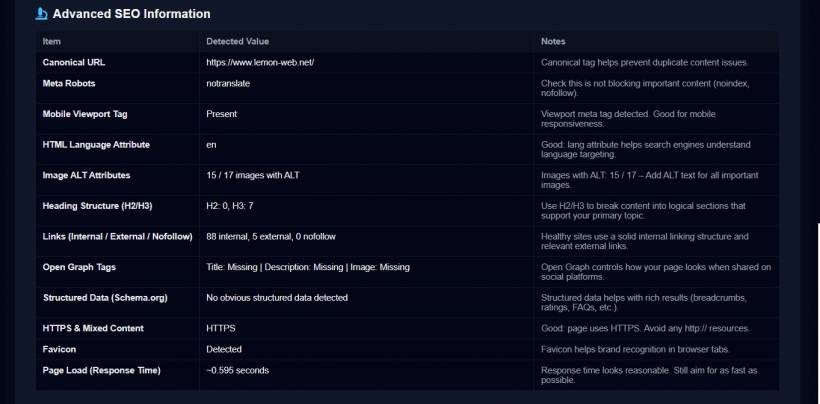
Advanced SEO Information: Going Beyond the Basics
Once you're confident the fundamentals are sound, SEO Analyzer dives deeper into Advanced SEO Information.
This section is where you start seeing more technical and structural details:
Checks if a canonical tag is present and what it's pointing to. Great for catching duplicate content issues or misconfigured tags.
Shows whether the page is using
noindex, nofollow, or custom crawl directives that might be accidentally blocking search engines.Confirms if the page includes a proper viewport meta tag, a key signal for mobile friendliness.
Displays the
lang attribute set on the <html> tag, helping with language targeting and accessibility.Counts total images vs those with ALT text, and flags missing ALT coverage so you can improve both accessibility and SEO.
Gives you counts of H2 and H3 tags so you can quickly see whether your content is properly sectioned or just one big wall of text.
Summarizes your internal linking structure, external references, and use of
rel="nofollow".Indicates whether Open Graph fields (title, description, image) are present, which affects how your content looks when shared on social media.
Checks for JSON-LD or microdata, giving you a quick sense of whether your page is prepared for rich results.
Detects whether the page is served over HTTPS and whether it still references insecure
http:// assets.Confirms the presence of a favicon for brand visibility in browser tabs.
Reports the approximate time taken to fetch the page. While not a full performance audit, it's enough to raise a flag if things feel slow.
For a single scanned URL, this is a lot of visibility in one place. You get a high-level technical overview without having to interpret raw HTML or headers.
Page Rank Information: A Practical, Heuristic Score
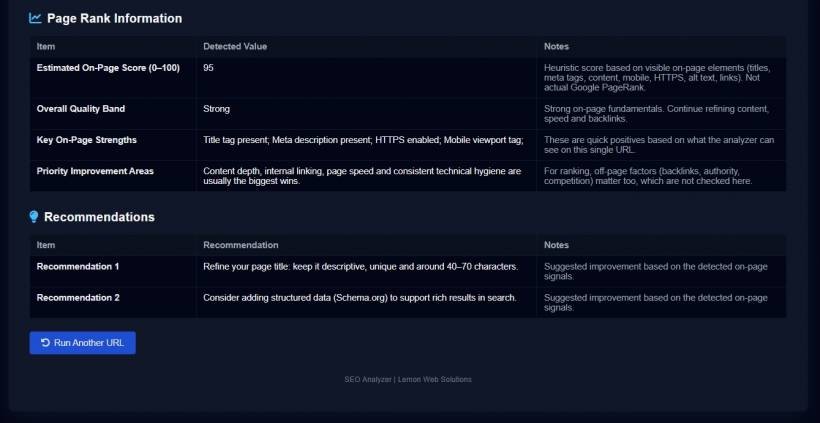
To tie everything together, the Page Rank Information section (again, this is a heuristic on-page score, not Google's historical PageRank) gives you:
Calculated based on multiple factors: title, description, content depth, mobile viewport, HTTPS usage, ALT coverage, structured data and internal links.
Tells you whether the page is Strong, Moderate, or Needs Improvement, along with a short explanation of why.
Highlights quick positives – for example: "Title tag present", "HTTPS enabled", "Mobile viewport tag", "Structured data detected".
Summarizes the big levers: content depth, internal linking, page speed, technical hygiene, and off-page factors like backlinks.
This section is especially helpful for stakeholders who just want a quick summary without reading all the individual checks line by line.
Recommendations: Actionable Next Steps You Can Actually Use
The final section, Recommendations, is where SEO Analyzer becomes more than just a diagnostic tool. Instead of simply telling you what exists or doesn't, it translates findings into practical suggestions, such as:
Each recommendation is listed in a familiar table format, so it matches the rest of the report visually and is easy to scan. You could literally treat it as a mini to-do list for your next round of SEO fixes.
Who Is SEO Analyzer For?
SEO Analyzer is deliberately simple, which makes it useful for a wide range of people:
Because it runs in the browser and requires no installation, it's also handy for quick client demos, audits or before-and-after comparisons.
What SEO Analyzer Is Not Trying To Be
Honesty matters here: SEO Analyzer is not a magic ranking button. It doesn't:
What it does do is give you a focused, page-level snapshot of the most important on-page SEO elements – then nudge you toward sensible improvements. Think of it as a health check, not a complete medical history.
Final Thoughts
SEO doesn't have to be mysterious or intimidating. With SEO Analyzer, the goal is simple: give you a clear, honest snapshot of how well a specific page is set up for search – and then hand you a short, practical list of things you can improve next. No bloated dashboards. No complicated setup. Just a focused report, a clean score, and recommendations that make sense even if you're not living and breathing SEO every day.
If you've been looking for a straightforward way to check your pages before sending them out into the world, this app might be exactly the quiet little helper you need in your toolkit.











Comments 0