

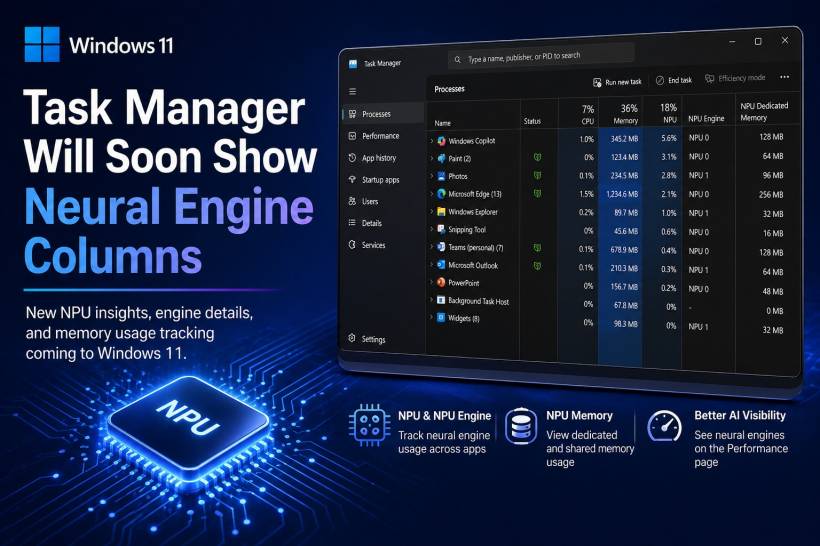
Microsoft appears to be preparing another update for Windows 11 — this time focusing on how users monitor AI-related performance. The upcoming changes will introduce new columns in Task Manager that highlight Neural Processing Unit (NPU) activity, reflecting the growing importance of AI hardware in modern PCs.
A Shift Towards AI-Aware System Monitoring
The update is currently being tested in a Windows Insider experimental build (version 29576.1000), and it brings a set of optional columns designed to give users deeper insight into how AI workloads are handled.
With this update, Task Manager will allow users to view:
• NPU Engine activity for more granular tracking
• NPU Dedicated and Shared Memory usage for better resource visibility
These additions are particularly relevant for newer PCs that include NPUs, which are increasingly used to handle AI-driven tasks more efficiently.
More Visibility Into AI Workloads
Beyond just adding columns, Microsoft is also expanding how AI processing is displayed across the system.
For example, if a GPU includes built-in neural engines, those will now appear in the Performance tab. This provides a more complete picture of how AI tasks are distributed across different hardware components — whether it's the CPU, GPU, or dedicated NPU.
In short, Task Manager is evolving from a traditional system monitor into something that can better reflect the realities of AI-powered computing.
Additional Improvements In The Pipeline
Alongside the NPU-related updates, Microsoft is also introducing a new "Isolation" column in the Processes and Details tabs. This will allow users to quickly identify which apps are running inside an AppContainer, adding another layer of transparency for system processes and security contexts.
Customising these new columns remains straightforward — users can simply right-click on the column headers in Task Manager and enable whichever metrics they want to see.
Still Experimental For Now
It's important to note that these features are currently part of the Windows Insider programme, specifically within early experimental builds.
As with most Insider features:
• They are still subject to change
• There's no guarantee they will make it into a final Windows release
Microsoft has made it clear that features in these early builds are used to test ideas and gather feedback, meaning some may be refined, replaced, or even removed entirely before reaching the public.
Final Thoughts
This update highlights how quickly AI is becoming a core part of everyday computing. As more devices integrate NPUs and AI-accelerated hardware, tools like Task Manager need to evolve to keep up.
While still in testing, these changes suggest that future versions of Windows will offer much better visibility into how AI workloads are handled — something that will become increasingly important as AI features become more deeply embedded into the operating system.











Comments 0