

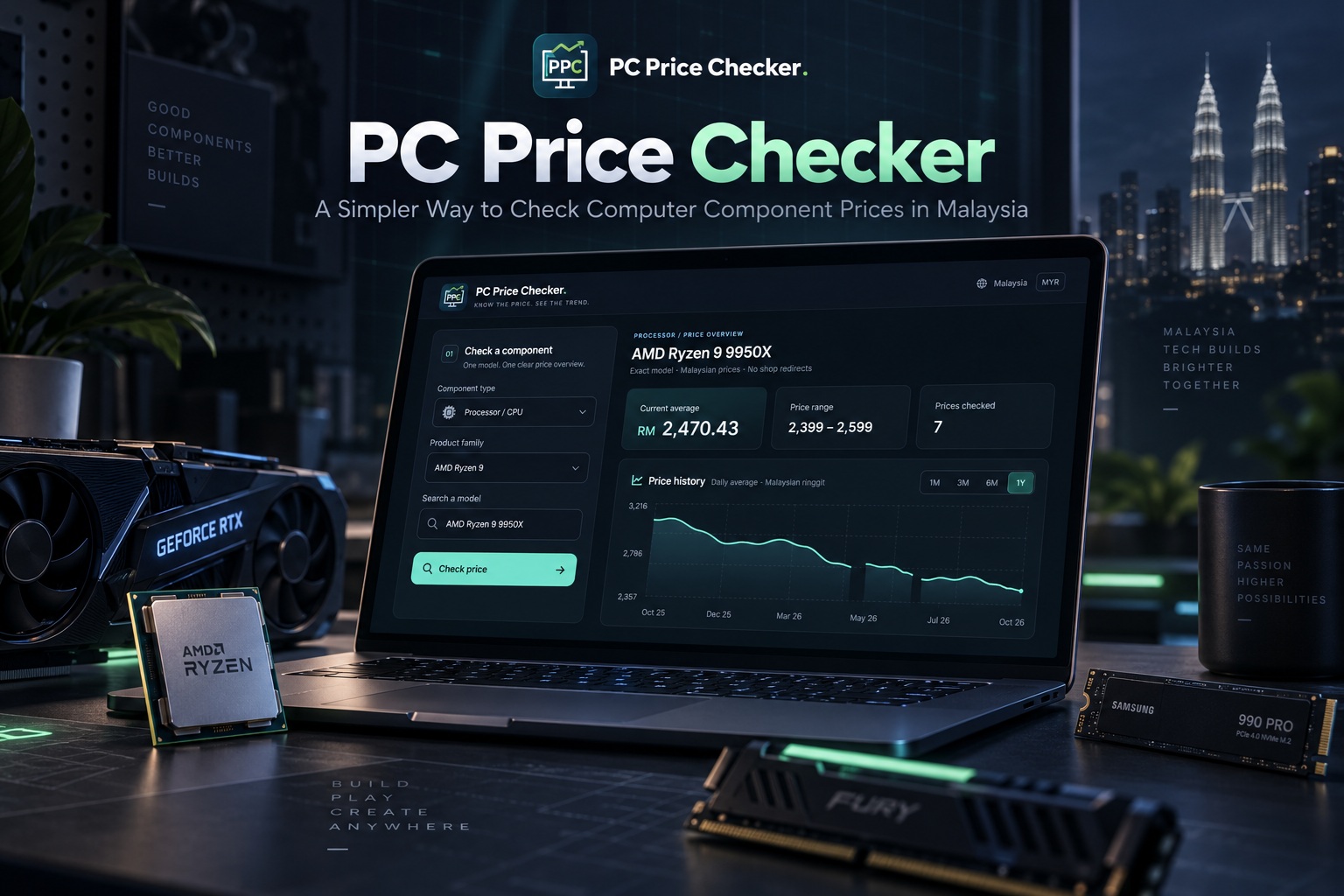
Planning a PC upgrade usually begins with a straightforward question: how much should this component actually cost? Whether you are considering a new processor, adding more memory or replacing an ageing storage drive, having a useful price reference makes the next decision easier. However, checking prices can quickly turn into a long browsing session, especially when you are trying to separate different models, capacities and product variations. Sometimes, you do not need another shopping website—you just need a clearer picture of the prices.
That is the idea behind PC Price Checker, or PPC, a web application from Lemon Web designed around a more focused approach. Rather than presenting a wall of product cards and sending you from one shop to another, it helps you select a computer component, check its current recorded average price and explore the available price history. The interface brings those details together in a dark, compact dashboard, keeping the experience centred on the information you came for. It is a tool for researching your next upgrade, without turning every price check into a shopping trip.
A Price Checker, Not Another Online Store
PC Price Checker deliberately moves away from the familiar shopping-page layout. There are no retailer product cards to browse through and no shop links competing for your attention. Instead, the application focuses on component selection, price information and historical observations. The purpose is to help you understand the pricing picture before deciding what to do next.
That distinction matters because checking a price and buying a product are not necessarily the same activity. You might be planning a build several weeks ahead, comparing an upgrade against your budget or simply wondering where a particular processor currently sits. PPC gives those early research questions their own space. You can look at the numbers without being pushed towards an immediate purchase.
Start With the Component, Then Narrow Down the Model
The selection process begins with the component you want to check. From there, the available choices help you narrow your selection until you reach a specific model. For processors, that means moving from the component category to the processor family and then to the exact CPU. Graphics cards follow a similar family-and-model approach.
For example, someone interested in an AMD Ryzen 9 processor can select that family before choosing a model such as the AMD Ryzen 9 9950X. This is more meaningful than treating every Ryzen 9 listing as though it represents the same product. A family name helps you find the right area of the catalogue, but the exact model gives the price check its focus. Once the selection is complete, clicking Check price brings the relevant information into the overview.
The guided structure also makes returning to the application straightforward. You do not need to rebuild a complicated search every time you want to check a familiar component. Choose the category, narrow the selection and review the result. The catalogue acts as a starting point for checking supported models rather than an endless marketplace to browse.
Better Choices for Memory, Storage and Power Supplies
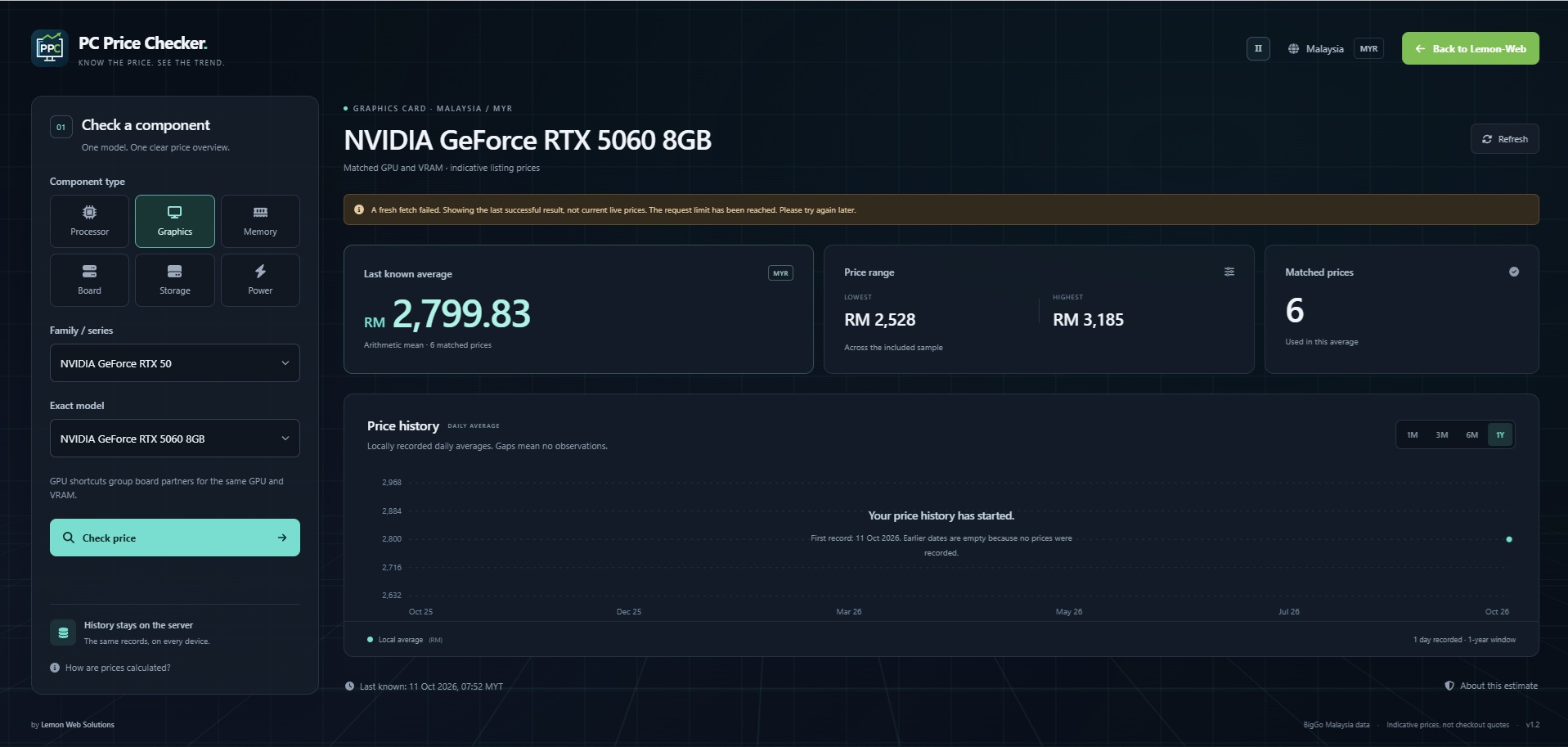
Different components need different selection methods, which is why memory, storage and power supplies have their own filtering paths. For memory, the process begins with the type, including DDR5, DDR4 and DDR3, before moving to the brand and the exact kit or model. This keeps the initial choice simple while allowing the final price check to remain specific. Instead of starting with a broad collection of RAM listings, you begin with the memory category you actually intend to research.
Storage follows a similarly practical structure, beginning with categories such as NVMe Gen4, NVMe Gen3, SATA SSD and HDD, with NVMe Gen5 also included. You then narrow the choices by brand and capacity before selecting the exact model. That final step is important because "2TB storage" is a broad description, not a single product. Selecting a particular drive gives the resulting average a clearer meaning than combining every drive with the same capacity.
Power supplies use a selection path based on form factor and efficiency class, followed by brand, wattage and model. This allows someone researching a particular type of power supply to move towards a relevant selection without working through unrelated options. The application does not assume that every unit with the same wattage should be treated as interchangeable. Across these categories, the principle remains the same: make the early choices approachable, then make the final comparison specific.
See the Average Price, Not Just the Lowest Number
A low advertised price can be interesting, but it does not tell the whole story on its own. PPC therefore places the filtered average price at the centre of the overview, alongside the lowest and highest included prices and the number of matched listings. Together, these figures offer more context than a single headline amount. You can see both the centre of the available sample and how widely its prices are spread.
Consider an illustrative situation where one included offer sits noticeably below the others. Looking only at that lowest amount could give you a very different impression from looking at the average and the full range. The dashboard lets you consider those figures together rather than assuming that the cheapest result represents the typical price. It is a useful distinction when deciding whether your budget is realistic or whether a particular offer deserves a closer look.
The matched-listing count adds another piece of context. An average based on a small number of results should be read differently from one supported by a larger set of relevant listings. Neither is a promise of the price you will pay, and the application does not claim to represent every seller in Malaysia. It provides a reference based on the matching data included in that check.
Explore Price History Without Losing Sight of the Present
The price-history graph adds a time dimension to the dashboard. Alongside the latest recorded figures, you can explore the available observations using one-month, three-month, six-month and one-year views. A shorter window helps you focus on recent records, while a longer view gives more room to consider the broader pattern. The current average remains part of the overview, so the historical information does not replace the number you are checking today.
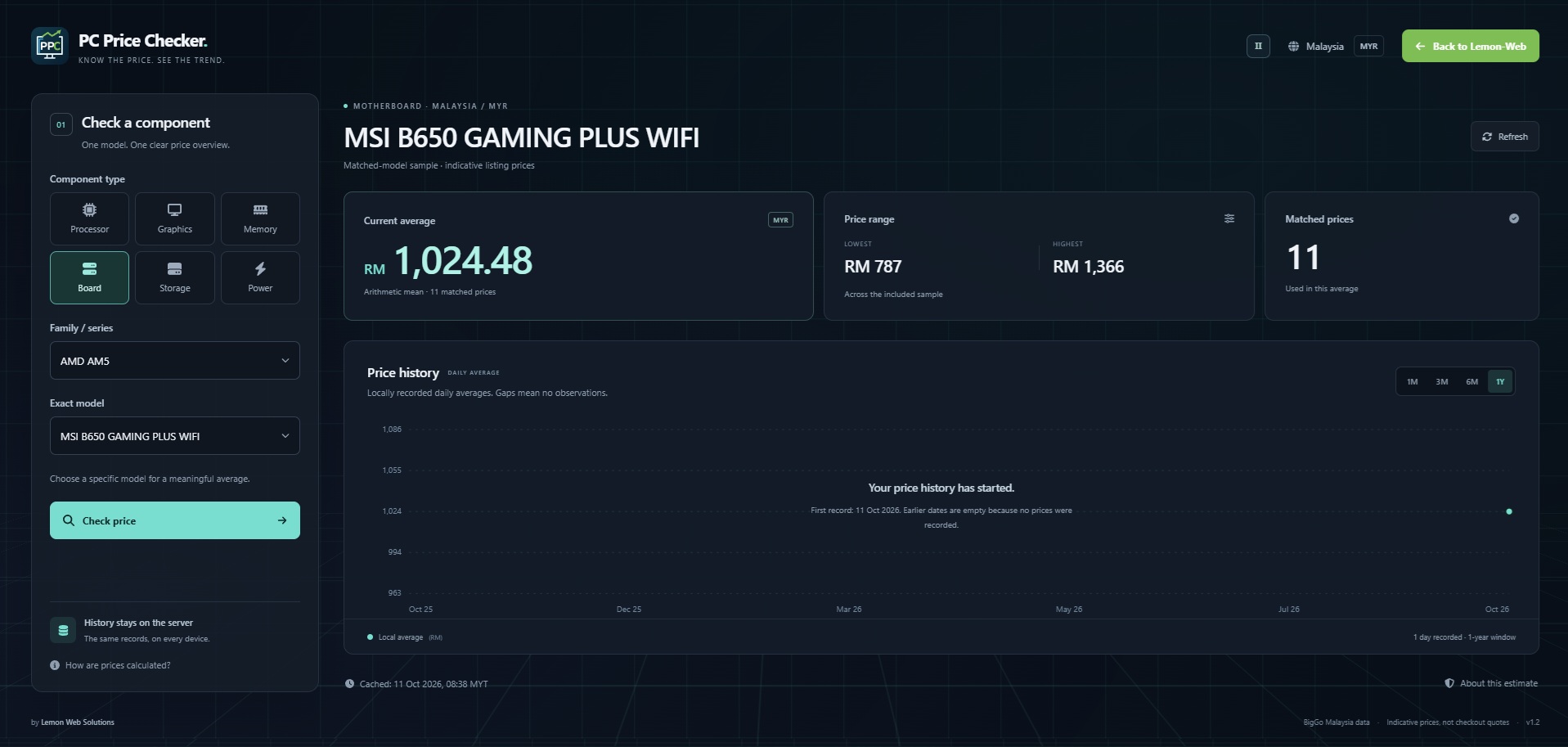
There is an important distinction between offering a one-year viewing range and already possessing a complete year of data. PPC displays genuine recorded observations; it does not create missing prices just to make a graph look complete. A component with limited history may therefore show only a small number of points, even when the one-year view is selected. As more successful updates are recorded, the available history becomes more useful.
Where usable dated historical records are available for import, those can add context, with imported listing samples distinguished from locally recorded model averages. A historical price for one listing is not automatically the same thing as an average across several listings. Keeping that difference visible helps avoid misleading comparisons. The graph is there to show the evidence available, not to suggest that every point represents an identical measurement.
Price History That Lives With the Application
PPC's recorded history is stored on the server rather than being kept only inside an individual visitor's browser. This means the historical dataset belongs to the application, not to the particular computer or phone used to open it. Viewing the dashboard from another device does not require starting a separate personal collection of observations. The available records remain part of the same shared reference.
New successful observations are added as component prices are checked and the dataset is maintained. Visitors do not need to run the maintenance tools or manage files to use the public dashboard. They simply select a supported component and review the information available. Fetch timestamps help indicate how recent that information is, which is more useful than presenting every stored figure as though it were a live checkout price.
Useful for Upgrade Planning and Everyday Price Checks
PPC can fit into several stages of a PC upgrade without requiring you to plan an entire build at once. You might begin by checking a processor to see whether it falls within your intended budget, then return later to research a memory kit or storage drive. Each check stays focused on the selected component. That makes the application useful even when your upgrade involves only one part.
It can also serve as a reference when reviewing a quotation or comparing a price you have found elsewhere. The average, range and available history give you additional context for your own comparison. A figure above the displayed average is not automatically a bad offer, just as a figure below it is not automatically the best purchase. Differences in the actual product, included services, delivery charges and warranty arrangements still need to be considered separately.
For users who prefer to research gradually, the ability to revisit the same model is especially useful. You can return to a familiar selection and review the latest recorded figures alongside earlier observations. There is no need to browse a fresh collection of shopping cards just to answer the same pricing question again. The application keeps the research task small and repeatable.
Use the Numbers as a Reference, Not a Buying Guarantee
Price information is most useful when its limits are clear. PPC's average reflects the matching listings available to the application at the time of collection, rather than a guaranteed nationwide price or a confirmed amount at checkout. The set of included listings can also change between observations, which may affect the average. Reading the timestamp, matched-listing count and price range together gives the headline figure better context.
The application is also focused on price checking, not component compatibility or purchasing advice. Selecting a memory kit, processor or power supply does not confirm that it is suitable for your existing system. Likewise, a historical graph can describe the records available without predicting what a component will cost next month. PPC supports your research, while the final checks on specifications, suitability and the actual purchase remain separate decisions.
Final Thoughts
PC Price Checker is built around a simple idea: checking computer component prices should not require browsing another online store. By combining guided model selection, filtered average prices, a visible price range and genuine historical observations, it offers a more focused way to research supported PC parts in Malaysia. The dark dashboard and animated digital background give it a distinctive look, while the underlying workflow remains straightforward. Choose a component, narrow down the model and review the available pricing information.
Whether you are researching a processor upgrade, comparing memory options or working out a realistic storage budget, PPC provides a useful place to begin. Its history becomes more valuable as records accumulate, while its current-price overview keeps the immediate question in focus. Available through Lemon Web Apps, PC Price Checker is designed to help you spend less time sorting through shopping pages and more time understanding the component you are considering.











Comments 0