

3D modeling software has become much more specialised than it used to be. Years ago, people often asked which software was the "best" for product design, as if there was one clear winner for everyone. In 2026, that question is harder to answer because the right tool depends heavily on the type of product you are designing, the way your team works, your budget, and how far the model needs to go after the design stage.
For some designers, the priority is engineering accuracy. For others, it is fast concept development, beautiful surfacing, photorealistic rendering, or collaboration across different locations. A freelancer designing 3D-printed accessories will not have the same needs as a medical device team, an automotive supplier, a jewellery designer, or a hardware startup preparing for manufacturing.
That is why comparing 3D modeling tools today is less about finding a single "winner" and more about understanding where each platform fits best.
The 3D Design Software Market Has Become More Specific
The product design world now covers many different workflows. Some designers begin with sketches, move into surface modeling, then pass the file to engineers for tolerance checks and manufacturing drawings. Others may design directly for CNC machining, 3D printing, animation, or marketing visuals.
This has created a software landscape where different tools shine in different areas. SolidWorks still dominates engineering-heavy mechanical design. Rhino remains a favourite for complex surfaces and industrial design. Fusion 360 is attractive for smaller teams that want CAD, CAM, simulation, and collaboration in one place. Blender has become a serious option for concept visuals and rendering. Onshape is pushing cloud-native CAD forward, while Shapr3D has made professional modeling feel natural on the iPad.
In short, the software you choose should match your actual workflow, not just the reputation of the brand.
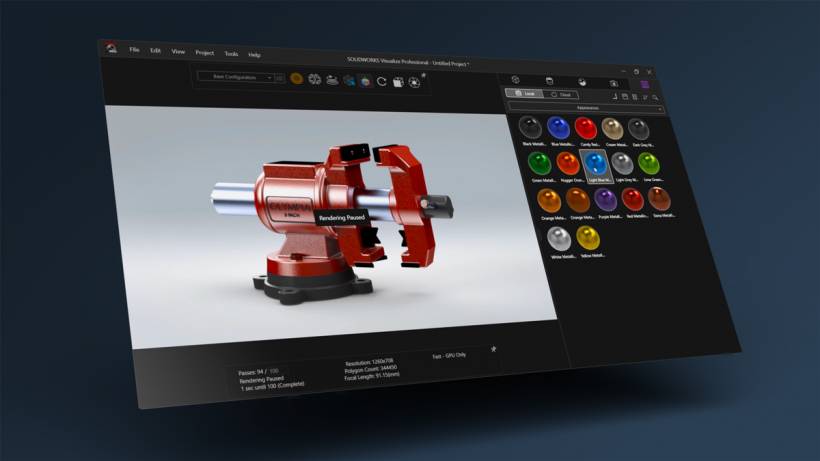
SolidWorks: Still The Engineering Workhorse
SolidWorks remains one of the strongest names in mechanical product design. If your work involves parts that need to fit together precisely, move correctly, or be manufactured with tight tolerances, SolidWorks is still one of the safest choices.
Its biggest strength is parametric modeling. Designers can build models with a clear design intent, where dimensions, relationships, and features are connected logically. If an early measurement changes, the model can update intelligently across the entire design. This is extremely useful when working on assemblies, mechanisms, enclosures, brackets, medical devices, automotive components, or any product where engineering accuracy matters.
SolidWorks is also widely accepted in manufacturing and engineering environments. Many suppliers, clients, and enterprise teams are already familiar with its file formats and workflows. That makes it easier to collaborate with established manufacturers.
However, SolidWorks is not the easiest tool to learn. New users may need months of consistent practice before they feel confident. It is also expensive, especially for freelancers or small studios. While it has surfacing tools, designers who focus heavily on organic shapes may still find Rhino more flexible.
SolidWorks is best suited for mechanical engineers, product development teams, manufacturing-focused designers, and consultants working with engineering-heavy clients.
Rhino 8: A Strong Choice For Complex Forms And Surfaces
Rhino has always had a special place in industrial design because of how well it handles complex geometry. It is especially useful when the product shape is not purely mechanical or box-like. If you are designing footwear, jewellery, furniture, consumer products, packaging, accessories, or sculptural forms, Rhino gives designers a lot of freedom.
Its strength comes from NURBS modeling, which allows precise mathematical surfaces. Rhino 8 continues to improve this area while also strengthening SubD modeling, making it easier to explore smooth and organic forms before turning them into more controlled surfaces.
Another major advantage is Grasshopper, Rhino's visual programming environment. Grasshopper allows designers to create parametric and generative designs without writing traditional code. This is useful for patterns, product variations, architectural elements, complex structures, and experimental design workflows.
That said, Rhino is not as strong as SolidWorks when it comes to managing large assemblies or detailed manufacturing documentation. It also does not behave like a full parametric engineering system. If you change one early curve, some surfaces may need manual adjustment or rebuilding.
Rhino is best for industrial designers, jewellery designers, footwear designers, architects, and anyone who needs strong control over freeform surfaces.
Fusion 360: The Practical All-In-One Option
Fusion 360 has become popular because it combines several important tools into one platform. Instead of using separate software for CAD, CAM, simulation, and collaboration, Fusion 360 brings these workflows together under one environment.
This makes it especially attractive for hardware startups, makers, small engineering teams, and designers who move quickly from idea to prototype. A designer can model a part, run basic simulation, prepare it for CNC machining, and collaborate with others without constantly exporting files between different applications.
Fusion 360 is also more approachable than SolidWorks for many beginners. Its interface feels modern, and its pricing is usually easier to justify for small teams compared with high-end engineering packages. Another useful advantage is its electronics workspace, which can be helpful for products that combine mechanical design with PCB development.
However, Fusion 360 is not perfect. Large assemblies can become slower compared with dedicated enterprise-level CAD tools. Its surfacing capability is good, but Rhino still feels more refined for complex industrial design surfaces. Since Fusion 360 is cloud-connected, users also need to be comfortable with Autodesk's online workflow.
Fusion 360 is best for startups, product designers who also handle fabrication, small manufacturing teams, and users who want CAD and CAM in a single package.
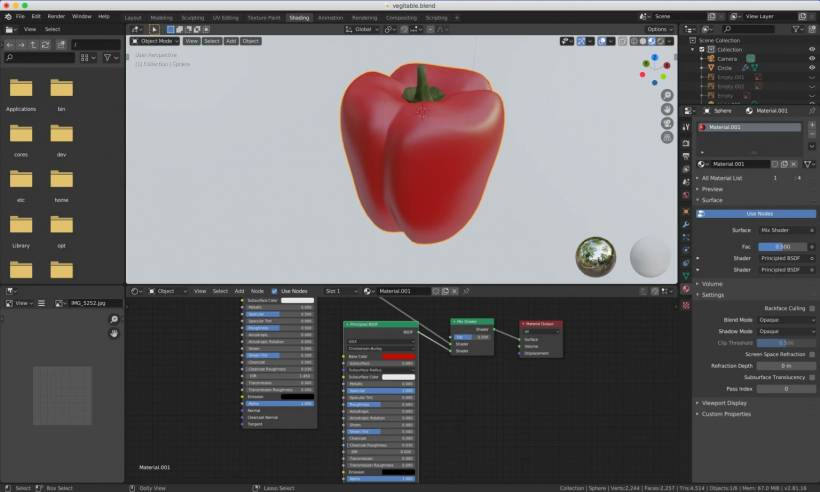
Blender: A Powerful Free Tool For Concept And Visualization
Blender has grown far beyond its old reputation as software mainly for animation and visual effects. In recent years, it has become much more useful for product visualization, concept modeling, rendering, and creative exploration.
The biggest attraction is obvious: Blender is free. For freelancers, students, small studios, and designers on a tight budget, that alone makes it worth considering. But the appeal is not only about cost. Blender's modeling tools are powerful, its Cycles rendering engine can produce excellent photorealistic images, and Geometry Nodes gives users a flexible way to create procedural or semi-parametric designs.
Blender is especially strong when the goal is presentation. If you need product renders, animations, concept visuals, promotional images, or stylised models, Blender can produce beautiful results without requiring expensive rendering software.
The limitation is that Blender is not a traditional engineering CAD platform. It is not the best tool for creating precise manufacturing-ready parts with detailed tolerance requirements. Interoperability with STEP and IGES workflows has improved, but it can still be more troublesome than using CAD-first software.
Blender is best for concept artists, industrial designers doing early-stage visuals, freelancers, product renderers, and anyone who needs strong creative output without licensing costs.
Onshape: CAD Built Around Cloud Collaboration
Onshape takes a very different approach from traditional desktop CAD. It is fully cloud-native, meaning users work through a browser rather than installing a conventional desktop application.
This gives Onshape one of its biggest advantages: collaboration. Multiple team members can work on the same model, track changes, and manage design versions without the usual file-sharing confusion. Its branching and merging approach feels similar to software development workflows, allowing teams to explore different design directions without destroying the main model.
For distributed teams, this can be a major advantage. There are no installation headaches, fewer hardware restrictions, and less IT overhead. Designers can access their work from different machines, and teams can avoid many of the version-control problems that happen when CAD files are emailed or stored in shared folders.
The downside is that Onshape's subscription model means ongoing cost. Some users also prefer the responsiveness and familiarity of desktop software, especially when working on very large assemblies. Its third-party ecosystem is also smaller than SolidWorks.
Onshape is best for distributed teams, companies that value version control, engineering groups working remotely, and organisations that want to reduce CAD administration headaches.
Shapr3D: Professional Modeling With A Touch-First Experience
Shapr3D stands out because it was designed around touch and stylus input, especially on the iPad. For designers who like sketching ideas naturally and turning them into 3D forms quickly, Shapr3D can feel very refreshing.
Using an Apple Pencil to sketch and shape models can feel more intuitive than working only with a mouse and keyboard. This makes Shapr3D useful for early design exploration, classroom teaching, client discussions, and quick concept development while away from a workstation.
It is also more capable than many people assume. Shapr3D can produce usable CAD geometry and export formats suitable for manufacturing workflows. For designers who travel often or prefer a more direct sketch-to-model experience, it can be a very practical tool.
However, the iPad hardware still has limits compared with powerful desktop workstations. Large assemblies, advanced simulation, and complex engineering workflows are not where Shapr3D is strongest. Its subscription cost can also feel high depending on how deeply a user relies on it.
Shapr3D is best for industrial designers, educators, mobile professionals, and users who want a gentle and intuitive way to create 3D models.
Choosing Based On What You Actually Design
The best way to choose 3D modeling software is to start with your product, not the software brand.
If you are designing mechanical assemblies, moving parts, precision components, or products that need serious engineering documentation, SolidWorks or Onshape will usually make more sense.
If your work involves organic shapes, complex surfaces, jewellery, footwear, or industrial design exploration, Rhino is likely to feel more natural.
If you need a balanced tool for design, prototyping, CNC machining, and collaboration, Fusion 360 is one of the most practical choices.
If your priority is rendering, animation, visual presentation, or concept modeling on a limited budget, Blender is difficult to ignore.
If you want to sketch and model naturally on an iPad, Shapr3D offers one of the smoothest entry points into professional 3D design.
Budget Also Plays A Big Role
Cost is another major factor. SolidWorks can be a serious investment, which makes sense for established companies but may be too expensive for independent designers. Rhino has a more straightforward one-time license model, which many studios appreciate. Fusion 360 is generally more affordable for small teams. Blender is free, which makes it extremely attractive for learning and visualisation. Onshape and Shapr3D both follow subscription-based models, which can be convenient but require long-term budgeting.
The cheapest option is not always the best option, and the most expensive software is not always necessary. A designer who only needs product renders may not need SolidWorks. A team preparing parts for manufacturing may quickly outgrow Blender. The right balance depends on the job.
Many Designers Use More Than One Tool
In real-world product design, it is common to use more than one software package. A designer might explore early shapes in Rhino, refine the engineering details in SolidWorks, and then create marketing visuals in Blender. Another team might use Fusion 360 for modeling and manufacturing, while using Shapr3D for quick concept sketches during meetings.
This multi-tool approach is often more realistic than expecting one platform to do everything perfectly. Each software has strengths, and experienced designers usually know when to switch tools depending on the stage of the project.
Final Thoughts
There is no single best 3D modeling software for product design in 2026. The market has matured into a collection of specialised tools, each serving a slightly different type of designer and workflow.
SolidWorks remains the engineering standard. Rhino is still excellent for surfacing and complex forms. Fusion 360 offers a strong all-in-one workflow for smaller teams and makers. Blender is a powerful free option for visuals and concept work. Onshape is ideal for cloud-based collaboration, while Shapr3D makes 3D design more natural and portable on the iPad.
The smartest choice is not necessarily the most popular software. It is the one that matches what you design, how you work, who you collaborate with, and how far your model needs to go toward manufacturing. For many product designers, the best setup may not be one tool at all, but a combination of two or three that work well together.











Comments 0