

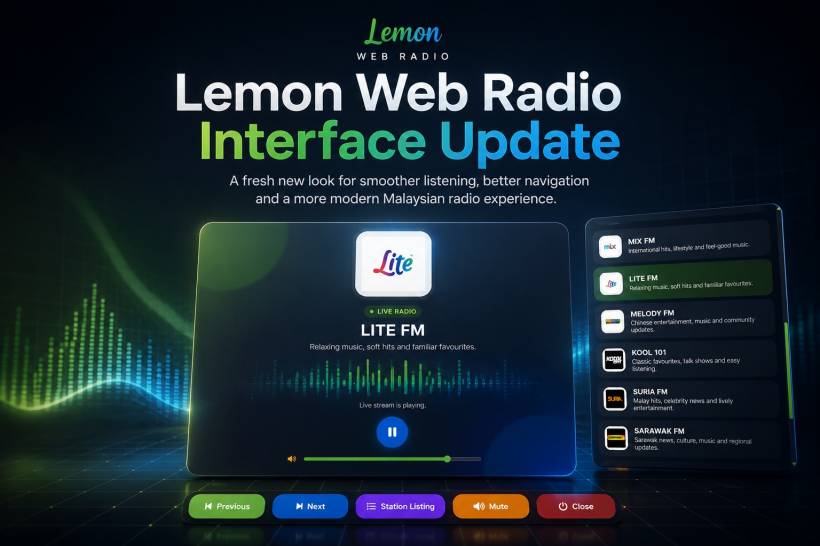
Lemon Web Radio has received a major interface refresh designed to make listening to Malaysian radio stations feel cleaner, easier and more enjoyable across desktop, tablet and mobile devices. The update moves away from a simple station list and basic audio player layout, replacing it with a more polished, modern radio experience that follows the same visual direction as Lemon WebTV. The new design keeps the focus on what matters most: choosing a station quickly, seeing what is playing, and controlling audio without unnecessary clutter.
Whether you are tuning in to music, news, talk shows, entertainment or regional radio stations, the refreshed Lemon Web Radio interface now feels more like a dedicated streaming platform rather than a traditional webpage with embedded audio controls.
A Modern New Station Selection Screen
The first major improvement is the redesigned station browsing page.
Radio stations are now presented in a cleaner card-based grid, with each station featuring its own logo, station name and a short description. This makes it easier to recognise familiar stations at a glance while also helping users discover other choices available on the platform.
The updated layout includes stations such as HITZ FM, ERA FM, SINAR FM, GEGAR FM, MY FM, HOT FM, 988 FM, MIX FM, LITE FM, MELODY FM, KOOL 101, SURIA FM, SARAWAK FM, TRAXX FM, RED FM and EIGHT FM.
Instead of scrolling through plain blocks of content, listeners can now browse a more visually organised collection of stations. Each card has a subtle glass-style appearance, hover animation and responsive layout that adapts to different screen sizes.
A Dedicated Full-Screen Radio Player
Once a station is selected, Lemon Web Radio opens a dedicated radio player interface.
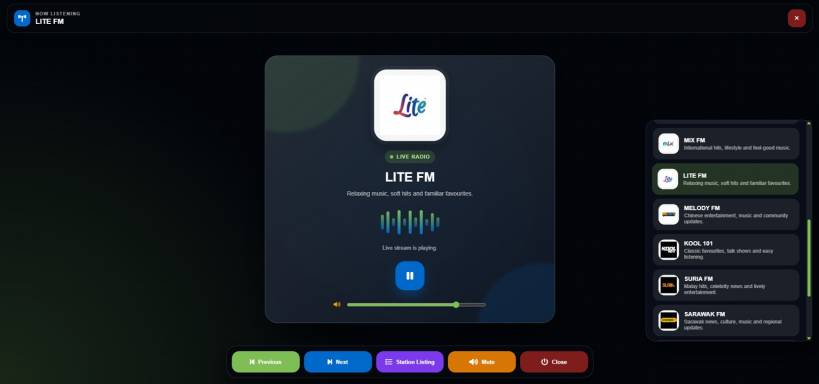
The player is designed around a central listening card that displays the station logo, station name, live radio indicator and a short description. This gives listeners a clearer sense of what they are currently tuned in to, especially when switching between multiple stations.
The full-screen experience also helps remove distractions. Rather than leaving a small audio player fixed somewhere on the page, the radio interface becomes the main focus while listening.
A live indicator and animated equalizer effect add a little more energy to the design, making the player feel active while a stream is playing.
Clearer and More Colourful Controls
The updated player controls are colour-coded to make navigation easier.
The Previous Station button uses green, while the Next Station button uses blue. The Station Listing button uses purple, helping it stand out when listeners want to browse and switch stations quickly. Audio mute controls use an amber-orange colour, while the Close button uses dark red for a clearer exit action.
This small colour system makes a real difference during everyday use. Instead of every button looking the same, users can recognise key actions more quickly even when listening on a smaller screen.
The player also includes:
• Previous and Next station navigation
• A station listing drawer for quick browsing
• Play and pause controls
• Volume adjustment
• Mute and unmute control
• Automatic hiding of interface controls for a cleaner listening view
Quick Station Switching Without Leaving the Player
One of the best improvements in the new interface is the station listing drawer.
Listeners no longer need to close the player and return to the main station page just to change streams. The Station Listing button opens a dedicated panel containing the available radio stations, complete with logos, descriptions and a highlight for the currently selected station.
This makes radio browsing feel much smoother. You can move from one station to another in just a few taps or clicks, whether you are changing from music to talk radio, switching language preferences or simply exploring something new.
The Previous and Next buttons also make station hopping faster, especially for listeners who enjoy browsing through multiple live stations.
Built for Desktop, Tablet and Mobile
The updated Lemon Web Radio layout is designed to work comfortably across different devices.
On desktop screens, the station cards are displayed in a spacious grid for easier browsing. On tablets, the layout adjusts to keep the cards readable without making the page feel crowded. On mobile devices, the design shifts into a single-column experience so station cards remain large enough to tap comfortably.
The radio player also adapts depending on screen size and orientation. Controls remain accessible, while the visual layout scales down to fit smaller devices without losing the main listening features.
This makes Lemon Web Radio suitable for listening at a desk, during a break, on a tablet at home or directly from a phone.
Improved Stream Handling Behind the Scenes
The redesign is not only visual. The player structure has also been improved to better handle different radio stream formats.
Some stations use HLS .m3u8 streams, while others use MP3 or AAC sources. The updated player supports these formats through HLS.js where needed, while also allowing compatible browsers to use their own native playback support.
The update also corrects a stream URL issue affecting Sarawak FM, helping ensure the station can load using the proper source address.
When a stream is connecting, buffering or unavailable, the player can display a clearer status message instead of leaving listeners unsure of what is happening.
A More Consistent Lemon Web Experience
The Lemon Web Radio refresh follows the same overall design concept introduced in Lemon WebTV.
Both platforms now use a darker premium-style interface, modern glass effects, responsive card layouts, colourful controls and dedicated media-player overlays. This creates a more consistent experience across Lemon Web Apps.
The goal is simple: whether users choose to watch a TV channel or listen to a radio station, the platform should feel familiar, easy to navigate and pleasant to use.
Final Thoughts
The Lemon Web Radio interface update gives the platform a more modern identity while making live radio browsing and listening much more convenient.
With a cleaner station grid, full-screen player, animated live listening interface, colourful controls, station navigation drawer, mobile-friendly layout and improved stream handling, Lemon Web Radio now feels more polished and easier to use from start to finish.
It is a practical update that improves both the visual experience and the day-to-day listening workflow for anyone tuning in to Malaysian radio online.











Comments 0