

Apple has officially started rolling out the stable versions of its latest operating systems after several months of developer and public beta testing. iOS 27, iPadOS 27, macOS 27, watchOS 27 and tvOS 27 are now available for compatible devices, bringing a collection of performance improvements, usability refinements, health features and upgrades across Apple's wider ecosystem. Rather than introducing another dramatic redesign, this year's releases focus more heavily on making the software people already use every day faster, smoother and more polished.
That approach makes sense following the major visual changes Apple introduced previously. The familiar Liquid Glass design language remains across the new operating systems, but Apple has refined several aspects of the interface based on feedback and real-world use. Icons are now more clearly defined, glass-like surfaces have been adjusted for better readability, and users receive more control over how transparent some interface elements appear. Overall, the updates feel more like a maturity release than a complete visual reset.
Liquid Glass Remains, but Users Get More Control
Apple is not abandoning Liquid Glass with this generation of software. Instead, the company has concentrated on improving how the design behaves across different devices and applications, particularly in situations where transparency can make text or interface controls harder to distinguish. App icons have been subtly adjusted to provide stronger definition, helping them stand out more clearly against complex backgrounds while still retaining the translucent appearance associated with the design language.
One of the more practical additions is a new opacity control for glass-like interface elements. Users can adjust how transparent those surfaces appear, providing some flexibility between the highly translucent presentation Apple originally envisioned and a more solid appearance that may improve readability. This is particularly useful for people who like the overall Liquid Glass aesthetic but find some interface areas too transparent for comfortable everyday use.
The refinement also reflects how Apple increasingly treats visual design as something that needs to scale across many different products. An interface that looks attractive on an iPhone needs to remain readable on an iPad, Mac, Apple Watch and Apple TV, all of which have very different screen sizes and interaction models. Instead of starting again visually, Apple appears to be tuning the existing design so it works more consistently throughout its ecosystem.
Performance Is One of the Biggest Themes This Year
While there may not be a dramatic new visual overhaul, Apple is making some substantial performance claims for the new releases. The company says AirDrop transfers can now be up to 80% faster, which could make a noticeable difference when moving large videos, photo libraries or project files between Apple devices. Apps are also claimed to launch around 30% faster, while newly captured photos can become available for viewing up to 70% more quickly.
These improvements are likely to be more noticeable in everyday use than many individual interface features. Faster application launches reduce the small delays users encounter dozens of times each day, while quicker photo processing makes the camera experience feel more immediate after capturing high-resolution or computationally processed images. AirDrop improvements could be particularly valuable to people who regularly move large files between an iPhone, iPad and Mac without relying on cloud storage.
Apple has also improved general responsiveness across browsing, file operations and multitasking, with iPad and Mac users receiving particular attention. These platforms increasingly handle workloads that were once limited to conventional desktop computers, so better resource management and faster transfers can have a meaningful impact on productivity. Rather than chasing benchmark numbers alone, the focus appears to be on reducing the small pauses that make an otherwise fast device feel slower than it should.

Search Gets Smarter Across Spotlight, Photos and Mail
Search is another area receiving a significant update across Apple's operating systems. Spotlight, Photos and Mail have all been refined to provide more comprehensive and relevant results, with Apple claiming improvements in both stability and efficiency. This is becoming increasingly important as users accumulate years of messages, photographs, documents and application data across their devices.
Mail receives a redesigned ranking system intended to surface more useful results when users search through large inboxes. Rather than relying primarily on exact matches or chronological ordering, the system can place greater emphasis on relevance so that important conversations are easier to find. For anyone who has tried searching through several years of email for one particular attachment or discussion, improving ranking can be more valuable than simply making the search itself faster.
Photos and Spotlight benefit from similar improvements, helping users find content without needing to remember exactly where it was saved. As Apple continues integrating information across applications and devices, system-wide search is gradually becoming a central navigation tool rather than merely a way of finding files. The improvements in version 27 appear designed to make that experience more predictable and useful.
Connectivity Should Feel More Seamless
Apple is also making under-the-hood improvements to connectivity, particularly when devices move between cellular and Wi-Fi networks. The company says transitions between the two should now occur more smoothly, reducing interruptions when users leave a building, travel between access points or move into an area where one connection becomes unreliable.
This type of improvement is easy to overlook because, when it works correctly, users barely notice it. A smartphone should simply maintain its internet connection without forcing the user to think about whether it is currently using Wi-Fi, 5G or another available network. Improvements to handovers can therefore benefit everything from FaceTime calls and streaming to navigation and cloud synchronisation.
The wider ecosystem may benefit as well because Apple devices increasingly depend on continuous communication with one another. Features such as AirDrop, Continuity, shared clipboards and cloud synchronisation all work best when network transitions happen quietly in the background. Making those connections more reliable helps reinforce the seamless experience Apple has long promoted between its products.
iCloud Shared Albums Finally Get Full-Resolution Media
Photo sharing receives a particularly welcome improvement through full-resolution photos and videos in iCloud Shared Albums. Previously, shared content could be subject to compression or other limitations, which made the feature less suitable for photographers, families or groups who wanted to preserve the original quality of their media.
The new behaviour makes Shared Albums more useful as a collaborative photo space rather than simply a convenient preview gallery. Family members can share important photographs without sacrificing detail, while groups returning from events or trips can maintain higher-quality copies of their videos and images. It also brings the feature more closely in line with expectations created by increasingly high-resolution smartphone cameras.
There will naturally be storage and bandwidth considerations when sharing larger files, but modern Apple devices routinely capture enormous amounts of high-resolution content anyway. Allowing users to preserve that quality when sharing makes the feature more consistent with the hardware's capabilities.
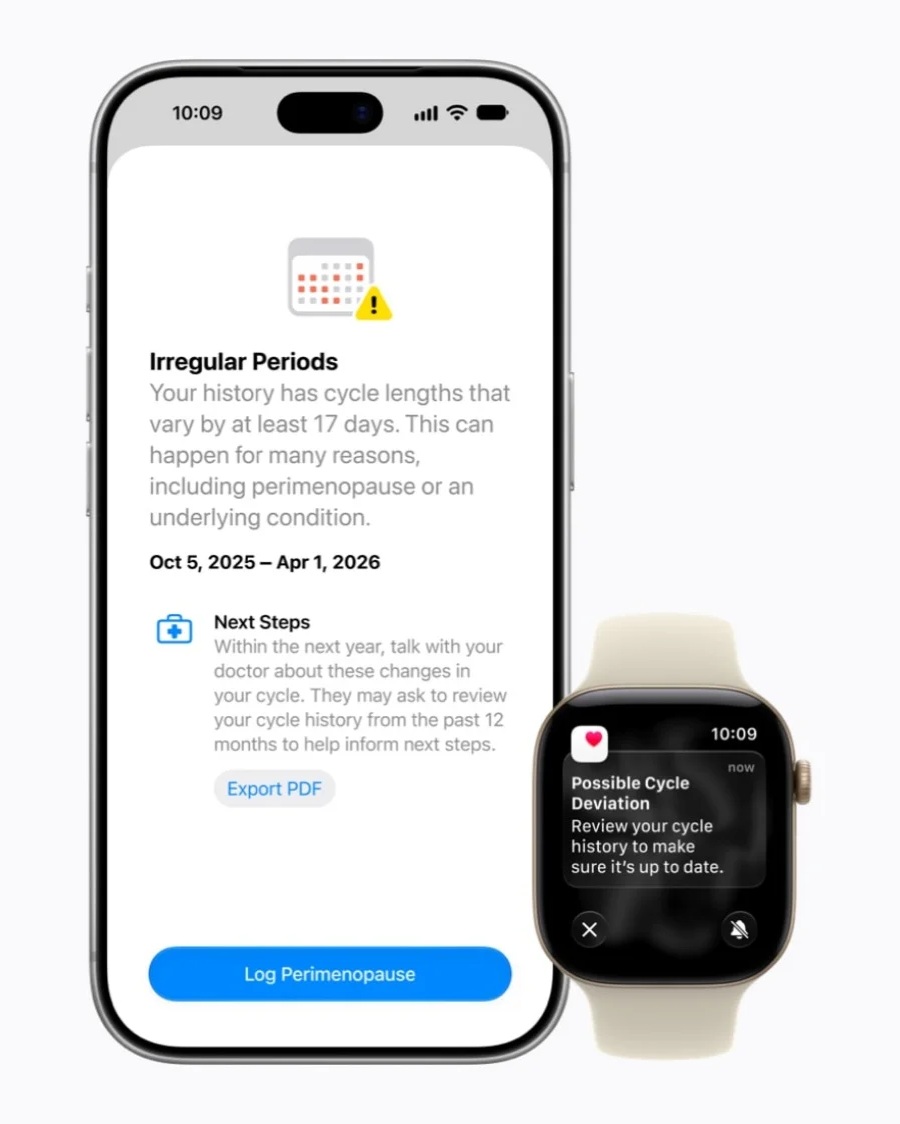
Health Adds Perimenopause and Menopause Support
Apple continues expanding the Health app with new features designed around women's health. The version 27 updates introduce perimenopause and menopause support, allowing users to track and better understand health information associated with those stages of life. This extends Apple's previous work around menstrual-cycle tracking and reproductive health.
The addition reflects Apple's broader strategy of turning the iPhone and Apple Watch into increasingly comprehensive personal health platforms. Rather than focusing solely on exercise metrics such as steps or heart rate, the company has gradually incorporated sleep, medications, hearing, cycle tracking and other areas that affect long-term wellbeing. Adding menopause-related tools addresses an area that has historically received less attention from mainstream consumer technology.
As with other health features, these tools are intended to help users observe patterns and maintain useful records rather than replace professional medical advice. Their greatest value may come from giving individuals more structured information that they can use when discussing symptoms or changes with healthcare professionals.
AirPods Gain Custom EQ While GymKit Expands
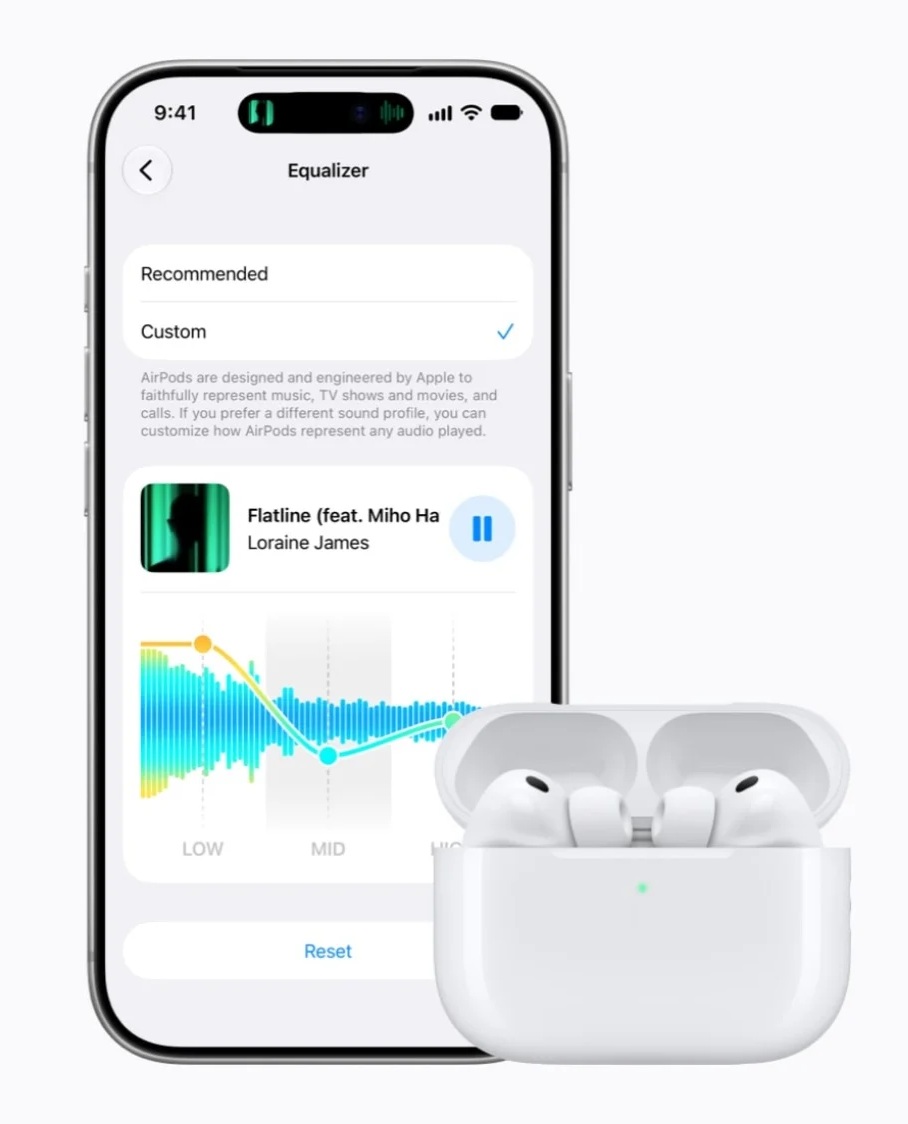
AirPods users are also getting more control over how their audio sounds through a new custom equaliser option. Apple's headphones have traditionally relied heavily on preset tuning and automatic processing, so providing more direct EQ adjustment gives listeners additional flexibility to tailor audio according to personal preference or the type of content being played.
The update also expands Apple GymKit, strengthening integration between Apple devices and compatible fitness equipment. GymKit allows workouts on supported machines to communicate with the Apple Watch, combining equipment measurements with personal health information to provide more complete workout data. Broader support could make the feature more useful in gyms where users regularly move between different types of equipment.
Together, these additions demonstrate Apple's tendency to improve accessories through operating-system updates rather than treating them as static hardware. AirPods and Apple Watch capabilities can continue evolving years after purchase as long as the underlying hardware supports the new software.
watchOS 27 Makes the Apple Watch More Context-Aware
Apple Watch receives several improvements of its own, including smarter Smart Stack widget suggestions. The system can provide widgets based on context, potentially surfacing information that is more relevant to what the user is doing at a particular moment rather than requiring everything to be opened manually.
A new single-handed tap gesture also expands how users can interact with the watch without relying on the other hand. Gesture-based controls can be particularly useful while carrying something, exercising or performing another activity where touching the screen is inconvenient. Apple has increasingly explored ways of controlling the Watch through hand movements, and version 27 continues that direction.
These may sound like relatively small changes individually, but the Apple Watch is a device where reducing interaction steps can make a considerable difference. Its screen is intentionally small, so features that anticipate what users need or allow actions without touching the display can improve usability more than adding another complicated menu.
Apple Maps Gets an AI-Enhanced Flyover Experience
Apple Maps is also gaining AI-enhanced Flyover experiences, bringing additional intelligence to the 3D city-viewing feature. Flyover has traditionally allowed users to explore selected locations from a detailed aerial perspective, and the new AI enhancements are intended to make those experiences more informative and visually useful.
The addition continues Apple's gradual improvement of Maps from the relatively limited service it launched years ago into a much broader navigation and location platform. Detailed city models, transit information, walking directions and immersive views have steadily expanded, with AI increasingly being used to organise and present that information more effectively.
How noticeable the new Flyover enhancements will be depends heavily on location availability. Apple's detailed map experiences are still more extensive in some cities and countries than others, so the feature's usefulness will vary according to where someone lives or travels.
Apple TV Gets Better Audio and Accessibility
tvOS 27 brings several quality-of-life improvements to the living room, particularly for users invested in Apple's media services. Apple Music gains high-resolution lossless audio support, offering another option for listeners with compatible audio equipment who want higher-quality playback through their television setup.
The Apple Podcasts application has also been redesigned, giving the service a more modern interface that better matches Apple's other media applications. Podcast listening on televisions may be a relatively niche use case compared with phones, but the update makes the experience more consistent for people who use Apple TV as the centre of their home entertainment system.
Accessibility improvements include broader text-size controls, allowing users to make interface elements easier to read from across the room. Accessibility changes often benefit far more people than those who specifically identify as having a disability, particularly on televisions where viewing distance varies substantially between households.
The Biggest Upgrade May Be How Everything Works Together
What makes Apple's operating-system releases different from updating a single device is how changes spread across the entire ecosystem. An iPhone user may also own an iPad, Apple Watch, AirPods, Mac and Apple TV, meaning improvements to one platform can influence how several devices work together. Faster AirDrop, better networking, more capable search and improved cloud sharing become more valuable when they operate consistently across the whole collection.
That ecosystem approach explains why this year's release can still be significant without introducing a headline-grabbing redesign. Apple is refining the interactions that connect its products, improving the speed of common activities and adding smaller features across several platforms. The result may feel less dramatic during the first few minutes after installing the update, but more noticeable after several days of regular use.
There is also an argument that mature operating systems benefit from this type of release cycle. Constant visual redesign can make software feel fresh, but it can also frustrate users who need to relearn familiar workflows. By keeping the overall Liquid Glass interface while refining performance and usability, Apple can improve the experience without forcing everyone to start over.
Final Thoughts
Apple's 2027 operating-system generation is clearly focused on polish rather than reinvention. iOS 27, iPadOS 27, macOS 27, watchOS 27 and tvOS 27 retain the Liquid Glass design language while addressing some of its rougher edges, including better-defined icons and adjustable transparency. Underneath the familiar appearance, Apple is promising meaningful improvements to app launching, AirDrop transfers, photo processing, connectivity, search and multitasking.
The smaller platform-specific additions are equally important. Full-resolution iCloud Shared Albums address a long-standing limitation, Health gains more inclusive tracking features, AirPods become more customisable, Apple Watch gets more intelligent widgets and easier gestures, while Apple TV receives improved audio and accessibility options. None of these features completely transforms its respective device, but together they make the ecosystem more capable.
For existing Apple users, the most noticeable benefit may simply be that familiar devices feel quicker and easier to use. That is not as visually exciting as a completely new interface, but mature software does not always need dramatic reinvention to deliver a worthwhile upgrade. Sometimes faster transfers, smarter search, better connectivity and fewer small frustrations make a larger difference over time.
With the beta period now complete, compatible devices can begin moving to the stable releases through their normal software-update menus. As usual, users relying on mission-critical applications may want to confirm compatibility before immediately upgrading, but for most consumers, Apple's version 27 releases represent the company's latest attempt to make its ecosystem feel more refined, responsive and connected rather than radically different.











Comments 0