

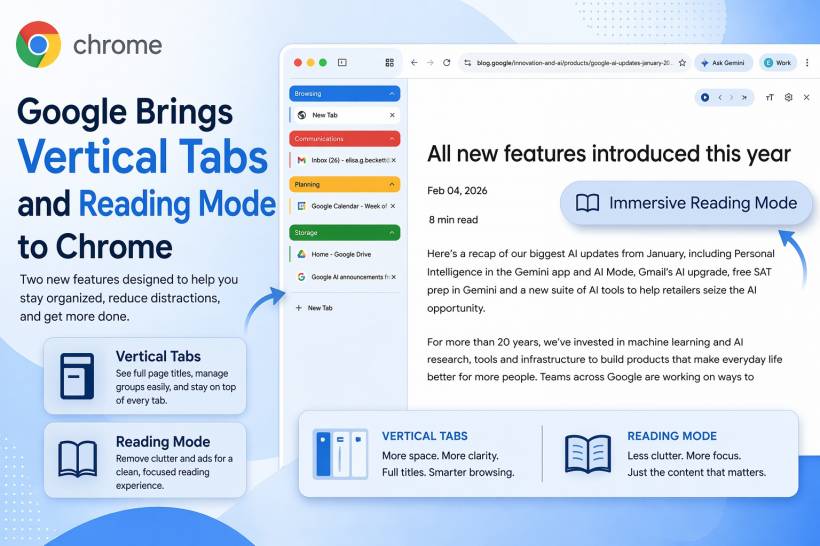
Google is introducing a couple of new Chrome features that look designed for people who spend a big part of their day juggling tabs and reading long pages online. The two additions are vertical tabs and a new reading mode, both aimed at making the browser feel a little cleaner, easier to manage, and more productivity-friendly.
While neither feature completely changes how Chrome works, they do show Google paying more attention to everyday browsing habits. For many users, Chrome is no longer just a place to open a few websites. It has become a workspace, a reading tool, and sometimes even a task manager in disguise. So small usability improvements like these can make a noticeable difference.
A Different Way to Manage Tabs
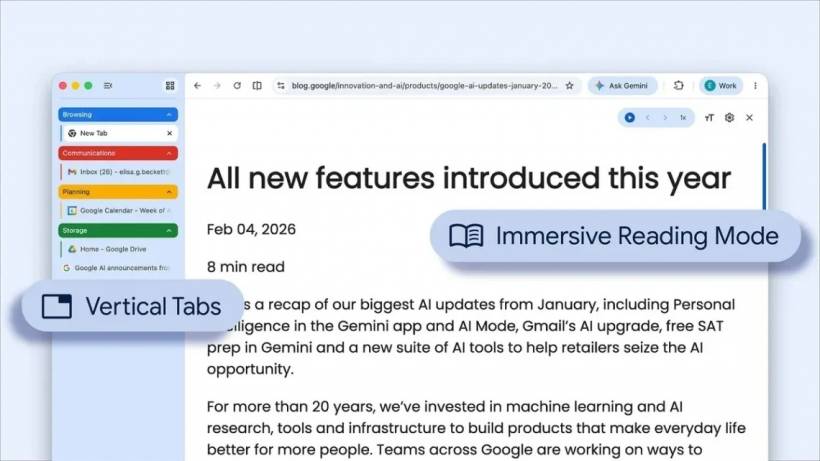
The first new feature is vertical tabs. Instead of placing tabs across the top of the browser window, Chrome can now move them to the side. Once this view is enabled, users are able to see the full names of pages more clearly, rather than trying to guess which tab is which from a tiny compressed label.
That may sound like a simple layout change, but it solves a very common problem. Anyone who keeps a large number of tabs open knows how quickly the traditional top bar becomes cluttered. After a certain point, tabs shrink so much that they stop being useful at a glance. By stacking them vertically, Chrome gives users a more readable and organised view, especially when multitasking across different projects, research pages, or grouped tabs.
Google says this should make it easier to identify pages and manage tab groups without constantly hovering over each tab to see what it contains. For people working on widescreen monitors, the layout may feel especially natural, since there is often more horizontal space available than vertical room anyway.
Of course, the trade-off is that vertical tabs take up space at the side of the screen. Google seems aware of that, which is why users can reduce the width of the sidebar when they want more room for the webpage itself.
Reading Mode Puts the Focus Back on Content
Alongside vertical tabs, Google is also rolling out a new reading mode. This feature is meant to make webpages easier to read by removing distracting elements and presenting content in a simpler, more focused format.
In practice, that means stripping away visual clutter such as ads and unnecessary page elements, leaving behind a cleaner reading experience that puts the text front and centre. For users who regularly read articles, guides, documentation, or long-form content in Chrome, this could be one of the more useful additions.
The idea behind reading mode is not new, but it remains valuable because the modern web is often packed with pop-ups, banners, sidebars, autoplay sections, and other distractions competing for attention. A dedicated reading view helps users concentrate on the actual content instead of fighting with the page layout.
Google is also positioning this as a feature that works particularly well with the new tab layout. The combination suggests a browser experience that is not just about opening more tabs, but also about making the content inside them easier to handle.
How to Turn the Features On
According to Google, enabling vertical tabs is straightforward. Users can click within a Chrome window and choose the option to show tabs vertically. Once that is activated, the tabs shift to the side and begin displaying full page titles.
Reading mode is similarly easy to access. Users can right-click on a page and choose the option to open it in reading mode, which then switches the page into a cleaner and more text-focused view.
Both features appear to be designed for convenience, without requiring users to dig through complex settings menus just to try them.
A Gradual Rollout Means Not Everyone Will See It Right Away
Although Google says the rollout has officially started, not every Chrome user will see the new options immediately. That is fairly normal for browser updates, especially when Google distributes features in phases rather than releasing them to everyone at once.
So if the settings are not showing up yet, it does not necessarily mean something is wrong. It may simply mean the update has not reached that browser installation yet. Updating Chrome to the latest version is still a good idea, but even then, feature availability may vary depending on rollout timing.
That gradual release approach is common with Google products, especially when the company wants to monitor adoption and stability before pushing a feature more widely.
Why These Small Features Matter
On the surface, vertical tabs and reading mode may look like minor additions. But together, they reflect a broader shift in how people use browsers today. Browsers are no longer just gateways to websites. They are where people work, study, research, read, compare, organise, and sometimes spend most of their digital day.
That is why features like better tab visibility and distraction-free reading matter more than they might have a few years ago. They are not flashy upgrades, but they directly improve daily comfort and usability.
For heavy Chrome users, especially those who often keep dozens of tabs open or read long articles online, these new tools could become genuinely useful once they appear.
Final Thoughts
Google's latest Chrome additions are all about making browsing feel a little less chaotic. Vertical tabs offer a more practical way to manage crowded browsing sessions, while reading mode creates a cleaner space for focusing on content without distractions.
They may not arrive for everyone at the same time, but once they do, they should give Chrome users a more flexible and productive browsing experience. For people who treat Chrome as part workspace and part reading platform, that is a welcome update.











Comments 0