

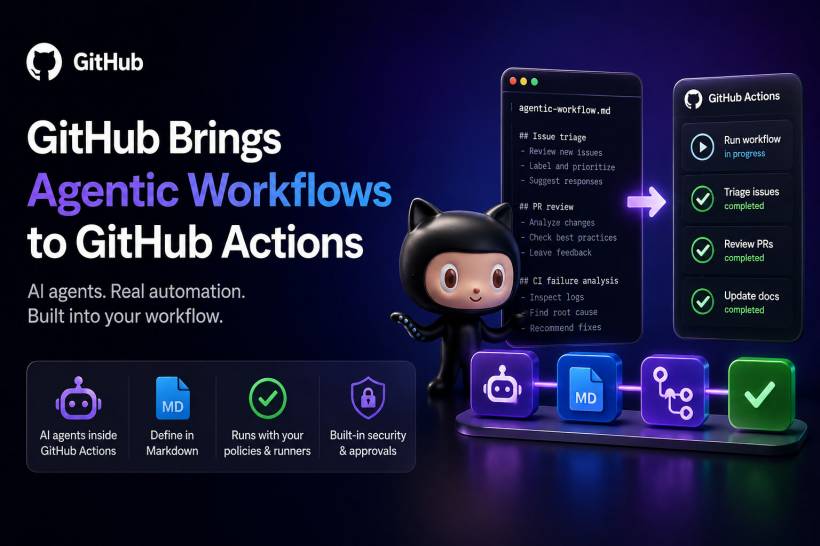
GitHub's new public preview lets teams define AI-driven repository tasks in Markdown, combining coding agents with the controls and infrastructure already used for GitHub Actions. GitHub is expanding the role of AI inside software development workflows with the public preview of GitHub Agentic Workflows.
The new feature allows organisations to run coding agents directly within GitHub Actions, giving teams a way to automate selected engineering tasks without moving outside their existing CI/CD environment.
Rather than treating AI as a separate chatbot or coding assistant, GitHub is positioning Agentic Workflows as part of the software delivery pipeline. Teams can use them for tasks such as issue triage, pull request reviews, documentation updates, CI failure analysis and routine maintenance work.
The goal is to reduce repetitive engineering tasks while still keeping organisations in control of how agents access repositories, run jobs and propose changes.
From Technical Preview to Public Preview
GitHub first introduced Agentic Workflows in a technical preview earlier this year. At the time, the company described the feature as a way to use AI agents for structured repository tasks through GitHub Actions.
The public preview expands on that concept by allowing teams to define more reasoning-based workflows. Instead of writing every automation entirely in traditional YAML configuration, developers can describe the intended task in natural-language Markdown files.
GitHub then compiles those instructions into standard GitHub Actions YAML workflows.
This approach could make automation more accessible for teams that understand the process they want to automate but do not want to write every workflow from scratch.
For example, a team could create an agent workflow that checks newly opened issues, identifies possible duplicates, assigns labels, suggests relevant documentation or prepares a draft response for maintainers to review.
Agentic Workflows Are Built Into GitHub Actions
One important part of the announcement is that Agentic Workflows run inside GitHub Actions rather than on a separate AI platform.
This means organisations can continue using existing runner groups, workflow policies and access restrictions. Teams do not need to create an entirely new environment just to introduce AI-powered automation.
GitHub said the feature can also use the built-in GITHUB_TOKEN available within Actions workflows. This reduces the need for teams to manually create and maintain separate personal access tokens for agent tasks.
For developers and administrators, that could simplify setup while keeping access management closer to the existing GitHub Actions security model.
More Runner Options for Modern Development Workloads
GitHub also announced additional hosted runner images in public preview.
These include newer operating system and architecture choices, such as Ubuntu 26.04 for x64 and Arm64 environments, along with Windows 11 Arm64 images that include Visual Studio 2026.
The additional runner options could be useful for teams building applications across different processor architectures, testing modern development stacks or preparing software for Windows-on-Arm devices.
As development environments become more diverse, runner flexibility is becoming increasingly important for CI/CD pipelines.

Bot-Created Pull Requests Will Require Approval Before Running Workflows
GitHub has also adjusted how pull requests created by github-actions[bot] interact with CI/CD workflows.
Under the updated approach, workflows created by bot-generated pull requests can run only after approval from a user with write access to the repository.
This adds a practical safeguard.
Generated code can sometimes trigger build pipelines, deployment logic or jobs with access to sensitive environment variables. Requiring a trusted contributor to approve the workflow first helps reduce the risk of automatically executing unreviewed changes.
It is a reminder that AI-assisted code generation should still be treated like any other contribution: useful, but subject to review and proper controls.
Early Users Are Applying Agents to Routine Engineering Work
GitHub cited Carvana and Marks & Spencer as early users of Agentic Workflows.
Carvana is reportedly using the feature for engineering work that can involve changes across several repositories. This type of task is often difficult to manage manually, especially when updates need to stay consistent across related projects.
Marks & Spencer has reportedly developed reusable workflows covering security, quality and software delivery. These workflows are being used for routine tasks including issue triage, vulnerability remediation, dependency maintenance and change reviews.
This highlights one of the biggest potential advantages of agentic workflows: teams may be able to create an approved workflow once, then apply it consistently across multiple repositories.
Security Controls Are a Major Part of the Design
GitHub has included several controls intended to limit the risk of automated changes.
Agents operate with read-only permissions by default and access repository content based on integrity filter rules. They run within sandboxed containers protected by the Agent Workflow Firewall, while outputs are checked through a safe-output process.
GitHub also says a separate threat-detection job scans proposed changes before they are applied.
These controls matter because AI agents can interact with source code, pull request descriptions, issue text, comments and workflow files. Any of those sources may contain untrusted or manipulated content.
The main challenge is not simply getting an agent to produce a pull request. It is making sure the output can be reviewed, trusted and merged safely.
Why CI/CD Security Still Needs Attention
The launch comes at a time when developer environments and CI/CD pipelines are increasingly attractive targets for attackers.
Recent software supply-chain incidents have shown how stolen GitHub Actions secrets, exposed tokens and compromised workflows can be used to access repositories, publish malicious packages or move into cloud environments.
Although these incidents are not directly linked to GitHub Agentic Workflows, they underline why permissions, approval gates, runner isolation and secret handling are so important.
An AI workflow can automate useful engineering work, but it may also process untrusted repository content. Issue descriptions, pull request text and comments can potentially influence an agent's reasoning or downstream automation.
Researchers have described this type of risk as "agentic workflow injection", where untrusted content is introduced into prompts, instructions or automated decision-making flows.
For this reason, organisations should treat agent-based automation as part of their wider DevSecOps environment, not as a simple productivity add-on.
What Teams Should Consider Before Using It
Teams exploring GitHub Agentic Workflows should begin with low-risk, reviewable tasks.
Good early use cases may include:
• Categorising issues and applying labels.
• Suggesting documentation updates.
• Identifying dependency update requirements.
• Summarising CI failures for developers.
• Preparing draft pull request reviews.
• Checking repositories for outdated configuration files.
More sensitive tasks, such as modifying infrastructure code, changing deployment workflows or accessing secrets, should have stricter review and approval requirements.
The safest approach is to start small, keep permissions limited and make sure humans remain responsible for approving changes.
Final Thoughts
GitHub Agentic Workflows could make GitHub Actions more useful for teams that want AI assistance built directly into their development process.
By allowing agents to run within existing workflows, organisations can automate repetitive tasks without giving up their existing runner controls, policies and review gates.
However, the feature also reinforces an important reality: automation becomes more powerful when it can make changes, but that power needs strong boundaries. Teams that combine Agentic Workflows with least-privilege permissions, approval checks, secure secret management and careful reviews will be in the best position to benefit from the technology safely.











Comments 0