

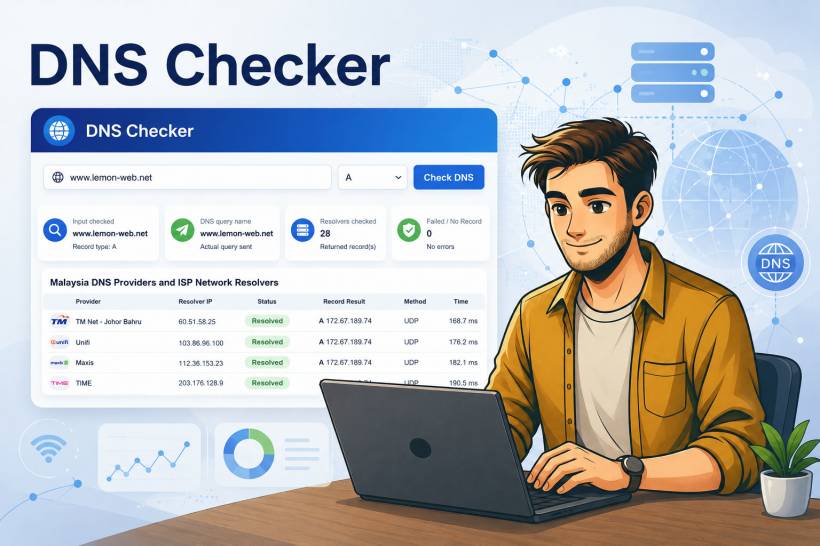
DNS issues are one of those problems that can look simple from the outside, but quickly become confusing once you start troubleshooting them properly. A website may load perfectly on one internet provider, fail on another, resolve correctly on mobile data, but behave differently on office Wi-Fi. For anyone managing websites, domains, hosting, Cloudflare, email records, or DNS migrations, this can become a very familiar headache.
That is exactly why this DNS Checker program was created. The idea is simple: provide a clean, browser-based tool where users can enter a domain name, choose the DNS record type they want to check, and see how that record resolves across selected Malaysian DNS resolvers and major global DNS servers.
Instead of depending only on one DNS server, the checker compares results from multiple resolvers. This gives a clearer view of whether a domain has propagated correctly, whether different resolvers are returning different answers, or whether a record is simply missing.
Why DNS Checking Matters
When we update a DNS record, such as changing an A record to point to a new server, adding an MX record for email, or modifying TXT records for verification, the change is not always visible everywhere immediately. DNS resolvers around the world may cache old results until the TTL expires. Some networks update quickly, while others may take longer.
For normal users, this usually appears as a random issue. One person says the website works. Another says it does not. Someone using mobile data may get a different result from someone using fibre broadband. In Malaysia, this can become even more noticeable because users may be connecting through TM/Unifi, TIME, Maxis, CelcomDigi, U Mobile, YES, ViewQwest, Exabytes-hosted networks, or other providers.
A DNS checker helps remove some of the guesswork. Instead of relying only on "it works on my side", the tool checks the DNS response from different resolvers and displays the actual returned records.
What This DNS Checker Does
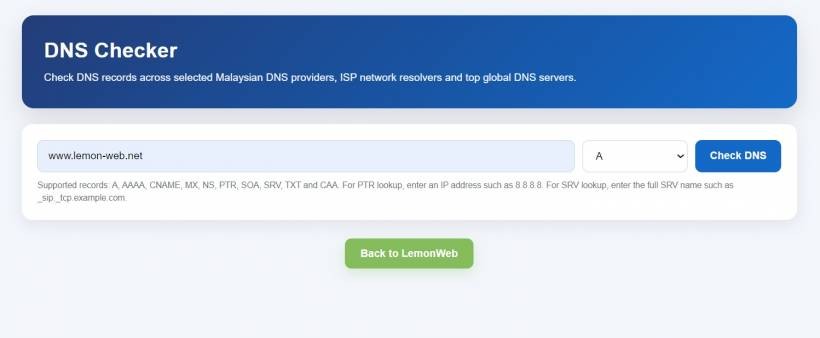
This DNS Checker is built as a single-page PHP 5.6 application. That means it can run on older hosting environments without needing Composer, external packages, or a modern PHP framework. The user enters a domain name, selects the DNS record type, clicks the button, and the system performs DNS queries against a selected list of resolvers.
The tool currently supports the following DNS record types:
• AAAA
• CNAME
• MX
• NS
• PTR
• SOA
• SRV
• TXT
• CAA
This makes the tool useful not only for checking website IP addresses, but also for email configuration, domain ownership verification, SSL certificate authority permissions, reverse DNS, service discovery records, and general DNS troubleshooting.
For example, an A record check can show which IPv4 address a domain points to. An MX check can confirm the mail servers used by a domain. A TXT check can help verify SPF, DKIM, DMARC, Microsoft 365, Google Workspace, or other verification records. A CAA check can show which certificate authorities are allowed to issue SSL certificates for the domain.
Focus on Malaysian DNS Resolvers
One of the main goals of the program is to make it more relevant for Malaysian users. Many online DNS propagation tools focus heavily on global resolver locations, but they may not always reflect the experience of users connecting from Malaysia.
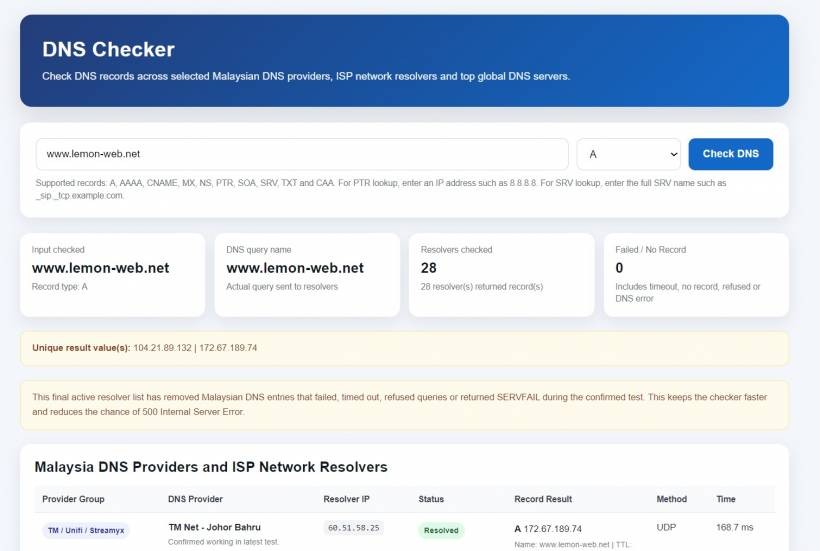
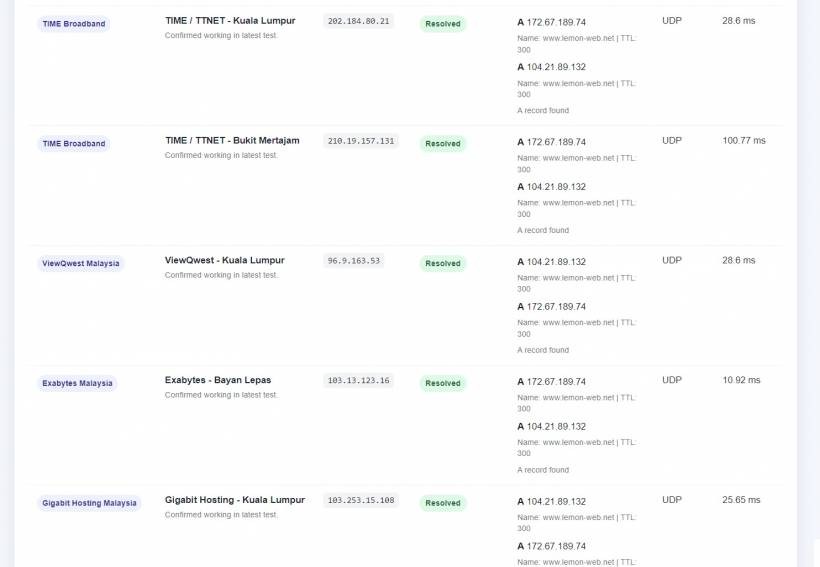
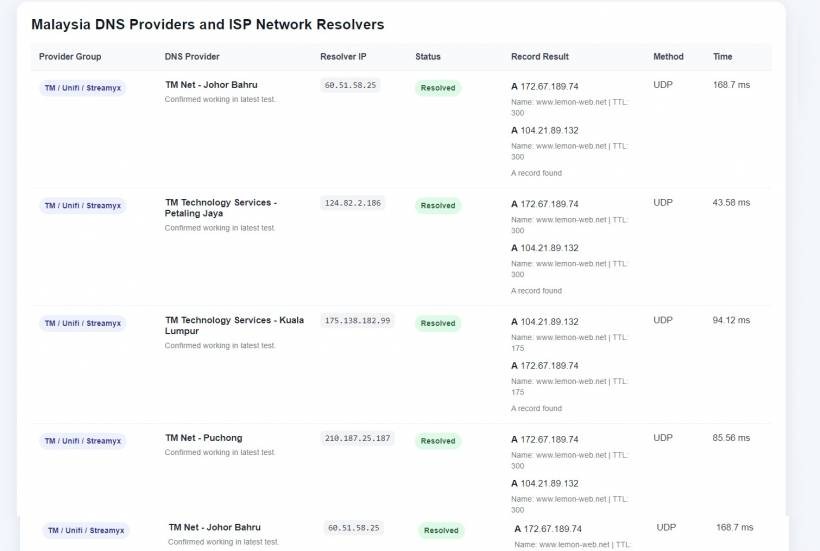
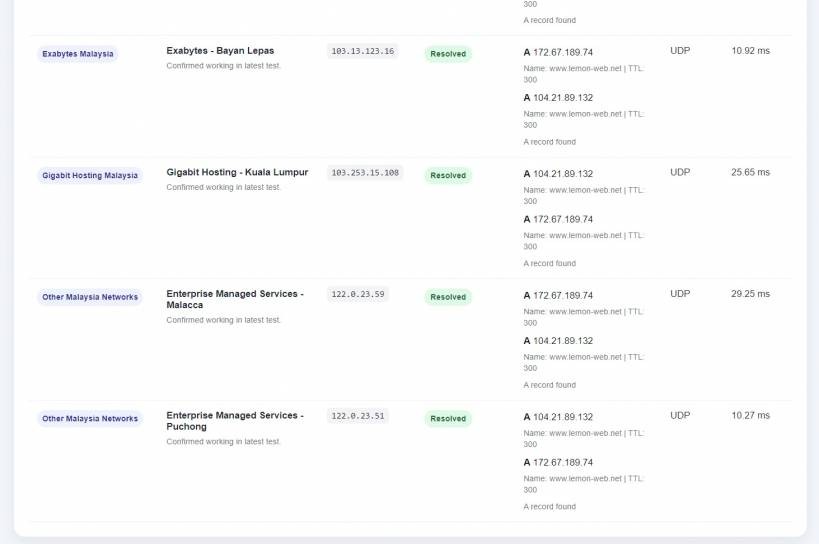
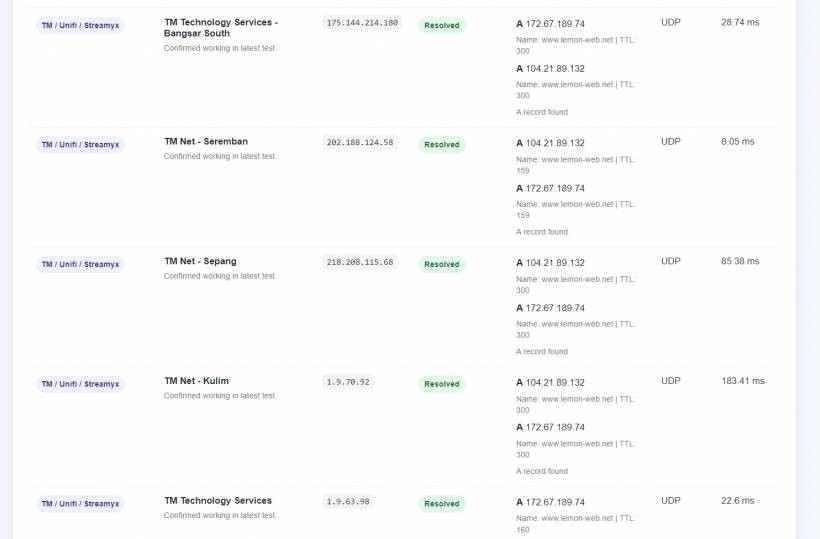
This checker includes a selected list of Malaysian DNS providers and ISP network resolvers. During testing with www.lemon-web.net, several Malaysian resolvers successfully returned valid DNS records, including TM/Unifi, TIME, ViewQwest, Exabytes, Gigabit Hosting, and Enterprise Managed Services entries. The test results showed the domain resolving correctly to Cloudflare IP addresses such as 104.21.89.132 and 172.67.189.74 from the working resolvers.
The important improvement in the final version is that failed resolvers were removed from the active scan. Earlier versions attempted to check many public-listed Malaysian DNS resolvers, but several of them returned timeout, refused queries, or SERVFAIL responses. That caused the checker to take too long and even risked triggering a 500 Internal Server Error on the web server.
So the final version takes a more practical approach: only keep resolvers that responded successfully during testing. This makes the tool faster, cleaner, and more reliable for normal users
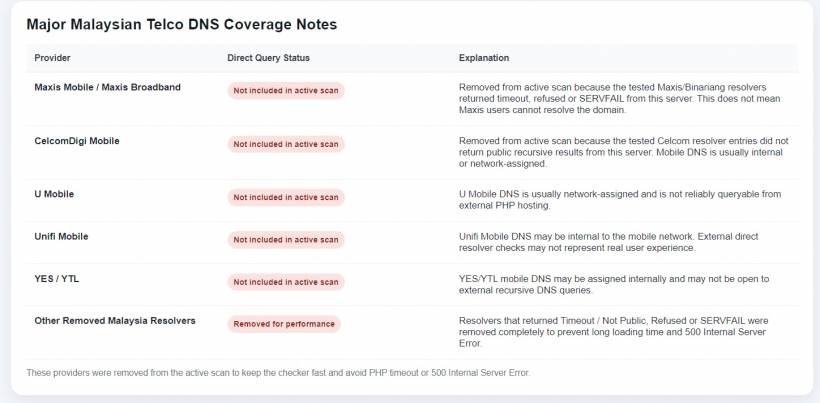
Why Some Malaysian Telco DNS Servers Are Not Included
One thing that came up during development is that not every ISP or mobile telco DNS server can be queried directly from a public web server. This is especially true for mobile networks such as Maxis Mobile, CelcomDigi, U Mobile, Unifi Mobile, and YES/YTL.
These providers may use internal DNS resolvers that are assigned only to users inside their own network. Some may also use transparent DNS behaviour, internal routing, or resolver policies that block recursive queries from outside IP addresses.
That means if a PHP script hosted on a normal web server tries to query those DNS resolvers directly, the request may fail. But that does not necessarily mean the telco's users cannot resolve the domain. It simply means the resolver is not publicly queryable from the server running the checker.
This distinction is important. A failed external DNS query should not be wrongly interpreted as "the ISP DNS is down" or "the domain does not work on that telco". For a truly accurate mobile telco DNS test, the query should be performed from inside that mobile network itself.
Global DNS Server Comparison
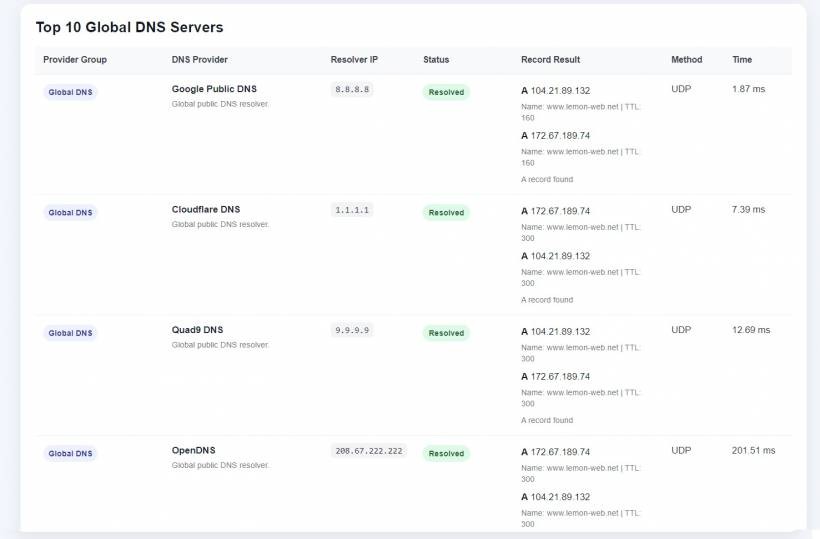
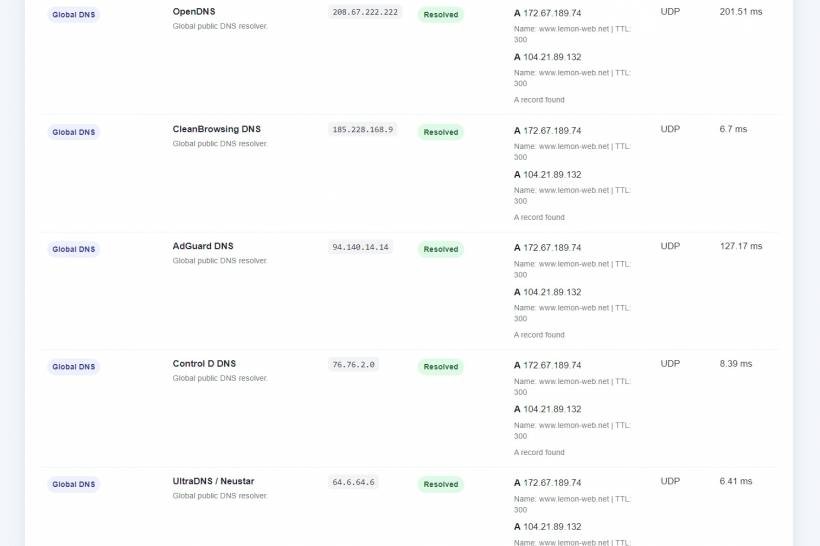
Besides Malaysian resolvers, the checker also includes a Top 10 Global DNS Servers section. This includes major public DNS providers such as Google Public DNS, Cloudflare DNS, Quad9, OpenDNS, CleanBrowsing, AdGuard DNS, Control D, UltraDNS/Neustar, Comodo Secure DNS, and DNS.WATCH.
This gives users a wider comparison beyond Malaysia. If a record resolves correctly on Malaysian resolvers but differently on one global resolver, it may suggest cache differences, CDN routing differences, or resolver-specific behaviour.
In the test result, most global resolvers returned the expected Cloudflare IP addresses for www.lemon-web.net, while DNS.WATCH returned a different pair of Cloudflare IPs, 188.114.96.3 and 188.114.97.3. This is not necessarily a problem. With CDN-backed domains, different resolvers may receive different edge IPs depending on routing, location, and resolver behaviour.
That is another reason why DNS checking should not always be treated as a simple "same IP everywhere" test. For websites using Cloudflare or other CDN providers, multiple correct IP answers can exist.
Designed to Avoid Long Loading and Server Errors
A key lesson from testing was performance. DNS checking can become slow if the program queries too many resolvers one by one. If each failed resolver waits one second, and there are dozens of them, the page can quickly become slow. If the timeout is longer, such as three seconds, the problem becomes worse.
Earlier testing showed many resolvers returning timeout or non-public responses. Some took around one second each after reducing the timeout, while earlier versions with longer timeout values could stack up into a very long page load.
The final program solves this by using a shorter timeout and removing known-failed Malaysian resolvers completely from the active list. It also uses UDP-only DNS checking for speed. TCP fallback was removed from the normal flow because it made the scan slower and increased the risk of server timeout.
This makes the checker more suitable for normal hosting environments, especially older PHP 5.6 hosting where long-running scripts may easily trigger server limits.
Clean Interface with Loading Feedback
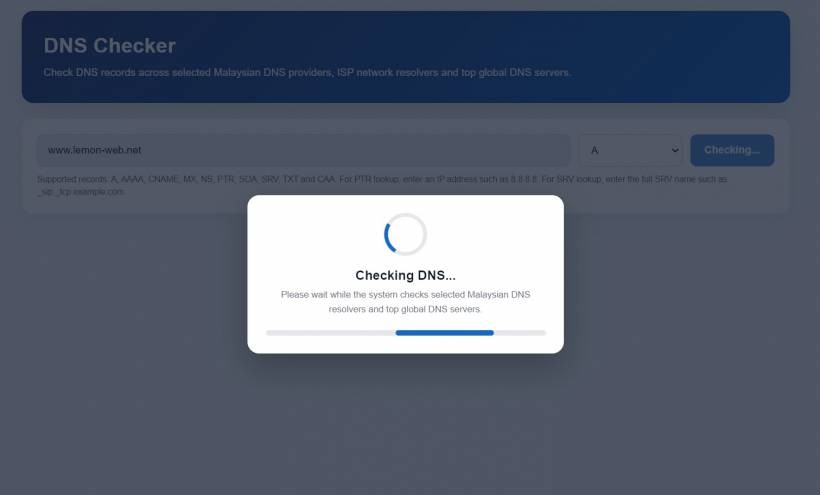
The program also includes a loading animation after the user clicks the Check DNS button. This is a small but important usability improvement. Without a loading indicator, users may think the page is frozen, especially when DNS checks take a few seconds.
The interface displays a simple form with a domain input field, a record type dropdown, and a submit button. Once results are available, the page shows summary cards, unique DNS result values, Malaysian DNS resolver results, global DNS results, and a note section explaining why certain telco DNS providers are not actively scanned.
There is also a "Back to LemonWeb" button at the bottom of the page, styled in green using #7fbe54, linking back to the Lemon Web Apps section. This keeps the tool nicely integrated into the Lemon Web Solutions website instead of feeling like a standalone technical script.
Practical Use Cases
This DNS Checker can be useful in many everyday scenarios.
For website owners, it can confirm whether a domain is already pointing to the correct hosting server. For IT teams, it can help troubleshoot whether DNS changes are visible across Malaysian networks and global DNS providers. For email administrators, it can check MX and TXT records after setting up Microsoft 365, Google Workspace, SPF, DKIM, or DMARC. For developers, it can quickly confirm CNAME, NS, SOA, CAA, or SRV records without opening command-line tools.
It is also useful when working with Cloudflare. Since Cloudflare may return different edge IPs depending on resolver and location, this checker helps show whether the domain is resolving correctly even when the IP addresses are not identical everywhere.
A Simple Tool, But Very Useful When Things Go Wrong
DNS problems are rarely exciting, but they can be frustrating. When something breaks, users usually just say the website is down. But from the technical side, the actual cause could be stale DNS cache, wrong records, missing TXT verification, delayed propagation, resolver restrictions, or CDN behaviour.
A tool like this does not solve every DNS problem automatically, but it gives a clearer starting point. It shows what different resolvers are returning, which records exist, and whether the issue appears to be local, Malaysian resolver-related, global, or simply a missing DNS record.
The most important part is that the final version is practical. Instead of trying to check every possible Malaysian resolver and making the page slow or unstable, it focuses on resolvers that were proven to work from the hosting environment. That keeps the checker fast enough for real users while still providing useful Malaysian and global DNS visibility.
Final Thoughts
This DNS Checker started as a simple propagation checker, but it has grown into a more complete DNS troubleshooting tool. By supporting multiple record types, Malaysian resolver checks, global DNS comparisons, loading feedback, and a cleaner resolver list, it becomes far more useful than a basic A record lookup.
It is not meant to replace advanced command-line tools like dig or enterprise monitoring platforms. Instead, it is designed to be a convenient web-based utility that anyone can use directly from the browser.
For Lemon Web Solutions, this fits nicely into the idea of building practical web tools that solve real everyday problems. DNS issues may not be glamorous, but when a domain suddenly behaves differently across networks, having a simple checker like this can save a lot of time, confusion, and unnecessary troubleshooting.











Comments 0