

Modern displays are brighter, sharper and far more reliable than the bulky televisions many of us grew up with. Yet despite all the improvements brought by LCD, Mini-LED and OLED technology, old cathode-ray tube displays still have a certain charm that modern screens struggle to reproduce.
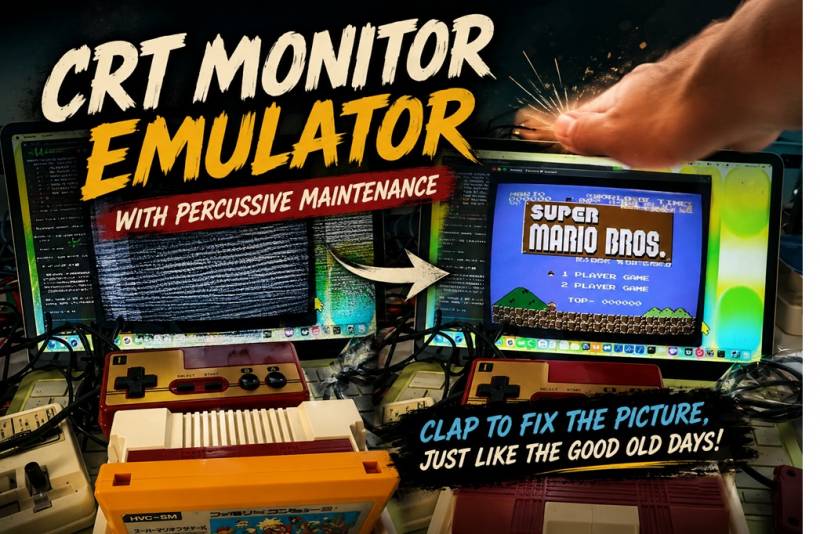
That nostalgia is exactly what inspired an unusually detailed macOS project that recreates the experience of using an ageing analogue television. It does not simply add scanlines or curve the corners of an image. The emulator recreates flickering, visual noise, colour distortion and unstable reception—and it even includes a digital version of the traditional "hit the television and hope it starts working again" technique.
More Than a Simple Retro Video Filter
Many retro gaming emulators already offer CRT-inspired visual filters. These usually add effects such as horizontal scanlines, softer pixels, colour bleeding and rounded screen edges to make modern displays resemble older televisions.
This macOS project takes the idea much further.
Instead of applying a decorative overlay to a clean digital image, it attempts to reproduce how an analogue television receives and interprets an actual radio-frequency signal. The result can look convincingly unstable, complete with interference, flickering and picture distortion that would have been familiar to anyone who used an old television with a poorly tuned aerial.
In fact, the early version reportedly produced so much interference that the simulated television was almost impossible to use. What began as a technical demonstration of CRT imperfections gradually became something closer to a fully interactive recreation of an unreliable vintage television.
The Project Comes From an Experienced Software Engineer
The emulator was created by a developer known online as GOROman, whose professional background reportedly includes experience at Sega and Facebook.
The original demonstration focused on reproducing visual characteristics associated with CRT televisions, including signal noise, image instability, colour aberrations and flickering. However, feedback from viewers encouraged the developer to add one of the most memorable parts of owning ageing electronic equipment: percussive maintenance.
For younger readers, percussive maintenance is the half-joking term for hitting, tapping or shaking a malfunctioning device in the hope that it will suddenly begin working again. It was never a proper repair method, but loose connections and ageing components sometimes made it appear surprisingly effective.
The updated emulator now recreates that behaviour without requiring users to physically strike their Mac or monitor.
It Requires a Real Analogue Signal
The project is not designed to work like a conventional game emulator that simply loads a ROM file. To experience the full effect, users need a device capable of producing the kind of analogue television signal used by older hardware.
One example is an original Nintendo Famicom or NES console with an RF output.
The console's VHF radio-frequency signal is captured using the HackRF One, an open-source software-defined radio device. Software-defined radio hardware allows computers to receive and process radio signals that would traditionally require specialised physical receivers.
Once captured, the analogue signal is passed into the macOS application, which recreates the way an older television would interpret it. The software can then manipulate the signal to exaggerate common CRT-era problems such as static, flickering, poor tuning and visual distortion.
This approach is what separates the project from an ordinary retro filter. It is not merely making a digital picture look old. It is simulating the imperfect signal chain that caused old televisions to behave the way they did.
How the Virtual Slap Actually Works
The most entertaining feature is the ability to temporarily improve the distorted picture through simulated percussive maintenance.
Rather than using the Mac's motion sensors or requiring users to strike the display, the program appears to listen for a sudden sound. An input variable reportedly labelled "audio tap" suggests that the application detects sharp audio peaks through the microphone.
That means users may be able to trigger the repair effect by tapping the desk, snapping their fingers or clapping near the computer. Once the sound is detected, the emulator responds as though the television has been physically struck, briefly stabilising the image.
It is a clever and much safer interpretation of an old habit—particularly when modern displays can cost significantly more than the CRT televisions people used to hit.
An accidental slap on a decades-old television might once have restored the picture. Trying the same method on an OLED monitor is more likely to result in an expensive repair bill.
Why CRT Displays Still Matter to Retro Gaming
The project may sound like a novelty, but CRT simulation remains an important subject within the retro gaming community.
Classic consoles were designed around the characteristics of analogue televisions. Game developers often relied on scanlines, colour blending and natural image softness when creating graphics. Dithering patterns that appear as visible checkerboards on a modern display could blend into smoother gradients on a CRT.
Sprites, shadows and transparency effects were therefore sometimes created with the television's imperfections in mind.
This is why older games can look unexpectedly harsh or overly pixelated when displayed through a clean digital connection. A carefully designed CRT effect can restore some of the visual blending and motion characteristics that the original artists expected players to see.
GOROman's project explores the less glamorous side of that experience as well. It recreates not only the warmth and softness people remember fondly, but also the static, unstable reception and questionable reliability they have conveniently forgotten.
A Technical Experiment Wrapped in Nostalgia
The emulator currently appears to be aimed primarily at macOS users, and its reliance on external radio hardware and an analogue signal means it is not a simple application that everyone can immediately install and use.
However, that complexity is also part of what makes the project interesting. It combines retro gaming, software-defined radio, analogue signal processing and interactive audio detection into a single experiment.
For some users, it may serve as a nostalgic reminder of adjusting antennas, tuning channels and tapping the side of a television. For younger players, it offers an exaggerated but educational look at how unpredictable home entertainment technology could once be.
Final Thoughts
This macOS CRT emulator is far more than another scanline filter. By processing a real analogue RF signal and recreating the behaviour of an unreliable television, the project delivers an unusually authentic interpretation of vintage display technology.
The ability to "repair" the picture by clapping near the computer gives the experiment a playful personality, while also showing how software can recreate not just the appearance of older technology, but the strange rituals that came with using it.
Modern displays may be thinner, clearer and more dependable, but they will probably never provide the satisfaction of fixing a broken picture with one perfectly timed slap.











Comments