


If you've been spending time on Lemon Web Games, jumping between classic DOS titles, Windows 95 games, and all sorts of retro goodness, you may not realise just how much your browser is quietly storing behind the scenes. Every game you load, every asset that gets cached, and every save file you create lives inside your browser's storage. And as the number of games on Lemon Web Games keeps growing, that storage can fill up faster than expected.
That's exactly why Lemon Web Games has now implemented a browser cache management feature, designed to give users better visibility and control over what's happening locally in their browser.
A Clear View of Your Lemon Web Games Storage
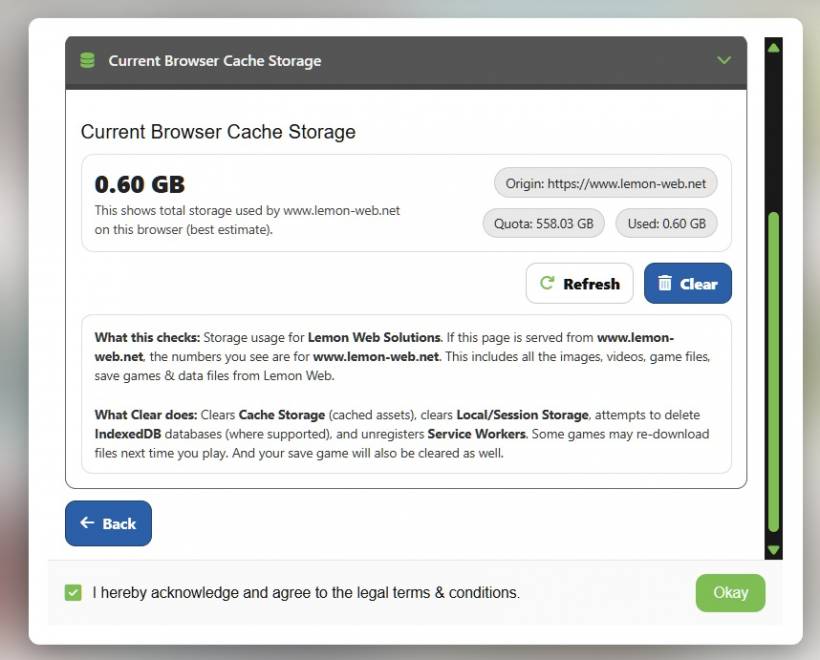
The new cache management page lets you check how much browser storage is currently being used by Lemon Web Games, limited strictly to the lemon-web.net domain. This is important, because it means you're not seeing unrelated data from other websites. What you're looking at is only what Lemon Web Games has stored on your device.
This includes things like game files, cached assets, and save data that help games load faster and resume where you left off. Instead of guessing why a game suddenly reloads or a save file disappears, you can now see the storage situation clearly in one place.
Why This Matters as the Library Grows
As Lemon Web Games expands, some titles naturally consume more storage than others. Large Windows-based games, for example, can take up a significant amount of browser cache. When browser storage limits are reached, the browser may start evicting older data automatically. Unfortunately, that can mean older save data gets wiped without warning.
This new tool helps prevent surprises like that. By monitoring storage usage, users can make informed decisions before things hit the limit. It adds a layer of transparency that's especially useful for players who actively jump between multiple games.
Clearing Cache, With a Word of Caution
At the moment, the system allows clearing cache at the site level. This approach keeps things simple and reliable. Clearing site storage removes cached assets, local and session storage, IndexedDB data (where supported), and service workers tied to Lemon Web Games. It's effective, but it does come with a trade-off: save data will also be cleared.
A more granular "clear cache by game" option is something being considered for the future. However, that would require mapping each individual game to its specific cache folders and storage entries, which is a significant amount of work. For now, the site-level approach strikes a practical balance between usefulness and stability.
A Small Feature With Big Long-Term Benefits
This browser cache management feature might seem simple at first glance, but it plays an important role in protecting the overall Lemon Web Games experience. By giving users insight into their local storage usage, it reduces confusion, helps preserve save data, and sets the groundwork for more advanced storage controls down the road.
As Lemon Web Games continues to grow, tools like this ensure that playing classic games in a modern browser stays smooth, predictable, and frustration-free.











Comments 0