

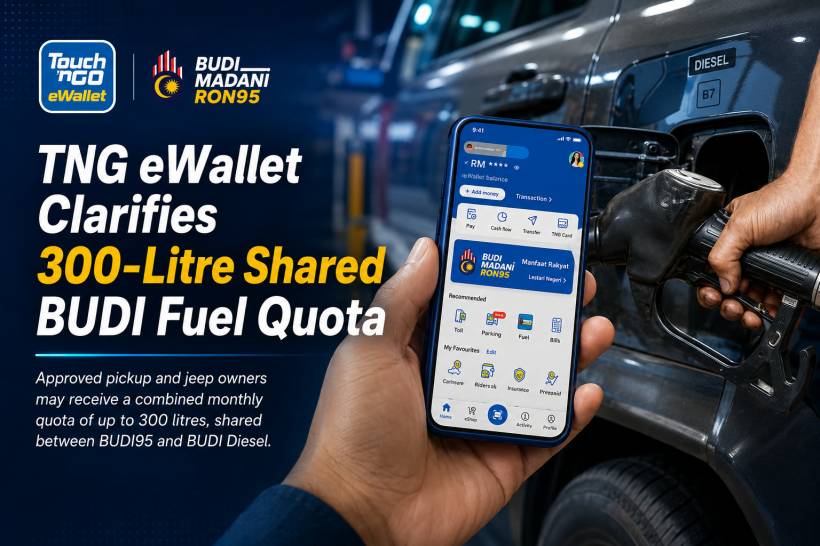
The introduction of an additional BUDI fuel quota for eligible pickup truck and jeep owners has created some confusion, particularly among users checking their remaining balance through TNG eWallet.
The main question is straightforward: if the standard allocation is a shared 200-litre monthly quota covering BUDI95 and BUDI Diesel, how does the additional 100 litres appear, and can it only be used to purchase diesel?
TNG Digital has clarified that approved users will not see a separate 100-litre diesel balance inside TNG eWallet. Once an application for the additional allocation has been approved, the user's total monthly quota will automatically increase to as much as 300 litres.
More importantly, the additional allocation is not restricted exclusively to diesel purchases. The approved total quota is shared between BUDI95 and BUDI Diesel.
Editor's Update – 10 July 2026
This article has been revised following a clarification received directly from TNG Digital. An earlier version stated that the additional 100 litres could only be used for diesel after the first 200 litres had been exhausted. TNG Digital has confirmed that this was inaccurate. Once the additional allocation is approved, the user receives a total shared quota of up to 300 litres that may be used for both BUDI95 and BUDI Diesel. We appreciate the clarification and have updated the relevant sections of this article accordingly.
Eligible Users Start With a Shared 200-Litre Quota
Under the BUDI MADANI programme, eligible individuals receive a base monthly quota of up to 200 litres.
This is a shared fuel quota rather than two separate allocations. Users who are eligible for both programmes may use the available balance to purchase subsidised RON95 petrol through BUDI95, subsidised diesel through BUDI Diesel, or a combination of both.
For example, a user could consume part of the monthly balance on RON95 and use the remaining litres for diesel. Every eligible purchase is deducted from the same available monthly quota.
This arrangement gives eligible motorists greater flexibility to manage their fuel consumption according to the vehicles they use and their actual monthly requirements.
The Additional 100 Litres Requires Separate Approval
The standard 200-litre allocation is not automatically increased for every user.
Eligible private owners of qualifying diesel-powered pickup trucks and jeeps may apply for an additional 100 litres. Applications can be submitted through the official BUDI MADANI portal, subject to the eligibility conditions and approval process established by the government.
Once approved, the additional allocation increases the user's total monthly entitlement from 200 litres to as much as 300 litres.
Users do not need to activate a separate balance manually within TNG eWallet. The updated entitlement should be reflected automatically after the approval has been processed by the BUDI MADANI system.
The Additional 100 Litres Is Not Displayed Separately
One of the reasons for the confusion is how the allocation appears inside TNG eWallet.
Approved users should not expect the application to display two independent balances such as:
• 200 litres shared between BUDI95 and BUDI Diesel
• 100 litres reserved exclusively for BUDI Diesel
Instead, TNG eWallet displays the user's combined remaining monthly quota. After approval, the total entitlement may therefore appear as 300 litres rather than separate 200-litre and 100-litre counters.
Any eligible purchase of subsidised RON95 or diesel will then be deducted from this combined balance.
The Full 300 Litres Is a Shared Fuel Quota
The most important clarification is that the additional 100 litres does not become a diesel-only balance.
Once the application has been approved, the user has a total shared monthly quota of up to 300 litres. This balance may be used across BUDI95 and BUDI Diesel according to the user's eligibility and fuel requirements.
For example, an approved user could theoretically use:
• 200 litres for diesel and 100 litres for RON95
• 150 litres for diesel and 150 litres for RON95
• Another combination of eligible RON95 and diesel purchases within the total quota
The exact usage will depend on the individual's fuel purchases, but the total amount deducted cannot exceed the approved monthly entitlement.
This means the system should not be interpreted as providing 200 flexible litres followed by another 100 litres that can only be used for diesel. All approved litres form part of the same shared quota.
How Refuelling Works Through TNG eWallet
For users, the general refuelling process through TNG eWallet remains largely unchanged.
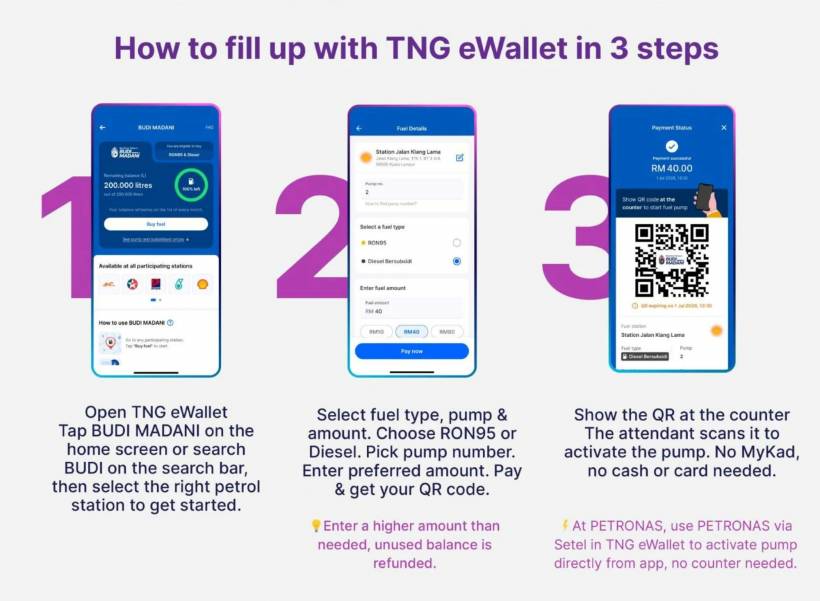
Users can open the relevant BUDI MADANI fuel feature within the app, confirm their eligibility and available balance, select the supported fuel option and follow the on-screen instructions to complete the payment.
Depending on the participating petrol station and available integration, users may be asked to select the station, pump number, fuel type and intended payment amount before beginning the refuelling process.
Eligibility is verified digitally through the registered and verified TNG eWallet account, allowing supported transactions to be completed without presenting a physical MyKad during the app-based payment process.
However, users who purchase fuel through other supported payment methods may still be required to use their MyKad for eligibility verification at the pump or petrol station counter.
eKYC Must Be Completed First
Users planning to access the BUDI MADANI fuel feature through TNG eWallet should ensure that their electronic Know Your Customer, or eKYC, verification has been completed.
The verification process links the user's identity and eligibility information to the registered TNG eWallet account. Without a verified account, the application may not be able to retrieve the correct BUDI MADANI eligibility status or remaining monthly balance.
Users should also check their available quota before refuelling, especially when using the allocation for both RON95 and diesel.
Since both fuel types draw from the same balance, a diesel purchase will reduce the amount available for future RON95 purchases, while an RON95 purchase will similarly reduce the amount remaining for diesel.
What Happens After the Monthly Quota Is Used?
Every eligible fuel purchase reduces the user's available monthly balance according to the number of litres purchased.
Once the entire 200-litre or approved 300-litre quota has been used, further fuel purchases during the same month will no longer receive the subsidised rate. The user may continue refuelling, but the purchase will be charged according to the prevailing market price.
The monthly quota is expected to reset at the beginning of the following month. Unused litres are not carried forward and therefore cannot be added to the next month's allocation.
This makes it useful for users to monitor their remaining balance periodically rather than relying only on the original approved amount.
What Happens to Unused Pre-Authorisation Amounts?
As with other app-based fuel payment services, a pre-authorisation amount may be reserved when users begin a refuelling transaction.
If the actual amount of fuel dispensed is lower than the authorised amount, users are charged only for the fuel purchased. The unused portion should be returned automatically to the user's TNG eWallet after the transaction has been processed.
The time required for the balance to appear may depend on the payment processing and settlement system, but users should not be permanently charged for fuel that was not dispensed.
Why the Clarification Matters
Describing the additional 100 litres as diesel-only could cause users to misunderstand how their remaining quota is calculated.
An approved pickup or jeep owner might assume that 100 litres has been protected specifically for diesel purchases, only to discover that earlier RON95 transactions have already reduced the combined balance.
The correct interpretation is simpler: eligible users begin with a shared quota of 200 litres, while approved pickup and jeep owners may receive a higher shared quota of up to 300 litres.
Both RON95 and diesel purchases are deducted from that same available balance.
Final Thoughts
The 300-litre allocation provides additional support for eligible private pickup truck and jeep owners, but it does not appear as a separate diesel-only quota inside TNG eWallet.
Once an additional quota application has been approved, the user's total monthly entitlement is updated from 200 litres to as much as 300 litres. The entire approved amount is shared across eligible BUDI95 and BUDI Diesel purchases.
The key points are therefore:
• The standard monthly quota is up to 200 litres
• Eligible pickup and jeep owners may apply for an additional 100 litres
• Approved users may receive a total quota of up to 300 litres
• The full quota is shared between BUDI95 and BUDI Diesel
• The additional 100 litres is not restricted exclusively to diesel
• TNG eWallet displays the combined balance rather than separate quota counters
Users should complete their eKYC verification, apply for the additional allocation through the official BUDI MADANI channel where eligible, and check their remaining combined balance before purchasing either RON95 or diesel.











Comments 0