

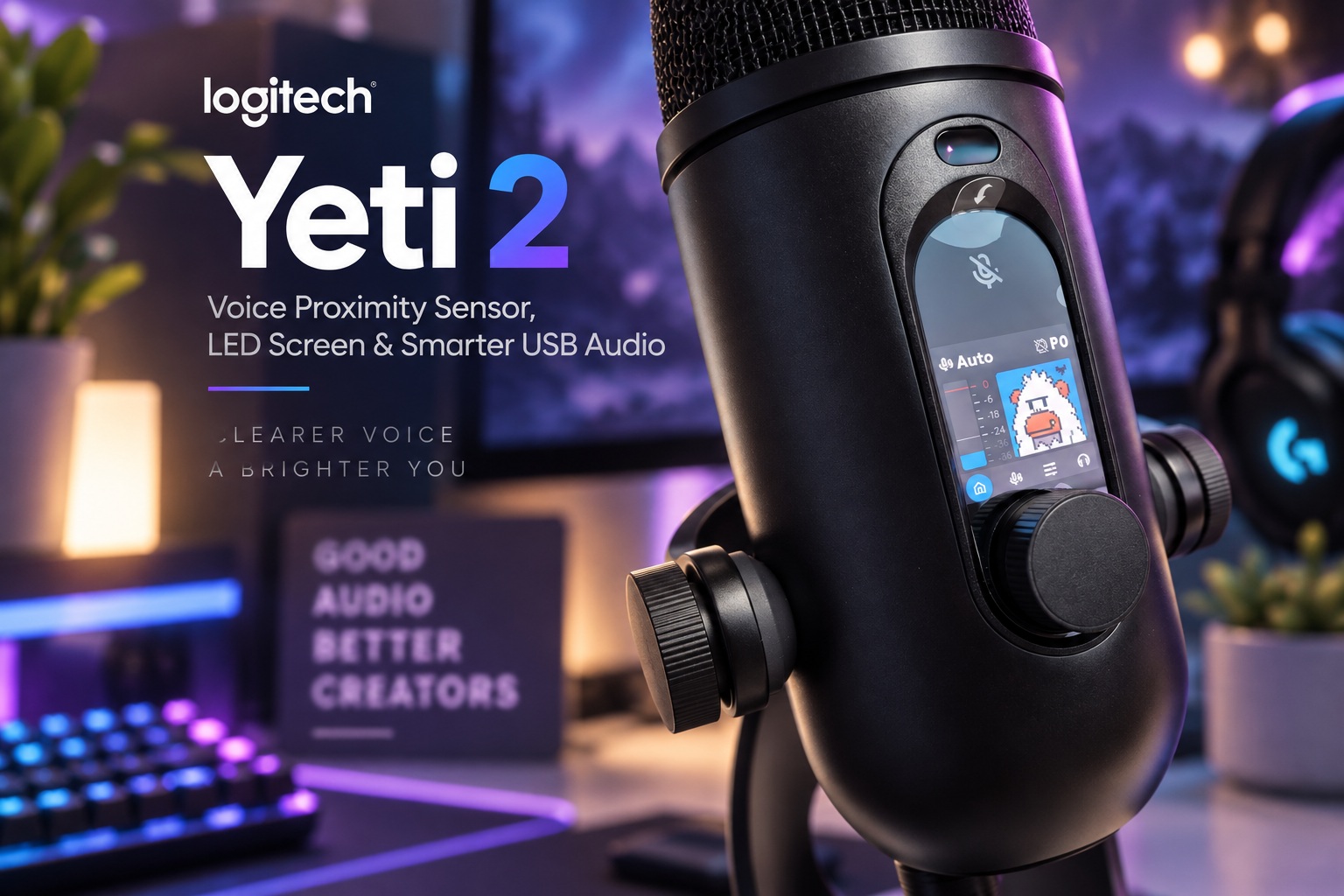
Logitech has expanded its gaming and creator hardware lineup at G Play 2026, introducing several new products under the Logitech G brand. Among the announcements were the Superstrike gaming mouse, additions to the company's Pro series, the G502 X Plus mouse and the G316 X 75 wired gaming keyboard. One of the more interesting launches, however, is the Logitech Yeti 2, a new USB microphone that finally serves as a direct successor to the original Blue Yeti.
The Yeti name has been around for years and became particularly popular among streamers, podcasters, gamers and creators looking for an easy USB microphone without moving into a full XLR audio setup. With the Yeti 2, Logitech is keeping that plug-and-play philosophy while introducing smarter features intended to make getting consistently good audio considerably easier.
A Familiar Yeti Design With a Modern Upgrade
The Yeti 2 retains the recognisable capsule-style design associated with earlier Yeti microphones, including the more recent Yeti GX. Rather than completely redesigning the product, Logitech has modernised the familiar form with new controls and smarter internal processing.
One of the most obvious additions is a built-in LED display. Instead of simply showing basic microphone levels or settings, the display includes a small Yeti mascot that can help communicate different microphone functions and statuses.
It gives the microphone a little more personality while providing users with immediate visual feedback without requiring Logitech G HUB to remain open on another screen. For streamers or gamers already surrounded by multiple applications, having essential information directly on the microphone can be surprisingly convenient.
Voice Proximity Sensor Tracks Where You Are
The standout feature is what Logitech calls a voice proximity sensor. Rather than assuming the person speaking will remain in exactly the same position throughout a recording, the microphone can monitor the user's voice in three-dimensional space.
This allows the Yeti 2 to compensate when someone leans closer to the microphone, moves farther away or shifts position during a stream or conversation. Logitech says the microphone can automatically adjust parameters such as gain, EQ and pickup pattern to maintain more consistent recording quality.
That could be particularly useful for users who do not have professional microphone technique. Traditional microphones often require fairly careful placement, and moving significantly away from the ideal position can change volume and tonal balance. Yeti 2 is essentially trying to automate some of those adjustments.
Automatic Gain Could Make Streaming Much Easier
Gain is one of those settings that sounds straightforward until someone actually tries to configure a microphone. Set it too low and the voice becomes quiet. Set it too high and background noise becomes more obvious while loud speech can distort.
By adjusting gain automatically according to where the user's voice is located, the Yeti 2 could remove much of that guesswork. Someone who moves around while streaming or becomes animated during a gaming session would not necessarily need to keep reaching for the microphone controls.
The automatic EQ adjustment works toward a similar goal. Instead of requiring the user to understand frequency bands and manually shape the sound, the microphone can adapt its processing according to the current speaking position.
Experienced audio users may still prefer manual controls, but for the broader audience that made the original Yeti popular, automation could be one of the microphone's strongest selling points.
AI Noise Reduction Targets Keyboards and Mouse Clicks
Gaming and streaming microphones have always faced another challenge: they usually sit very close to a keyboard and mouse. Even a good microphone can pick up mechanical keyboard switches, rapid mouse clicking, PC fans and other background sounds that are perfectly normal in a desktop environment.
Logitech addresses this with an AI-powered de-noiser designed to identify the user's voice while suppressing unwanted sounds such as keyboard presses and mouse clicks.
This could be particularly useful for gamers who use loud mechanical keyboards or stream in rooms that have not been acoustically treated. Instead of relying entirely on third-party noise suppression software, part of that cleanup can happen as part of the microphone experience itself.
As with any AI noise reduction, the real test will be how aggressively it processes the voice. The best systems reduce distracting noise without making speech sound robotic or overly compressed.
Three-Capsule Array Offers More Recording Flexibility
Inside, Logitech has updated the microphone with a three-capsule array. Multiple capsules allow the microphone to support different pickup behaviours depending on how it is being used.
That becomes particularly useful alongside the automatic pickup-pattern adjustment. A solo streamer sitting directly in front of the microphone may need a different recording configuration from two people having a conversation around the same desk.
Instead of making users manually select the ideal configuration every time, the Yeti 2's proximity system can potentially combine information about where the voice is coming from with the capabilities of its multi-capsule hardware.
That combination of physical microphone design and software automation is really what separates the Yeti 2 from simply being another USB microphone.
24-Bit Audio Keeps the Recording Specs Sensible
The Yeti 2 records at 24-bit/48kHz, providing plenty of resolution for voice recording, gaming, streaming, video calls and podcasting.
There are USB microphones that advertise much higher sample rates, but those specifications are not always particularly meaningful for normal spoken-word content. A well-implemented 24-bit/48kHz recording chain is more than sufficient for most creators, particularly when good microphone positioning and signal processing have a much larger impact on perceived quality.
The 24-bit depth also provides useful headroom when recording, which can help when adjusting levels later in production.
Logitech appears to be concentrating less on chasing extreme specifications and more on making the microphone easier to use consistently.
Headphone Monitoring Is Built In
The microphone includes a headphone jack for direct monitoring, allowing users to hear themselves without depending on software monitoring through the computer.
Direct monitoring is particularly valuable because it can avoid the noticeable delay that sometimes occurs when microphone audio travels through software before returning to the headphones. Even a small latency can make speaking feel surprisingly uncomfortable.
Being able to monitor directly also helps users immediately notice problems such as incorrect gain, excessive background noise or poor microphone positioning before recording an entire session.
For streamers and podcasters, it is one of those relatively simple features that quickly becomes difficult to live without once you are accustomed to it.
Physical Controls Remain Part of the Experience
Despite all the automation, Logitech has not moved everything into software. The Yeti 2 includes a capacitive mute control for quickly silencing the microphone, along with a physical dial for adjusting settings.
A dedicated mute control is particularly useful during live calls and streams because it provides a faster and more reliable way to cut the microphone than searching through software menus.
Physical controls also make the Yeti 2 more approachable for users who simply want the microphone to work without constantly interacting with Logitech G HUB.
The general philosophy appears to be that automation should simplify the common tasks while physical controls remain available when users need immediate intervention.
G HUB Provides More Advanced Customisation
Users wanting more control can turn to Logitech G HUB, which provides additional configuration beyond the microphone's automatic features.
That should allow more experienced users to tune the microphone around their own preferences rather than accepting every automatic adjustment. It also ties the Yeti 2 into Logitech's wider gaming ecosystem, where users may already be controlling mice, keyboards, headsets and lighting through the same application.
This balance between plug-and-play operation and deeper customisation is important. Beginners can connect the microphone and allow the automated processing to handle much of the setup, while experienced creators can dig further into the settings when needed.
It is a much more flexible approach than forcing everyone into either full manual control or a completely closed automatic system.
The Yeti 2 Is Designed for More Than Streaming
While Logitech G naturally positions the microphone heavily toward gaming and streaming, the features could make the Yeti 2 useful for much broader everyday work.
Remote workers who spend hours in video calls could benefit from automatic voice tracking and background-noise removal. Podcasters could use the improved capsule array and direct monitoring, while YouTubers or other content creators gain a relatively straightforward recording system without investing in an audio interface and XLR microphone.
That versatility helped make the original Blue Yeti so successful. It was not necessarily the absolute best microphone in every situation, but it was easy to recommend because it worked reasonably well for many different situations.
The Yeti 2 appears to be continuing that same idea with substantially more intelligence built around the hardware.
Available in Black and White for RM659
Logitech is offering the Yeti 2 in both black and white finishes, making it easier to match different gaming setups or workspaces.
In Malaysia, the microphone is priced at RM659, placing it comfortably within the premium USB microphone category without pushing into the territory of more elaborate professional recording setups.
At that price, Logitech will be competing with a growing number of microphones aimed at streamers and creators, many of which now include software noise reduction, RGB lighting or advanced audio processing.
The Yeti 2's differentiator is likely to be how well its voice proximity technology works in practice. If it can genuinely maintain consistent audio while the user moves naturally around the desk, that could provide a noticeably easier experience than microphones requiring careful positioning throughout every session.
Final Thoughts
The original Blue Yeti became popular because it made decent-quality recording accessible without requiring users to understand professional audio equipment. The Logitech Yeti 2 appears to be taking that same philosophy and applying modern automation to it.
The new voice proximity sensor is easily the most interesting addition, allowing the microphone to track the user's position and automatically adjust gain, EQ and pickup behaviour. Combined with AI-powered background-noise reduction, the three-capsule array and built-in LED display, Logitech is clearly trying to make good audio less dependent on perfect microphone technique.
The 24-bit/48kHz recording, headphone monitoring, capacitive mute button and physical dial cover the traditional essentials, while G HUB remains available for anyone who wants more control.
At RM659, the Yeti 2 is not the cheapest USB microphone available, but it offers something more valuable than simply another specification increase: convenience.
For streamers, gamers and creators who would rather concentrate on what they are saying than constantly adjust how they sound, that may be exactly the point.











Comments 0