

While most Windows users have been busy talking about buggy updates and Microsoft's new automated upgrade rollout, the company has quietly released another update — and it's one Microsoft itself labels as "critical." This new package is already available for download, and unlike many feature updates, it's designed to improve something most users rarely think about: the Windows Recovery Environment.
What This Critical Update Actually Fixes
According to reports highlighted by Neowin, the update enhances the Windows Recovery process, specifically through improvements to WinRE, the recovery system built into Windows 10 and Windows 11. These are sometimes called Safe OS updates, and they help Windows recover from situations where the operating system fails to boot correctly.
The update also refreshes the Setup file binaries, meaning Microsoft is patching and stabilizing the components that handle Windows installation and upgrades. This includes fixes for Setup.exe, enhancements to SafeOS, and improvements to how Windows preserves Language Packs and Features on Demand during upgrades.
In simpler terms: this update helps ensure your system can recover more reliably, and it smoothens the processes that run when Windows installs or updates itself.
Only Newer Windows Versions Get It
Because Windows 11 version 23H2 has already reached end-of-support status, this new critical update is only available on:
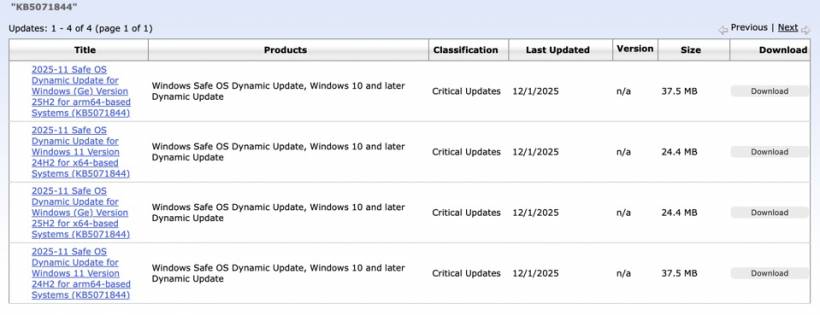
Users running older versions won't see it in Windows Update.
Once installed, your device's WinRE version should show 10.0.26100.7297.
How Microsoft Is Delivering the Update
Microsoft says the update is distributed through Windows Update and installs automatically. There are no prerequisites, no restarts needed, and the update cannot be removed once applied — which makes sense, given that recovery tools must remain stable and secure.
This aligns with Microsoft's ongoing approach of using machine-learning-driven rollout decisions. Recently, the company confirmed that Windows Update no longer simply "offers" major version updates in a passive manner. Instead, Windows may silently download Windows 11 version 25H2 in the background based on ML signals, then wait for the user to choose whether to install or delay it.
The goal is to reduce compatibility issues and ensure that systems with a higher likelihood of successful upgrades get access first.
A Reminder About the Windows 11 25H2 Upgrade Path
Microsoft now offers a one-click toggle to upgrade to Windows 11 25H2, whether you're coming from Windows 11 or directly from Windows 10 — as long as your hardware meets the Windows 11 requirements. This new streamlined path is part of the wider shift toward automated, intelligence-driven updates.











Comments