

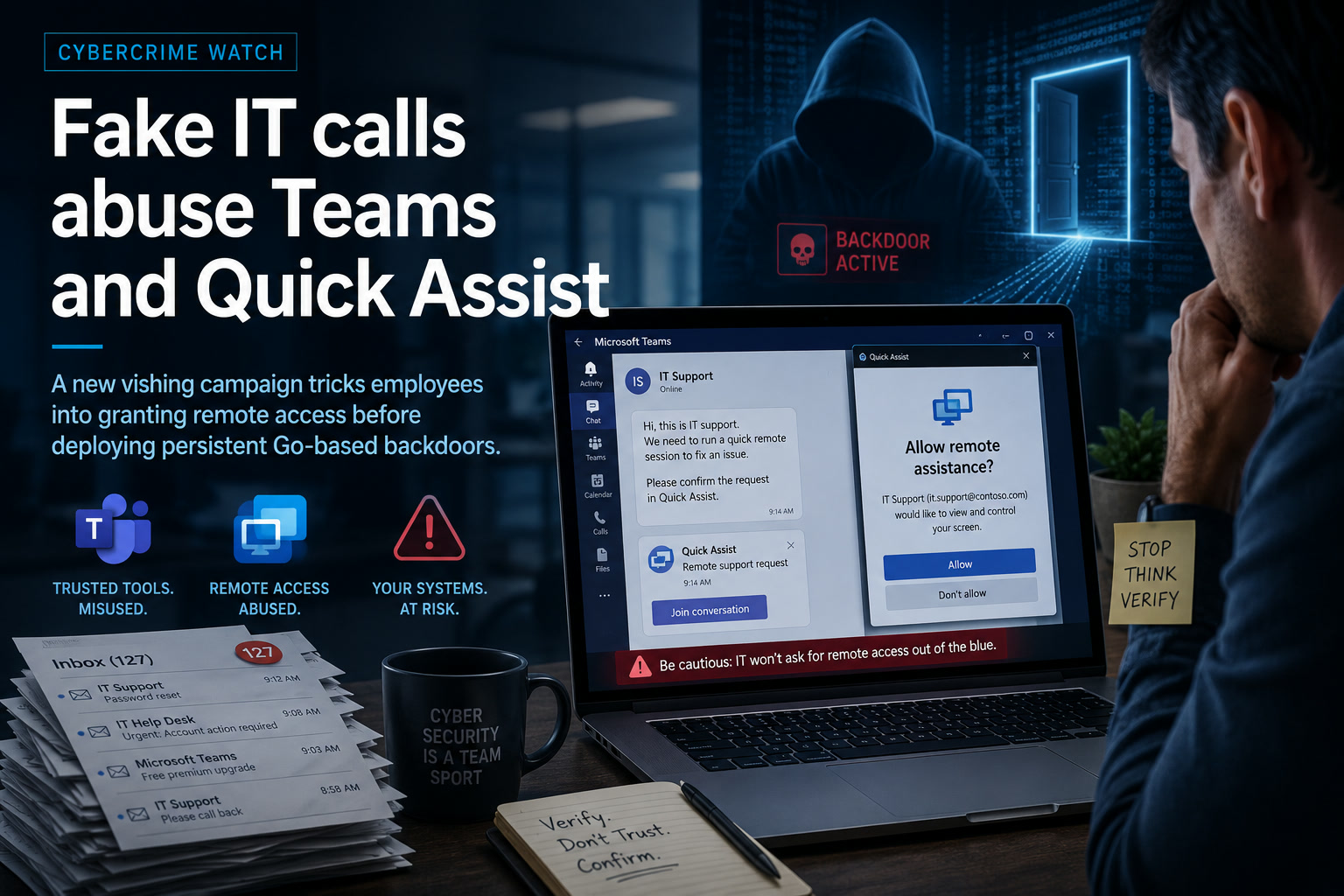
A convincing message from the IT helpdesk can feel reassuring when an employee is already dealing with a flooded inbox or an unexpected computer problem. Unfortunately, attackers are now deliberately creating that confusion and then presenting themselves as the people who can fix it.
A newly documented Microsoft Teams vishing campaign combines spam bombing, fake technical-support calls and Microsoft Quick Assist sessions to gain control of corporate Windows devices. Once the victim approves remote access, the attackers use PowerShell to download additional malware, including a Go-based backdoor known as GoGRPC. The campaign has been assessed as high severity because the malware can execute commands, gather system information and maintain long-term access to compromised devices.
The attack is particularly dangerous because it does not begin with an obvious software exploit. It succeeds by convincing employees that the attacker is a legitimate member of their own IT department.
The Attack Begins by Creating a Problem
The first stage often involves spam bombing, where the victim's inbox is suddenly flooded with unwanted emails.
Hundreds of subscription notices, newsletters, verification messages or other irrelevant emails may arrive within a short period. The immediate objective may not be to infect the computer through those messages. Instead, the attacker wants to create confusion and make the victim believe something is wrong with their account.
While the employee is trying to understand what happened, someone contacts them through Microsoft Teams and claims to be from internal IT support.
The fake technician may appear unusually convincing because the attacker could already know the employee's name, company and email address. They may also refer directly to the inbox problem that they created.
The attacker then offers to solve the issue through Microsoft Quick Assist and pressures the employee to approve a remote-support session.
This sequence makes the attack psychologically effective:
The attacker creates the emergency, arrives at exactly the right moment and presents the solution.
Why the Fake Helpdesk Story Works
Most employees have been taught to avoid suspicious attachments and unexpected website links. Fewer are prepared for a caller who appears through an approved business platform and uses a legitimate Microsoft support tool.
Microsoft Teams is commonly used for internal communication, while Quick Assist is a genuine Windows feature designed to let a trusted technician view or control another person's screen.
Neither application is malicious by itself.
That legitimacy helps attackers avoid some of the warning signs people associate with cybercrime. There may be no strange executable attached to an email and no obviously fraudulent website asking for a password.
Instead, the victim is asked to open software that may already be installed on the computer.
This is why the incident should not be treated merely as another phishing campaign. It is an abuse of trusted collaboration and remote-support infrastructure.
Quick Assist Becomes the Door into the Computer
Once the victim accepts the Quick Assist session, the attacker can interact directly with the Windows environment.
Depending on the permissions granted and the session configuration, the remote operator may be able to move the pointer, open applications, download files and run commands.
The advisory reports that the attackers use PowerShell to retrieve and execute additional payloads after the remote session has been established. They then install GoGRPC and create persistence through a Windows Registry Run entry, allowing the malware to start again whenever the user signs in.
This persistence mechanism is simple but effective.
Even after the Quick Assist session ends, the attacker may retain access through the installed backdoor. The employee may believe the support interaction is finished while the compromised device continues communicating with malicious infrastructure.
Closing Quick Assist is therefore not enough once commands or payloads have already been executed.
The Attack Exploits Trust Rather Than a Quick Assist Vulnerability
There is an important distinction between exploiting a software vulnerability and abusing legitimate functionality.
In this campaign, the attacker is not necessarily breaking Quick Assist through an undisclosed technical flaw. The attacker persuades the victim to approve access voluntarily.
This means patching Quick Assist alone will not completely stop the technique.
Updated software remains important, but organisations also need controls covering:
A security product may allow the session because the user explicitly approved it. The control failure begins with identity verification, not only endpoint protection.
GoGRPC Provides Persistent Remote Access
GoGRPC is a backdoor written in the Go programming language.
The researchers identified four variants named Lep, Giver, Pet and Kind. Although they share the same general purpose, the versions differ in areas such as encryption, code obfuscation, victim fingerprinting and command-execution functionality.
The malware communicates with command-and-control servers using gRPC over HTTP/2, usually through port 443.
Port 443 is commonly associated with normal encrypted web traffic. Later Pet and Kind variants also added TLS support, making their connections more difficult to distinguish from legitimate communications without deeper inspection.
This is a familiar strategy among modern attackers.
Instead of using an unusual port that immediately attracts attention, the malware communicates through channels that blend into ordinary business traffic.
The Malware Profiles the Compromised Environment
After installation, the backdoor collects information about the device and the surrounding organisation.
The collected information may include:
The attacker can use this information to determine whether the compromised device belongs to a valuable organisation and whether the environment is suitable for further intrusion.
For example, domain information may reveal that the device belongs to a corporate network rather than a personal household. Security-software discovery can help the attacker decide which tools or techniques are most likely to avoid detection.
The initial victim may not be the final objective.
A compromised employee workstation can become a starting point for discovering servers, accounts, applications and other devices across the network.
The Campaign Uses More Than One Malicious Tool
GoGRPC is only one component associated with the activity.
The attackers have also reportedly deployed tools including BlindDoor, RevSocket, PyGRPC, S3Siphon and RSOX. These provide capabilities such as remote command execution, reconnaissance, network tunnelling and data theft.
Using several tools gives attackers flexibility.
One component may provide the original backdoor, another may create a tunnel into the internal network, while another may collect or transfer sensitive information.
This modular approach also makes incident response more difficult. Removing one detected file does not guarantee that the device is clean when other persistence methods or remote-access tools remain active.
A complete investigation must determine everything that happened after the Quick Assist session began.
The Campaign May Support Ransomware Operations
The activity has been associated with a threat actor that may act as an initial access broker.
An initial access broker specialises in gaining entry to organisations and then selling or transferring that access to other criminal groups. Those groups may conduct espionage, steal information, extort the organisation or deploy ransomware.
This business model allows different attackers to specialise in separate stages of the intrusion.
One group handles social engineering and initial compromise. Another performs network discovery. A ransomware operator may arrive later after the most valuable systems and accounts have already been identified.
This means the employee who accepted the fake support session may not immediately see ransomware or widespread disruption.
The initial access may remain quiet while attackers study the organisation, collect credentials and prepare a more serious operation.
Why Inbox Flooding Should Be Treated as a Security Warning
An unexpected flood of messages is easy to dismiss as an email problem, but it can be part of a coordinated social-engineering attack.
Spam bombing may also hide legitimate security notifications. A password-reset alert, purchase confirmation or sign-in warning can disappear among hundreds of unwanted messages.
Employees should report sudden, unexplained inbox flooding to IT or the security team rather than simply deleting the messages.
The report should become even more urgent when someone contacts the employee shortly afterwards and offers technical assistance.
A useful organisational rule is straightforward:
The person who notices the problem should contact IT through a known internal channel. IT should not appear unexpectedly and ask the user to approve remote control.
Support Requests Must Be Verified Independently
Employees should never rely only on the name, profile picture or display information shown in Microsoft Teams.
External users may use names resembling senior executives, IT administrators or real employees. A caller may also possess enough public information to sound convincing.
Unexpected support requests should be verified through a separate, trusted channel.
For example, the employee can:
The advisory recommends verifying unexpected support requests before starting a remote session, restricting external Microsoft Teams communication and limiting Quick Assist use to approved IT personnel.
The verification process must not use a phone number, email address or link supplied by the suspicious caller.
External Microsoft Teams Access Should Be Controlled
Organisations that do not require communication with external Teams users should consider blocking it.
Those that rely on external collaboration can use a controlled allowlist of approved partner domains rather than allowing every external tenant to contact employees.
External accounts should also be visibly identified, and staff should be trained to treat the External label as a reason for additional verification.
However, technical labels are not enough.
Attackers may use compromised accounts from legitimate organisations, or employees may stop noticing the warning after seeing it repeatedly. External-access controls should therefore be combined with identity verification and user awareness.
Sensitive departments such as finance, human resources, executives and IT administration may require stricter communication policies because they are particularly attractive targets.
Quick Assist Should Not Be Available Without Governance
Quick Assist is useful for legitimate support, but unrestricted availability increases the chance that employees will approve fraudulent sessions.
Organisations should decide whether the tool is genuinely required on every workstation.
Possible controls include:
Some organisations may use a managed remote-support platform instead, where sessions are initiated through the official service desk and authenticated using corporate identities.
The objective is not simply to block one Microsoft application. It is to ensure that employees can distinguish authorised support from an unsolicited remote-access attempt.
PowerShell Activity Requires Contextual Monitoring
PowerShell is another legitimate administrative tool frequently abused by attackers.
Blocking it completely may disrupt IT administration, automation and application management. A more practical approach is to monitor how, where and by whom it is used.
Security teams should investigate PowerShell activity that:
The advisory specifically recommends watching for suspicious PowerShell execution, unauthorised Registry Run entries, unexpected remote-support sessions and unusual outbound gRPC or WebSocket communications.
PowerShell logging, script-block logging and endpoint-detection telemetry should be retained long enough to support investigation.
Registry Run Entries Can Reveal Persistence
GoGRPC uses a Registry Run value to restart when a user signs in.
Security teams should monitor common persistence locations, including:
HKCU\Software\Microsoft\Windows\CurrentVersion\Run
HKLM\Software\Microsoft\Windows\CurrentVersion\Run
New entries should be compared against approved applications and normal system behaviour.
A suspicious entry may reference a file inside a temporary folder, a user profile or another location where normal business software is not expected to run.
Attackers can use many other persistence techniques, so the absence of a Run entry does not prove that the system is clean. Nevertheless, it is an important detection point for this campaign.
Network Teams Should Understand gRPC Traffic
gRPC is a legitimate communication framework used by many modern applications and cloud services.
The presence of HTTP/2 or gRPC traffic is therefore not automatically malicious.
Detection should consider destination reputation, process behaviour, connection timing and whether the application normally uses gRPC.
For example, an unknown executable launched from a user's temporary directory should not normally create repeated encrypted connections to a recently registered external domain.
Security teams may also look for unusual outbound WebSocket sessions or encrypted connections initiated shortly after PowerShell downloads and remote-support activity.
Behavioural correlation is more reliable than blocking all traffic of one protocol.
Important Indicators of Compromise
The advisory lists several domains associated with the campaign, including:
scansec-upd.com re2.filesdwnload.top re8.dowlfles.online update19.upldf.online xeds.geranteeg.onlineAssociated command-and-control addresses include:
5.253.59.222 94.140.114.192 193.29.57.37 45.86.162.228 46.30.191.126 46.30.191.60 185.82.126.91The advisory also provides SHA-256 hashes for GoGRPC variants, RevSocket, PyGRPC and RSOX-related files.
These indicators can support threat hunting and blocking, but they should not be treated as permanent proof of compromise.
Attackers can change domains, IP addresses and file hashes quickly. Behavioural detections such as fake support calls, unexpected Quick Assist use, PowerShell downloads and unusual persistence may remain useful after the specific infrastructure has changed.
The ATT&CK Pattern Covers a Full Intrusion Lifecycle
The documented techniques extend far beyond the initial Teams call.
The campaign includes voice phishing, command execution, PowerShell use, Registry persistence, masquerading, file deletion, hidden artefacts, network discovery, account discovery, security-software discovery, remote services and command-and-control activity.
This shows how quickly a social-engineering incident can become a broader enterprise compromise.
The attack starts with a conversation but may progress into:
Security awareness and technical monitoring must therefore work together.
What Employees Should Do During an Unexpected IT Call
An employee receiving an unsolicited Teams call from someone claiming to be IT should stop before following any instructions.
They should not:
The employee should end the conversation and contact the real IT department using an established internal method.
If Quick Assist access has already been granted, the employee should disconnect the session, unplug the network cable or disable Wi-Fi when safe to do so, and immediately contact the security team.
They should not attempt to clean the computer independently because this may remove evidence required for investigation.
How IT Should Respond to a Suspected Session
A computer involved in an unauthorised Quick Assist session should be treated as potentially compromised even when the employee believes no files were downloaded.
The incident-response team should:
A password reset alone may be insufficient when malware remains installed on the device.
Where the integrity of the system cannot be confidently restored, rebuilding the workstation from a trusted image may be safer than attempting selective removal.
The Helpdesk Process Itself Must Be Hardened
Attackers are impersonating IT because employees are accustomed to receiving technical assistance from people they may not know personally.
Organisations can reduce that uncertainty by standardising the support process.
Every remote-support interaction should include predictable verification elements, such as:
IT staff should also avoid developing habits that resemble attacker behaviour.
A genuine technician should not ask an employee to bypass warnings, reveal authentication codes or accept unexpected remote access without verification.
When legitimate support follows strong procedures consistently, suspicious deviations become easier for employees to recognise.
Final Thoughts
This Microsoft Teams and Quick Assist campaign demonstrates how attackers can combine legitimate business tools with carefully timed social engineering.
The inbox flood creates urgency. The Teams call creates trust. Quick Assist provides remote access. PowerShell delivers the malware. GoGRPC then maintains control after the original conversation has ended.
No single security product can reliably stop every stage when the employee has been persuaded to approve the session.
The strongest defence is layered: restrict unnecessary external Teams communication, control Quick Assist, monitor PowerShell and persistence activity, limit user privileges and train employees to verify every unexpected support request through a known internal channel.
Most importantly, organisations should make one message unmistakably clear:
Real IT support should never object when an employee pauses to verify their identity.
A legitimate technician will appreciate the caution. An attacker will usually create more urgency, pressure or fear. That difference may be the final warning before a fake support call becomes a full corporate breach.











Comments 0