

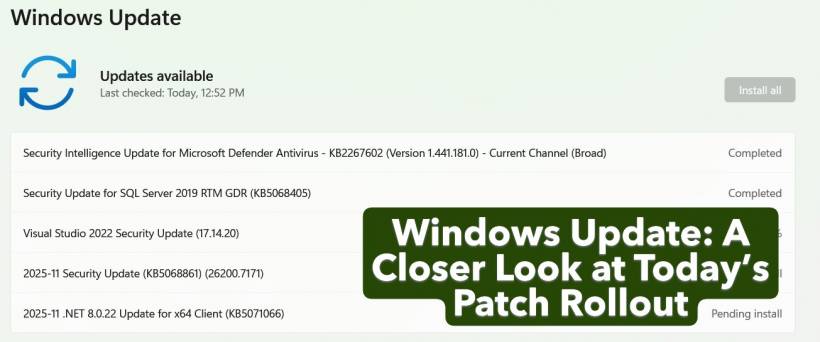
If you opened Windows Update today and were greeted with a long list of installations, you're definitely not alone. Microsoft has pushed out a fresh batch of updates covering everything from security patches to developer tools. At first glance, the list looks like the usual routine maintenance, but there's quite a bit happening behind the scenes.
Let's break it down in a more conversational way.
A Busy Update Day for Windows
From the screenshot, you can see multiple updates in different stages, including some already completed and others waiting in the queue. This is typical during monthly security cycles or when Microsoft bundles several improvements together.
Your Windows Update list includes:
That's a healthy mix of both system-level and development environment patches.
Defender Intelligence Update: Your First Line of Defense
This update (KB2267602) is part of Microsoft's continuous effort to improve malware detection. These definitions are updated frequently—sometimes multiple times a day—so seeing this marked as "Completed" means your device is already protected with the latest threat intelligence.
SQL Server 2019 Security Update: Keeping Enterprise Data Protected
Next is the security update for SQL Server 2019 RTM GDR (KB5068405). Even if you are not actively using SQL Server for heavy database workloads, Microsoft still patches critical vulnerabilities that could be exploited in unprotected installations. These updates are especially important in enterprise environments where databases are frequently targeted.
Visual Studio 2022 Security Update: Essential for Developers
This one is currently "Installing – 0%", which is common because Visual Studio updates are heavier and require more validation across installed components.
Version 17.14.20 includes fixes that help secure the IDE and the underlying runtime libraries. Developers often overlook these updates because they seem minor, but they play an important role in preventing supply-chain style attacks on project dependencies.
November 2025 Security Update (KB5068861): The Monthly Patch You Should Not Skip
Listed as "Pending install," this is likely part of the cumulative monthly update cycle. These packages typically include:
Even though cumulative updates can sometimes be large, they are the backbone of maintaining a stable and secure Windows environment.
.NET 8.0.22 Update: Modern Apps Rely on It
The .NET update (KB5071066) is also pending. This matters if you run or develop applications built on modern .NET versions. These updates usually include bug fixes, performance boosts, and important security patches for runtime components.
Skipping .NET updates can eventually lead to compatibility issues, especially with enterprise or custom-built applications.
Why These Updates Matter
While it may seem like just another queue of patches, each item directly contributes to:
Regular patching remains one of the simplest and most effective ways to secure Windows systems in both personal and enterprise settings.
Should You Install Everything Now?
Generally, yes. These updates are safe to apply and are part of routine Windows maintenance cycles. If you're multitasking or working on something heavy, you can schedule the installation during downtime, especially for updates involving Visual Studio or .NET Framework since they may briefly interrupt development tasks.











Comments