

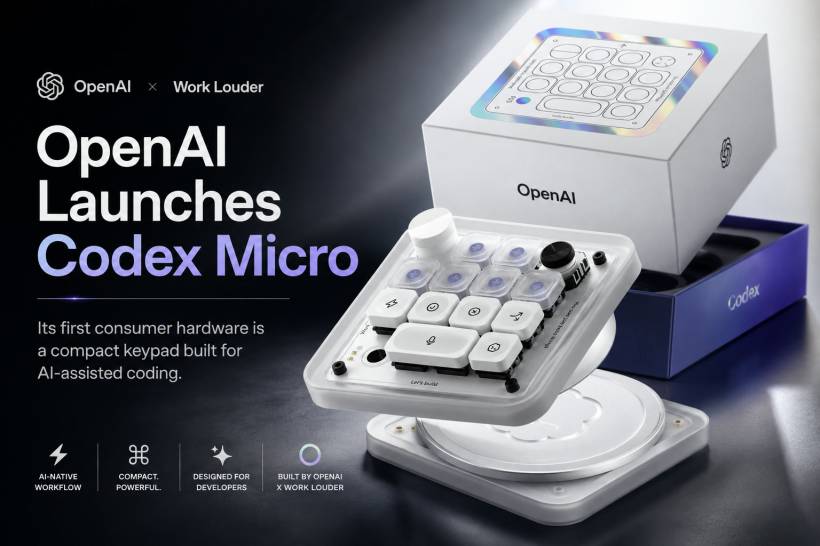
OpenAI has officially entered the consumer hardware market, but its first product is not the mysterious AI device many people expected from its collaboration with former Apple design chief Jony Ive. Instead, the company has introduced something far more specialised: a compact mechanical keypad designed to make AI-assisted coding faster and more hands-on.
Known as the Codex Micro, the device works as a companion controller for OpenAI's Codex coding assistant. It does not replace a standard keyboard. Instead, it provides dedicated physical buttons, a dial and a joystick for triggering common development actions without repeatedly navigating menus or typing the same prompts.
A Physical Controller for OpenAI Codex
The Codex Micro was created in partnership with peripheral manufacturer Work Louder and is being sold through OpenAI's Supply Co. online store.
Its main purpose is to give developers direct physical access to frequently used Codex functions. Rather than clicking through an interface each time they want the AI to review code, investigate an error or approve a suggested change, users can assign those actions to dedicated keys.
This is essentially the AI-coding equivalent of a macro pad. The difference is that its default layout and controls are specifically designed around Codex workflows rather than general productivity, gaming or video editing.
For developers who spend hours working with AI coding assistants, physical shortcuts could reduce repetitive interactions and make the workflow feel more immediate.
What Is Vibe Coding?
The Codex Micro is being promoted heavily around the growing idea of vibe coding.
Vibe coding generally refers to building software by describing what should happen and allowing an AI assistant to generate much of the code. The developer then reviews, adjusts, tests and approves the output rather than writing every line manually.
The term is often used casually, but the underlying workflow is becoming increasingly common. Developers may ask an AI to create a feature, repair an error, explain unfamiliar code, rewrite a function or generate tests.
The Codex Micro attempts to turn some of those interactions into physical controls. Instead of repeatedly typing instructions such as "review this change" or "debug this function," a user could press a programmed button.
It does not remove the need to understand the code. Developers still need to check whether generated changes are secure, accurate and suitable for the project. The device simply aims to reduce the friction around the AI interaction itself.
Thirteen Programmable Mechanical Keys
The keypad includes 13 programmable mechanical keys, giving users a compact set of controls that can be customised for different tasks.
Its built-in actions reportedly include shortcuts for:
Users can also replace the default assignments with their own macros. This gives the device some value outside Codex, since the buttons could potentially be configured for development tools, terminal commands, text snippets, application shortcuts or other repetitive actions.
For example, a developer might assign buttons to:
That flexibility may make the Codex Micro more useful than a controller tied exclusively to one AI service, although its branding and design clearly target Codex users first.
The Rotary Dial Controls Codex Reasoning
One of its more unusual controls is a rotary dial used to adjust the Codex assistant's reasoning level.
In practical terms, this may allow users to move between faster, lighter responses and more detailed AI analysis depending on the task. A simple formatting request may not require extensive reasoning, while debugging a complicated issue or analysing an unfamiliar codebase may benefit from a deeper response.
Turning a physical dial is certainly more tactile than opening a settings menu. Whether it offers a meaningful productivity improvement will depend on how frequently developers change reasoning levels during normal work.
The feature does, however, show that OpenAI is thinking about how physical controls might interact with AI behaviour rather than simply creating another generic macro keyboard.
An Analogue Joystick Adds Another Input Option
The Codex Micro also includes an analogue joystick.
OpenAI has not positioned the device as a gaming controller, so the joystick is more likely intended for navigation, selection or configurable AI-related functions. Depending on the software integration, it could potentially be used to move between suggestions, scroll through options or control custom shortcuts.
The joystick also helps distinguish the device visually from ordinary mechanical macro pads. Whether it becomes genuinely useful or remains more of a novelty will depend on the quality of its software support.
Because the keys and controls are programmable, users may also find uses that extend beyond the original Codex-focused design.
RGB Lighting Displays Session Information
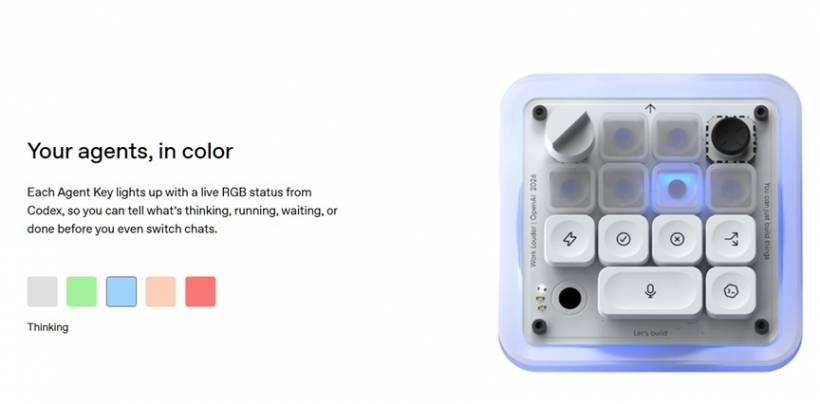
Six illuminated keys can change colour to show the status of an active Codex session or display notifications from the assistant.
This gives the keypad a passive information-display role in addition to its shortcut functions. A colour change could potentially indicate that Codex is processing a request, waiting for approval, reporting an error or presenting a completed task.
Visual status indicators may be useful when AI operations take some time, particularly if the developer is working in another application while Codex handles a request.
The RGB system also gives the product the appearance of a premium enthusiast keyboard accessory, although some users may see it as unnecessary decoration on a productivity device.
Interchangeable Keycaps and Switch Options
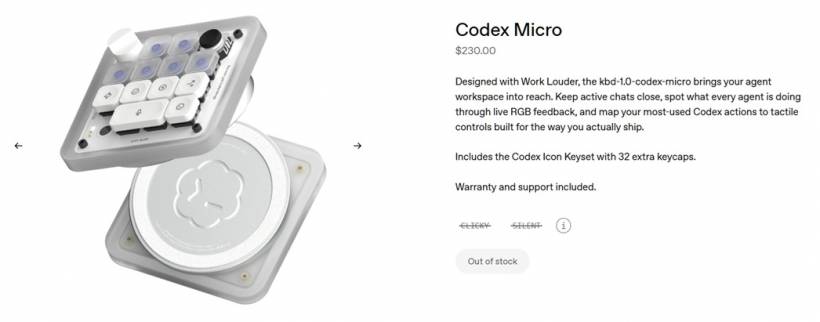
OpenAI includes 32 interchangeable keycaps carrying different symbols for various functions.
This allows users to physically label the keypad according to their preferred workflow. Someone who mainly uses it for code review and testing could select different keycaps from someone who uses it for terminal commands and project navigation.
Buyers can also choose between silent and clicky mechanical switches.
Silent switches may be more appropriate for shared offices, meetings or late-night work. Clicky switches provide stronger audible and tactile feedback, which some mechanical-keyboard enthusiasts prefer.
Offering both options suggests the device is aimed partly at developers who already appreciate custom keyboards and premium desktop peripherals.
Bluetooth and USB-C Connectivity
The Codex Micro supports both Bluetooth and USB-C, allowing it to operate wirelessly or through a wired connection.
Wireless connectivity may help reduce desktop clutter, while USB-C should provide a straightforward option for users who prefer a stable wired connection or do not want to manage another battery-powered accessory.
The keypad is compatible with Windows and macOS, covering the two most common desktop platforms among professional developers.
Linux support was not mentioned in the original announcement, which may disappoint developers who rely heavily on Linux-based environments. It is possible that basic keyboard functions could still work, but the deeper Codex integrations may depend on official software support.
OpenAI's Hardware Debut Is Surprisingly Practical
Many people expected OpenAI's first hardware launch to be a major new category of AI device.
Interest has been building around the company's work with Jony Ive, with speculation ranging from an AI companion to a screen-free personal assistant. Against that background, a programmable mechanical keypad feels surprisingly modest.
However, it may also be a sensible first step.
The Codex Micro is a relatively low-risk product aimed at a clearly defined audience. OpenAI does not need to convince the general public to adopt an entirely new type of device. It only needs to appeal to developers already using Codex and interested in specialised desktop accessories.
The partnership with Work Louder also allows OpenAI to enter hardware without building an entire manufacturing operation from scratch.
The Price Places It Firmly in Premium Territory
The Codex Micro is available for pre-order at US$230, which was estimated at approximately RM950 before shipping and possible taxes.
Shipping to Malaysia reportedly adds around RM303.80, bringing the total cost to more than RM1,200 before any import duties or additional charges.
Shipping is expected to begin on 24 July 2026.
At that price, the Codex Micro is not positioned as an inexpensive productivity accessory. It sits firmly in the premium mechanical-keyboard and enthusiast-peripheral market.
For Malaysian buyers, the cost becomes even harder to justify once international delivery is added. There is currently no indication that a local distributor will offer the device officially, meaning interested buyers may need to import it directly.
Is a Dedicated AI Keypad Really Necessary?
The value of the Codex Micro depends heavily on how frequently someone uses Codex and how much time the physical shortcuts genuinely save.
For a developer who interacts with Codex continuously throughout the working day, dedicated buttons could make common actions more convenient. The dial, lighting and programmable keys may also create a more streamlined and satisfying workflow.
For occasional users, however, the improvement may be difficult to justify.
Most Codex functions can already be accessed through software, keyboard shortcuts or custom scripts. Pressing a dedicated key may be faster, but the time saved during each action could be small.
The product is therefore likely to appeal most strongly to:
It may be less attractive to developers who simply want an affordable way to automate repetitive actions.
Cheaper Macro Pads Already Exist
Programmable macro pads are not new.
There are already many smaller keyboards, stream controllers, gaming keypads and custom mechanical devices capable of launching applications, entering commands and triggering scripts.
Gaming mice and keyboards with programmable buttons can also be repurposed for productivity. A user could assign code snippets, terminal commands, editing shortcuts or AI prompts to buttons they already own.
This means the Codex Micro is not competing only against other AI products. It is also competing against established peripherals that offer similar programmable controls at considerably lower prices.
Its strongest advantage is likely to be the native Codex integration. If that integration is deep, reliable and continuously updated, it may offer a smoother experience than manually configuring a generic macro pad.
Without that advantage, buyers may struggle to see why the OpenAI-branded device commands such a high price.
The Hardware May Be More About Ecosystem Than Buttons
The Codex Micro could also be viewed as an early attempt to build a physical ecosystem around OpenAI's software.
Until now, most interactions with services such as ChatGPT and Codex have happened through websites, desktop applications, mobile apps and developer tools. A dedicated hardware controller gives OpenAI a physical presence on the user's desk.
That may be strategically important even if the product remains niche.
The company can use the launch to learn how people interact with AI through buttons, dials, lights and other non-traditional controls. Those lessons could influence more ambitious hardware products in the future.
The Codex Micro may therefore be less significant as a standalone keypad and more important as an experiment in connecting physical devices directly to AI services.
Final Thoughts
The Codex Micro is an unexpected first hardware product from OpenAI. Rather than launching a futuristic AI companion, the company has introduced a premium mechanical keypad designed for developers already working with Codex.
Its programmable keys, reasoning dial, joystick, RGB status indicators and interchangeable keycaps offer a distinctive physical interface for AI-assisted coding. For heavy Codex users, those features could make frequent actions faster and more convenient.
The biggest obstacle is the price. At more than RM1,200 after estimated shipping to Malaysia, the device is difficult to recommend purely as a collection of programmable shortcuts. More affordable macro pads, gaming peripherals and custom keyboard solutions can already perform many similar tasks.
Still, the Codex Micro offers an early glimpse of how OpenAI may connect its software with physical controls. It may not be the revolutionary consumer AI device many expected, but it could be the beginning of a broader push to move AI beyond the screen and onto the desk.











Comments 0