

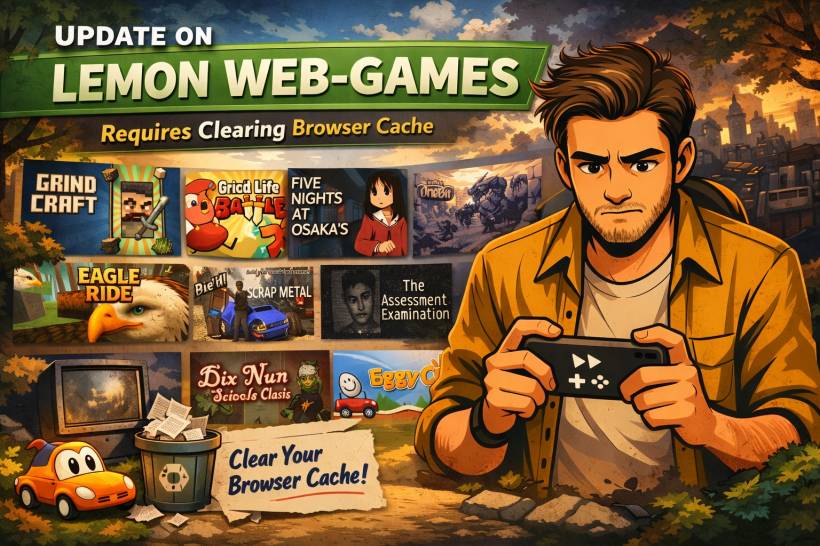
If you have recently visited one of the emulator-based games on Lemon Web and noticed that something feels a little off, there is a simple explanation. A recent update was made to the EmulatorJS files used by many of the web-based retro games, and in some cases, your browser may still be loading older cached files instead of the latest ones.
In plain English, the site has already been updated, but your browser may still be hanging on to an older version of certain game engine files. That can lead to situations where the game does not behave as expected even though the server is already serving the newer files.
Why this happens
Modern browsers cache files aggressively to improve speed. That is usually a good thing. It helps pages load faster and reduces repeated downloads of the same JavaScript, CSS, and support files.
The problem appears when a site update keeps the same file names and paths, but the contents behind those files have changed. In this case, the emulator files powering many Lemon Web Games were updated, but some devices and browsers may still be using the previously stored local copy.
That means two visitors can open the same game page and get different results.
• Another visitor may still be running older cached emulator files
• Private browsing or incognito mode may load the new files properly because it avoids the normal browser cache
This can make the issue look confusing at first, especially when the game works fine in incognito mode but not during regular browsing.
What you may notice
If your browser is still using older cached files, you might experience things such as:
• Certain emulator changes not appearing yet
• One device working correctly while another still behaves like the older version
• Private browsing working fine while normal browsing does not
This does not usually mean the game itself is broken. More often, it means the browser is still using an older stored copy of the supporting emulator files.
Why the update is not instantly visible to everyone
This is one of those things that sounds simple on the surface but becomes a little stubborn in real-world use.
When a browser has already cached a JavaScript file such as a loader or emulator support file, it may continue using that local copy until its cache rules expire or until the browser decides to recheck the server. Even if the server is fully updated, the visitor's device may still rely on what it downloaded earlier.
That is why site owners can update files correctly on the server and still hear from users saying they are seeing the old version.
The update is live. The browser just needs to stop trusting the older local copy.
The quickest fix for visitors
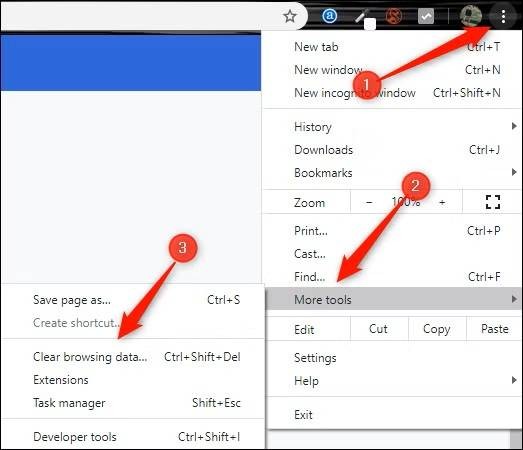
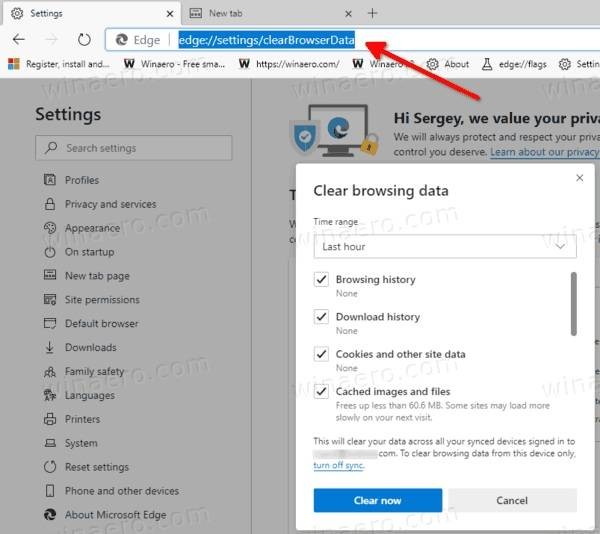
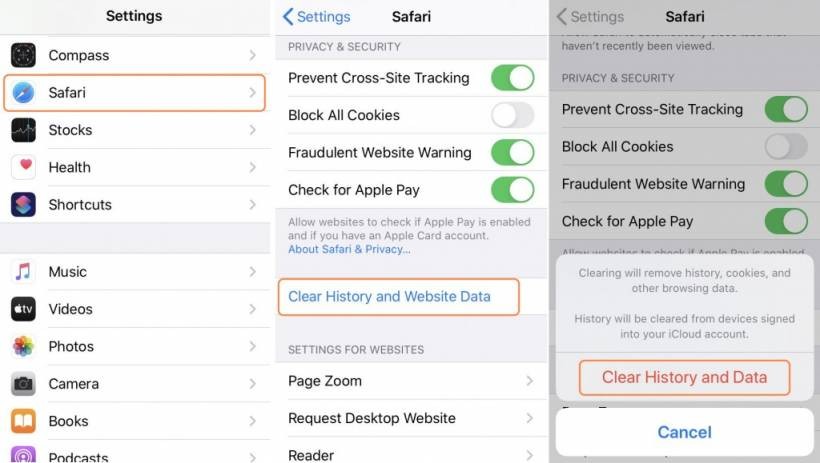
If you recently opened a Lemon Web emulator-based game and it does not seem to reflect the latest update, the best thing to do is clear your browser cache.
After clearing cache, reload the game page and the browser should fetch the latest emulator files from the site.
If you do not want to clear all browsing data, another quick test is to open the game in a private or incognito window. If it works properly there, that is a strong sign that the normal browser cache is the reason.
Why this matters for emulator-based games
Emulator-based games often rely on a small set of shared engine files that are reused across many individual game pages. This design is efficient and makes updates easier from the server side, since one shared folder can power hundreds of pages.
But it also means that when those shared files are updated, browsers that previously cached them may not always refresh immediately. That creates a strange situation where the site can be updated globally, but some visitors still temporarily see older behavior.
For a platform like Lemon Web Games, where many classic titles are delivered through a common emulator setup, browser caching plays a bigger role than people might expect.
A quick note to regular visitors
If you are a regular visitor and one of the games seems a bit inconsistent after a recent update, there is no need to worry. The most likely issue is just cached browser files. Clearing cache or trying a private browsing session should resolve it.
This is one of those behind-the-scenes web update issues that is not always visible until an important shared file changes.
Final thoughts
Updates to shared emulator files are important because they help improve compatibility, stability, and overall performance across the Lemon Web emulator-based games collection. But as useful as browser caching is for speed, it can sometimes delay how quickly those improvements appear for returning visitors.
So if a game seems to be loading the old behavior, the fix is usually very simple: clear your browser cache and try again. Once the latest files are pulled in, the updated version should load properly.
In other words, the site may already be ready. It is just your browser that needs a little reminder to catch up.











Comments 0